
What is VPN (Virtual Private Network)?
Updated: 3 days ago

A VPN (Virtual Private Network) creates a protected connection between your device or network and a VPN endpoint over another network, usually the internet. Many modern VPNs encrypt traffic between those endpoints, helping protect it from people observing the local WiFi or the intervening connection. A VPN can also provide secure access to private work or home networks, or route public internet traffic through a VPN provider. It does not make you anonymous, automatically secure every application, or increase the speed of your broadband line.
The most important distinction is where the protection ends: the VPN tunnel protects traffic to the VPN endpoint. When traffic leaves that endpoint for a website or service, protection depends on other mechanisms, such as HTTPS, and on how the VPN is configured.
How does a VPN work?
A VPN client on your device establishes an authenticated connection with a VPN server or gateway. The client encapsulates selected network traffic and, for encrypted VPNs, protects it cryptographically before sending it across the underlying connection. The endpoint validates and processes the traffic, then forwards it to the private network or public destination according to its routing and access policies.
Your device connects to the internet using its ordinary broadband, mobile or WiFi connection.
The VPN client authenticates the VPN peer and establishes keys using its chosen protocol.
Traffic selected by the VPN routing policy enters the encrypted tunnel.
The VPN server or gateway decrypts the tunnel traffic and forwards it towards the permitted destination.
Return traffic follows the configured route back through the tunnel to the client.
The outside network can normally still observe that you are exchanging packets with a VPN endpoint, along with some timing and volume metadata. Encryption does not hide the fact that network traffic exists.
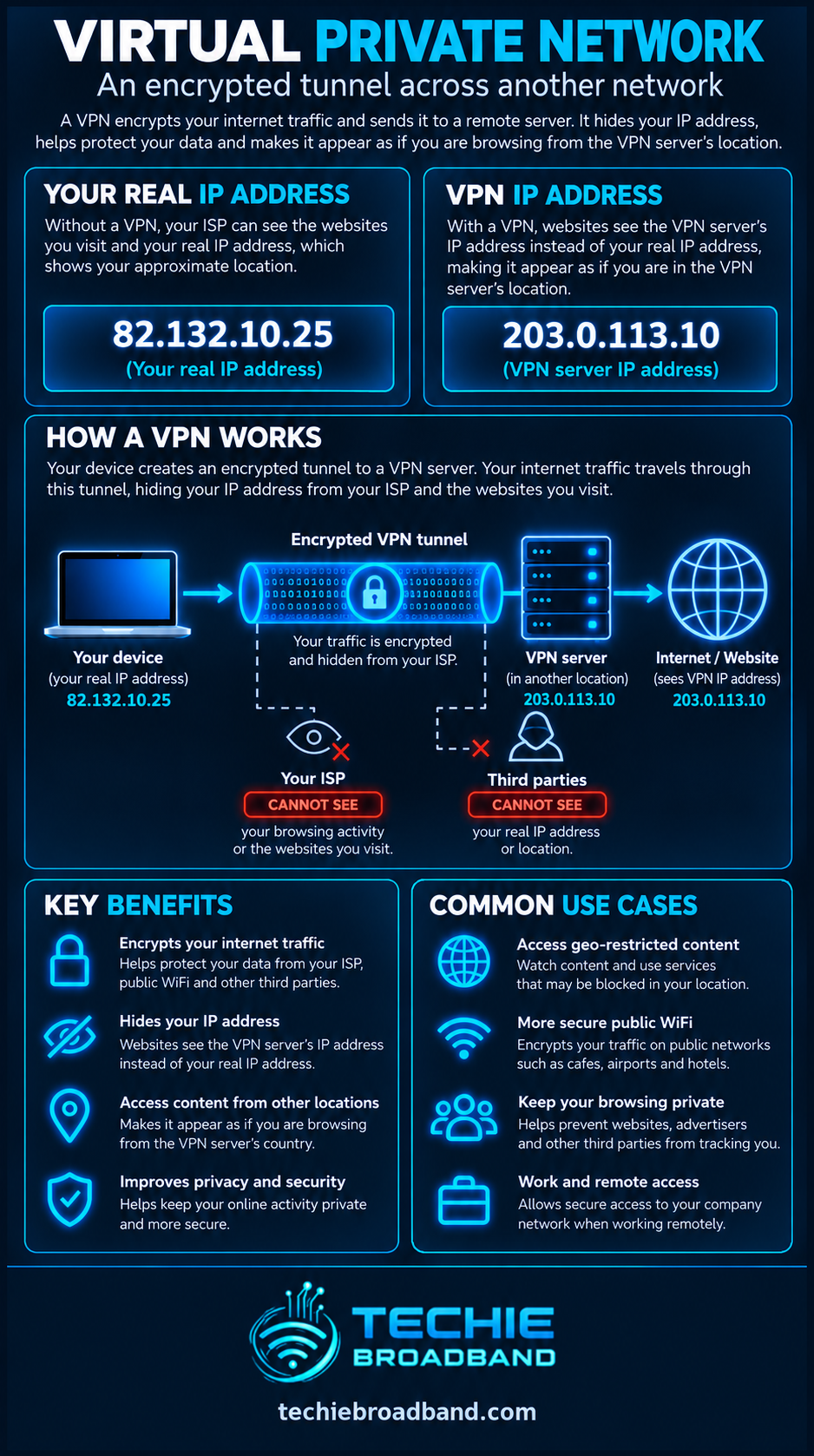
VPN infographic: what is protected?
The Techie Broadband diagram compares a direct connection with a VPN connection and shows where the encrypted tunnel starts and ends. It also separates useful VPN capabilities from claims a VPN cannot guarantee.
What are VPNs used for?
Remote access: employees securely reach approved work applications, file servers or internal networks from another location.
Site-to-site connectivity: two offices or networks exchange traffic across an authenticated protected tunnel.
Privacy from a local network: an encrypted tunnel reduces what a public WiFi operator or other local observer can read about tunnelled traffic.
Consumer VPN services: internet traffic exits through a provider's VPN server, so websites often see the provider's public IP address rather than your home connection's IP.
Self-hosted access: a home VPN can let an authorised user reach home services without exposing each individual application directly to the internet.
Does a VPN hide your IP address?
When a consumer VPN routes your internet traffic through its server, the destination website generally sees the VPN server's public IP address. The VPN provider can still associate activity with the tunnel to varying degrees, depending on its infrastructure, policies and logging. Sites may also recognise you through accounts, cookies, browser fingerprinting or information you voluntarily supply.
If the VPN uses split tunnelling, only selected traffic uses the tunnel; other traffic continues over your ordinary connection and can expose your usual public IP address. IPv4, IPv6 and DNS routing must all be checked rather than assuming one displayed IPv4 address proves that every connection is tunnelled.
What can a VPN see, and what can your ISP see?
Your broadband provider can generally see that your connection is communicating with a VPN endpoint and observe metadata such as destination endpoint, volume and timing. For properly encrypted VPN traffic, it should not be able to read the protected payload between your device and the VPN endpoint.
The VPN operator becomes a new party you must trust. Depending on the configuration and the protocols used, it may be able to observe destination addresses, DNS requests and unencrypted traffic after the tunnel terminates. HTTPS still matters: it protects web data between the browser and the website independently of the VPN tunnel.
VPN vs HTTPS vs private browsing
VPN: protects selected traffic between your device or gateway and the VPN endpoint, and may change the internet-facing source IP address.
HTTPS: authenticates a website or service and encrypts application traffic between the browser or application and that service, including beyond a VPN exit.
Private or incognito browsing: mainly limits local browser history and stored session information; it does not create a VPN tunnel or hide activity from the network by itself.
Proxy: relays certain application traffic, but may not encrypt it or route every application and protocol.
VPN protocols: WireGuard, IPsec and OpenVPN
WireGuard
WireGuard is a modern VPN protocol built around authenticated peers, public-key cryptography and a comparatively small design. It uses UDP transport and cryptographic primitives including ChaCha20-Poly1305 and Curve25519. Its AllowedIPs configuration influences which addresses are routed to or accepted from peers; an incorrect configuration can leave traffic outside the intended tunnel.
The official WireGuard protocol documentation explains its cryptography and cryptokey routing.
IPsec and IKEv2
IPsec is a family of IP-layer security mechanisms used for remote-access and site-to-site VPNs. ESP can provide confidentiality, integrity and authentication for protected packets. IKEv2 is commonly used to negotiate keys and security associations. Tunnel mode adds an outer IP header around protected inner packets, enabling protected paths between hosts and gateways.
The underlying architecture is described in IETF RFC 4301; precise protection depends on the negotiated configuration and algorithms.
OpenVPN
OpenVPN is an established VPN implementation that commonly uses TLS-based authentication and can operate over UDP or TCP. Performance and compatibility depend on its cryptographic settings, server capacity, transport and device capabilities. The protocol name alone does not guarantee a particular privacy policy or speed.
Full tunnel vs split tunnel
A full-tunnel configuration routes the intended default internet traffic through the VPN, subject to correct IPv4, IPv6 and DNS handling. A split-tunnel configuration routes only selected destinations or applications through the VPN. Split tunnelling can reduce unnecessary traffic through a corporate gateway but creates more complex security and privacy boundaries.
For example, a work VPN may tunnel traffic to 10.20.0.0/16 while leaving ordinary web browsing on your home broadband. That is a practical routing example, not a universal default or a recommended configuration for every organisation.
Does a VPN slow down broadband?
A VPN cannot increase the physical capacity of your broadband connection. It adds encapsulation, cryptographic processing and often a longer network path. In some cases a VPN route performs better than a congested or poorly routed direct path, but that is a routing effect, not extra broadband capacity.
Techie Broadband calculation: tunnel overhead
Illustrative calculation: assume a 1,500-byte path MTU and a hypothetical additional 80 bytes of encapsulation overhead per packet. That leaves 1,420 bytes for the inner packet, so the simple payload-space reduction is 80 ÷ 1,500 × 100 = 5.33%. Actual overhead depends on the protocol, IP version, packet sizes and tunnel configuration; this is not a measured VPN speed penalty.
A device using a 100 Mbps broadband service will not automatically receive 94.67 Mbps over a VPN. Encryption processing, TCP behaviour, packet size distribution, congestion, server capacity, latency and protocol implementation all affect real-world throughput. An MTU or MSS mismatch can also cause fragmentation, black-hole symptoms or unexpectedly poor performance.
VPNs on UK broadband: IPv4, IPv6 and CGNAT
Most outbound consumer VPN connections can work behind CGNAT because the client initiates traffic towards a reachable VPN server. Hosting your own VPN endpoint at home is different: unsolicited inbound IPv4 connections may not reach your router when your ISP uses CGNAT. A public IPv4 address, correctly reachable IPv6 service, upstream mapping or an outbound mesh/relay arrangement may be required.
For addressing background, read What is IPv4? and consider whether the VPN handles both IP versions rather than protecting IPv4 alone.
For the newer addressing protocol, see What is IPv6?; an IPv6-capable broadband service does not guarantee that a particular VPN client tunnels IPv6 traffic.
On FTTP, FTTC, cable, mobile or fixed-wireless broadband, the underlying access network still carries the VPN packets. Whether you can host a server, forward ports or use a bring-your-own router depends on the specific ISP, product, network and location rather than on the label 'fibre broadband' alone.
What is a VPN kill switch?
A kill switch is a client feature intended to prevent selected traffic from leaving outside the tunnel when the VPN disconnects. Implementation varies: some clients block all internet access, while others block only certain routes or applications. Test behaviour during startup, reconnection, sleep and network changes before relying on it.
What is a DNS leak or IPv6 leak?
A DNS leak occurs when name-resolution requests that you expected to pass through the VPN instead use another resolver or route. An IPv6 leak can occur when IPv6 traffic bypasses a VPN configuration that only protects IPv4. These are configuration and routing problems, not evidence that all VPN protocols are inherently insecure.
How to test whether your VPN is working
Record your apparent public IPv4 and IPv6 addresses and DNS resolver behaviour before connecting.
Connect the VPN and confirm the client reports an authenticated, established tunnel.
Check which public addresses and DNS resolvers appear after connection; assess both IPv4 and IPv6.
Confirm that intended private-network services are reachable, without assuming a successful connection proves all traffic is protected.
Compare routing behaviour for services meant to use the tunnel and those deliberately excluded by split tunnelling.
Disconnect or interrupt the tunnel and test the kill-switch behaviour if that feature is required.
If speeds are poor, test the same device over wired Ethernet, compare VPN servers, and investigate MTU, CPU load, WiFi and server congestion.
How to choose a VPN service
Decide whether you need private-network access, public-WiFi protection or a consumer internet exit; these are different requirements.
Check the supported protocols, client platforms, IPv4/IPv6 handling, DNS routing and kill-switch behaviour.
Examine the provider's ownership, logging policy, independent security evidence and how it handles account information.
Confirm that the server locations, throughput, latency and simultaneous-device limits suit your use.
Prefer providers that explain technical limitations instead of promising complete anonymity or guaranteed speed improvements.
Frequently asked questions
Is using a VPN legal in the UK?
VPN technology is generally legal to use in the UK. Using a VPN does not make otherwise unlawful activity legal, and organisational policies or particular services may restrict its use.
Does a VPN make me anonymous?
No. It changes which network parties can observe certain traffic, but accounts, cookies, device identifiers, browser fingerprints and VPN operator records may still identify you.
Does a VPN protect me on public WiFi?
A properly configured encrypted VPN protects selected traffic between your device and the VPN endpoint, reducing what local WiFi observers can read. It does not stop phishing, malware or unsafe behaviour, and HTTPS remains important.
Can I use a VPN with CGNAT?
Yes, outbound VPN clients usually work behind CGNAT. Hosting an inbound VPN server at home may require additional arrangements because CGNAT prevents ordinary unsolicited inbound IPv4 forwarding.
Is a VPN the same as changing DNS?
No. Changing DNS alters how names are resolved. A VPN creates a tunnel and may also route DNS through it, but DNS changes alone do not encrypt all your internet traffic.
Can a VPN improve gaming ping?
Sometimes a VPN's route can avoid a problematic network path, but additional tunnelling and distance usually introduce extra processing or latency. Measure the actual route rather than assuming a VPN lowers ping.
Do I still need HTTPS when using a VPN?
Yes. HTTPS protects application traffic to the website itself, including the path after it leaves the VPN server.
Key takeaway
A Virtual Private Network provides an authenticated, often encrypted path between a device or network and a VPN endpoint. It can support secure remote access and protect tunnelled traffic from local observers, but its security boundary ends at the endpoint. Good configuration, trustworthy operators, HTTPS and careful IPv4/IPv6 routing remain essential.
To explore the related technical concepts used in this VPN (Virtual Private Network) guide, visit our broadband terminology guide.
