
What is Firewall?
Updated: 3 days ago

A firewall is a network security control that allows, blocks or otherwise handles traffic according to a defined policy. In a typical home broadband router it helps stop unsolicited inbound connections while allowing replies to connections that devices inside the home initiated. The important distinction is that a firewall controls traffic policy: it is not the same thing as NAT, antivirus software, encryption or simply having a private IP address.
For UK broadband users, firewall behaviour matters whenever you expose a service, use port forwarding, move from IPv4 to IPv6, run a home server, troubleshoot an apparently blocked connection or replace an ISP router with your own equipment.
What does a firewall actually do?
A firewall sits at a point where traffic can be inspected and policy enforced. It can permit traffic, reject it explicitly, drop it silently, log it or pass it to another security function. The UK National Cyber Security Centre describes firewalls as hardware or software controls used to prevent unauthorised access to or from a network through allow and deny rules.
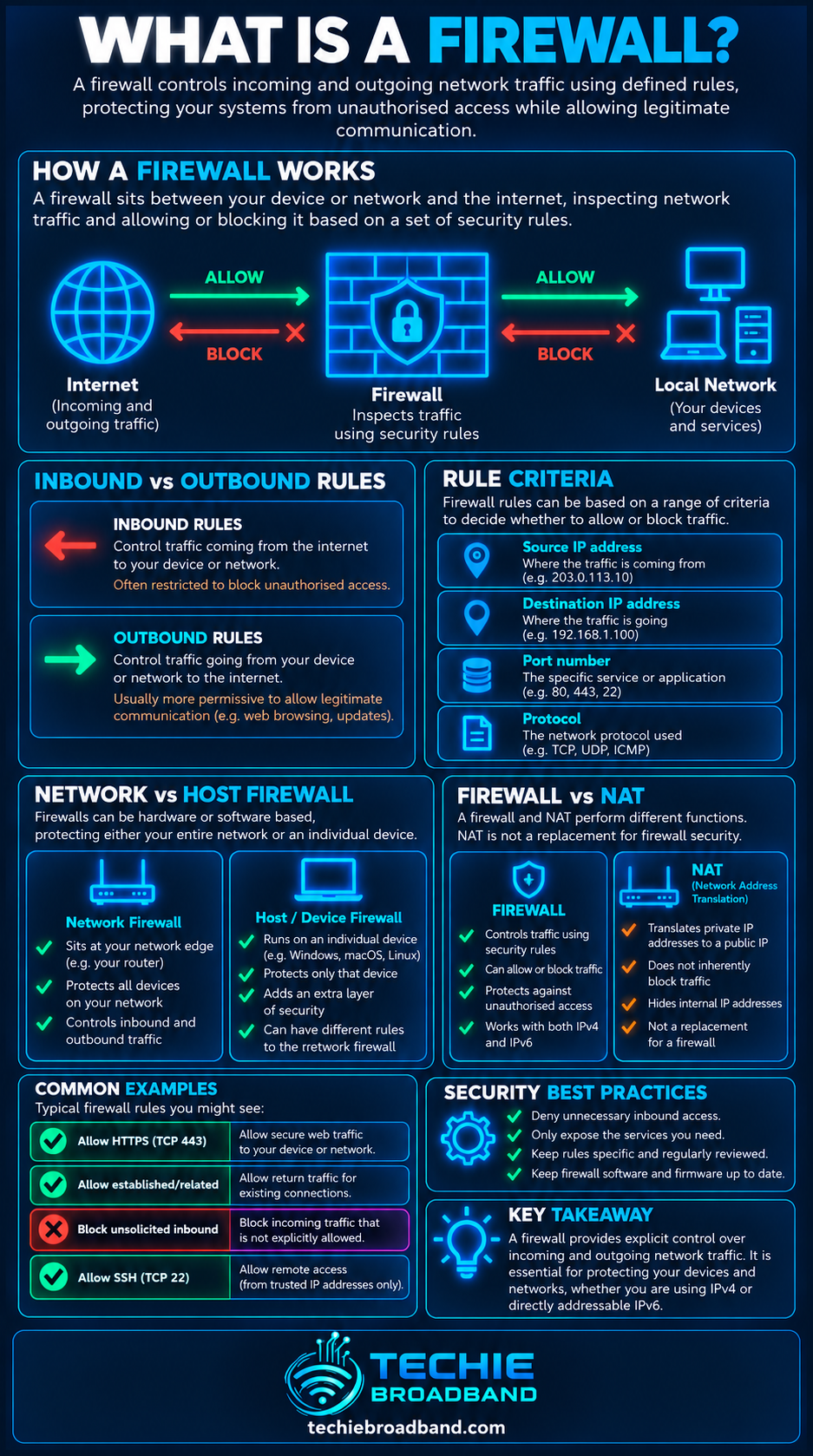
Basic packet filtering can use the source IP address, destination IP address, protocol, source port and destination port. Together these are commonly treated as the connection five-tuple.
Source IP address: where traffic appears to come from.
Destination IP address: where traffic is going.
Protocol: for example TCP, UDP or ICMP.
Source port: the sender-side transport endpoint where ports apply.
Destination port: the service endpoint the traffic is trying to reach.
More advanced firewalls can also consider interface, direction, connection state, application identity, user identity, time and application-layer information. The exact capabilities depend on the firewall.
The infographic below shows the practical relationship between traffic policy, stateful inspection, the five-tuple and NAT.
Stateless and stateful firewalls are different
Stateless packet filtering
A stateless firewall evaluates packets against its rules without relying on remembered connection state. It can allow or deny traffic by address, protocol or port, but it has less context about whether a packet belongs to a legitimate conversation.
Stateful packet filtering
A stateful firewall keeps a state table describing active flows or connections. RFC 2647 defines stateful packet filtering as forwarding or rejecting traffic based on a state table maintained by the firewall. This is why a home router can normally allow reply packets for an outbound web connection without requiring a permanent inbound rule for every temporary client port.
TCP state can follow the connection lifecycle. UDP has no TCP-style handshake, so stateful firewalls generally create temporary state after outbound traffic and remove it after an idle timeout.
A firewall is not the same as NAT
NAT changes addressing. A firewall enforces traffic policy. RFC 2979 explicitly treats firewall and NAT functions as separate, even though consumer routers commonly provide both in the same device.
With IPv4 home broadband, NAT and a stateful firewall often work side by side. An unsolicited inbound connection can fail because there is no NAT mapping, because firewall policy denies it, or because both conditions apply.
Port forwarding creates an inbound IPv4 mapping through NAT. It does not automatically override a router or host firewall. Both the translation path and the security policy must permit the traffic.
Firewalls and open ports
An open port is not automatically evidence that a firewall has failed. Public services need reachable ports. The security question is whether the exposure is intended, necessary and protected appropriately.
A network port is a transport-layer endpoint. A firewall can use port numbers as policy inputs, but a port number alone does not prove an application is trustworthy or vulnerable. Port 443 commonly carries HTTPS, but allowing TCP 443 does not make every service listening there safe.
Inbound and outbound firewall rules
Inbound rules govern traffic entering the protected host or network. Outbound rules govern traffic leaving it. Home router configurations commonly focus on unsolicited inbound traffic, while enterprise and endpoint firewalls may apply detailed policy in both directions.
Inbound example: allow TCP 443 only to a deliberately published HTTPS server.
Outbound example: prevent a device class from reaching an administrative service.
Inter-zone example: let an IoT network reach the internet while preventing it initiating connections into a trusted workstation network.
Allow rules, deny rules and rule order
Firewall rule sets are policy, not just port lists. The NCSC notes that allow and deny rules are commonly processed in priority order. A broad rule above a narrow restriction can therefore change the outcome. Least privilege means permitting what is genuinely required rather than creating unnecessarily broad allowances.
Host firewall vs router firewall
A router firewall protects traffic crossing a network boundary. A host firewall runs on an individual computer or server and can enforce policy wherever that device connects. Using both is normal because they protect different points in the path.
A failed connection can therefore be blocked at several layers: the application may not be listening, the host firewall may deny it, the router firewall may deny it, an upstream network may filter it, or routing may fail before traffic reaches the firewall.
Firewall behaviour with IPv4
On residential IPv4 broadband, private addressing and NAT are common. A stateful router firewall normally allows return traffic for connections initiated from inside while denying unwanted new inbound traffic unless policy and any required NAT mapping allow it.
If your provider uses CGNAT, there is an additional provider-side translation boundary. Changing your own router firewall cannot create an inbound IPv4 path through provider CGNAT that you do not control.
IPv6 still needs a firewall
IPv6 does not remove the need for firewall policy. Devices can have globally routable IPv6 addresses without IPv4 NAT44, while a stateful IPv6 firewall can still allow replies for internally initiated connections and block unwanted new inbound connections.
This is why 'IPv6 has no NAT, so every device is exposed' is an oversimplification. Addressability and reachability are different.
What is a next-generation firewall?
A next-generation firewall generally combines traditional packet and stateful filtering with application-aware security functions. Depending on the product that can include application identification, intrusion prevention, domain controls, malware inspection, identity-aware rules and TLS inspection.
The label alone does not guarantee better security. Capability, configuration, updates, visibility and operational discipline matter more than the marketing category.
Firewall vs Deep Packet Inspection
A firewall is fundamentally a policy enforcement point. Deep Packet Inspection describes inspection beyond basic IP and transport headers. A firewall may use DPI to identify applications or behaviour, while DPI can also be used for monitoring and traffic classification.
Can a firewall slow broadband down?
Yes. A firewall platform has finite processing capacity. Stateful filtering may be relatively inexpensive on capable hardware, while intrusion prevention, VPN encryption, application inspection or TLS inspection can demand substantially more CPU and memory.
This matters on gigabit and multi-gigabit broadband. A router can have 2.5 GbE or 10 GbE interfaces yet still fail to forward at that rate with advanced inspection enabled. Interface speed is not proof of firewall throughput.
Techie Broadband practical firewall diagnostic model
When a connection fails, treating 'the firewall' as one yes/no switch is usually too vague. Follow the path and identify each policy boundary.
Confirm the application is listening on the expected IP address, protocol and port.
Check the device host firewall and the correct network profile or interface.
For inbound IPv4 through NAT, verify the port-forward mapping and destination device address.
Check the router or gateway firewall rule and its direction.
Compare the router WAN IPv4 address with the public IPv4 address to identify CGNAT or upstream NAT.
If IPv6 is available, test IPv6 separately rather than assuming the IPv4 result applies.
Test from the correct side of the firewall; external reachability needs a genuinely external test.
Use firewall logs or counters where available to identify which rule handled the traffic.
Common firewall misconceptions
NAT is my firewall: NAT and firewalling are separate functions.
A closed port proves my firewall works: the application may simply not be listening.
An open port means I have been hacked: legitimate public services require reachable ports.
IPv6 bypasses security because there is no NAT: stateful IPv6 firewalling can block unsolicited inbound traffic.
Disabling the firewall is the best troubleshooting test: it can create unnecessary exposure and often hides the actual rule problem.
A faster Ethernet port means faster firewall throughput: inspection can become the bottleneck first.
How to configure a home firewall sensibly
Keep router and endpoint operating systems supported and updated.
Leave stateful inbound protection enabled unless there is a specific reason to change it.
Expose only services you intentionally need from the internet.
Use specific source, destination, protocol and port rules where practical.
Review automatic mappings such as UPnP if you do not need them.
Use guest or IoT isolation where the router supports it.
Check both IPv4 and IPv6 policy when both protocols are active.
Review firewall logs when diagnosing repeated blocks rather than immediately disabling protection.
The key point
A firewall is a policy enforcement system for network traffic. The useful mental model is not 'wall on or off', but rules applied at one or more points in the path, often with connection state. NAT changes addresses, port forwarding creates a path through IPv4 NAT, and CGNAT can add an upstream boundary, but none is interchangeable with firewall policy.
For broadband troubleshooting, identify the IP version, transport protocol, source, destination, port, direction and policy boundary being tested. That turns 'the firewall is blocking it' from a guess into a testable networking statement.
What is Firewall? FAQs
Does a home router have a firewall?
Most modern home routers include firewall functionality, commonly stateful filtering for traffic crossing the internet boundary. Exact controls and defaults vary by router and ISP.
Is NAT the same as a firewall?
No. NAT translates addressing information; a firewall enforces traffic policy. They commonly coexist in IPv4 home routers but are separate functions.
Should I disable my firewall for gaming?
Normally no. Games generally work through stateful outbound connections, UPnP or specific required mappings. Broadly disabling a firewall is a poor substitute for identifying the exact connectivity requirement.
Does IPv6 need a firewall?
Yes. IPv6 can give devices globally routable addresses, but a stateful firewall can still control which new inbound and outbound traffic is permitted.
Can a firewall block port forwarding?
Yes. A correct IPv4 port-forward mapping creates a translation path, but the router or host firewall can still deny the forwarded traffic.
Can a firewall reduce internet speed?
It can if the firewall hardware or enabled inspection features cannot process traffic at the broadband rate, particularly on gigabit and multi-gigabit connections.
To explore the related technical concepts used in this Firewall guide, visit our broadband terminology guide.
