
What is Port Forwarding?
Updated: 2 days ago

Port forwarding is a router configuration that deliberately sends incoming traffic arriving on a specified public TCP or UDP port to a particular device and port on your private network. It matters when you want a service inside your home or office, such as a game server, NAS, VPN endpoint or self-hosted application, to accept connections initiated from the internet.
The critical distinction is that port forwarding does not create a public IP address and it does not bypass every layer of NAT. If your broadband connection sits behind CGNAT, another translation layer exists inside the ISP network and a rule on your own router may not be enough.
A useful model is: public IP address + public port → router rule → private IP address + destination port. All four parts must line up for the connection to work.
The infographic below shows the complete rule and the four conditions that have to line up.
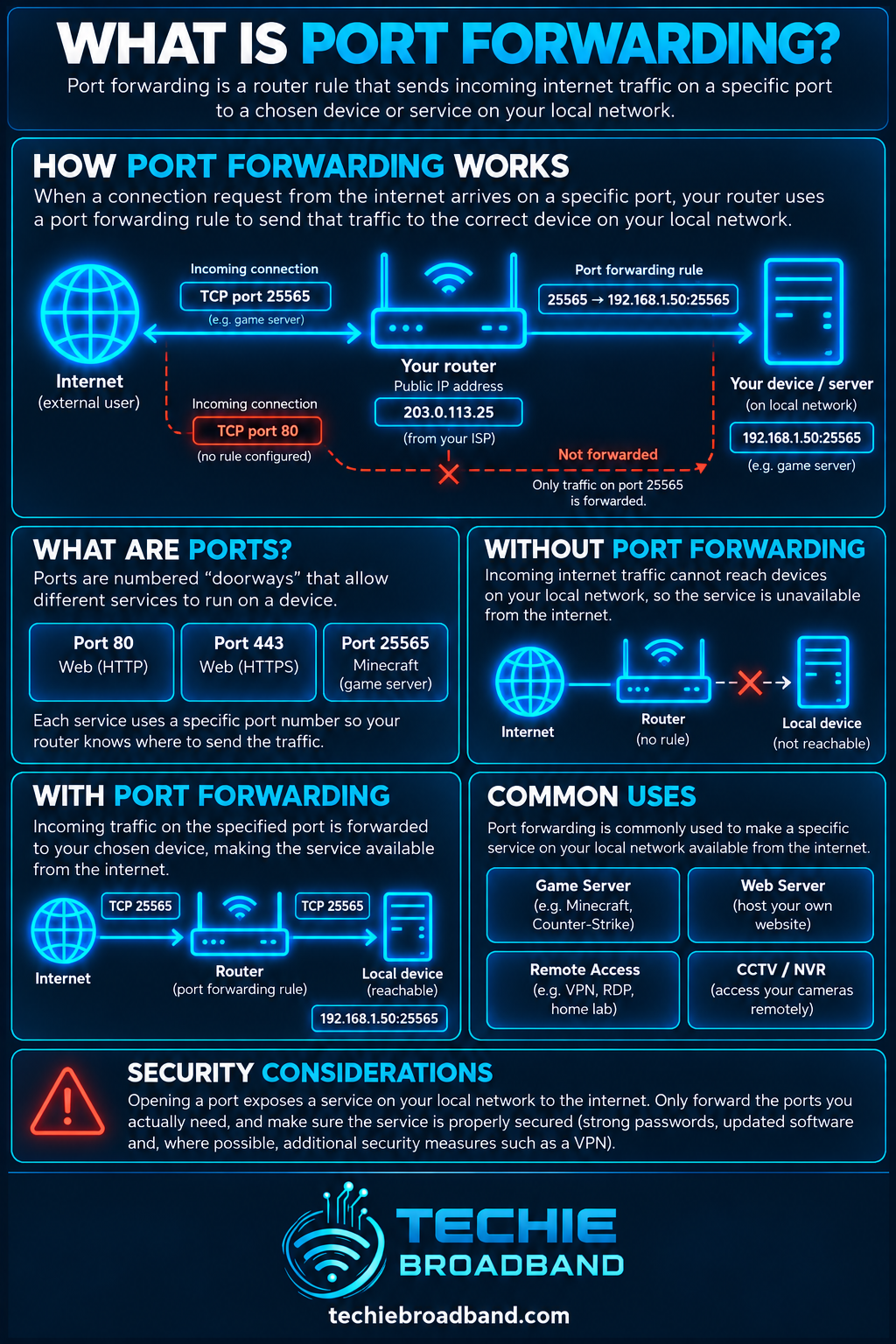
What is port forwarding?
Most home networks use NAT.
Unsolicited inbound traffic is different. If a packet arrives without an existing mapping, the router needs an explicit instruction telling it where that traffic should go. A port forwarding rule supplies that instruction.
External or public port: the port a remote client connects to.
Protocol: TCP, UDP or both when genuinely required.
Internal or private IP address: the destination device.
Internal port: the port on which the application is listening.
How does port forwarding work?
Suppose a server has private address 192.168.1.50 and listens on TCP port 25565. A rule can map public TCP port 25565 to 192.168.1.50:25565.
The router matches the protocol and destination port, rewrites the destination and sends the packet to the defined internal host. Return traffic is associated with the same connection state.
Remote client connects to the public IP and port.
Router matches the forwarding rule.
Router rewrites the destination to the private IP and port.
Destination service accepts the traffic if it is listening and allowed.
Return traffic follows the connection state back through the router.
What is a port?
A port is a transport-layer identifier used with an IP address so multiple network services can communicate through the same device. TCP and UDP each use port numbers from 0 to 65535.
The same numerical port can be used separately by TCP and UDP. Forwarding TCP 5000 does not automatically forward UDP 5000.
Public and private ports can be different
A router can translate one external port to a different internal port. Public TCP 8443 could, for example, map to private 192.168.1.50 port 443.
Changing the external port can be convenient, but it is not a substitute for authentication, patching, access control or a firewall.
Port forwarding, NAT and firewall rules are different
NAT translates addressing information. Port forwarding creates a deliberate inbound mapping. A firewall decides whether traffic is permitted. Consumer routers often combine these functions, which makes them easy to confuse.
Port forwarding and CGNAT
Port forwarding is straightforward only when the router you configure is reachable through the public IPv4 address used by remote clients. With CGNAT, the ISP translates traffic again upstream, so your router may receive a non-public WAN address.
A correct home-router rule can therefore remain unreachable because unsolicited inbound traffic stops at the carrier NAT. Solutions depend on the ISP and product and can include a public IPv4 option, static IPv4, IPv6 with appropriate firewall policy, or an application relay or tunnel.
Static IP, dynamic IP and Dynamic DNS
A static public IP is convenient because remote clients can keep using the same address. A dynamic public IPv4 address can also support port forwarding, but it may change.
Dynamic DNS can give a changing public IP a stable hostname. It does not solve CGNAT because CGNAT is a reachability problem, not merely an address-discovery problem.
Why the destination needs a stable private IP
A forwarding rule points to a specific internal address. If the server changes from 192.168.1.50 to 192.168.1.87, a rule still pointing to .50 sends traffic to the wrong place. Use a DHCP reservation or another correctly managed stable addressing method.
TCP and UDP port forwarding
TCP is connection-oriented. UDP is datagram-oriented. NAT devices maintain mapping and filtering state differently for UDP, so always use the protocol required by the application.
If documentation says a service needs both TCP and UDP, create both only for the ports it actually needs.
Manual forwarding, UPnP, NAT-PMP and PCP
Manual forwarding is not the only way mappings can be created. UPnP IGD, NAT-PMP and PCP can allow applications or hosts to request mappings automatically.
Automatic mapping is convenient, but enabling it should be a deliberate security decision because applications on the local network can request exposure without a person manually creating each rule.
What is double NAT?
Double NAT occurs when traffic passes through two NAT routers before reaching the internet. A common example is an ISP router connected to a second router with both operating in router mode.
A forward on the inner router alone will not normally make the service reachable because the outer router receives the unsolicited inbound traffic first.
Does port forwarding improve gaming?
Port forwarding does not reduce broadband latency, increase bandwidth or improve WiFi signal. Its purpose is inbound reachability. It can help when a game or peer-to-peer application genuinely requires inbound connectivity and automatic NAT traversal is unavailable or unreliable.
Does port forwarding make broadband faster?
No. A forwarding rule does not increase download speed, upload speed, throughput or line rate. It changes how selected inbound traffic is handled.
If a self-hosted service is slow, the constraints can include upload capacity, server performance, storage, Ethernet or WiFi, remote-client capacity, latency and congestion.
Techie Broadband practical example
Assume a UK FTTP connection has 100 Mbps upload capacity and four remote users each transfer from a home server at 20 Mbps. The theoretical demand is 80 Mbps, or 80% of the 100 Mbps upload capacity before protocol overhead and other household traffic.
This is a Techie Broadband calculation, not a performance guarantee. Port forwarding does not reserve bandwidth.
Security implications of port forwarding
A port forward deliberately makes a service reachable from outside the private network. That increases the importance of securing the service itself. NAT should not be treated as the security control.
Expose only ports that are genuinely required.
Keep router, OS and application software patched.
Use strong authentication and encrypted protocols where appropriate.
Restrict source addresses where practical.
Monitor logs and remove obsolete rules.
Port forwarding and IPv6
IPv6 normally removes the need for IPv4-style address translation that lets many private devices share one public IPv4 address. That does not mean unsolicited inbound IPv6 traffic should automatically be permitted.
With IPv6, the equivalent practical task is usually firewall policy rather than IPv4 NAT port forwarding.
How to set up port forwarding
Router interfaces differ, so labels are not universal. Look for Port Forwarding, Virtual Server, NAT Rules or similar. Identify the application, protocol and exact ports before changing anything.
Give the destination device a stable private IP or DHCP reservation.
Confirm the service works locally.
Identify TCP, UDP or both.
Confirm the router WAN address is genuinely public.
Create the external port, protocol, private IP and internal port mapping.
Check the destination firewall.
Apply the configuration.
Test from a genuinely external network.
How to troubleshoot port forwarding
Work from the service outward. This avoids repeatedly changing the router when the application is not listening or the broadband connection is behind another NAT layer.
Confirm the application is listening.
Test locally using the private IP.
Check the host firewall.
Confirm the device still has the address referenced by the rule.
Check protocol and port values.
Compare router WAN and externally observed public IPv4 addresses.
Check for double NAT.
Check for CGNAT or ISP inbound filtering.
Test from outside the LAN.
Use logs or packet capture to find where traffic stops.
Port forwarding on UK broadband
UK broadband products can differ in their IPv4 and IPv6 design even when they use the same physical access network. FTTP, FTTC, cable, fixed wireless and mobile services can be sold with different addressing arrangements.
Check the ISP, access network, product and location. For inbound IPv4, determine whether the product provides a reachable public address, whether it is static or dynamic, whether CGNAT is used and whether provider policy affects inbound traffic.
Key takeaway
Port forwarding is an explicit inbound routing decision: selected traffic arriving on a public TCP or UDP port is sent to a defined private IP address and port. It works only when the complete path is reachable, the rule is correct, the destination address is stable, the service is listening and relevant firewalls permit the traffic.
Authoritative technical references
The IETF explains UDP NAT mapping and filtering behaviour in RFC 4787.
The IETF defines NAT Port Mapping Protocol in RFC 6886.
The Port Control Protocol is defined in RFC 6887.
The impact of carrier NAT on inbound port forwarding is discussed in RFC 6269.
IPv6 residential gateway filtering recommendations are covered by RFC 6092.
Port forwarding FAQs
Do I need a static public IP for port forwarding?
No. A dynamic public IPv4 address can support port forwarding, but the address may change. A static address is more convenient for a predictable endpoint.
Can I port forward behind CGNAT?
A home-router rule is normally insufficient when unsolicited inbound IPv4 traffic is stopped by an upstream carrier NAT. You need an ISP-supported solution, public IPv4, suitable IPv6 design, or a relay or tunnel.
Is port forwarding the same as opening a firewall port?
No. Port forwarding defines where matching traffic should go. A firewall rule defines whether traffic is allowed.
Can two devices use the same public port?
Not on the same public IPv4 address and protocol with an ordinary one-to-one rule. Different external ports can normally map to services on different devices.
Should I forward TCP and UDP together?
Only if the application requires both. They are separate transport protocols.
Why does a port checker say closed?
The service may not be listening, the host firewall may block it, the rule may be wrong, another NAT layer may exist, CGNAT may be in use, or the ISP may filter the traffic.
Does port forwarding reduce latency?
No. It changes inbound reachability, not network latency or bandwidth.
Is UPnP the same as port forwarding?
UPnP can request mappings automatically. Manual port forwarding creates the mapping explicitly.
To explore the related technical concepts used in this Port Forwarding guide, visit our broadband terminology guide.
