
What is Latency Under Load?
Updated: 3 days ago

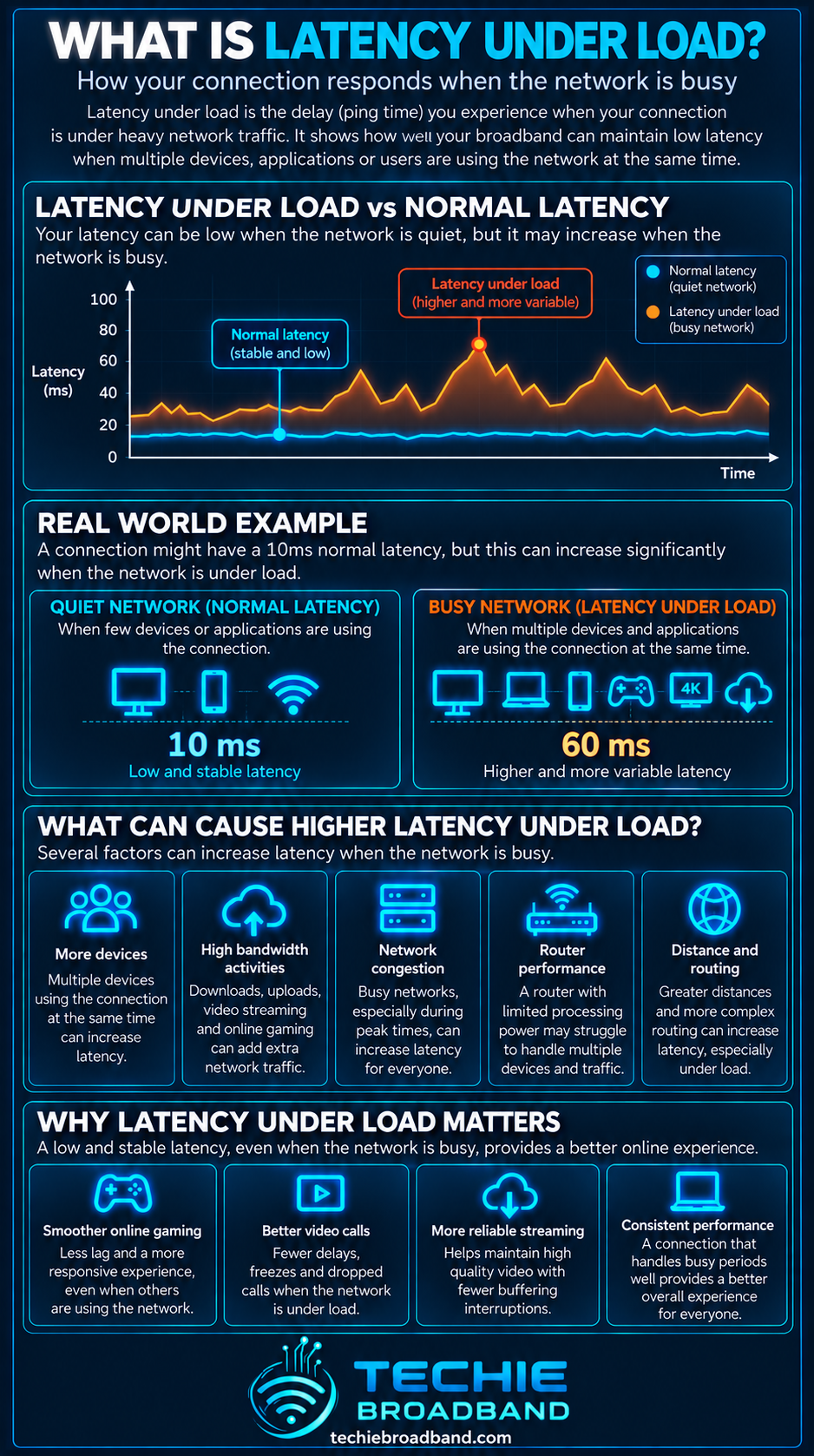
Latency under load is the delay a connection experiences while it is actively carrying significant traffic. It answers a different question from idle latency: not simply how quickly packets make a round trip when the line is quiet, but whether the connection stays responsive while downloads, uploads and other devices are using it. A connection can therefore have low idle latency and high throughput yet still feel sluggish when busy if queues build at a bottleneck.
What does latency under load mean?
Latency is delay. On broadband it is commonly observed as round trip time, or RTT, measured in milliseconds. Latency under load measures that delay while traffic is deliberately competing for capacity.
A useful test separates three conditions: idle latency, latency during download load and latency during upload load. The difference between the loaded measurement and the idle baseline shows how much extra delay appeared when the connection became busy.
The IETF's current work on responsiveness under working conditions formalises the broader idea that network quality should include responsiveness while a network is doing work, not only throughput and idle latency.
Latency under load versus idle latency
Idle latency measures delay when the connection is relatively quiet.
Download loaded latency measures delay while downstream traffic is stressing the path.
Upload loaded latency measures delay while upstream traffic is stressing the path.
Added latency is the increase from the idle baseline under the relevant load.
Throughput measures how much data is moving, not how promptly small time sensitive packets are being served.
This distinction is why a conventional speed result can look excellent while a game, voice call, remote desktop session or interactive website becomes noticeably less responsive during a large transfer.
For the underlying latency concept, see What is Round Trip Time (RTT)?. For capacity and carried data rate, see What is Bandwidth? and What is Sustained Throughput?.
How to calculate added latency under load
The simplest comparison is loaded RTT minus idle RTT. This does not identify the exact queue or device responsible, but it makes the change in responsiveness visible.
Techie Broadband worked example
Assume a wired test records 12 ms idle RTT, 82 ms while download traffic is saturating the connection and 212 ms while upload traffic is saturating it.
Download added latency: 82 ms − 12 ms = +70 ms.
Upload added latency: 212 ms − 12 ms = +200 ms.
The upload direction is adding 130 ms more delay than the download direction in this example.
These are illustrative Techie Broadband calculations, not a universal grading scale or published UK average. The practical interpretation is that this hypothetical connection remains much less responsive during upload saturation than when idle.
Why latency rises when a connection becomes busy
Packets sometimes arrive at a network resource faster than that resource can transmit or process them. They then wait in a queue. Short queues are a normal part of packet networking, but persistent queues can add substantial delay.
The IETF's RFC 7567 active queue management recommendations state that queueing occurs when ingress arrival rate exceeds the current egress rate and identify excessive queueing as a source of unwanted delay. The document recommends AQM mechanisms to manage queue lengths and reduce end to end latency.
That is the direct relationship between Queue Depth and latency under load: more data waiting at the bottleneck can mean more time before a newly arrived packet is served.
Latency under load and bufferbloat
Bufferbloat is excessive latency caused by packets spending too long in network queues. It often becomes visible only when the connection is busy, which is why loaded latency testing is useful.
CoDel, described in RFC 8289, controls excess queueing delay by observing packet sojourn time. FQ CoDel, described in RFC 8290, combines flow queueing with CoDel to improve latency behaviour and reduce the impact of one flow on others.
Latency under load and bufferbloat are related but should not be treated as perfect synonyms. A loaded latency test observes the outcome. Bufferbloat is one possible cause of a large increase, but WiFi contention, processing limits, congestion elsewhere or the test path itself can also affect the measurement.
Where loaded latency can be introduced
Broadband performance is end to end. The bottleneck responsible for extra delay can sit inside the home, at the access connection, within the ISP, at interconnection, or farther towards the remote service.
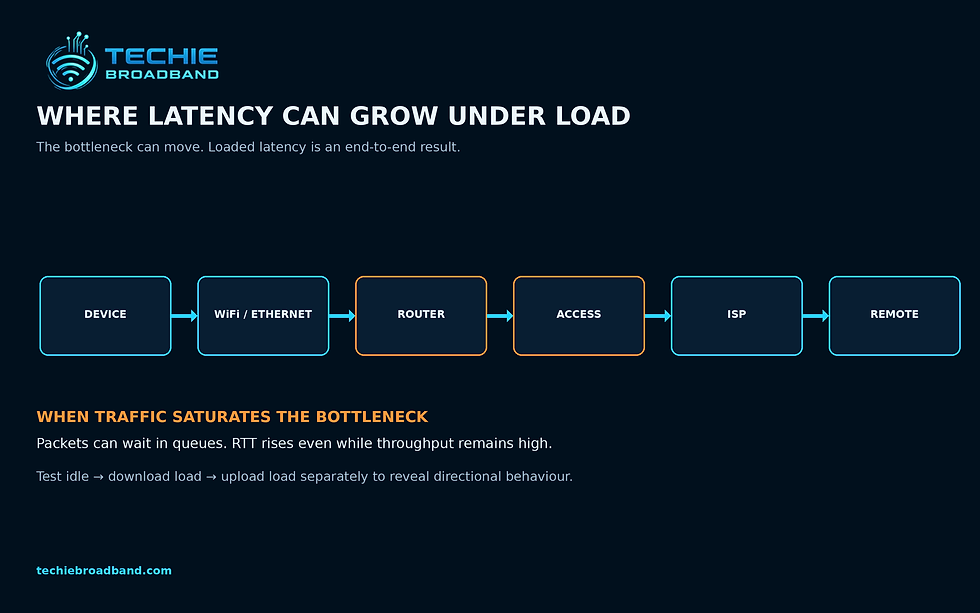
Device: CPU, driver or application behaviour can affect timing.
WiFi: contention, retransmissions and changing radio rates can create variable delay.
Ethernet: a slower negotiated link can become an unexpected bottleneck.
Router: WAN shaping, queueing and processing can determine loaded latency.
ONT or modem: traffic may encounter buffering around the access handoff.
Access network: shared or scheduled capacity can affect queue behaviour.
ISP network and interconnection: busy links can add queues farther from the home.
Remote service: server and network conditions at the destination can affect measured RTT.
Why upload latency under load can be especially revealing
Many UK broadband products are asymmetric, with less upload capacity than download capacity. That means the upstream can reach saturation with a smaller absolute amount of traffic. A cloud backup, photo sync, large file transfer or multiple video calls can therefore create upstream pressure even while download capacity remains largely unused.
This is a product and access network characteristic, not a rule for every UK connection. Some FTTP products are symmetrical, while others have different download and upload rates. Always consider the specific ISP, access network, product and location.
See What is Upload Speed? for the upstream capacity concept and What is Symmetrical Speeds? for the difference between matched and asymmetric service rates.
Why faster broadband does not automatically guarantee low loaded latency
More bandwidth can make saturation less likely during ordinary use, but it does not guarantee that queues are well managed. A fast service can still show a large increase in RTT if a bottleneck is saturated and packets wait in a deep queue.
As access speeds increase, the limiting component can also move. A multi gigabit FTTP service may expose a 1 Gbps Ethernet interface, WiFi link, router processing ceiling or remote server as the new bottleneck.
That is why Goodput, peak throughput and latency under load should be treated as different measurements of connection behaviour.
How to test latency under load properly
Use wired Ethernet where practical so WiFi is not the first uncontrolled variable.
Confirm the Ethernet link has negotiated at the expected rate.
Pause unrelated downloads, cloud sync and background transfers before establishing the baseline.
Measure idle RTT repeatedly rather than relying on one ping.
Apply sustained download load while continuing to measure latency.
Allow the connection to drain, then apply sustained upload load while continuing to measure latency.
Record throughput as well as latency so you know whether the test actually stressed the connection.
Repeat against more than one suitable test endpoint.
Repeat at different times if you are investigating peak time behaviour.
Change one variable at a time, such as router queue management or WiFi versus Ethernet, then retest.
Bufferbloat.net's testing guidance similarly recommends observing latency while a speed test is creating load, and lists tools that measure latency during download and upload activity.
How to interpret the result
There is no single latency under load number that describes every application, path and test method. Compare like with like and focus first on the increase from your own idle baseline, the direction that creates it and whether the behaviour is repeatable.
Small increase from idle: the connection is remaining comparatively responsive under that test load.
Large download increase: investigate downstream queueing, WiFi and the download bottleneck.
Large upload increase: investigate upstream saturation and queue management first.
Both directions poor: check the router, WiFi, access path and whether the test endpoint is suitable.
Highly variable results: investigate jitter, wireless conditions, competing traffic and time dependent congestion.
Do not compare grades from different test providers as though they were identical standards. Their traffic generation, probe method, duration, endpoints and scoring rules can differ.
Latency under load, jitter and packet loss
Loaded latency is about delay while the network is busy. Jitter describes variation in delay, while packet loss describes packets that do not successfully reach the destination. They can occur together but are different phenomena.
A queue can add delay without dropping packets. If the queue eventually fills, packet loss or congestion marking may occur. A real time application can therefore suffer before a conventional throughput test appears to fail.
Latency under load on WiFi
Testing over WiFi measures the combined behaviour of the broadband path and the wireless link. That can be useful if the question is how the connection feels on a real device, but it is less useful for isolating the broadband service itself.
WiFi airtime is shared. Interference, neighbouring networks, signal strength, retransmissions and changing modulation rates can all alter the rate at which queued frames are served. For diagnosis, repeat a poor WiFi result over Ethernet before blaming the ISP.
Latency under load on FTTP, FTTC, cable and mobile
The principle applies across access technologies, but the bottlenecks differ. FTTP can remove copper line constraints without eliminating router, WiFi, access scheduling or wider network queues. FTTC adds a copper access segment. Cable uses shared access capacity. Fixed wireless and mobile introduce radio scheduling and variable link conditions.
The access technology alone therefore cannot predict loaded latency. The retail product, network design, current utilisation, router, local network and test destination all matter.
Can Smart Queue Management improve latency under load?
Often, when the problematic queue is under your control. Smart Queue Management typically combines traffic shaping with modern queue management so that the router controls the bottleneck rather than allowing a larger unmanaged queue elsewhere to dominate.
RFC 7567 recommends AQM to manage queues and reduce latency. Specific consumer implementations vary, so enabling a setting labelled QoS is not proof that an effective AQM algorithm is active. Router CPU capacity also matters because high speed shaping can be computationally demanding.
A practical diagnostic sequence
Establish a repeatable wired idle baseline.
Measure download loaded latency and throughput.
Measure upload loaded latency and throughput.
Identify which direction adds the most delay.
Check whether that direction is actually reaching its available capacity.
Inspect the router for SQM, AQM, CAKE or FQ CoDel support.
If shaping is configurable, make one controlled change and retest.
Repeat over WiFi separately to quantify the wireless contribution.
Repeat during and outside busy periods to look for wider congestion.
Only then escalate to the ISP if evidence points beyond the local network.
For time dependent behaviour, see What is Peak Time Performance?. If throughput itself falls as demand rises, see What is Network Congestion?.
Frequently asked questions about latency under load
Is latency under load the same as ping?
Not exactly. Ping is one way to measure round trip delay. Latency under load describes the condition in which that delay is measured while traffic is actively loading the connection.
Is latency under load the same as bufferbloat?
No. A large rise in latency under load is a common symptom of bufferbloat, but loaded latency is the measurement outcome and bufferbloat is a queueing problem that may explain it.
Can a gigabit connection have bad latency under load?
Yes. High throughput and low loaded latency are separate properties. A gigabit connection can still develop queues at the router, WiFi link, access path or another bottleneck.
Should I test download and upload separately?
Yes. The two directions can have different capacities and different bottlenecks. Testing them separately makes a directional problem much easier to diagnose.
Does low idle latency guarantee good gaming performance?
No. Low idle RTT is useful, but a game shares the connection with other traffic. If RTT rises sharply whenever the connection is busy, interactive performance can deteriorate even though the idle result looked excellent.
Can changing router settings fix latency under load?
Potentially. Effective SQM or AQM can improve queue behaviour when the controllable bottleneck is at the router. It will not fix every cause, such as poor WiFi radio conditions or congestion beyond your network.
Key takeaway
Latency under load shows whether your broadband connection stays responsive while it is busy. Measure idle latency first, then compare it with latency during download and upload load. A large repeatable increase points to waiting time somewhere around a bottleneck, often caused by queueing. The useful diagnosis is not simply whether the line is fast, but where responsiveness changes, in which direction, under what load and whether the behaviour persists after local network limitations are removed.
To explore the related technical concepts used in this Latency Under Load guide, visit our broadband terminology guide.
