
What is Network Congestion?
Updated: 3 days ago

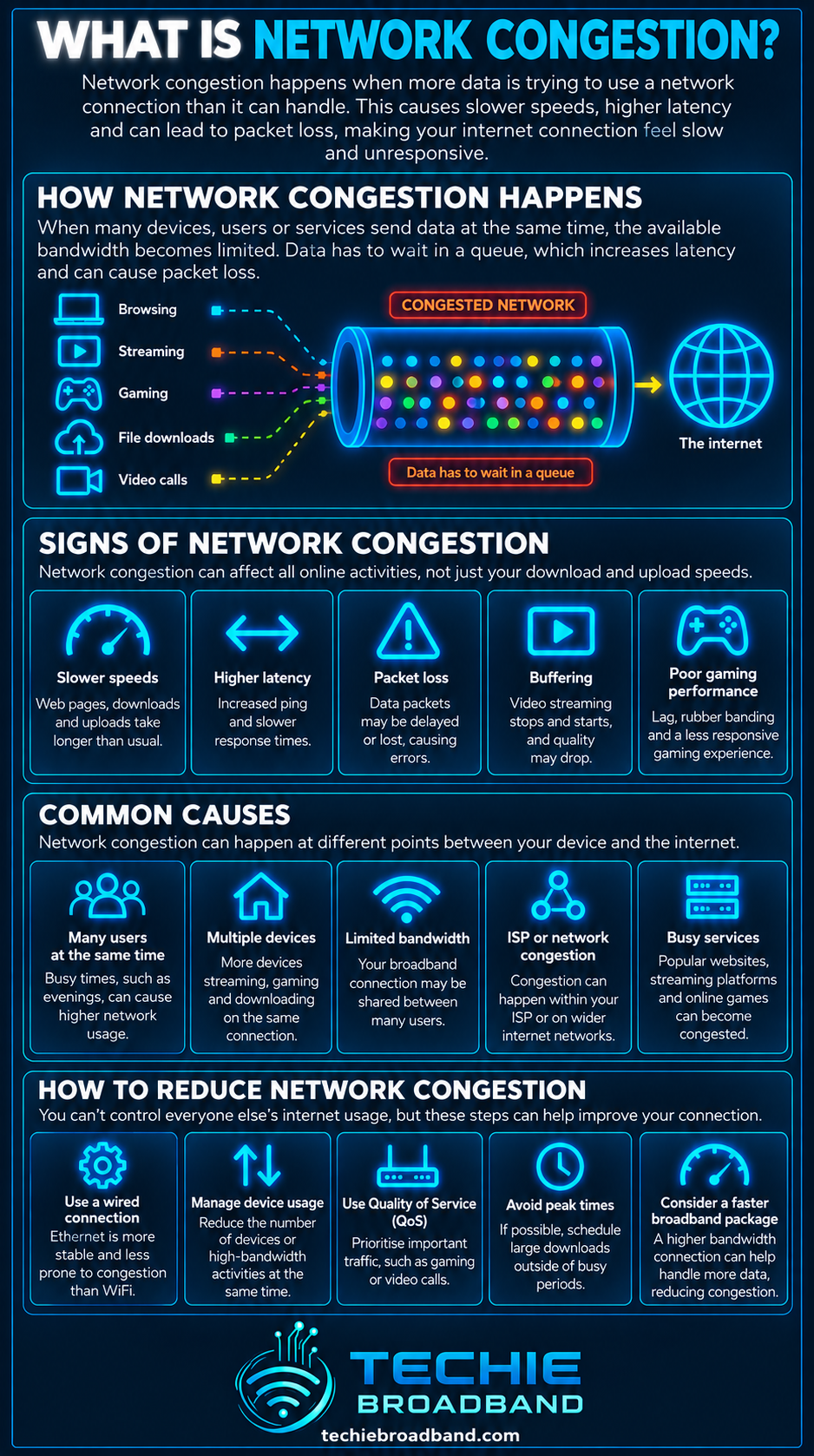
Network congestion happens when the traffic offered to a network resource exceeds the capacity that resource can carry for long enough to create queues, delay or packet loss. It can occur on a home network, an access network, inside an ISP, at an interconnection point or at a remote service. The key distinction is that congestion is not simply “slow broadband”: it is a load versus capacity problem at a specific point in the end to end path.
What is network congestion?
The IETF defines congestion in traffic engineering terms as a state where traffic incident on a network resource exceeds its output capacity over an interval of time. In practical broadband use, that excess demand normally appears first as queueing delay. If the overload persists, throughput can fall, jitter can rise and packets may be dropped.
This matters because a connection can have a high headline speed and still suffer congestion elsewhere. A 1 Gbps FTTP service does not guarantee that every link between your device and every internet destination has 1 Gbps of uncontended capacity available to your traffic.
Congestion, contention and saturation are related but different
Contention means multiple users or flows share a resource. Sharing does not automatically mean congestion. Congestion occurs when the offered load becomes too high for the available capacity or scheduling policy. Saturation describes a resource operating at or close to its usable limit. A saturated link can create congestion when more traffic continues to arrive than it can transmit.
What happens when a network becomes congested?
Packets begin to queue behind other packets waiting for the same output resource.
Queueing delay increases, raising latency and often jitter.
If buffers fill or queue management deliberately drops traffic, packet loss can occur.
Transport protocols such as TCP can detect congestion signals and reduce their sending rate.
Application throughput and goodput can fall until offered load and available capacity move back towards equilibrium.
A simple congestion example
Techie Broadband calculation: imagine 150 Mbps of traffic arriving at a bottleneck that can forward only 100 Mbps. The excess demand is 50 Mbps. The offered load is 150% of the bottleneck capacity. The network cannot forward all arriving traffic at the same rate, so packets must wait, be scheduled differently or eventually be dropped.
That does not mean exactly 50 Mbps will be lost. Real networks use buffers, queue management, traffic scheduling and end host congestion control. The example shows the underlying capacity mismatch, not a prediction of packet loss.
Network congestion is an end to end problem
A broadband session crosses many components: the remote service, internet transit or peering, the ISP network, the access network, the ONT or modem, the router, Ethernet or WiFi and finally the device and application. The narrowest busy resource can constrain the whole flow.
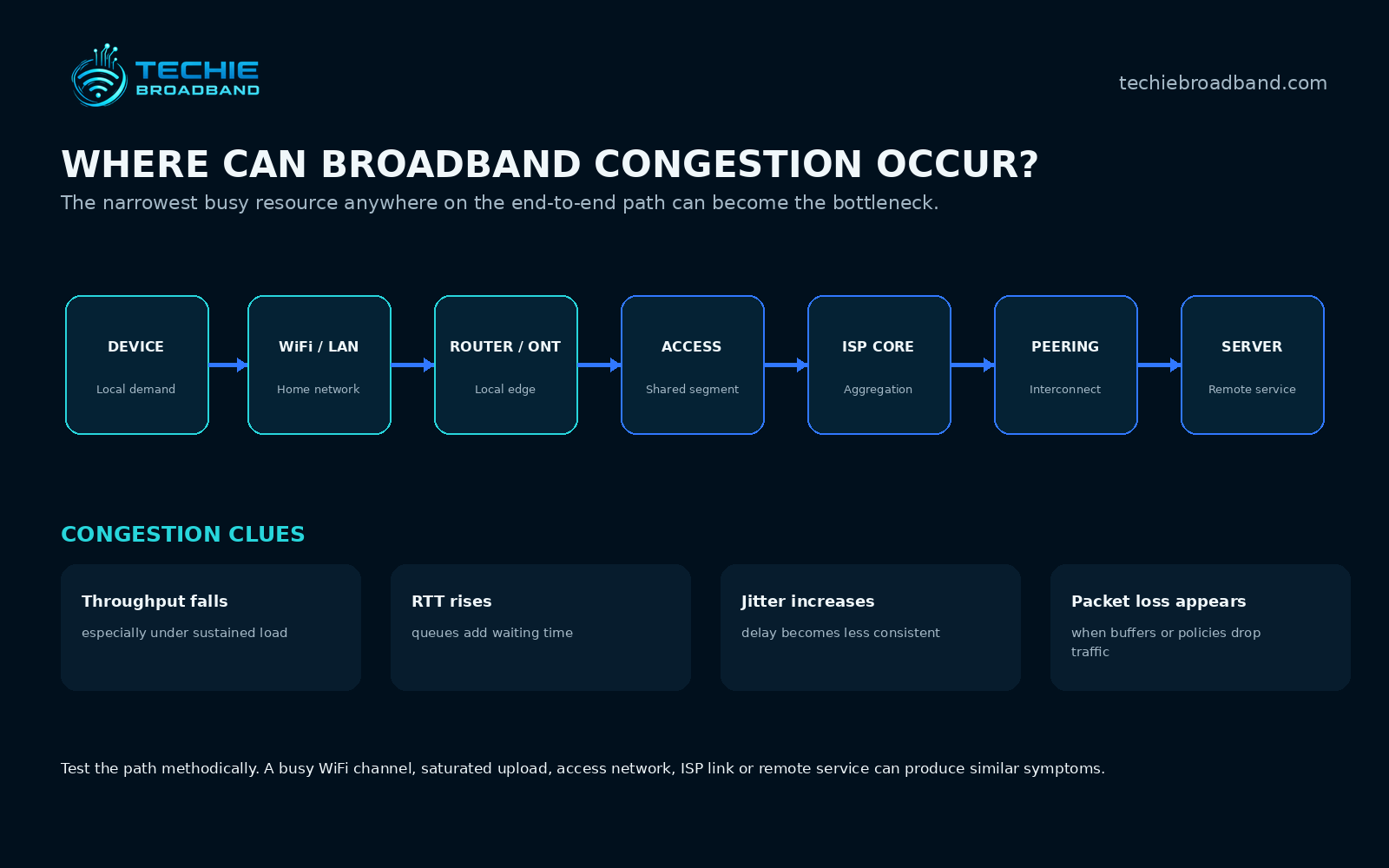
Where can congestion occur on UK broadband?
Inside the home
A busy WiFi channel, saturated upload, overloaded router or a slower Ethernet link can create local congestion. This is why a poor result does not automatically prove an ISP network problem.
On the access network
FTTP, cable, fixed wireless and mobile systems contain shared resources. The architecture and capacity planning differ, but a shared segment can become busy enough to affect performance. FTTP itself therefore does not make congestion impossible.
Inside the ISP network
Aggregation links, broadband network gateways, backhaul and core links all need enough capacity for the traffic they carry. Operators engineer these networks around demand patterns rather than dedicating every subscriber's headline package rate end to end.
At peering, transit or the remote service
A connection may perform well to one destination and poorly to another because the constrained resource sits beyond the access network. A remote server, CDN path or interconnection can be the limiting point.
Network congestion and peak time performance
Residential broadband demand is often highest in the evening. Ofcom uses 8pm to 10pm as the residential busy time when communicating broadband speed information. Its March 2023 home broadband measurements found average peak time download speed across all measured connections was 67.7 Mbit/s, 95% of the 71.0 Mbit/s average maximum speed. That is historical published evidence, not a claim that every UK network behaves the same way today.
For a deeper explanation of time of day behaviour, see What is Peak Time Performance?.
Congestion affects more than download speed
A congested queue can increase round trip time before a speed test shows a dramatic throughput collapse. That is why interactive applications such as gaming, voice, remote desktop and video calls can feel poor while bulk downloads still look acceptable.
See What is Round Trip Time (RTT)? for the relationship between network path delay, queueing and loaded latency.
Network congestion and bandwidth
Bandwidth describes capacity. Congestion describes what happens when demand competes for insufficient available capacity at a resource. More bandwidth at the actual bottleneck can relieve congestion, but buying a faster broadband package does not necessarily fix congestion located somewhere else.
The distinction is covered in more depth in What is Bandwidth?.
Network congestion and throughput
Throughput is the rate at which data is successfully carried over a period of time. During sustained congestion, congestion control, queueing and packet loss can reduce throughput. The effect depends on the protocol, round trip time, loss pattern, queue behaviour and competing traffic.
Network congestion and goodput
Goodput counts useful application payload delivered over time. Retransmitted data and protocol overhead consume capacity without adding new useful payload, so congestion related loss can reduce goodput disproportionately. See What is Goodput?.
Can upload congestion make downloads feel slow?
Yes. A heavily loaded upstream can create queues that delay acknowledgements and other control traffic. The download path may have plenty of nominal capacity while the connection still feels sluggish because the upstream queue has increased latency. Read What is Upload Speed? for the wider upload capacity relationship.
Can WiFi congestion look like broadband congestion?
Yes. WiFi is a shared radio medium. Nearby networks, multiple active devices, retransmissions, weak signal and airtime competition can all reduce performance or increase delay. A wired Ethernet baseline is therefore essential before concluding that a recurring slowdown is in the ISP network.
Packet loss, queues and bufferbloat
Large queues can temporarily absorb bursts, but excessive queueing can create high latency under load. This is commonly associated with bufferbloat. Smaller or actively managed queues can keep delay lower but may signal congestion through packet drops or Explicit Congestion Notification where supported. The objective is not simply to avoid every drop; it is to keep the network stable while using capacity efficiently.
How congestion control responds
Congestion control is the feedback based adjustment of the sending rate. TCP and modern transports react to congestion signals rather than transmitting indefinitely at whatever rate an application requests. This is fundamental to Internet stability because many independent senders share network resources.
The IETF's RFC 5783 describes congestion control as feedback based adjustment of the rate at which data is sent into the network, while RFC 9522 defines congestion around traffic exceeding output capacity over time.
Why faster broadband does not eliminate congestion
Moving from 100 Mbps to 1 Gbps gives a household much more access capacity, but it does not enlarge every shared link, WiFi channel, router queue, peering path or remote server. Faster access can also move the bottleneck elsewhere. On multi gigabit services, local Ethernet, WiFi, router processing and storage become increasingly important.
Techie Broadband congestion headroom calculation
Suppose a household has a 500 Mbps usable downstream path and simultaneous demand reaches 350 Mbps. Headroom is 500 − 350 = 150 Mbps, or 30% of the 500 Mbps capacity. If demand rises to 550 Mbps, offered load becomes 110% of capacity. Something must then queue, slow or be discarded until the effective offered rate falls back within what the bottleneck can serve.
How to test for network congestion properly
Use wired Ethernet to remove WiFi as a variable.
Confirm the computer, router and Ethernet link have negotiated at a speed above the broadband service rate.
Pause cloud backups, game downloads, CCTV uploads and other competing household traffic.
Record download speed, upload speed and idle RTT when the connection is quiet.
Repeat the same tests under deliberate load and record loaded RTT.
Repeat at different times, including the evening busy period.
Use more than one reputable test server or destination.
Compare whether every destination slows or only particular services.
Check packet loss and retransmissions where your tools expose them.
Repeat across several days before diagnosing a recurring network pattern.
If the issue is local, isolate WiFi, router processing, cabling and device limitations.
If a repeatable wired time of day pattern remains, provide the evidence to the ISP.
How to distinguish congestion from another bottleneck
Only one device is slow: investigate that device, WiFi connection, adapter, software or storage first.
All devices slow only on WiFi: investigate radio conditions and access point capacity.
Wired and WiFi both degrade when uploads are busy: investigate upstream saturation and queueing.
Performance falls at similar evening times across several wired tests: wider shared network congestion becomes more plausible.
Only one website or service is affected: investigate the remote service, CDN, route or interconnection.
A speed test is fast but applications remain laggy under load: measure RTT and jitter as well as throughput.
Network congestion on FTTP, FTTC, cable and mobile
Every access technology has different capacity, sharing and scheduling characteristics. FTTP can provide very high access rates, but PON resources and upstream network elements are still shared. FTTC adds copper line limitations. Cable uses shared segment capacity. Fixed wireless and mobile broadband also share radio resources whose available capacity changes with signal conditions and active users. The correct comparison is always ISP + access network + product + location.
Does a symmetrical connection prevent congestion?
No. Symmetrical broadband gives similar downstream and upstream service rates, which can provide much more upstream headroom than an asymmetric service, but either direction can still become congested locally or elsewhere. See What is Symmetrical Speeds?.
Common network congestion misconceptions
“Full fibre cannot be congested.” False. Fibre changes access capability, not the basic fact that networks contain shared resources.
“A faster package always fixes congestion.” Only if the package rate is the relevant bottleneck and sufficient capacity is available beyond it.
“Packet loss must happen before congestion exists.” Queueing delay can rise before buffers overflow or packets are deliberately dropped.
“Slow WiFi proves the ISP is congested.” WiFi has its own contention and congestion behaviour.
“One evening speed test proves congestion.” A diagnosis needs repeatable evidence and a controlled baseline.
Frequently asked questions about network congestion
What causes network congestion?
Network congestion is caused when offered traffic exceeds the capacity available at a network resource for long enough to create sustained queueing, delay or loss. The immediate cause is excess load, although inadequate capacity, traffic bursts, failures, routing changes or unusual demand can contribute.
Does network congestion reduce broadband speed?
It can. Sustained congestion can reduce throughput as queues build, packets are dropped and congestion control reduces sending rates. Latency and jitter may worsen before a large speed reduction becomes obvious.
Why is my broadband slower in the evening?
Shared network demand is one possibility because residential usage is often higher in the evening. Increased household traffic and busier WiFi can produce the same pattern, so compare repeated wired tests at quiet and busy times.
Can network congestion increase ping?
Yes. Packets waiting in queues add delay, so RTT or ping can rise when a bottleneck is heavily loaded.
Can I fix ISP congestion myself?
You cannot add capacity to an ISP bottleneck yourself, but you can rule out local causes, manage your own traffic and provide repeatable evidence. If the constrained resource is in the provider network, the provider must change capacity, routing or traffic management.
Does upgrading to gigabit broadband stop congestion?
Not necessarily. It increases access capacity, but congestion can still occur in WiFi, the router, shared access infrastructure, ISP links, interconnection or the remote service.
Authoritative technical references
IETF RFC 9522: Overview and Principles of Internet Traffic Engineering defines congestion and busy hour terminology used in modern Internet traffic engineering.
IETF RFC 5783: Congestion Control in the RFC Series explains congestion control as feedback based adjustment of sending rate.
Ofcom broadband speeds guidance explains the UK busy time convention used for residential and business broadband speed information.
The key point
Network congestion is not a synonym for slow internet. It is a specific capacity problem: too much traffic is being offered to a network resource for the capacity available at that moment. Diagnose it by finding where performance changes, measuring throughput and latency together, removing local variables and looking for a repeatable pattern across time and destinations.
To explore the related technical concepts used in this Network Congestion guide, visit our broadband terminology guide.
