
What is Port?
Updated: 3 days ago

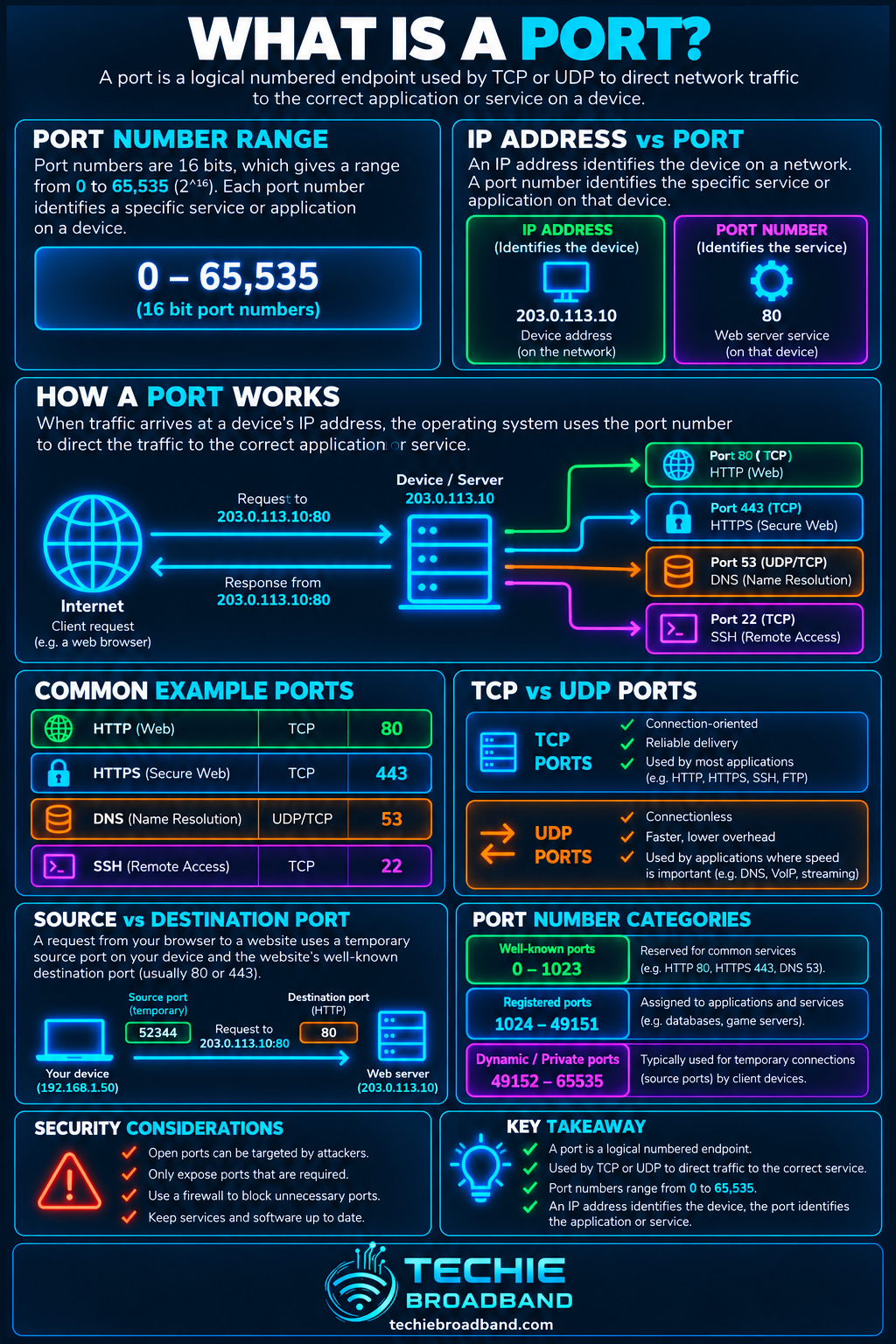
A port is a numbered transport-layer endpoint used to direct network traffic to the right application or service on a device. IP addresses identify hosts or interfaces; port numbers help TCP and UDP identify which service or conversation should receive the traffic.
For broadband troubleshooting, that distinction matters. A connection can reach the correct public IP address and still fail because the destination port is blocked, untranslated, not forwarded, or has no service listening behind it.
What is a network port?
A network port is a 16-bit number carried by transport protocols such as TCP and UDP. The valid numeric range is 0 to 65,535. It is not a physical socket on a router and it is not an extra IP address.
The simplest mental model is that the IP address gets traffic to a device, while the destination port identifies the service or application endpoint on that device. That model is useful, but a real connection is identified by more than a destination port alone.
A connection is more than a port number
A TCP or UDP flow is normally distinguished using the transport protocol together with source and destination addresses and source and destination ports. For example, a browser might create a connection from 192.0.2.10:53124 to 203.0.113.20:443 using TCP.
Source IP address: 192.0.2.10
Source port: 53124
Destination IP address: 203.0.113.20
Destination port: 443
Transport protocol: TCP
Another connection can use the same destination IP and destination port at the same time because its source address, source port, or both are different. This is one reason thousands of simultaneous connections can share a server and why many client connections can pass through one NAT gateway.
TCP ports and UDP ports are separate
TCP and UDP each have their own port-number space. TCP port 443 and UDP port 443 are therefore different transport endpoints. A service listening on TCP 443 does not automatically mean anything is listening on UDP 443.
This distinction is important when testing firewall rules, port forwards and application reachability. A port number without its transport protocol is incomplete information.
How port numbers are divided
IANA divides the 0 to 65,535 port-number range into three broad ranges:
System Ports: 0–1023. Often called well-known ports and associated with widely recognised services.
User Ports: 1024–49151. Used by registered applications and services.
Dynamic or Private Ports: 49152–65535. Commonly used for temporary client-side source ports and private purposes.
These ranges describe allocation and registration conventions. They do not create a security boundary. A firewall can block port 443, an application can listen on port 50000, and software can be configured to use a non-standard port.
Common port examples
22/TCP is commonly associated with SSH.
53/UDP and 53/TCP are used by DNS in different circumstances.
80/TCP is conventionally associated with HTTP.
443/TCP is conventionally associated with HTTPS, while modern protocols can also use UDP 443.
123/UDP is commonly associated with NTP.
These are conventions, not guarantees. Seeing traffic on a familiar port does not prove which application generated it, and moving a service to an unusual port does not make the service secure.
Source ports and destination ports
When a client starts a connection, the destination port usually represents the service it wants to reach. The source port is commonly selected dynamically by the client operating system. The returning traffic uses the connection state so it can be delivered back to the correct application.
This is why opening a web page does not require your router to forward inbound TCP 443 to your laptop. The outbound connection creates state that allows the expected reply traffic back through a stateful firewall and, where applicable, through NAT.
What does open, closed or filtered mean?
Port scanners often describe a tested port as open, closed or filtered, but those words describe the observed result from a particular source to a particular destination at a particular moment.
Open usually means a service responded in a way consistent with listening on that transport port.
Closed usually means the destination was reachable but no service accepted the connection on that port.
Filtered usually means a firewall or another network control prevented the scanner from receiving the response needed to classify the port normally.
A port is therefore not globally open or closed in isolation. Firewall policy, source address, IP version, routing, NAT state and where the test originates can all change the result.
Ports, firewalls and security
A firewall applies policy to traffic. Depending on the firewall, rules can consider protocol, source and destination addresses, source and destination ports, connection state and other attributes. The presence of a port number does not itself open a path through the firewall.
Likewise, a listening service is not automatically reachable from the internet. It may be bound only to localhost, restricted to a LAN interface, blocked by the host firewall, blocked by the router, or unreachable because no inbound mapping exists.
Ports and NAT
With NAT (Network Address Translation), the address and sometimes the port observed on one side of the translator can differ from the values used on the other side. A home router commonly maps many private IPv4 client connections onto one public IPv4 address and keeps enough state to return each reply to the correct internal flow.
That creates an important troubleshooting rule: always state where a port number was observed. A client-side source port, a router's translated public-side port and a server-side destination port can all be different values within one end-to-end conversation.
Ports and port forwarding
A port forwarding rule creates an inbound mapping so traffic arriving at a specified external address and port can be sent to an internal address and port. The external and internal port numbers do not have to be identical.
For example, a router could accept TCP 8443 on its public side and forward it to TCP 443 on a server inside the LAN. The service itself must still be listening, and relevant firewalls must still permit the traffic.
Ports and CGNAT
If your broadband connection uses CGNAT, your router may not control the public IPv4 address that internet users actually reach. A local port-forward rule can therefore be correct while unsolicited inbound IPv4 traffic still stops at the provider's carrier-grade NAT layer.
This is why a failed external port test does not automatically mean the local router rule is wrong.
Ports with IPv4 and IPv6
Ports belong to transport protocols, so they are relevant over both IPv4 and IPv6. The major operational difference is often the surrounding address and translation model rather than the port number itself.
A typical IPv4 home network uses private addressing and NAT44, so unsolicited inbound traffic often needs a port forward as well as permissive firewall policy. Native IPv6 normally does not need NAT44-style port translation, but the router's IPv6 firewall can and should still control unsolicited inbound traffic.
A port is not the same thing as a service
Port numbers identify transport endpoints. Applications and services decide what protocol behaviour occurs after traffic reaches that endpoint. The same application can be configured to listen on a different port, and different applications can use the same numeric port on different addresses or transport protocols.
This is also why 'port 443 is secure' is an inaccurate statement. Security depends on the protocol and configuration used by the application, certificate validation where relevant, software quality, firewall policy and the rest of the system.
Why a port can appear reachable from one place but not another
Reachability is path-dependent. A service might work from the LAN but fail from the internet, work over IPv6 but not IPv4, or work from one external network while another source is blocked.
The service may be listening only on a specific local address.
The host firewall may permit some source networks but not others.
The router may have a missing or incorrect NAT mapping.
CGNAT may prevent unsolicited inbound IPv4 traffic.
An upstream firewall or provider policy may block the path.
The test may be using TCP when the service expects UDP, or vice versa.
The service may be reachable over IPv6 while the test is using IPv4.
How to troubleshoot a port problem
Confirm the application is running and actually listening on the expected transport protocol and port.
Confirm which local IP address the service is bound to. A service bound only to 127.0.0.1 or ::1 is not listening on the LAN interface.
Test locally on the host, then from another device on the same LAN. This separates application or host-firewall problems from router and internet-path problems.
Check the host firewall and router firewall rules for the correct protocol, addresses and direction.
If IPv4 NAT is involved, verify the port-forward rule points to the correct internal address and port.
Check whether the router's WAN IPv4 address is genuinely public or whether CGNAT or another upstream NAT layer exists.
Test from a genuinely external connection rather than relying only on a device inside the same LAN.
If IPv6 is available, test IPv4 and IPv6 separately. Success on one protocol does not prove the other path works.
Common port misconceptions
An open port is not automatically a vulnerability. Risk depends on the service exposed and how it is secured.
A closed port does not mean the device is offline. It can simply mean no service is listening there.
Changing a service to a high or unusual port is not a substitute for authentication, patching or firewall policy.
NAT is not a firewall. Translation and security policy are different functions even when one router performs both.
You do not normally need inbound port forwarding for ordinary outbound web browsing.
TCP and UDP using the same number are not the same port endpoint.
The useful way to think about ports
For diagnosis, treat a port as one coordinate in a network conversation rather than as a magic door in a router. Ask which transport protocol is in use, which source and destination addresses are involved, which side of any NAT boundary you are observing, whether a service is listening, and which firewall policies apply.
That approach explains far more than simply asking whether 'the port is open'. It also makes port-forwarding, CGNAT and dual-stack problems much easier to isolate.
What is Port? FAQs
How many network ports are there?
TCP and UDP each use a 16-bit port-number field, giving numeric values from 0 to 65,535. Their port spaces are separate.
Is port 443 always HTTPS?
No. TCP 443 is conventionally used for HTTPS, but a port number alone does not prove which application protocol is running. UDP 443 is also used by protocols such as QUIC.
Does an open port mean my network is insecure?
Not by itself. An open port indicates that a service is reachable at that endpoint. Security depends on what the service is, how it is configured and patched, authentication, encryption and firewall policy.
Do I need port forwarding for normal internet use?
Normally no. Outbound connections create state that permits expected return traffic. Port forwarding is mainly relevant when you deliberately need unsolicited inbound traffic to reach a service behind IPv4 NAT.
Can CGNAT stop port forwarding?
Yes. If the provider places another NAT layer between your router and the public IPv4 internet, a local port-forward rule cannot by itself create the required mapping through that upstream CGNAT device.
Do IPv6 connections use ports?
Yes. TCP and UDP ports work over IPv6 as well as IPv4. Native IPv6 generally removes the need for NAT44-style port translation, but firewall policy still matters.
To explore the related technical concepts used in this Port guide, visit our broadband terminology guide.
