
What is DDNS (Dynamic DNS)?
Updated: 3 days ago

DDNS, or Dynamic DNS, keeps a hostname linked to a public IP address that can change. Instead of remembering the latest numeric address assigned to your broadband connection, you use a stable name such as home.example.net; when the public IP changes, a DDNS client updates the relevant DNS record so the name follows the new address. DDNS solves an addressing problem, not a reachability problem: it does not bypass CGNAT, a firewall, closed ports or an ISP that blocks inbound traffic.
It is easiest to understand DDNS after understanding DNS. Ordinary DNS maps names to records. Dynamic DNS adds a mechanism for changing those records automatically when the underlying address changes.
How does DDNS work?
A typical home or small-business DDNS setup has four moving parts: your changing public IP address, a DDNS update client, a DDNS provider or authoritative DNS service, and the hostname remote users resolve.
Your ISP assigns a public IPv4 address to the broadband connection. On a dynamic service, that address may later change.
The router or another DDNS client detects the current public address.
The client authenticates to the DDNS service and reports the new address.
The DNS record for the chosen hostname is updated.
Remote devices resolve the hostname and receive the latest address rather than an obsolete one.
The IETF's RFC 2136 defines the DNS UPDATE operation for adding and deleting DNS resource records dynamically. Consumer DDNS services do not all expose RFC 2136 directly to end users, but the core idea is the same: the DNS data changes without somebody manually editing the zone after every address change.
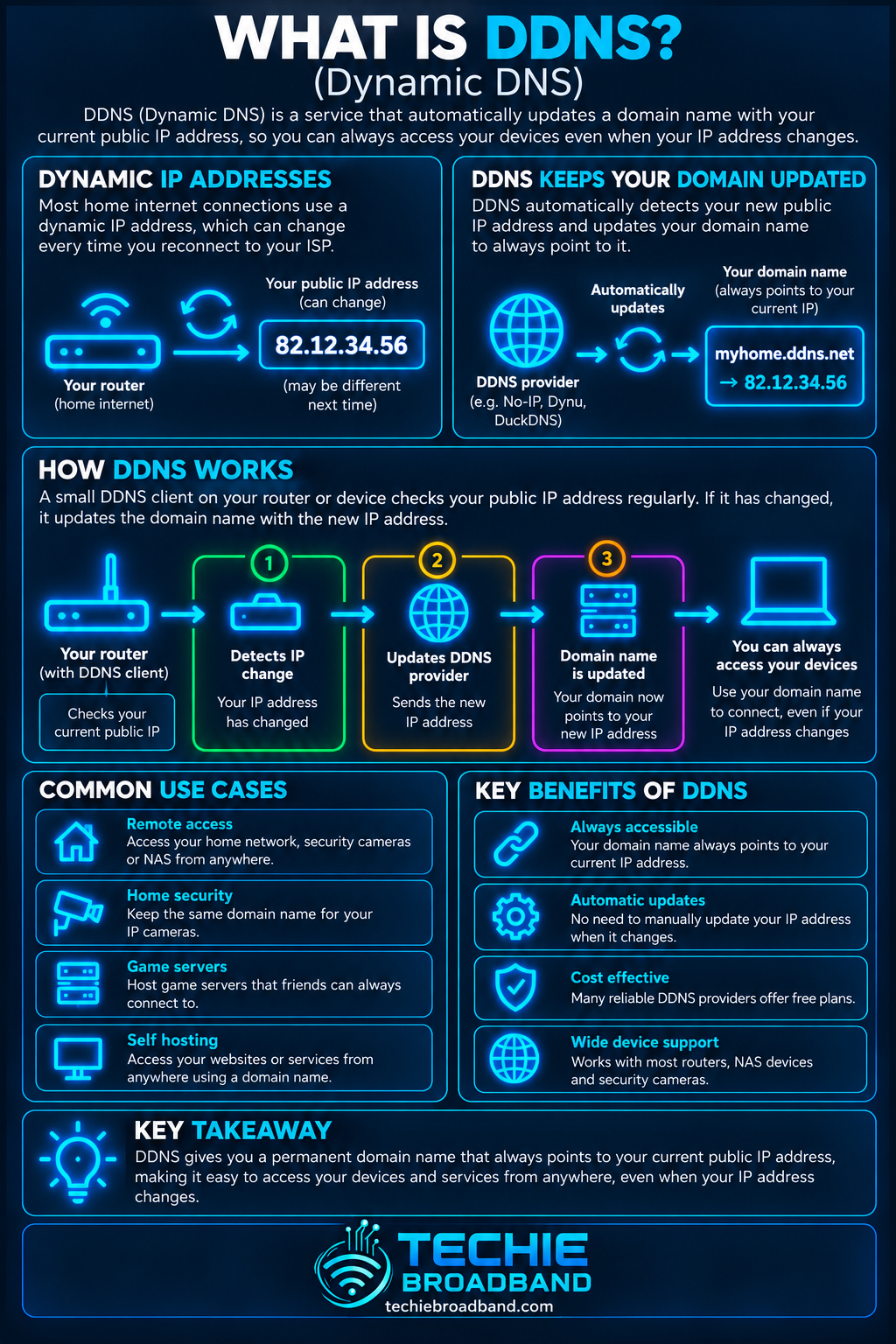
The infographic shows the important relationship: the hostname stays stable while the address it resolves to can change. That indirection is the practical value of DDNS.
Why can your public IP address change?
Many broadband connections use dynamically assigned IPv4 addresses. The address can remain unchanged for a long time, but it is not guaranteed to be permanent. A reconnect, lease or session change, ISP network change, router replacement or other operational event can result in a different public address. This is separate from the private addresses assigned inside your network by DHCP.
Your devices might use private addresses such as 192.168.1.20 while the router presents one public address to the internet. The IPv4 address DDNS normally tracks for remote access is the public-facing address, not an individual device's private LAN address.
DDNS vs a static IP address
A static public IP and DDNS can both give you a predictable way to find a connection, but they achieve it differently.
Static public IP: the numeric public address itself remains fixed according to the service arrangement.
Dynamic public IP with DDNS: the numeric address may change, but a hostname is automatically updated to point to the current address.
Practical difference: software and users can keep using the hostname even after the broadband address changes.
A static IP is often simpler for services that expect a fixed numeric source or destination, firewall allowlists, business VPN configurations and some server environments. DDNS can be a practical alternative when the main requirement is simply to find a changing connection by name.
DDNS does not bypass CGNAT
This is one of the most important limitations. DDNS can publish the address it is given, but it cannot create an inbound path that does not exist.
If your ISP places the connection behind carrier-grade NAT (CGNAT), the public address visible on the internet may be shared by many customers and may not be assigned directly to your router. Updating a hostname to that shared address does not give the wider internet a unique route to your home router.
DDNS can tell a remote device which public address to try.
It cannot create a port-forwarding rule.
It cannot open a firewall.
It cannot make a CGNAT address uniquely yours.
It cannot override an ISP policy that blocks inbound connections.
For remote access, the network still needs a viable inbound path. Your gateway and firewall configuration, NAT behaviour, ISP addressing model and the application itself all matter.
What is DDNS used for?
DDNS is useful when a service needs to be reached from outside a network whose public address is not guaranteed to stay fixed.
Remote access to a home server or NAS.
Self-hosted services and development environments.
VPN endpoints hosted on the broadband connection.
Remote administration of equipment where secure inbound access is deliberately configured.
Network monitoring or lab systems.
Some CCTV and security-system deployments, although vendor relay or cloud services are also common.
DDNS should not be treated as a reason to expose management interfaces directly to the public internet. Prefer secure protocols, strong authentication, restricted access and a VPN or other properly designed remote-access method where appropriate.
A worked DDNS example
Practical example: imagine your router currently has public IPv4 address 81.2.69.104 and your DDNS hostname is myhome.example.net. The DNS record points the hostname to 81.2.69.104.
Later, the ISP changes the connection's public address to 86.17.203.25. Without DDNS, the hostname can continue pointing to the old address until somebody edits the DNS record manually. With a working DDNS client, the service is notified and the hostname is updated to 86.17.203.25.
Remote users continue entering the same hostname. The changing part is hidden behind DNS. There can still be a short period where resolvers cache the previous answer, depending on TTL and caching behaviour.
DDNS and DNS TTL
DNS records have a time to live (TTL), which influences how long a resolver may cache an answer. A lower TTL can reduce how long an old DDNS answer remains cached after an address change, but it does not guarantee instant global change.
Update timing depends on more than TTL. The DDNS client has to notice the address change, the provider has to accept and publish the update, and recursive resolvers or applications may retain cached information until it expires.
DDNS update security matters
A DDNS update changes public DNS data, so the update mechanism must be authenticated. RFC 3007 describes secure DNS dynamic update and makes the key distinction that authorisation of the update transaction is separate from DNSSEC validation of DNS data.
If an attacker obtains DDNS credentials or an update token, they may be able to redirect the hostname to an address they control. Treat DDNS credentials as sensitive secrets.
Use a unique, strong account password and multi-factor authentication where the provider supports it.
Prefer narrowly scoped update tokens or credentials rather than broad account credentials where possible.
Keep router firmware and DDNS client software current.
Do not embed update secrets in public scripts or repositories.
Remove obsolete hostnames and revoke old credentials after replacing equipment.
Router-based DDNS vs a separate client
Many routers can run a DDNS client themselves. That is convenient because the router is already at the network edge and can monitor the WAN address. A separate client can instead run on a server, NAS or another always-on device.
Router client: simple and independent of a particular computer being switched on.
Server or NAS client: useful when the router does not support your chosen DDNS provider or when you want more control over update logic.
Provider API or script: useful for technical environments where updates are automated directly, but credentials and failure handling need careful design.
How to tell whether DDNS will actually help
Check the WAN address shown by the router.
Compare it with the public IPv4 address reported by a reputable external IP-check service.
If the addresses differ, investigate whether the connection is behind CGNAT or another upstream NAT layer.
Confirm that your ISP permits the inbound service you intend to run.
Confirm the router and firewall can forward or route the required traffic securely.
Only then configure DDNS and test the hostname from a genuinely external connection.
Testing from inside the same LAN can be misleading because some routers support NAT loopback or split DNS while others do not. A mobile connection with Wi-Fi disabled is a simple way to test whether the service is actually reachable from outside.
Troubleshooting DDNS
If a DDNS hostname stops reaching the intended service, separate DNS problems from connectivity problems rather than changing several settings at once.
Resolve the hostname and note the IP address returned.
Check the router's current WAN or public address.
Confirm the DDNS hostname points to that same public address.
If it does not, inspect the DDNS client's last successful update, credentials and provider status.
If it does match, test whether the required port or protocol is reachable from outside the network.
Check firewall and port-forwarding or routing rules.
Check whether the ISP has moved the connection behind CGNAT or changed inbound filtering.
Check the service is actually listening on the expected local address and port.
Allow for DNS caching if the public address changed recently.
Common DDNS misconceptions
“DDNS gives me a static IP.” No. The public IP can still change; DDNS keeps a name mapped to the current value.
“DDNS opens my network to the internet.” No. Reachability still depends on routing, NAT, firewalls, CGNAT and the service configuration.
“The DNS update is instant everywhere.” Not necessarily. Client detection, provider processing, TTL and caching can introduce delay.
“DDNS is only for websites.” No. It can identify any reachable service for which a stable hostname is useful.
“If the hostname resolves, the service must be working.” No. Successful DNS resolution only proves the name returned an address; it does not prove the destination service is reachable.
DDNS with IPv6
DDNS can also update IPv6 records. Instead of an A record pointing to IPv4, an AAAA record can point a hostname to an IPv6 address. The addressing and firewall model is different because IPv6 normally does not rely on IPv4-style NAT for basic end-to-end addressing.
That does not mean an IPv6 service should be exposed without controls. Stateful firewall policy remains important, and the chosen device address must be suitable for a stable DNS mapping. Privacy addresses that change frequently are generally not a useful target for a remotely accessed service.
Techie Broadband analysis: DDNS is a naming fix, not a connectivity fix
The most useful way to diagnose DDNS is to split remote access into three separate layers: naming, addressing and reachability. DDNS only directly solves the first layer.
Naming: does the hostname resolve to the intended current address?
Addressing: is that address actually assigned or routable to your connection?
Reachability: can the required traffic pass through ISP policy, NAT, routing and firewall controls to the service?
This three-layer test prevents a common troubleshooting mistake: repeatedly changing DDNS settings when DNS is already correct and the real fault is CGNAT, a closed port, a firewall rule or the application itself.
Key takeaway
DDNS gives a changing internet connection a stable name. A client detects the current public address and updates DNS so the hostname follows it. That can make remote access much easier on a dynamic public IP, but DDNS does not provide a static IP and does not bypass CGNAT, firewalls, routing restrictions or blocked inbound traffic.
DDNS FAQs
Is DDNS the same as a static IP?
No. A static IP keeps the numeric public address fixed. DDNS allows the address to change while automatically updating a hostname to point to the latest address.
Does DDNS work behind CGNAT?
It can update a hostname, but that normally does not make an inbound service reachable through CGNAT. The shared upstream address is not uniquely routed to your router.
How quickly does DDNS update?
There is no universal time. It depends on how quickly the client detects the address change, provider processing, the record TTL and caching by resolvers and applications.
Do I need DDNS if I have a static public IP?
Usually not for the purpose of tracking address changes, because the public address is already fixed. You may still use a normal DNS hostname to avoid relying on the numeric address in everyday use.
Can DDNS be used with IPv6?
Yes. A DDNS system can update AAAA records for IPv6, provided the chosen address is appropriate for the service and inbound firewall policy allows the intended traffic.
To explore the related technical concepts used in this DDNS (Dynamic DNS) guide, visit our broadband terminology guide.
