
What is Static IP?
Updated: 3 days ago

A static IP is an IP address that is intended to remain assigned consistently rather than being routinely replaced with another address. On UK broadband, the term usually refers to a public IPv4 address that an ISP keeps associated with your connection, although stable addressing can also apply to IPv6 prefixes and addresses. A static IP matters when another system needs to know where to find your connection reliably, such as for a VPN, remote access, self-hosted services, DNS records or IP allowlisting.
The most important distinction is that a static IP does not make broadband faster. It changes address consistency and reachability, not bandwidth, latency or throughput. A connection can be extremely fast with a dynamic IP and relatively slow with a static one.
Static also does not automatically mean publicly reachable. A private static address inside your home network is different from a static public address supplied by an ISP, and firewall rules, NAT, CGNAT and IPv6 configuration can still determine whether inbound connections work.
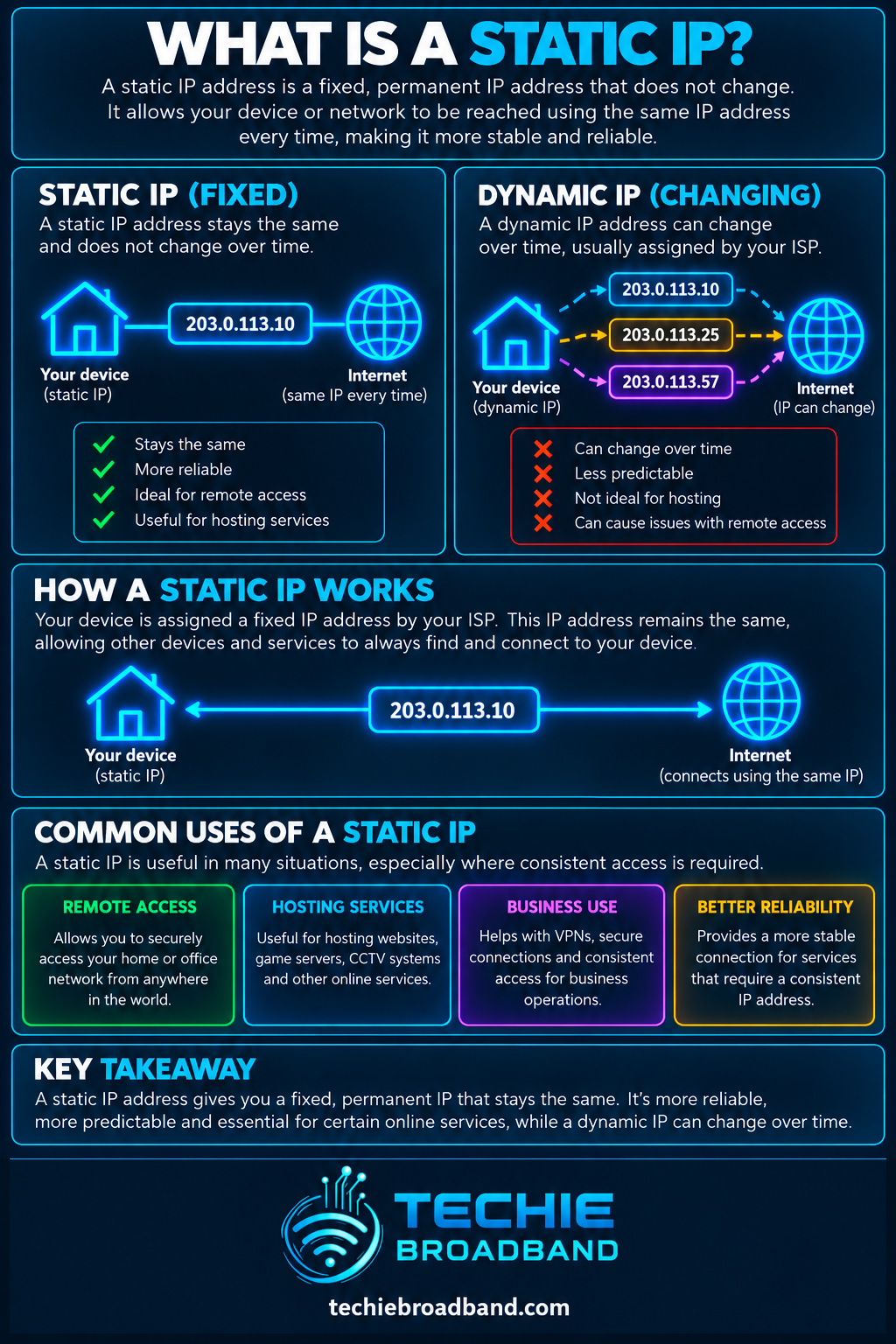
The infographic below shows the core idea: a predictable public address gives external systems a consistent destination, while a dynamic address can change when the provider reallocates it.
What does static IP actually mean?
An IP address identifies an interface for Internet Protocol communication. A static IP is an addressing arrangement in which the relevant address is deliberately kept consistent. The exact mechanism can vary. It might be configured manually, reserved by a DHCP system, persistently assigned by an ISP, or associated with a stable routed prefix.
If you first need the wider addressing context, read What is IP Address?. A static IP is not a separate version of IP. It is a property of how an IPv4 or IPv6 address is assigned and retained.
For IPv4, RFC 2131 distinguishes automatic, dynamic and manual DHCP allocation. Dynamic allocation leases an address for a limited period, while manual allocation lets an administrator assign the address and use DHCP to convey it. A broadband ISP can implement persistent public addressing in its own network without exposing those internal mechanics to the customer.
Static IP vs dynamic IP
A dynamic IP is allocated in a way that permits the address to change. That does not mean it will change every day, every reboot or every time the router reconnects. Some dynamic assignments can remain unchanged for long periods, but the customer should not rely on that address remaining the same unless the service explicitly provides that guarantee.
Static IP: designed to remain consistently associated with the connection or service.
Dynamic IP: can be replaced with another address according to the provider's allocation system.
Sticky or persistent dynamic IP: may remain unchanged for a long time but is not necessarily guaranteed.
DHCP reservation: keeps a particular local address associated with a device on a private network and is not the same thing as buying a static public IP from an ISP.
The operational difference becomes important when a remote system needs to initiate communication towards your network. If the public address changes unexpectedly, a DNS record, firewall allowlist or remote client that still points to the old address can stop reaching the intended service.
Public static IP vs private static IP
The word static describes consistency. Public and private describe address scope. They are separate concepts.
A public static IPv4 address is globally unique and intended to remain associated with your Internet connection or routed service.
A private static IPv4 address is fixed inside a local network but is not globally routable across the public Internet.
A device can have a static private address while the broadband router itself uses a dynamic public address.
A broadband connection can have a static public address while individual devices continue receiving dynamic private addresses from the router.
The private IPv4 ranges are defined by RFC 1918 as 10.0.0.0/8, 172.16.0.0/12 and 192.168.0.0/16. Those addresses can be reused by many separate private networks and are not globally unique.
Why would you want a static public IP?
A static public IP is useful when the address itself needs to act as a dependable reference point. Common reasons include:
Hosting a VPN endpoint at home or in a small office.
Remote administration of equipment where inbound access is intentionally enabled.
Running a self-hosted web, game, voice, monitoring or other network service.
Pointing a DNS record at a broadband connection without having to track address changes.
Allowlisting a known source IP on business systems, cloud services or firewalls.
Site-to-site VPNs where each end expects a predictable peer address.
Remote CCTV or other equipment where the design genuinely requires direct inbound reachability.
Technical testing, development or lab environments where repeatable addressing simplifies configuration.
Does a static IP improve broadband speed?
No. A static IP does not increase the line rate, download speed, upload speed, bandwidth or physical capability of the broadband connection. It changes the predictability of the network address.
A 1 Gbps service with a dynamic IP can still provide the same access speed as an otherwise identical 1 Gbps service with a static IP. Likewise, moving from dynamic to static addressing does not inherently reduce latency or jitter. Any performance difference would come from some other difference in the product, routing or network, not from the address being static.
This distinction matters because static IP is sometimes treated as a premium networking feature and therefore incorrectly assumed to make the connection itself technically faster.
Static IP, NAT and port forwarding
Most UK home networks use private IPv4 addresses internally and translate traffic through the router's public IPv4 address using Network Address Translation. If you have a static public IPv4 address on the router, devices behind it can still remain on private addresses.
For an inbound IPv4 service, the router normally needs a rule telling it which internal device should receive the traffic. This is commonly implemented with port forwarding. A static public address solves the problem of the external destination changing, but it does not automatically create the forwarding rule or bypass the firewall.
That is why 'I have a static IP' and 'my server is reachable from the Internet' are not equivalent statements.
Static IP and CGNAT
A static public IPv4 address is particularly relevant when comparing a service with CGNAT. Under CGNAT, multiple customers can share public IPv4 addressing through translation inside the provider network. The customer router therefore does not necessarily control a unique public IPv4 address.
If you need conventional unsolicited inbound IPv4 connections, merely knowing the public address seen by websites is not enough. You need an addressing arrangement that gives your connection suitable inbound reachability. A provider may solve this with a public dynamic IPv4 address, a static public IPv4 address, IPv6, or another service design.
Do not assume every UK broadband package from the same ISP behaves identically. Addressing can depend on the ISP, access network, product and location.
Static IPv4 and IPv6 are not the same problem
IPv4 scarcity is one reason static public IPv4 is commercially significant. IPv6 has a vastly larger address space and usually gives networks a prefix rather than relying on the same one-to-many NAT model used by many IPv4 broadband connections.
However, IPv6 introduces an important distinction between a stable routed prefix and the individual addresses a device uses. A broadband provider can keep a customer's IPv6 prefix stable while devices generate multiple addresses within that prefix.
The IETF's RFC 8981 defines temporary IPv6 addresses designed to change over time to reduce address-based activity correlation. A device can therefore have temporary IPv6 addresses even when the network prefix itself is stable.
For hosting or firewall policy, the question is not simply 'is IPv6 static?' You need to know whether the delegated prefix is stable, how the host address is generated, whether inbound traffic is permitted and how DNS and firewall rules are configured.
Techie Broadband practical example: what actually breaks when a dynamic IP changes?
Consider a home lab running a VPN server. A remote laptop is configured to connect to 198.51.100.25. While the broadband connection retains that public address, the laptop can reach the router and the router can forward the VPN traffic to the server.
If the ISP later changes the broadband address to 198.51.100.86, the laptop continues trying the old address until its configuration or DNS information is updated. The broadband line itself may be working perfectly. The failure is simply that the remote client is looking in the wrong place.
A static IP removes that particular moving-target problem. Dynamic DNS can provide another approach by updating a hostname when a dynamic address changes, but it introduces an additional update mechanism and does not make the underlying address static.
Static IP vs Dynamic DNS
Dynamic DNS, often shortened to DDNS, maps a hostname to a changing public IP address and updates the DNS record when the address changes. It can be a practical alternative where a true static IP is unavailable.
Static IP keeps the address consistent.
Dynamic DNS keeps a hostname updated to follow a changing address.
Static IP is useful where another system requires an IP address rather than a hostname.
Dynamic DNS depends on the address-change detection and DNS update process working correctly.
Neither option by itself opens firewall ports or overcomes every form of CGNAT.
Does a static IP make you easier to track?
A long-lived public address provides a more persistent network identifier than an address that changes frequently. That can make address-based correlation easier, although an IP address alone does not reliably identify an individual person.
The privacy trade-off is especially explicit in IPv6. RFC 8981 describes temporary addresses that change over time to limit the period during which network activity can be correlated using the same address. This is one reason a technically well-designed IPv6 network can use stable addressing where services need it and temporary addressing for client traffic.
A static IP should therefore be chosen because there is a technical reason for address consistency, not because static is inherently better.
Does a static IP make your connection less secure?
Not automatically. Security depends on what is reachable, which services are listening, firewall policy, software patching, authentication and network design. A static address does make the destination predictable, but a dynamic address should never be treated as a security control.
Keep unsolicited inbound traffic blocked unless it is genuinely required.
Expose the minimum number of services.
Prefer strongly authenticated VPN access over directly exposing administration interfaces.
Keep routers, servers and applications patched.
Use firewall allowlists where appropriate, while understanding that source addresses can also change.
Monitor exposed services and remove obsolete forwarding rules.
Do you need a static IP for gaming?
Usually not. Online gaming does not inherently require a static public IP. Matchmaking, NAT traversal and platform networking normally operate without the player's public address remaining permanently unchanged.
What can matter is the NAT environment. If a game or console needs inbound connectivity, CGNAT or restrictive NAT behaviour may cause problems. A public IPv4 address can therefore be useful in some situations, but that public address does not necessarily need to be static.
Do you need a static IP for working from home?
Most people do not need one simply to work from home. Web applications, cloud services, video calls and outbound corporate VPN connections normally work with dynamic addressing.
A static IP becomes relevant when an employer or service allowlists your home public address, when you host an inbound VPN endpoint, or when a specialist system needs a predictable source or destination address. In those cases, confirm whether the requirement is specifically a static IPv4 address, a stable IPv6 prefix, or simply a publicly reachable connection.
Static IP on UK broadband
In the UK, static IP availability is a product feature rather than an automatic property of FTTP, FTTC, cable or another access technology. The fibre or copper access circuit does not itself determine whether the retail ISP gives you static addressing.
This means two services delivered over the same physical access network can have different IP policies. One ISP may use CGNAT on a particular product, another may supply a public dynamic IPv4 address, and another may offer one or more static addresses. IPv6 support and prefix behaviour can differ as well.
When comparing providers, check the specific ISP, access network, product and location. Do not assume that a provider's addressing policy is identical across every package or wholesale network.
What should you ask a broadband provider?
If static addressing matters to you, ask precise questions rather than simply asking whether the service has 'a static IP'.
Is the address a public IPv4 address?
Is it genuinely static or merely likely to remain unchanged?
Is CGNAT used on this specific product?
Are unsolicited inbound IPv4 connections supported?
Is the static address included or an additional charge?
Can more than one IPv4 address or a routed IPv4 block be provided if required?
Is native IPv6 available?
Is the IPv6 prefix stable, and what prefix size is delegated?
Can I use my own router if I need custom firewall, VPN or routing configuration?
Are there restrictions on hosting services or particular inbound ports?
How to check whether you already have a static public IPv4 address
You cannot prove an address is contractually static just because it has remained unchanged for weeks or months. The reliable answer comes from the provider or product specification. You can, however, check the technical arrangement.
Record the public IPv4 address shown by your router or a reputable external IP-checking service.
Check whether the router's WAN address matches the public address seen externally.
Look for CGNAT or private/shared addressing on the router WAN interface.
Reconnect only if doing so is safe and appropriate, then compare the public address afterwards.
Check the broadband account or product documentation for static IP wording.
Ask the ISP whether the address is guaranteed to remain assigned to your service.
A matching address before and after a reconnect still does not prove it is static. Dynamic allocation systems often return the same address to a customer while it remains available.
How to configure a static IP safely
The correct setup depends on whether you mean a public ISP address or a private LAN address. Do not manually type the public address into a router unless the ISP's configuration specifically requires that.
Confirm the addressing details supplied by the ISP, including whether configuration is automatic or manual.
Confirm the router WAN settings expected by the service.
If hosting a service, give the internal server a predictable private address using an appropriate static configuration or DHCP reservation.
Configure only the required inbound firewall or port-forwarding rules.
Set DNS records to the public static address where a hostname is required.
Test from a genuinely external connection rather than from inside the same LAN.
Verify both IPv4 and IPv6 behaviour separately if the service provides dual stack.
Document the configuration so future router changes do not silently break reachability.
Common static IP misconceptions
A static IP makes broadband faster. False: it changes address consistency, not access speed.
A static IP means every device has a public IP. False: devices can remain behind private addressing and NAT.
A static IP automatically opens ports. False: firewall and NAT policy still control inbound reachability.
A dynamic IP changes constantly. False: it may remain unchanged for long periods without being guaranteed.
A public IP is always static. False: public IPv4 addresses can be static or dynamic.
A static private IP is the same as a static public IP. False: they solve different problems.
IPv6 removes the need to think about stable addressing. False: prefix stability, temporary addresses, DNS and firewall policy still matter.
A static IP is essential for gaming. Usually false: the NAT and reachability model is more relevant.
Static IP FAQs
Is a static IP permanent?
It is intended to remain consistently assigned, but 'permanent' should not be interpreted as an absolute lifetime guarantee. Providers can renumber networks or change addressing arrangements. Check the service terms if long-term address retention is operationally critical.
Can I get a static IP on home broadband?
Some UK broadband products offer static public addressing and others do not. Availability can depend on the ISP and specific product, so check the current product specification rather than assuming it from the access technology.
Can I create my own public static IP?
No. You cannot simply choose an arbitrary public address and make it globally routable. The address or routed prefix has to be provided or routed to you through the relevant network arrangement.
Is a static IP the same as a dedicated IP?
Not necessarily. Static describes whether the address remains consistent. Dedicated usually implies that an address is not shared with other customers or services. The exact commercial wording varies, so check what the provider actually supplies.
Does a static IP bypass CGNAT?
A genuine static public IPv4 address normally means your connection is no longer relying on a shared CGNAT public address for that IPv4 reachability, but confirm the exact product implementation with the provider.
Can I use a static IP with my own router?
Potentially, but BYO router support and the required WAN configuration depend on the broadband provider and product. Confirm the authentication and addressing requirements before replacing the supplied router.
Do I need a static IP for a VPN?
Not for every VPN. A device connecting out to a commercial or corporate VPN normally does not need a static home address. A VPN server accepting inbound connections is where a predictable public address becomes much more useful.
Key takeaway
A static IP is an address designed to remain consistently associated with a connection or service. Its value is predictability: remote systems, DNS records, VPN peers and allowlists can continue pointing to the same address.
It does not make broadband faster and it does not automatically make a service reachable or secure. The practical questions are whether the address is public or private, IPv4 or IPv6, whether CGNAT is involved, whether inbound traffic is permitted, and whether the ISP, access network, product and location provide the addressing behaviour you actually need.
To explore the related technical concepts used in this Static IP guide, visit our broadband terminology guide.
