
What is DNS (Domain Name System)?
Updated: 3 days ago

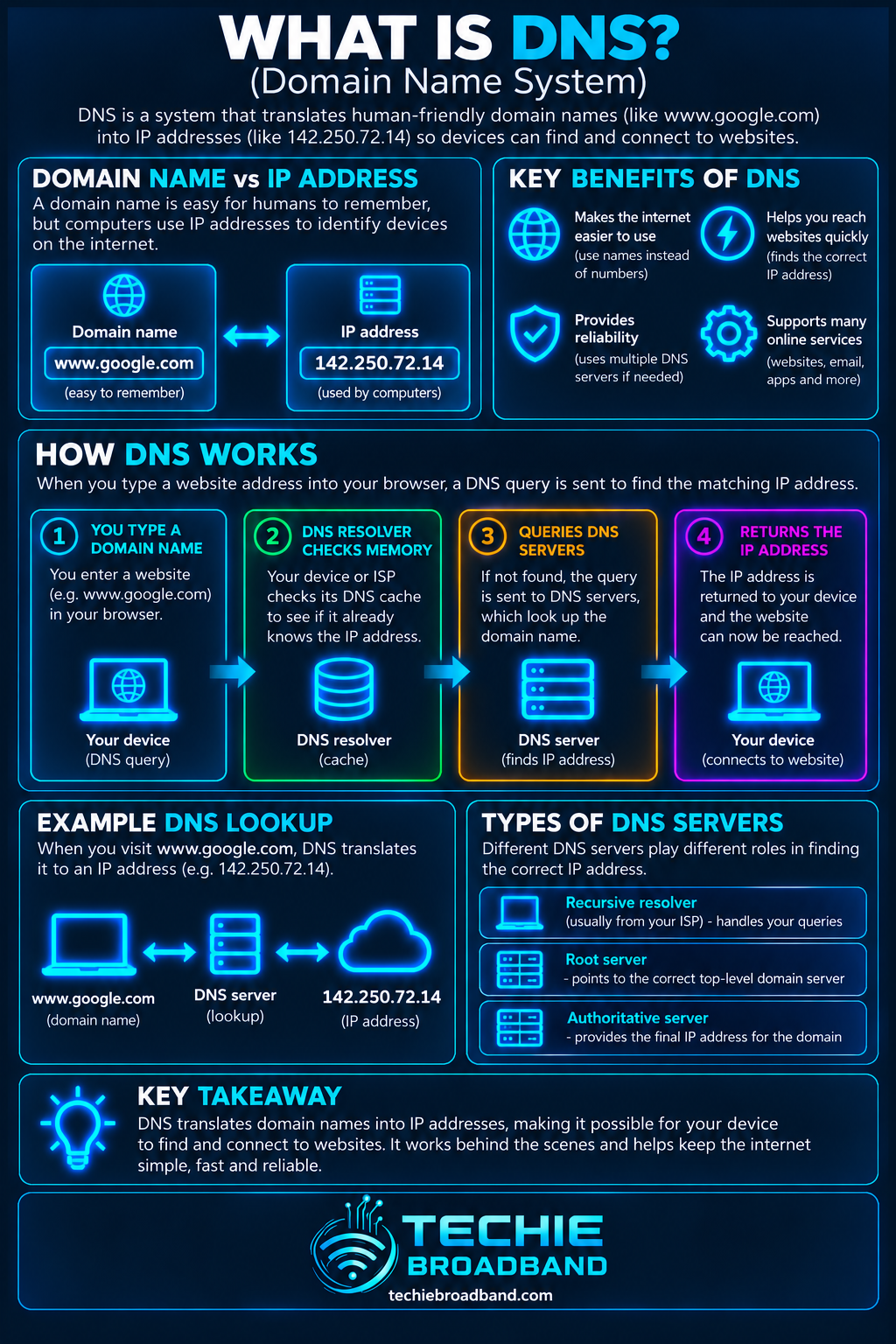
DNS, or the Domain Name System, is the naming system that translates human-readable domain names such as techiebroadband.com into the IP addresses computers use to reach services across IP networks. Without DNS, you would often need to remember numerical addresses instead of names.
For most home users, DNS works quietly in the background. Your device asks a recursive DNS resolver for an answer, the resolver may use a cached result, and when it does not already know the answer it follows the DNS hierarchy until it can return the requested record.
What is DNS?
The Domain Name System is a distributed database and protocol used to associate names with information. Its best-known job is mapping hostnames to IP addresses, but DNS also carries records used for mail routing, aliases, service discovery, domain verification and other functions.
DNS is closely connected to IPv4 and IPv6, because A and AAAA records can provide the addresses a client needs to contact a host. DNS itself does not create the internet connection; it helps applications discover where named services are located.
How does DNS work?
A normal lookup involves several roles. Your application usually relies on the operating system's stub resolver. That resolver sends a query to a recursive resolver, often provided by your broadband provider, router configuration or a DNS service you have selected.
Your device checks information it already has locally.
The query is sent to a recursive resolver if an answer is not already available.
The recursive resolver checks its cache.
If necessary, it asks the DNS hierarchy where to continue.
A root nameserver directs it towards the appropriate top-level domain nameservers.
The TLD nameserver identifies the authoritative nameservers for the domain.
The authoritative service returns the requested record, and the recursive resolver sends the result back to your device.
The exact path is often shorter than this because caching is fundamental to DNS. A resolver that already has a valid cached answer can respond without repeating the full hierarchy.
Recursive resolvers, authoritative servers and the DNS hierarchy
Recursive DNS resolver
A recursive resolver does the lookup work on behalf of the client. It accepts the client's question, uses cached data when valid and obtains the answer from other DNS servers when needed.
Root nameservers
Root nameservers sit at the top of the public DNS hierarchy. They normally return referrals that tell the resolver which top-level domain nameservers to ask next rather than returning the final host address.
TLD nameservers
Top-level domain nameservers cover zones such as .com, .uk and .net. They normally direct the resolver to the authoritative nameservers responsible for the requested domain.
Authoritative DNS
An authoritative nameserver provides answers from DNS data for zones it serves. This is where records such as A, AAAA, MX and other resource records are published for the domain.
What are DNS records?
DNS stores information as resource records. Different record types have different purposes, so a DNS lookup is not simply a request for an IP address.
A: maps a name to an IPv4 address.
AAAA: maps a name to an IPv6 address.
CNAME: aliases one name to another canonical name.
MX: identifies mail exchangers for a domain.
NS: identifies authoritative nameservers for a zone.
TXT: carries text data used for purposes including verification and email-related policies.
PTR: supports reverse mapping from an IP address towards a domain name in the relevant reverse-DNS namespace.
What is DNS caching and TTL?
DNS caching reduces repeated work and makes lookups faster. Resolvers and clients can retain an answer for a limited period instead of asking the authoritative infrastructure every time.
The Time to Live, or TTL, attached to DNS data helps determine how long a cached record may be retained. A long TTL can reduce query load and improve cache effectiveness, while a shorter TTL can allow changes to become visible to recursive resolvers sooner. It does not guarantee that every device everywhere changes at exactly the same instant.
Where does your device get its DNS server settings?
On many home networks, DNS server information is supplied automatically alongside other network configuration. DHCP can provide IPv4 clients with DNS server addresses, while IPv6 networks have their own mechanisms for supplying resolver information.
Your gateway or router may act as a DNS forwarder, meaning devices send DNS queries to the router and the router forwards them to another resolver. Alternatively, devices may be configured to query public or provider resolvers directly.
DNS over UDP, TCP, TLS and HTTPS
Traditional DNS commonly uses UDP port 53 for queries, with TCP also part of the DNS protocol and used where required. Modern encrypted DNS transports include DNS over TLS and DNS over HTTPS. These encrypt the DNS exchange between a client and the resolver that supports the chosen encrypted transport.
Encrypted DNS can stop an observer on that particular path from reading the DNS query in plain text, but it does not make all internet activity anonymous. The resolver you choose still matters, and other metadata or subsequent connections may reveal information about the services being contacted.
DNS and DNSSEC are not the same thing
DNSSEC adds mechanisms that allow DNS data to be cryptographically validated. Its purpose is data origin authentication and integrity for signed DNS data, not confidentiality. DNSSEC therefore does not encrypt the domain name you ask for.
What happens when DNS goes wrong?
DNS faults can make a working broadband connection look broken because applications cannot turn names into usable destinations. A useful diagnostic distinction is whether the network itself has failed or whether name resolution has failed.
If an IP address is reachable but the equivalent hostname is not, investigate DNS.
If neither names nor known IP destinations work, check the wider connection as well as DNS.
If only one domain fails, check that domain's authoritative records and delegation.
If a recent DNS change appears inconsistent, consider cached records and TTL values.
If different devices get different answers, compare their configured resolvers, VPNs, secure-DNS settings and caches.
How to troubleshoot DNS
Start by checking what DNS servers the affected device is actually using. Do not assume every device on the same WiFi network uses the same resolver because browsers, VPN software and operating systems can override normal network settings.
Confirm the device has a valid network configuration and can reach its local network.
Check the configured DNS resolver addresses.
Test whether a known IP destination is reachable separately from a hostname.
Query the hostname and inspect the returned record type and value.
Compare the result using another trusted resolver if appropriate.
Check whether a VPN, security product, browser secure-DNS feature or local filtering service is intercepting queries.
If you manage the domain, inspect authoritative records, nameserver delegation and DNSSEC configuration.
After a DNS change, account for caching and the previous TTL before treating different cached answers as a fault.
Does changing DNS make broadband faster?
Changing DNS can alter lookup time, filtering behaviour, privacy characteristics and reliability, but it does not increase the bandwidth of your broadband line. Once a connection to the destination is established, the DNS lookup is no longer the component carrying the application data.
A slow or unreliable resolver can make the beginning of a browsing session feel sluggish, while a responsive resolver may make name lookups complete more quickly. That should not be confused with increasing download or upload capacity.
DNS privacy and security
DNS is part of your security and privacy picture because the names you resolve can reveal useful information about the services you are trying to reach. Encrypted transports protect queries between participating endpoints, while DNSSEC addresses authenticity and integrity rather than secrecy.
Filtering DNS services can also block known malicious or unwanted domains, but DNS filtering is not a replacement for endpoint security, patching, firewalls or safe browsing practices.
DNS standards and authoritative references
The core DNS concepts and message formats are defined in the IETF's RFC 1034 and RFC 1035. DNSSEC is specified across later standards including RFC 4033.
DNS FAQs
What does DNS stand for?
DNS stands for Domain Name System.
Is DNS the same as an IP address?
No. DNS is a naming system. One of its jobs is returning records that map names to IPv4 or IPv6 addresses.
Is DNS part of my router?
Your router may forward or proxy DNS queries and may advertise DNS settings to devices, but the global Domain Name System is distributed across many independent servers and operators.
Can DNS work if my broadband is down?
Some cached answers may still exist locally, but reaching normal public DNS resolvers and the services their answers point to requires working network connectivity.
Does DNS use port 53?
Traditional DNS uses port 53 with UDP and TCP. Encrypted DNS transports use different arrangements, such as DNS over TLS and DNS over HTTPS.
What is the simplest way to think about DNS?
Think of DNS as distributed internet naming infrastructure. You ask about a name, the DNS system finds the relevant published information, and your device uses the answer to continue communicating with the intended service.
To explore the related technical concepts used in this DNS (Domain Name System) guide, visit our broadband terminology guide.
