
What is Goodput?
Updated: 2 hours ago

Goodput is the rate at which useful application data is successfully delivered across a network. It is normally lower than the headline line rate or raw throughput because protocol overhead, retransmissions, duplicated traffic and other non-useful bits do not become usable application payload. If your broadband is sold as 1 Gbps, goodput answers the more practical question: how much useful file, video, page or application data is actually arriving per second?
The distinction matters more as UK broadband gets faster. Ofcom reported in May 2026 that full fibre was available to 82% of UK homes and gigabit-capable broadband to 89%. As access capacity rises, protocol efficiency, WiFi, Ethernet, routers, servers, storage and packet loss can become increasingly visible limits on the useful data an application receives.
What does goodput mean?
In networking, goodput is application-useful data delivered per unit of time. IETF RFC 5166 describes goodput as the useful subset of throughput, excluding traffic such as duplicates and data that will not become useful at the receiver. RFC 7928 similarly defines end-to-end goodput around successfully forwarded data minus loss and retransmission.
Goodput is usually expressed in bits per second for network comparisons, such as Mbps or Gbps, although applications may report useful transfer rates in bytes per second such as MB/s. The measurement boundary matters: a browser download, file copy and network benchmark may count different layers of payload.
Goodput, throughput and bandwidth are different
Goodput sits inside a chain of related measurements. Bandwidth describes capacity. Throughput describes the rate data is actually moved across a path or flow. Goodput narrows that again to the useful application data successfully delivered.
Bandwidth or line rate: the capacity or signalling rate available at a particular layer or interface.
Throughput: the rate at which data is transferred through the system under the chosen measurement definition.
Goodput: the useful payload rate that successfully reaches the application or intended destination.
Retransmitted, duplicate, discarded and protocol-only traffic can consume capacity without increasing goodput.
A simple goodput formula
A practical model is: goodput = useful application payload delivered ÷ elapsed transfer time.
For efficiency comparisons, Techie Broadband uses: goodput efficiency = goodput ÷ reference line rate × 100.
Example: if a 1,000 Mbps reference rate produces 900 Mbps of useful application data, the goodput efficiency relative to that reference is 90%. This does not mean the missing 10% is one single overhead. It can be the combined result of protocol framing, transport behaviour, retransmissions, encryption, application framing and bottlenecks elsewhere.
Where the bits go
The diagram below separates useful application payload from protocol overhead and retransmitted data. All of those bits can occupy network capacity, but only the payload that successfully reaches the application contributes to goodput.
Why goodput is lower than the headline broadband speed
A broadband package rate and application goodput are measured at different points and often at different protocol layers. Even on a healthy connection, some capacity is used to transport the information needed to make networking work.
Ethernet framing and link-layer overhead.
IP and TCP or UDP headers.
TLS and application protocol overhead where used.
Acknowledgements and transport control traffic.
Retransmission of lost or corrupted data.
Application framing and metadata.
Content encoding, encryption and protocol behaviour.
Limits in the server, device, storage, router, WiFi or Ethernet path.
Techie Broadband goodput reference
The infographic below brings together the line rate, throughput and goodput relationship, a worked efficiency example, common causes of lost useful capacity and the effect on a 10 GB transfer.
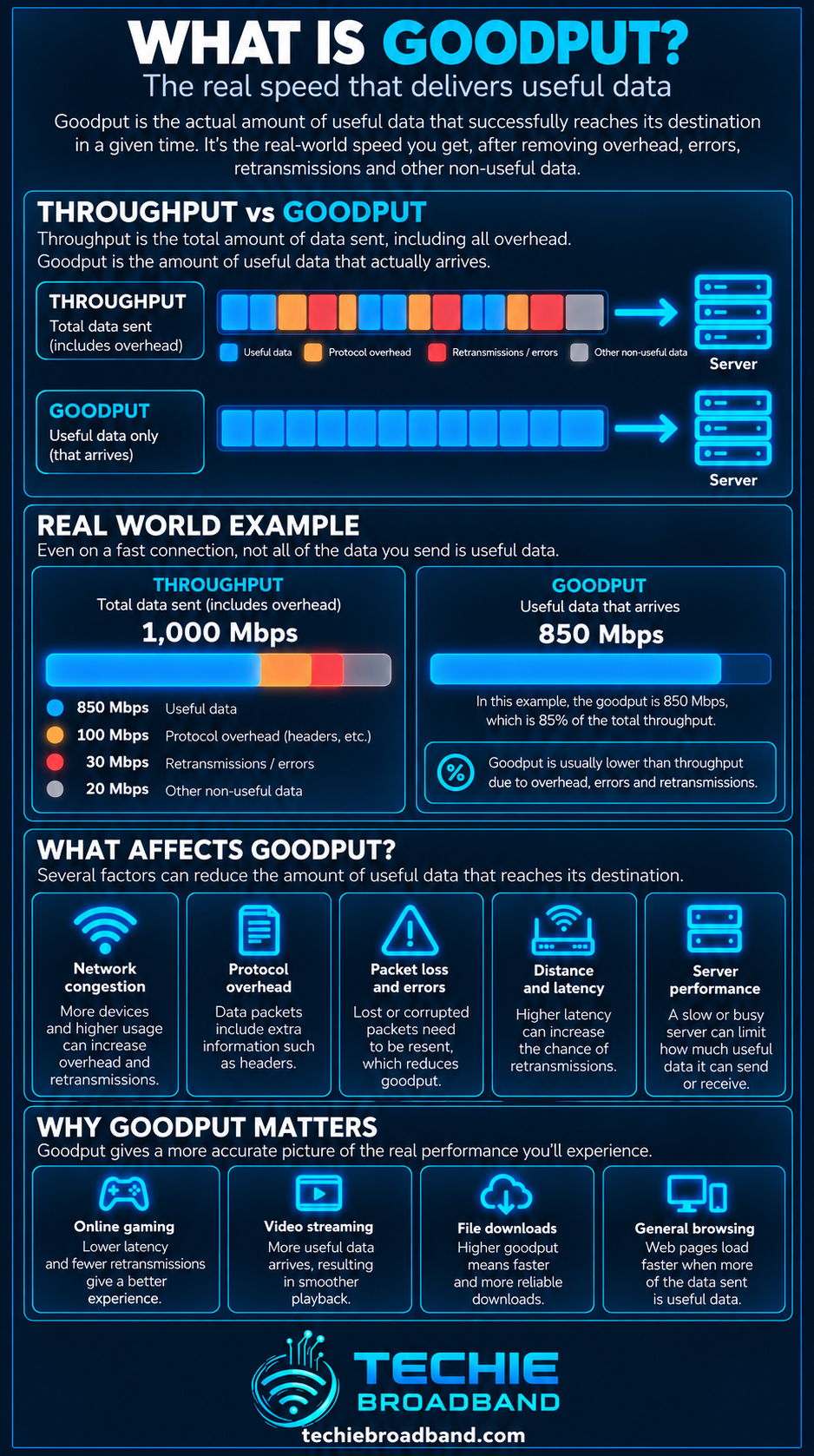
Techie Broadband calculation: 1 Gbps line rate versus 900 Mbps goodput
Assume a decimal 10 GB file, so the application needs to receive 80 gigabits of useful payload. At an ideal 1,000 Mbps application rate, 80,000 megabits ÷ 1,000 megabits per second = 80 seconds.
At 900 Mbps goodput, the same 80,000 megabits ÷ 900 = 88.9 seconds. At 750 Mbps goodput it takes 106.7 seconds. The file has not changed and the advertised broadband rate has not necessarily changed. What changed is the useful application delivery rate.
Goodput reference table
1,000 Mbps goodput: 10 GB theoretical payload time 80.0 seconds.
950 Mbps goodput: 10 GB theoretical payload time 84.2 seconds.
900 Mbps goodput: 10 GB theoretical payload time 88.9 seconds.
750 Mbps goodput: 10 GB theoretical payload time 106.7 seconds.
500 Mbps goodput: 10 GB theoretical payload time 160.0 seconds.
These are Techie Broadband calculations using decimal units and assume the stated goodput remains constant. Real transfers vary with server behaviour, congestion control, storage, packet loss and application design.
Goodput versus download speed
A broadband download speed result can be close to application goodput, but the two terms are not automatically interchangeable. A speed test controls its own servers, connections and measurement method. A real application may have a slower server, different protocol overhead, a single flow instead of several parallel flows, or a storage bottleneck.
This explains why a gigabit speed test can look healthy while a game download, cloud sync or browser transfer runs more slowly. The speed test and the application are not necessarily measuring the same payload across the same end-to-end conditions.
Goodput versus upload speed
The same principle applies to upload speed. A 100 Mbps upstream service cannot deliver 100 Mbps of application payload under every condition because the application still sits above transport and protocol layers. Packet loss or a slow remote receiver can reduce useful upload delivery further.
Goodput on symmetrical broadband
Symmetrical broadband gives the connection the same advertised upload and download rate, but symmetry does not guarantee identical application goodput in both directions. The remote service, route, protocol, WiFi conditions and device workload can differ between an upload and a download.
Protocol overhead and goodput
Every network layer adds information needed to deliver data. Ethernet identifies frames. IP carries addressing and routing information. TCP provides sequencing, acknowledgements and reliability. TLS protects encrypted sessions. HTTP or another application protocol adds its own structure.
Those bytes are necessary, not wasted in the ordinary sense. But if the measurement question is how quickly a 10 GB file reached the application, headers and control traffic are not part of the 10 GB useful payload.
Packet loss and retransmissions
Packet loss can reduce goodput twice. First, lost data does not reach the application. Second, reliable transports such as TCP may retransmit it, consuming additional capacity to deliver payload that should have arrived the first time.
A small loss rate can have a disproportionate application effect because transport congestion control can also reduce the sending rate after loss. The impact depends on RTT, congestion-control algorithm, flow size, receive window and the pattern of loss.
Goodput and Round Trip Time
Round Trip Time (RTT) can influence goodput even though RTT is not itself a data rate. Reliable transports need feedback. On high-capacity, long-RTT paths, the sender needs enough data in flight to keep the path busy.
A 1 Gbps path with 20 ms RTT has a bandwidth-delay product of about 20 megabits, or 2.5 MB. At 100 ms RTT the same 1 Gbps path has about 100 megabits, or 12.5 MB, in flight. If transport windows, loss recovery or the application cannot sustain that flight size, useful throughput can fall below the available capacity.
Goodput and peak time performance
Goodput can change during busy periods even when the package headline remains unchanged. Peak time performance depends on how capacity and contention behave across the access and wider ISP network. Congestion, queuing and loss can reduce the rate at which useful application data arrives.
Ofcom's 2023 home broadband performance research found that average 8pm to 10pm download speed across measured connections was 95% of average maximum speed. That is not a goodput statistic, but it demonstrates why time of day can change the available transfer performance feeding an application.
Goodput over FTTP, FTTC, cable and mobile
Goodput is not tied to one access technology. It can be measured over FTTP, FTTC, cable, fixed wireless, 4G, 5G or satellite. What changes is the underlying capacity, latency, loss behaviour, contention and protocol stack.
FTTP removes the copper access segment used by FTTC and can support much higher service rates. GPON and XGS-PON products can offer very different line capacities and retail speed tiers. However, a faster optical access network does not guarantee that a particular application will achieve proportionally higher goodput.
UK broadband context in 2026
Ofcom's Spring 2026 Connected Nations update reported full-fibre availability at 24.9 million UK residential premises, equal to 82% of UK homes, with gigabit-capable availability at 89%. This makes the difference between access capacity and useful application delivery increasingly relevant.
As more homes move onto gigabit and multi-gigabit products, a 1 Gbps Ethernet port, older WiFi client, router processing limit, storage write speed or remote server can become the narrowest part of the path.
Goodput and WiFi
WiFi introduces its own airtime overhead, contention, acknowledgements, retransmissions and variable modulation rates. The WiFi link rate displayed by a device is therefore not application goodput.
A client connected at a high PHY rate can still deliver much lower useful data because airtime is shared and the radio environment changes. Signal quality, channel width, interference, neighbouring networks, client capability and access-point load all matter.
Goodput and Ethernet
Ethernet is more predictable than WiFi, but interface rate is still not the same as application goodput. A 1 GbE link is a signalling and frame rate reference, not a promise that an application will receive 1,000 Mbps of useful payload.
On broadband products above 1 Gbps, 1 GbE can become an obvious bottleneck. To exploit a 2 Gbps or 2.5 Gbps service from one device, the relevant ONT, router ports, switches, cabling and device adapter must all support an appropriate multi-gigabit path.
Goodput and storage
A network can deliver data faster than a device can sustainably read or write it. Slow disks, saturated SSDs, filesystem overhead, antivirus scanning, decompression or CPU limits can reduce application transfer rate even when the network itself has spare capacity.
This is why local hardware belongs in an end-to-end goodput diagnosis.
Goodput and remote servers
The remote service can be the bottleneck. A download server may rate-limit users, have limited uplink capacity, be under load, or deliberately restrict each connection. Content delivery networks can improve useful delivery by serving content closer to the user, but cache state and routing still matter.
One TCP flow versus multiple flows
Some speed tests use several parallel connections to fill a high-capacity link. A real application may use one or only a few flows. One flow can be more sensitive to RTT, loss, congestion control and server limits.
A strong multi-flow speed-test result therefore does not prove that every single-flow application can achieve the same goodput.
Goodput and VPNs
A VPN adds another protocol layer and usually changes the route. Encryption, encapsulation, VPN server capacity, MTU behaviour and CPU performance can all affect useful application delivery. Test with and without the VPN when diagnosing unexplained goodput loss.
Goodput and IPv4 versus IPv6
IPv4 and IPv6 have different header structures and can follow different network paths. In ordinary broadband use, path quality and routing can matter more than the small header difference. Do not conclude that one protocol is inherently faster from one transfer.
What is a good goodput efficiency?
There is no universal percentage that every broadband connection should achieve. The answer depends on which reference rate you use, which protocol layer you measure, the application, packet size, transport, encryption, access technology and test conditions.
A more useful approach is consistency. Establish a wired baseline to a capable nearby server, record the ratio between the chosen reference rate and application goodput, then investigate material changes under the same conditions.
Techie Broadband worked example: a gigabit household
Suppose a home has a 1 Gbps broadband product. A wired speed test reports 940 Mbps, while a large application download settles at 820 Mbps of useful payload. Relative to the 1,000 Mbps package reference, the application is receiving 82% goodput. Relative to the 940 Mbps measured test rate, it is receiving about 87.2%.
Those two percentages answer different questions. The first compares the application with the package headline. The second compares it with the network performance demonstrated by the test at that time. Always state the denominator when quoting a goodput percentage.
Why small transfers can show poor goodput
A short transfer may finish before the transport reaches a high steady sending rate. DNS, connection setup, TLS, TCP slow start and application startup can consume a meaningful share of the total elapsed time.
For sustained goodput testing, use a transfer large enough to move beyond startup effects, while avoiding a test so large that storage or thermal throttling becomes the new bottleneck.
How to measure goodput properly
Use wired Ethernet first so WiFi is not an uncontrolled variable.
Confirm the Ethernet link speed and router port capability.
Choose a server or application capable of exceeding the broadband rate you are testing.
Use a sufficiently large transfer and measure useful application payload over elapsed time.
Repeat the test and report the median or a sensible range rather than one lucky result.
Compare the result with a speed test under the same conditions.
Check packet loss, RTT and retransmissions if goodput is unexpectedly low.
Repeat at different times to identify peak-time changes.
Test another destination to separate local or ISP behaviour from one remote server.
Only then reintroduce WiFi, VPNs or other variables.
A practical goodput troubleshooting order
Check the package and expected access-network rate.
Test one capable device over wired Ethernet.
Confirm every Ethernet interface in the path negotiated at the expected speed.
Pause other household traffic.
Run a reputable broadband speed test to establish a network baseline.
Run a large real application transfer and calculate useful payload per second.
Compare multiple remote servers or CDNs.
Check RTT, packet loss and retransmission behaviour.
Check router CPU, firewall, QoS and VPN processing.
Check storage and device CPU utilisation.
Repeat during quiet and peak periods.
Test WiFi separately only after the wired path is understood.
Common goodput mistakes
Treating advertised speed as application payload rate.
Calling every difference from line rate packet loss.
Comparing MB/s in an application with Mbps on a broadband package without multiplying or dividing by eight.
Using a tiny file and treating startup time as sustained transfer performance.
Testing over WiFi and immediately blaming the ISP.
Ignoring the remote server and storage device.
Comparing two tools that count different protocol layers.
Quoting a goodput percentage without saying what reference rate was used.
Frequently asked questions about goodput
Is goodput the same as throughput?
No. Goodput is the useful subset of delivered traffic at the chosen application or destination boundary. Throughput can include traffic that does not contribute useful application payload, depending on the measurement definition.
Is goodput the same as bandwidth?
No. Bandwidth describes capacity. Goodput describes useful delivered data per unit of time. A high-capacity link can have poor goodput if another bottleneck, loss or application limitation prevents useful payload from flowing efficiently.
Why is goodput lower than my broadband speed?
Because the broadband headline is not an application payload measurement. Protocol overhead, retransmissions, WiFi, Ethernet, router processing, the remote server, storage and application behaviour can all create a gap.
Can goodput ever equal the line rate?
At an application layer, exactly matching the underlying physical or interface line rate is generally unrealistic because lower layers carry information needed to deliver the payload. The exact gap depends on what rate and layer are being compared.
Does packet loss reduce goodput?
Yes. Lost useful data does not arrive, and reliable protocols may retransmit it. Loss can also trigger congestion-control responses that reduce the sending rate.
Does faster broadband always improve goodput?
It raises the maximum access capacity available to the application, but goodput only rises if the rest of the end-to-end path can use that extra capacity.
Does WiFi link speed show goodput?
No. WiFi link or PHY rate is not application goodput. Airtime overhead, contention, retransmissions, signal quality and device capability reduce the useful rate.
How do I calculate goodput from a file transfer?
Divide the useful file size in bits by the transfer time in seconds. For example, a decimal 10 GB file contains 80 gigabits. If it arrives in 100 seconds, average goodput is 800 Mbps.
The key point
Goodput is the useful data rate that matters to the application. It explains why a broadband line, Ethernet interface or WiFi link can advertise one number while a real file, stream or application receives another. Measure it end to end, state the measurement boundary and reference rate, and investigate the whole path before deciding where the missing useful capacity went.
To explore the related technical concepts used in this Goodput guide, visit our broadband terminology guide.
