
What is Throughput?
Updated: 3 days ago

Throughput is the rate at which data is actually carried across a network path during a measured period. It is the realised data rate, not simply the theoretical or advertised capacity of the connection. A broadband service can therefore have 1 Gbps of nominal capacity while a particular test, transfer or application achieves a lower throughput because another part of the end to end path becomes the constraint.
The most important distinction is that bandwidth describes available capacity, while throughput describes what is actually achieved. Goodput focuses on useful application data. Latency, packet loss, congestion, protocol behaviour, WiFi, Ethernet, routers, devices and remote servers can all affect measured throughput.
What is throughput?
In networking, throughput is a measured rate of successful data transfer over a defined path and interval. The exact meaning depends on the layer and test method. A device benchmark, a TCP flow, an ISP speed test and an application file transfer can all report a throughput figure, but they are not necessarily measuring exactly the same bytes at the same layer.
The IETF discusses throughput in several contexts. RFC 5166 describes throughput as measurable as aggregate link utilisation or as a per flow rate, while RFC 6349 provides a methodology specifically for end to end TCP throughput testing. A technically useful result should therefore state what was measured and how.
Throughput versus bandwidth
Bandwidth is capacity. Throughput is achieved rate. If a broadband product is provisioned at 1 Gbps, that figure describes a nominal service rate or capacity boundary. It does not guarantee that every individual transfer will move data at 1 Gbps.
A 1 Gbps access service can be constrained by a 1 Gbps Ethernet port and protocol overhead.
A fast access line can be constrained by WiFi conditions inside the property.
A capable local network can still be constrained by congestion or routing farther upstream.
A single TCP flow can be limited by round trip time, loss and TCP window behaviour.
A remote server may be unable or unwilling to send data as quickly as the access line can receive it.
Techie Broadband calculation: throughput utilisation
Consider an illustrative broadband path with a nominal capacity of 1,000 Mbps and a measured throughput of 920 Mbps.
Throughput utilisation = measured throughput ÷ nominal capacity × 100
920 ÷ 1,000 × 100 = 92%
In this theoretical example, measured throughput is 92% of nominal capacity. The missing 8% should not automatically be labelled a fault. It can reflect protocol overhead, test design, equipment, traffic conditions or figures measured at different layers.
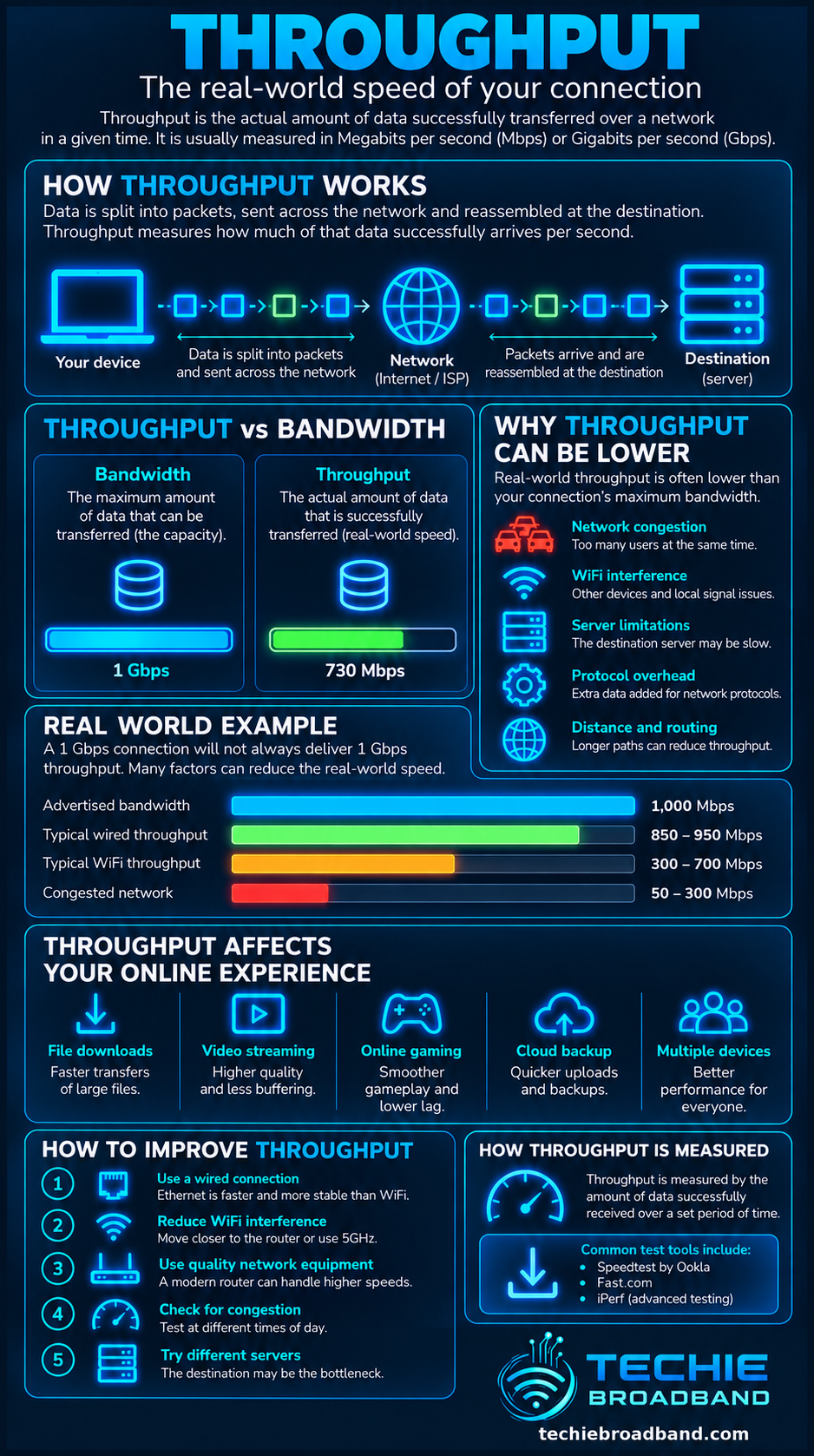
The infographic below separates nominal capacity from achieved throughput and shows the main reasons the two numbers can differ.
Throughput versus goodput
Throughput and goodput are related but should not be treated as synonyms. RFC 9065 describes throughput as the amount of payload data sent by a flow per time interval and goodput as the useful subset after unwanted traffic such as loss and retransmission is accounted for. RFC 5166 makes a similar distinction.
For a broadband user, the practical point is simple: a network can move a large quantity of traffic while the useful application rate is lower. See the dedicated Goodput guide for the deeper distinction.
Throughput versus download speed and upload speed
Download speed and upload speed are directional ways of describing broadband performance. A speed test normally estimates downstream and upstream throughput between your device or router and a test endpoint. The retail package speed is not itself proof of the throughput every application will achieve.
This matters particularly on asymmetric services. A connection might have ample downstream throughput while a busy upstream becomes saturated. That upstream saturation can create queues and increase latency even when download capacity remains available.
Instantaneous, average and sustained throughput
A short burst can briefly reach a high rate without proving that the same rate can be maintained. Sustained throughput asks whether transfer performance remains stable over a longer interval. This is often more informative for large downloads, backups and other long lived transfers.
Average throughput also depends on the observation window. A 10 second average can hide short dips and bursts visible at finer resolution. Whenever two throughput figures are compared, check that test duration and methodology are comparable.
How TCP affects throughput
TCP throughput is influenced by more than link capacity. RFC 6349 explains how round trip time, bottleneck bandwidth, receive window, congestion window and packet loss influence achievable TCP throughput. A high capacity path needs enough data in flight to keep the path busy.
The bandwidth delay product links capacity and round trip time. As capacity or RTT increases, more data may need to remain in flight to fully utilise the path. Modern operating systems normally tune TCP automatically, but a constrained receive window, loss recovery or application limit can still suppress throughput.
Why packet loss can reduce throughput
Packet loss can force retransmission and can cause congestion controlled transports such as TCP to reduce their sending rate. The impact depends on the transport, RTT, congestion control algorithm, loss pattern and application. A small loss percentage should not be interpreted in isolation.
How latency affects throughput
Latency does not impose a simple fixed speed limit, but it affects transport feedback. TCP needs acknowledgements and controls how much data remains in flight. On a high bandwidth, high RTT path, insufficient window capacity can leave the link underused.
This is why a nearby speed test server can produce a different result from a distant real world service. The distant path can involve a longer RTT, different routing, different congestion and a different server.
How congestion affects throughput
Network congestion occurs when demand approaches or exceeds available capacity at a bottleneck. Queues form, latency can rise and packets may eventually be dropped. TCP responds to congestion signals, so per flow throughput can fall even though the customer's access link has not changed.
If wired throughput is consistently strong off peak but repeatedly lower during busy periods, shared capacity somewhere beyond the local device becomes more plausible. Compare multiple destinations before assigning the cause to the ISP.
Where the throughput bottleneck can be
Broadband performance is end to end. The narrowest relevant component can constrain the result.

Remote server or content delivery network
Internet transit, peering or routing
ISP core or aggregation capacity
Access network capacity
ONT or modem interface
Router WAN and LAN interfaces
Ethernet switch or cable
WiFi radio conditions and airtime
Device network adapter and CPU
Storage, operating system and application
A multi gig broadband example
Suppose a property has a 2.5 Gbps broadband service but the test computer is connected through a 1 Gbps Ethernet interface. The client cannot demonstrate 2.5 Gbps end to end throughput through that 1 Gbps link. The local interface is already the narrower component.
Multi gig testing requires every relevant component in the path to support enough capacity, including the router WAN port, LAN port, switch, cabling and client adapter.
Throughput on WiFi
A WiFi speed test measures a combined path that includes the wireless link. It does not isolate the broadband access service. Radio standard, channel width, signal level, interference, contention, client capability and access point design can all change the result.
The Broadband Forum's 2026 discussion of TR-471 explains why modern broadband measurement needs to consider service quality and limitations of traditional speed testing. For fault isolation, a capable wired Ethernet baseline remains useful because it removes the variable wireless hop.
Throughput on UK FTTP, FTTC, cable and mobile broadband
The same principles apply across UK access technologies, but likely bottlenecks differ. FTTP removes the copper access segment to the premises, yet retail throughput still depends on the product, access network, ISP capacity, local equipment and destination.
FTTC retains a copper final segment whose attainable rate can vary with line conditions. Cable uses shared network capacity. Fixed wireless and mobile broadband add radio conditions, spectrum, cell loading and signal quality. None of these technology labels alone guarantees a specific end to end throughput.
Always distinguish ISP + access network + product + location. Two customers buying services from the same retail ISP can be carried over different infrastructure or products and therefore have different performance characteristics.
How to test throughput properly
Use a capable computer connected by wired Ethernet where possible.
Confirm the negotiated Ethernet rate is above the throughput you expect to measure.
Check the router WAN and LAN interface capabilities.
Pause unrelated large transfers for a clean baseline.
Run several tests rather than relying on one peak result.
Use more than one capable test server or service.
Record download throughput, upload throughput and idle latency.
Repeat under load if you want to understand responsiveness as well as rate.
Repeat at different times if congestion is suspected.
Compare WiFi separately after establishing the wired baseline.
For multi gig services, verify the client adapter, switch, router and cabling all support the required rate.
Why two speed tests can disagree
Different test services can select different servers, use different numbers of parallel connections, run for different durations and calculate results differently. Browser performance, CPU load and background traffic can also change the outcome.
A difference between two tests is not automatically evidence that one is wrong. Look for repeatability, test conditions and whether the test endpoint itself has enough capacity.
Throughput and simultaneous users
A broadband connection carries aggregate demand. If three devices each sustain 200 Mbps at the same time, the connection is carrying roughly 600 Mbps of application traffic before considering how the measurement is defined and what other traffic is present.
On a 1 Gbps service that leaves nominal headroom. On a 500 Mbps bottleneck, the three flows cannot all sustain 200 Mbps simultaneously. Queueing and congestion control determine how available capacity is shared.
Common throughput misconceptions
A 1 Gbps package does not mean every download will run at exactly 1 Gbps.
Higher bandwidth does not automatically reduce idle latency.
A WiFi speed test does not isolate the broadband line.
One fast burst does not prove high sustained throughput.
Low throughput does not automatically mean ISP congestion.
Throughput and goodput are not always the same measurement.
A multi gig access line can still be bottlenecked by gigabit local hardware.
A practical throughput diagnostic workflow
Identify the exact provisioned download and upload rates for the product.
Establish a wired baseline on a client with sufficient interface capacity.
Check negotiated link rates from client to switch, router and ONT or modem where visible.
Test multiple capable destinations.
Compare short tests with longer sustained transfers where appropriate.
Measure latency and packet loss alongside throughput.
Repeat at quiet and busy times.
Test the local LAN separately if possible.
Inspect router CPU load, VPN processing, QoS and traffic shaping.
Only after local constraints are excluded investigate access network, ISP, routing and destination limitations.
Frequently asked questions about throughput
Is throughput the same as bandwidth?
No. Bandwidth is capacity, while throughput is the data rate actually achieved during a measurement. Throughput can be lower because of protocol behaviour, overhead, congestion or another bottleneck.
Is throughput the same as internet speed?
Internet speed is an informal phrase. A speed test usually reports measured download and upload throughput, but the number is influenced by the whole test path and should not be confused with nominal broadband capacity.
Why is my throughput lower than my broadband package speed?
Possible causes include protocol overhead, Ethernet or WiFi limits, router performance, competing traffic, congestion, packet loss, TCP behaviour, the selected test server and the remote application. Test systematically before assigning the cause.
Does lower latency increase throughput?
It can help some transport scenarios because feedback returns sooner and less data needs to remain in flight for a given capacity. It does not automatically increase throughput if the path is already limited by bandwidth, hardware, server capacity or another bottleneck.
Can packet loss reduce throughput?
Yes. Packet loss can trigger retransmissions and congestion control responses. Its impact varies with RTT, transport protocol, congestion control and the pattern of loss.
How much throughput should I get from 1 Gbps broadband?
There is no single universal percentage that applies to every test. The result depends on where the service rate is defined, protocol overhead, hardware, test method and the rest of the path. Compare like with like and make sure the local network can exceed the expected result.
Why does a large download run slower than a speed test?
The download server may have a lower per user limit, a more distant route, a single connection constraint or storage and application overhead. A speed test is deliberately designed to generate enough traffic to measure capacity and may use several parallel flows.
Key takeaway
Throughput is the rate your network actually achieves, not the number printed on the broadband package. Interpret it alongside bandwidth, sustained throughput, goodput, latency, packet loss and congestion. The useful question is which part of the end to end path is setting the rate you can actually achieve.
To explore the related technical concepts used in this Throughput guide, visit our broadband terminology guide.
