
What is Packet Loss?
Updated: 3 days ago

Packet loss is the failure of one or more network packets to reach the intended destination within the measurement window. It matters because internet applications depend on packets arriving. When some disappear, software may retransmit data, conceal the loss, reduce its sending rate or continue with missing information. Packet loss is not the same as latency or jitter. Latency measures delay, jitter measures variation in delay, while packet loss measures delivery failure.
How packet loss is measured
Packet loss is normally expressed as a percentage of packets sent. The IETF's RFC 7680 one-way loss metric defines a packet as received or lost according to whether it arrives within a defined loss threshold. A packet that arrives extremely late can therefore be operationally equivalent to a lost packet for a time-sensitive application.
The basic calculation is: packet loss percentage = packets lost ÷ packets sent × 100.
Techie Broadband worked example
Suppose a test sends 10,000 packets and 50 do not arrive within the test's loss threshold.
Packets sent: 10,000
Packets received: 9,950
Packets lost: 50
Packet loss = 50 ÷ 10,000 × 100 = 0.5%
This is a Techie Broadband calculation to explain the mathematics. It is not a claimed UK broadband average and it does not mean that 0.5% loss affects every application in the same way.
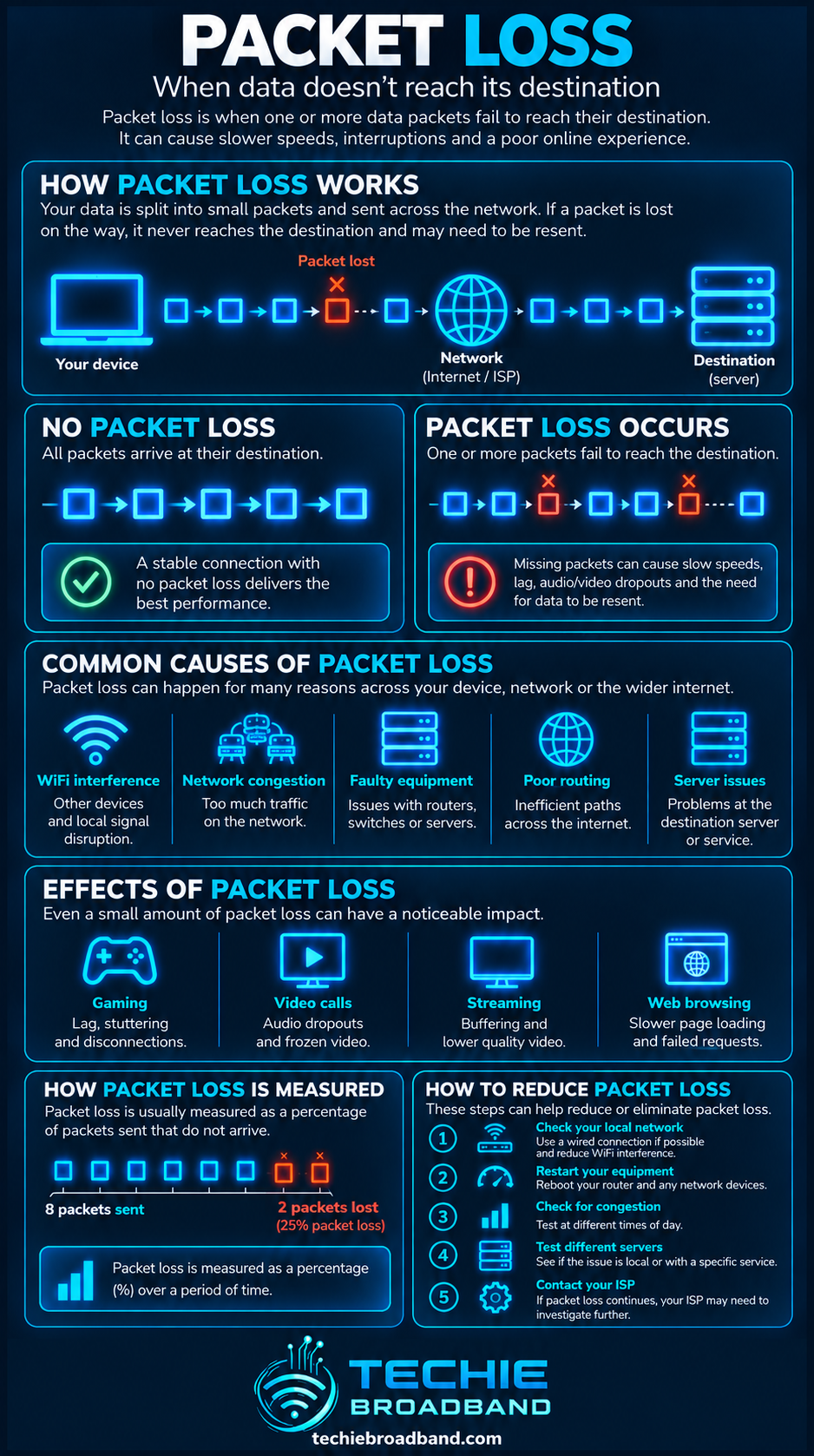
Why packet loss happens
A packet can be discarded anywhere along the end-to-end path if a device cannot successfully receive, process, queue or forward it. The loss may be local to your home, within the broadband access network, deeper inside an ISP, on the wider internet or at the destination.
WiFi interference, contention or weak signal
Router, firewall or device processing limits
A network queue filling faster than it can drain
Congestion on a shared access or ISP link
Physical errors or failing hardware
Routing or wider internet path problems
An overloaded or unreachable remote service
A measurement endpoint unable to process every test packet
Queue behaviour is especially important. IETF RFC 7567 explains that network devices can signal congestion by delaying, marking or dropping packets. A drop is therefore not automatically evidence of broken hardware.
Where packet loss can occur on broadband

The diagram is deliberately end to end. A packet loss result tells you delivery failed somewhere between sender and receiver. It does not identify the failing component by itself.
For a UK fixed broadband connection, the path can include the application, operating system, Ethernet or WiFi adapter, router, ONT or modem, access network, ISP, transit or peering, destination network and remote server. FTTP removes the copper access line used by FTTC, but it does not remove every other possible source of loss.
Packet loss versus latency and jitter
Latency measures how long delivery takes. Jitter measures how much packet delay varies. Packet loss measures whether packets arrive within the relevant measurement threshold.
High latency with zero loss means packets arrive reliably but slowly.
Low average latency with loss means many packets arrive quickly but some do not.
High jitter with zero loss means packets arrive but their timing is inconsistent.
Loss plus rising loaded latency can indicate queues filling and eventually dropping traffic.
A single quiet ping is therefore not a complete broadband health check. Latency under load can expose queueing behaviour that an idle test misses.
Packet loss and network congestion
When traffic demand exceeds available capacity, queues form. If a queue reaches its limit, additional packets may be dropped. This connects packet loss directly to network congestion and queue behaviour.
Short traffic spikes called microbursts can temporarily overwhelm a bottleneck even when average utilisation looks safe.
Random loss versus burst loss
Two tests can report the same loss percentage while producing very different application behaviour. Ten isolated lost packets spread across a long session are not equivalent to ten consecutive packets disappearing together.
Burst loss can be especially disruptive to real-time media because a run of missing packets can exceed the application's ability to conceal the gap. Percentage alone needs context: timing, direction, traffic type, load and destination all matter.
What packet loss does to TCP
TCP is designed to provide reliable byte delivery. When data is lost, TCP can retransmit missing information. The current specification, RFC 9293, describes retransmission behaviour and treats excessive retransmission as evidence of a possible host or network-path failure.
For a file transfer, the user may not see a corrupted file because TCP repairs missing data. Instead, loss can appear as reduced throughput, pauses or longer completion time. Retransmissions consume capacity without increasing useful application data.
That is one reason goodput can fall even when line rate and headline broadband speed have not changed.
What packet loss does to UDP and real-time applications
UDP itself does not provide TCP-style reliable retransmission. The application decides what to do when packets are missing. Voice, video and games often prioritise timeliness, so waiting for retransmission can be less useful than continuing without the missing packet.
Voice calls can produce clicks, gaps or robotic audio.
Video calls can show frozen frames, blockiness or quality reduction.
Online games can show missed state updates, warping or inconsistent movement.
Live streams can reduce quality or buffer depending on transport and player design.
Request-response traffic can require retries when a request or reply disappears.
There is no single packet-loss percentage that is universally acceptable for every application. Packet size, loss pattern, codec, retransmission strategy, buffering and application tolerance all change the outcome.
Can a fast broadband connection still have packet loss?
Yes. Bandwidth describes available capacity, not guaranteed packet delivery. A 1 Gbps or multi-gigabit service can still suffer loss because of WiFi, upload saturation, full queues, faulty equipment, congestion elsewhere or a remote service problem.
Higher capacity can reduce the chance that ordinary household demand saturates a link, but it cannot make loss impossible. As access speeds rise, bottlenecks can move into routers, WiFi, Ethernet interfaces, switches, device processing or remote services.
Why upload saturation can cause packet loss
Many UK broadband products remain asymmetric. If uploads fill the available upstream, packets can queue in the router or access path. This can raise loaded latency and, if the queue fills, cause drops. Understanding upload speed matters even when the visible problem occurs during a download, game or video call.
The correct diagnosis depends on ISP, access network, product and location. Do not assume every FTTP product is symmetrical or every service from one retail ISP has identical upstream characteristics.
Packet loss on WiFi
WiFi can introduce loss before traffic reaches the broadband WAN. Interference, weak signal, competing clients, airtime contention, channel conditions and wireless retransmissions can all affect delivery.
A test performed only over WiFi cannot cleanly separate the wireless LAN from the internet connection. If loss disappears over Ethernet, keep the investigation local before blaming the ISP.
Packet loss on FTTP, FTTC, cable and mobile broadband
FTTP
Full fibre removes the copper access line between premises and fibre network, but packets can still be lost in the home network, router, PON or Ethernet infrastructure, ISP, wider internet or destination. Architecture varies by access network and product.
FTTC
FTTC retains a copper section between premises and street cabinet. Line conditions can therefore matter in addition to router, ISP and wider internet factors.
Cable
Cable broadband uses shared access capacity and can experience changing conditions with local network load, while home WiFi and end-to-end internet factors remain relevant.
Mobile and fixed wireless
Radio conditions, signal quality, interference, cell loading, mobility and scheduling can vary over time. Repeated testing across different conditions is more informative than one short test.
How to test packet loss properly
The goal is not simply to produce one percentage. A useful test should help isolate where loss begins and under what conditions it appears.
Start with wired Ethernet where possible.
Confirm the Ethernet link negotiated at the expected rate.
Pause large downloads, uploads, cloud backups and competing traffic.
Run a sufficiently long idle test to a stable destination.
Repeat against more than one destination.
Test under controlled download load.
Test separately under controlled upload load.
Repeat at different times, including busy evening periods if relevant.
Compare Ethernet with WiFi.
Record loss percentage, latency, jitter, direction, destination and test duration together.
A very short test can miss intermittent loss. A test to one distant or rate-limited endpoint can also mislead. Measurement method is part of the result.
How many packets should you test?
There is no universal sample size that makes every loss test definitive. The rarer the event you are trying to observe, the longer the test generally needs to run.
If 1,000 packets are sent, one missing packet reports as 0.1%. If 10,000 are sent, one missing packet reports as 0.01%. This shows why sample size changes the resolution of the percentage.
Techie Broadband sample-size calculation
1 loss from 100 packets = 1%
1 loss from 1,000 packets = 0.1%
1 loss from 10,000 packets = 0.01%
1 loss from 100,000 packets = 0.001%
These are mathematical examples, not pass or fail thresholds. A meaningful result also states packet type, destination, duration, load and measurement method.
Why a speed test can look normal despite packet loss
A conventional speed test primarily reports achieved data rate. It can mask intermittent loss because transports recover, multiple flows are used or the loss is absent during the short test window. Sustained throughput should therefore be considered alongside packet loss rather than as a substitute.
Packet loss and peak time
If loss appears mainly in the evening, compare it with peak time performance. A time-dependent pattern can indicate load somewhere in the path, but it is not proof of one particular ISP component.
How to diagnose packet loss step by step
Confirm the problem on one device, then check a second.
Move from WiFi to wired Ethernet.
Replace or reseat suspect Ethernet cables where practical.
Test a stable nearby destination and then a wider internet destination.
Measure at idle.
Measure during download load.
Measure during upload load.
Check whether loss starts only when a particular device or application is active.
Repeat at several times of day.
Compare early and later hops cautiously.
If loss is reproducible over Ethernet to multiple destinations, preserve the results, times and conditions before contacting the ISP.
Why traceroute can mislead packet-loss diagnosis
Some routers rate-limit or deprioritise diagnostic replies addressed to themselves while continuing to forward transit traffic normally. Apparent loss at one intermediate hop is not automatically proof that the hop drops user traffic.
If one intermediate hop shows loss but later hops and the final destination respond normally, control-plane reply behaviour may be the explanation. Focus on whether loss persists to the destination.
How packet loss relates to queue management
Large unmanaged queues can add delay, while a full queue can drop arriving packets. RFC 7567 recommends Active Queue Management and explains the relationship between queueing, congestion signalling and packet drops.
A connection can suffer severe loaded latency before measurable loss appears, or can drop packets while an average utilisation graph looks ordinary. Measure both delay and delivery.
Does zero packet loss mean the connection is perfect?
No. Zero observed loss means the chosen test did not observe loss under those conditions. The connection can still have high latency, high jitter, low throughput, poor WiFi, route inefficiency or loss at other times.
UK broadband context
UK infrastructure increasingly includes FTTP alongside FTTC, cable, fixed wireless and mobile access. Ofcom's Connected Nations 2025 reports on the continuing rollout and availability of fixed full fibre and gigabit-capable services. Access technology changes physical and shared-network characteristics, but packet delivery still depends on the complete path.
For troubleshooting, separate ISP, access network, product and location. Two customers of the same retail provider can use different underlying networks, products or local infrastructure.
Frequently asked questions about packet loss
Is any packet loss bad?
Packet loss means some packets were not delivered within the measurement criteria, but practical impact depends on application, amount, pattern and method. Persistent or bursty loss deserves investigation, particularly when it reaches the final destination.
Is 1% packet loss high?
There is no universal threshold for every application. One per cent means one packet in every hundred was lost on average across the sample, but disruption depends on the traffic and whether losses are isolated or clustered.
Can packet loss cause lag?
Yes. Missing packets can trigger retransmissions, congestion-control responses or missing real-time updates, experienced as pauses, warping, audio gaps or instability.
Can a router cause packet loss?
Yes. A router can drop packets because of full queues, processing limits, faults, configuration or traffic management. A loss result alone does not prove the router is responsible.
Can WiFi cause packet loss?
Yes. Wireless interference, weak signal, airtime contention and radio conditions can contribute to failed delivery or repeated transmissions. Compare with wired Ethernet before escalating a broadband fault.
Can packet loss happen with low ping?
Yes. Packets that arrive may have low latency while a smaller proportion are lost. Ping latency and loss should be reported separately.
Does faster broadband reduce packet loss?
More capacity can reduce congestion caused by local demand, but a faster package does not eliminate WiFi problems, faulty hardware, upstream congestion, route problems or destination-side loss.
Should I test packet loss while the connection is busy?
Test both idle and loaded conditions. Loss that appears only under upload or download load is diagnostically useful because it points towards queueing, capacity or processing constraints.
Key takeaway
Packet loss is a delivery problem, not simply a speed problem. Measure how many packets fail to arrive, but also record where you tested, for how long, whether the connection was idle or loaded and whether losses were isolated or bursty. Start with Ethernet, compare multiple destinations and work methodically from the local network towards the internet.
To explore the related technical concepts used in this Packet Loss guide, visit our broadband terminology guide.
