
What is Path MTU (Maximum Transmission Unit)?
Updated: 3 days ago

Path MTU, or Path Maximum Transmission Unit, is the largest IP packet size that can travel from a source to a destination across the complete network path without needing fragmentation. The Path MTU is determined by the smallest link MTU anywhere on that route. It matters because packets that are too large can be fragmented, rejected or silently lost, while packets that are unnecessarily small add overhead and can reduce efficiency.
The IETF definition is precise: RFC 1191 defines the IPv4 Path MTU as the minimum MTU of the hops in the path, while RFC 8201 defines the corresponding mechanism for IPv6.
Path MTU versus MTU
MTU and Path MTU are related, but they are not the same thing. An interface MTU describes the largest IP packet that a particular link or interface can carry in one piece. Path MTU describes the smallest usable MTU across the entire end to end route.
For example, your Ethernet interface might use a 1500 byte MTU, but a tunnel later in the route might only support 1420 bytes. In that case the effective Path MTU is 1420 bytes, even though your local interface still reports 1500.
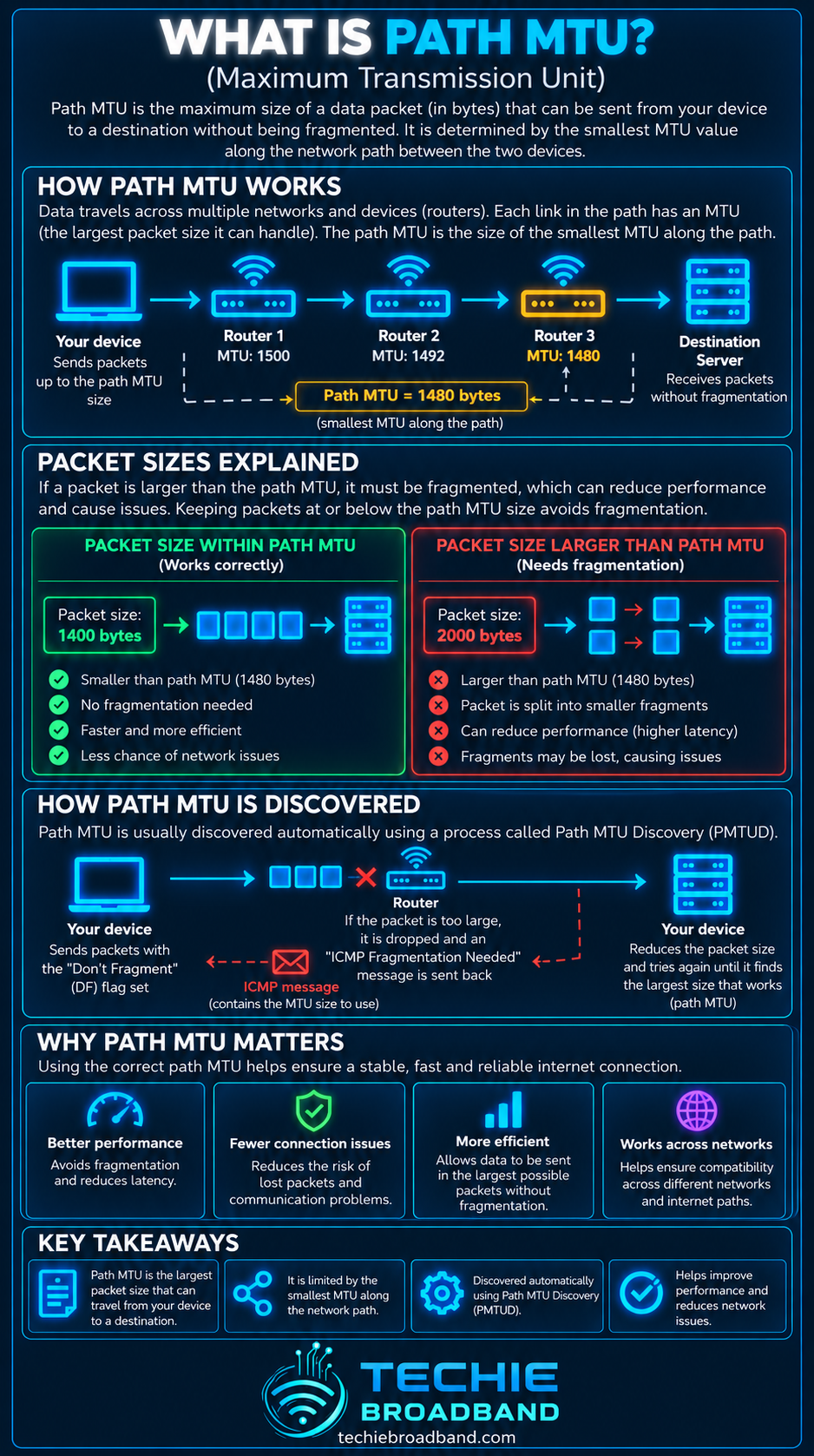
Why the smallest link determines Path MTU
An internet path is a chain of links. Each link can have its own MTU. A packet must fit through every link it encounters, so the largest packet that can cross the whole path without fragmentation is constrained by the smallest MTU on that path.
This is a different type of bottleneck from bandwidth or throughput. Bandwidth constrains how much data can be carried over time. Path MTU constrains the size of each IP packet that can cross the path intact.
A simple Path MTU example
Consider a route containing five links with MTUs of 1500, 1500, 1420, 1500 and 1500 bytes.
Link 1: 1500 bytes
Link 2: 1500 bytes
Link 3: 1420 bytes
Link 4: 1500 bytes
Link 5: 1500 bytes
Techie Broadband calculation: the Path MTU is 1420 bytes because 1420 is the minimum link MTU on the route. Increasing the MTU on any of the 1500 byte links would not increase the Path MTU unless the 1420 byte constraint also changed.

How Path MTU Discovery works
Path MTU Discovery, usually shortened to PMTUD, is the process a sender uses to learn the largest packet size that can cross a path successfully. Classical PMTUD relies on network feedback when a packet is too large for a link.
IPv4 Path MTU Discovery
With IPv4, RFC 1191 describes PMTUD using packets for which fragmentation is not permitted. If a router cannot forward a packet because the next link has a smaller MTU, it can return an ICMP Destination Unreachable message indicating that fragmentation is needed. The sender can then reduce the packet size.
IPv6 Path MTU Discovery
IPv6 changes the fragmentation model. Routers do not fragment IPv6 packets in transit. RFC 8201 describes how a sender learns the Path MTU using ICMPv6 Packet Too Big feedback and adjusts the size of packets it sends.
That makes correct ICMPv6 handling important. Blocking all ICMPv6 is not a sensible security shortcut because some ICMPv6 messages are part of normal IPv6 operation.
What is a Path MTU black hole?
A Path MTU black hole occurs when packets that are too large are discarded but the sender does not receive the feedback needed to reduce packet size. RFC 2923 documents this long standing failure mode for TCP.
A connection affected by an MTU black hole can be confusing because it may not fail completely. Small packets can work, DNS may resolve, a TCP handshake may complete, and a lightweight page may begin loading. Larger data transfers can then stall when packet sizes exceed what the path can carry.
Packetization Layer Path MTU Discovery
Modern systems do not have to rely solely on ICMP feedback. Packetization Layer Path MTU Discovery, or PLPMTUD, uses probes at the packetization layer to determine a usable packet size. RFC 8899 specifies Datagram PLPMTUD for datagram transports and describes it as a robust approach that can detect and respond to packet black holes.
This matters on real networks because ICMP feedback can be filtered, rate limited or otherwise fail to reach the sender. Probe based discovery gives transport protocols another way to establish a workable packet size.
Path MTU, TCP MSS and packet overhead
Path MTU describes the complete IP packet. TCP Maximum Segment Size, or MSS, describes the maximum TCP payload carried inside an IP packet. The two values therefore are not interchangeable.
A common theoretical IPv4 example uses a 1500 byte MTU, a 20 byte IPv4 header and a 20 byte TCP header with no TCP options.
1500 byte IP MTU
minus 20 byte IPv4 header
minus 20 byte TCP header
equals a 1460 byte TCP MSS in this simplified example
Real packets can include additional headers or options, and tunnels can add encapsulation overhead. The usable payload therefore depends on the protocol stack and the path.
Why tunnels and encapsulation can reduce Path MTU
VPNs, PPPoE and other encapsulation technologies add headers around traffic. Those extra headers consume space on the underlying link. If the outer link cannot carry a larger frame, the effective MTU available to the encapsulated packet can be lower than the familiar 1500 byte Ethernet value.
This is why MTU problems often appear after adding a VPN, changing a WAN technology, introducing a tunnel or moving traffic through a different network path.
Does Path MTU stay the same?
Not necessarily. Internet routing can change. A different route can contain a different smallest link MTU. RFC 1191 explicitly associates PMTU with a path, not with the internet as a whole.
A traceroute can help show the route being observed, but it does not by itself prove the Path MTU or identify every forwarding characteristic. ICMP responses from intermediate hops also need careful interpretation.
Symptoms of a Path MTU problem
Small requests work but larger transfers stall or repeatedly retry.
A VPN connects but some websites, applications or file transfers behave unpredictably.
IPv6 connectivity appears partly functional but larger flows fail.
Changing the MTU on an endpoint or tunnel makes a previously failing transfer work.
Packet captures show retransmissions or repeated attempts around larger packet sizes.
Connectivity changes when ICMP or ICMPv6 filtering rules are corrected.
Do not assume that every stalled transfer is an MTU problem. Similar symptoms can come from packet loss, congestion, application faults, firewall policy, DNS problems or server limitations.
How to test for a Path MTU problem
Start with a wired baseline where possible so WiFi behaviour is not confused with the WAN path.
Confirm the configured MTU on the relevant router, WAN interface, VPN and tunnel.
Test normal connectivity with small packets.
Use an operating system tool that can send progressively larger probe packets without allowing fragmentation where the platform supports it.
Allow for IP and ICMP header overhead when converting a probe payload size into an IP packet size.
Repeat against more than one suitable destination because Path MTU is path specific.
Check firewall rules for required ICMP and ICMPv6 feedback.
Capture traffic if necessary and look for Packet Too Big, fragmentation needed, retransmission or repeated probe behaviour.
Only change MTU values after identifying the actual constraint rather than guessing.
Path MTU on UK broadband connections
The underlying principle is the same across UK FTTP, FTTC, cable, fixed wireless and mobile broadband, but the practical path can differ according to the ISP, access network, product, router and any tunnels or encapsulation in use.
A broadband service can therefore work perfectly with a local Ethernet MTU of 1500 while the effective Path MTU to a particular destination is smaller. Conversely, equipment that supports jumbo frames on a local network does not mean jumbo packets can traverse the public internet end to end.
Features such as CGNAT are separate concepts. CGNAT changes address translation behaviour. It does not define Path MTU, although any additional network architecture or tunnelling in a path can affect the effective packet size available.
Path MTU does not tell you how fast the connection is
A larger Path MTU does not automatically mean lower latency, higher broadband speed or better routing. It simply allows larger IP packets to cross the path without fragmentation. Actual application performance also depends on throughput, loss, congestion, transport behaviour, server performance and local equipment.
Likewise, goodput measures useful application data delivered over time. Path MTU can influence protocol efficiency, but it is only one part of the complete performance picture.
Common Path MTU misconceptions
MTU and Path MTU are not identical. MTU applies to a link or interface, while Path MTU applies to the complete path.
1500 bytes is common on Ethernet, but it is not a universal internet Path MTU.
Jumbo frames on a LAN do not imply that the public internet supports the same packet size.
A successful ping does not prove that larger packets will cross the path.
Blocking all ICMP does not make a network more secure if it breaks essential network feedback.
A smaller MTU is not automatically better. Unnecessarily small packets increase packet and header overhead.
Path MTU FAQs
What does PMTU stand for?
PMTU stands for Path Maximum Transmission Unit, commonly shortened to Path MTU. It is the largest IP packet size that can traverse a particular path without needing fragmentation.
Is Path MTU always 1500 bytes?
No. 1500 bytes is common for Ethernet, but the Path MTU is determined by the smallest link MTU across the route. Tunnels, encapsulation and other network technologies can reduce it.
What is the difference between MTU and MSS?
MTU refers to the size of the complete IP packet that a link or path can carry. TCP MSS refers to the maximum TCP payload size advertised by an endpoint. IP and TCP headers consume part of the MTU.
Can a wrong MTU make websites fail?
Yes. A Path MTU black hole can allow small packets to work while larger packets are discarded, causing some pages, transfers, VPN traffic or application sessions to stall.
Does IPv6 use Path MTU Discovery?
Yes. IPv6 routers do not fragment packets in transit, so Path MTU Discovery and ICMPv6 Packet Too Big feedback are important parts of normal IPv6 operation.
The key point
Path MTU is the largest IP packet that can cross the complete route from source to destination without fragmentation, and it is set by the smallest link MTU on that route. Understanding it becomes especially important when tunnels, VPNs, IPv6 or unusual connectivity failures are involved. When small packets work but larger transfers stall, Path MTU behaviour should be part of the diagnostic process.
To explore the related technical concepts used in this Path MTU (Maximum Transmission Unit) guide, visit our broadband terminology guide.
