
What is ICMP (Internet Control Message Protocol)?
Updated: 3 days ago

ICMP, or Internet Control Message Protocol, is the control and diagnostic messaging system used alongside IP to report network conditions and problems. Routers and hosts use ICMP to tell a sender that a destination is unreachable, a packet has exceeded its permitted lifetime, or another IP level problem has occurred. Diagnostic tools such as ping and traceroute also rely on ICMP behaviour.
ICMP does not carry normal application data and it does not make IP reliable. Its job is to provide feedback about the network so hosts, routers and diagnostic tools can understand what happened to an IP packet.
What does ICMP do?
IP is designed to move packets between networks, but packets can encounter conditions that the sender needs to know about. A router may have no route to a destination. A packet may arrive with its Time to Live exhausted. A destination may be reachable but the requested UDP port may be closed. ICMP provides standard messages for reporting situations such as these.
Report that a network, host, protocol or port is unreachable in defined circumstances.
Report that an IPv4 packet needs fragmentation but the Don't Fragment condition prevents forwarding.
Report that an IPv6 packet is too large for the next link.
Report that a packet's IPv4 TTL or IPv6 Hop Limit has expired.
Support echo request and echo reply behaviour used by ping.
Provide control information used by diagnostic and path discovery tools.
The original IPv4 protocol is defined by RFC 792, which describes ICMP as an integral part of IP and explains that its control messages provide feedback about problems rather than guaranteeing delivery.
How ICMP fits into an IP connection
ICMP operates at the IP layer. It is closely related to routing because routers can generate ICMP messages while forwarding packets between networks. Unlike TCP or UDP, ICMP is not a transport protocol used by an application to establish a normal client to server data flow.
A useful way to think about ICMP is as network feedback. Your application sends traffic using IP, TCP or UDP. If something important happens while the packet is being processed, a router or destination can return an ICMP message that describes the condition.
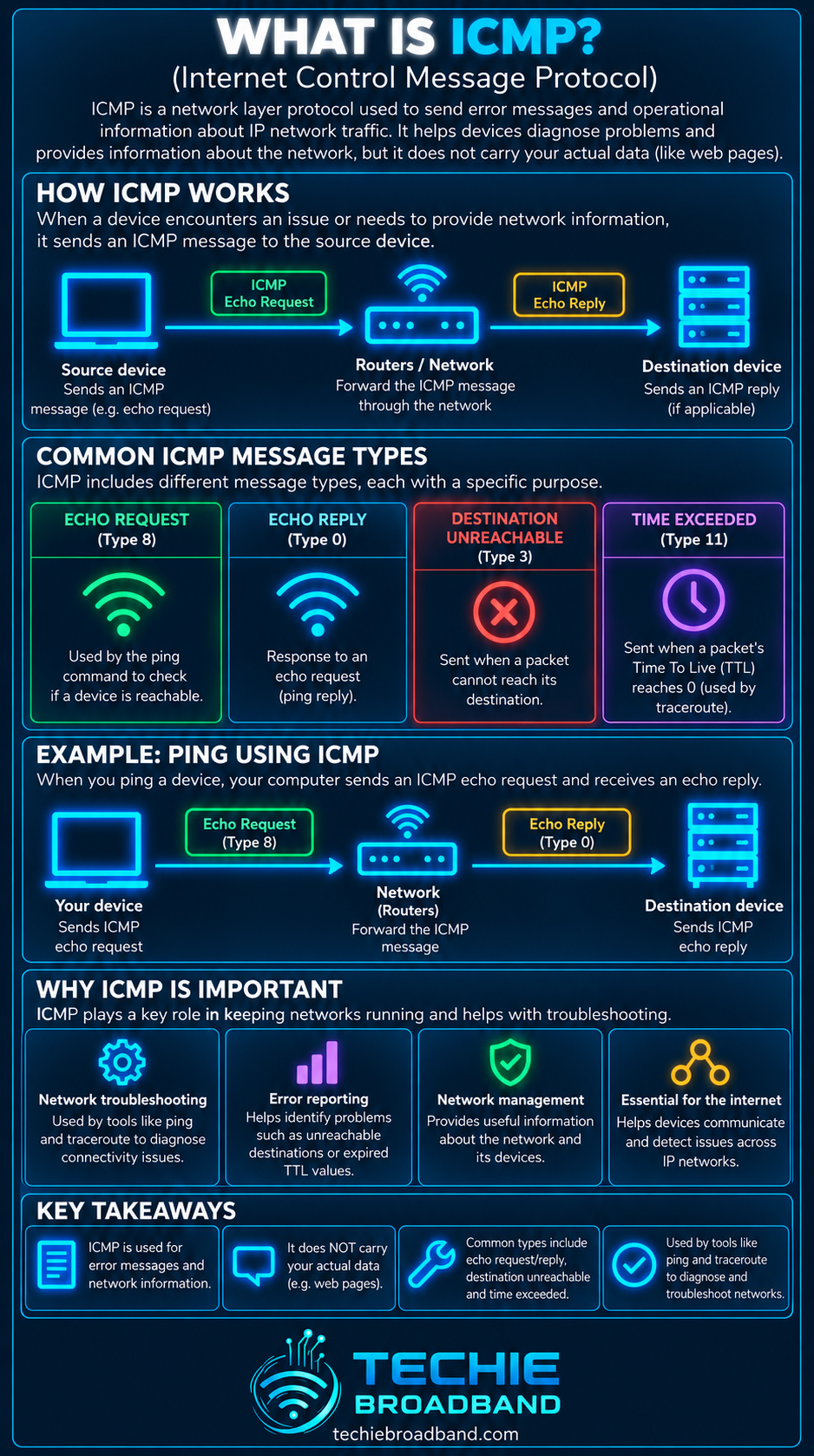
Common ICMP message types
ICMP messages contain a Type field, and many types also use a Code field to describe the condition more precisely. The exact numbers differ between IPv4 ICMP and ICMPv6.
Echo Request and Echo Reply: used for reachability testing by ping. In IPv4 these are types 8 and 0.
Destination Unreachable: IPv4 type 3. Codes distinguish conditions including network unreachable, host unreachable, port unreachable and fragmentation needed.
Redirect: IPv4 type 5. Used to tell a host about a more appropriate next hop in particular circumstances.
Time Exceeded: IPv4 type 11. Commonly seen when TTL reaches zero in transit and central to traditional traceroute behaviour.
Parameter Problem: IPv4 type 12. Reports a problem with an IP header parameter.
The current IANA ICMP parameter registry is the authoritative registry for ICMP type and code assignments, including messages that have been deprecated over time.
ICMP Echo Request and Echo Reply
Ping commonly sends an ICMP Echo Request to a destination and waits for an Echo Reply. If a reply returns, the tool can show that the destination responded and calculate the round trip response time for that exchange.
That does not mean ping measures broadband throughput. It measures timing and reachability for the probes it sends. The result should therefore be interpreted alongside latency, round trip time and packet loss rather than treated as a download speed test.
ICMP Destination Unreachable
Destination Unreachable is one of the most important IPv4 ICMP error messages. It can indicate that forwarding cannot continue or that the destination cannot deliver the packet to the requested protocol or port.
Network unreachable: the reporting device cannot reach the destination network.
Host unreachable: the destination host cannot be reached in the relevant context.
Protocol unreachable: the destination does not support the protocol identified in the packet.
Port unreachable: commonly returned when a UDP packet reaches a host but no application is listening on the destination port.
Fragmentation needed: an IPv4 router cannot forward the packet without fragmentation while the packet is marked not to be fragmented.
A Destination Unreachable message therefore does not have one universal meaning. The Type identifies the broad message family and the Code provides the more specific reason.
ICMP Time Exceeded and traceroute
IPv4 packets contain a Time to Live field. Each forwarding router reduces the effective lifetime of the packet. If it reaches zero, the packet is discarded and the router can return ICMP Time Exceeded. This behaviour is what allows traditional traceroute techniques to expose successive network hops.
Traceroute sends probes with progressively larger TTL values. A probe that expires at the first router can trigger a Time Exceeded response from that router. A later probe reaches further before expiring. Repeating the process can reveal a sequence of responding routers towards the destination.
A missing response at one hop does not automatically prove that normal traffic is being lost there. Routers can filter or rate limit ICMP while continuing to forward ordinary traffic.
ICMP and Path MTU Discovery
ICMP also matters when a sender needs to discover the largest packet size that can traverse a route. In IPv4, a router can report that fragmentation is needed when a packet cannot fit the next link and fragmentation is not permitted. This feedback is important to Path MTU Discovery.
If the required ICMP feedback is blocked, the sender may continue transmitting packets that cannot traverse the path. The result can be a size dependent connectivity failure often described as an MTU black hole.
ICMPv6 is not simply IPv4 ICMP with new addresses
IPv6 uses ICMPv6. RFC 4443 defines the core ICMPv6 message format and divides messages into error and informational classes. ICMPv6 has an IPv6 Next Header value of 58.
ICMPv6 Destination Unreachable is type 1.
ICMPv6 Packet Too Big is type 2.
ICMPv6 Time Exceeded is type 3.
ICMPv6 Parameter Problem is type 4.
ICMPv6 Echo Request and Echo Reply are types 128 and 129.
Packet Too Big is especially important because IPv6 routers do not fragment packets in transit in the IPv4 manner. The sender needs suitable feedback so it can adapt packet size to the path.
ICMP is important to IPv6 operation
ICMPv6 has a broader operational role than many people associate with the word ping. IPv6 control functions use ICMPv6 based messaging, including neighbour discovery related functions defined in separate standards.
That is one reason why a blanket rule that blocks all ICMP or all ICMPv6 is poor network practice. Selective security policy is very different from indiscriminately suppressing protocol control traffic that normal network operation may require.
Does blocking ICMP make a network more secure?
Blocking every ICMP message can hide some responses from casual probing, but it can also break diagnostics and interfere with legitimate network functions. Security policy should consider which ICMP types are needed, which should be limited, and where they should be accepted rather than treating the protocol as a single all or nothing service.
Rate limiting can also be appropriate because generating control plane responses consumes router or host resources. The important distinction is between controlling ICMP exposure and breaking useful network feedback.
ICMP does not prove that an intermediate router is faulty
One of the easiest diagnostic mistakes is to see a slow or missing response from an intermediate traceroute hop and conclude that the router is causing the broadband problem. That conclusion is not justified from the intermediate response alone.
A router can prioritise forwarding normal packets over generating ICMP replies.
An intermediate router can rate limit its ICMP responses.
The return path for the ICMP response can differ from the forward path of the original probe.
A silent intermediate hop can still forward traffic normally.
Persistent end to end loss or latency at the destination is more meaningful than one isolated intermediate response.
Practical ICMP troubleshooting
Use ICMP as one part of a wider diagnostic process rather than as a single pass or fail test.
Start with ping to a known reachable destination and record whether replies return consistently.
Compare the result with another destination so one remote host does not determine the diagnosis.
Run traceroute and look for route changes, repeated timeouts or an unexpected path.
Check whether any apparent problem persists at the final destination rather than only at an intermediate hop.
Repeat tests over wired Ethernet where possible so WiFi behaviour does not confuse the network path diagnosis.
Compare IPv4 and IPv6 separately when both are available because they can use different routes and different ICMP message families.
If large transfers fail while small requests work, investigate Path MTU behaviour and whether required ICMP or ICMPv6 feedback is being filtered.
Correlate ICMP findings with latency, packet loss, throughput and application behaviour before deciding where the fault sits.
ICMP misconceptions
ICMP is not just ping. Echo is only one family of ICMP messages.
ICMP is not TCP or UDP and does not carry ordinary application sessions.
A failed ping does not prove the destination itself is offline because ICMP can be filtered.
A successful ping does not prove that a website, game server or other application is working.
A traceroute asterisk does not automatically mean packet loss affecting your real traffic.
Blocking all ICMP is not automatically a security improvement.
IPv4 ICMP and ICMPv6 are related but they are not identical protocols with identical message numbering.
ICMP in a UK broadband connection
On a UK broadband connection, ICMP behaviour can involve your home router, the access network, ISP edge and core routers, peering or transit networks, and the remote destination. The precise path depends on the ISP, access network, destination, routing policy and whether the traffic uses IPv4 or IPv6.
This means an ICMP result should be interpreted end to end. A timeout can occur because a device is configured not to answer that probe. A genuine connectivity problem can sit locally, within the access network, inside the ISP, beyond the ISP, or at the destination.
ICMP FAQs
What does ICMP stand for?
ICMP stands for Internet Control Message Protocol. It is used with IP to carry control, error and diagnostic messages about network conditions.
Is ICMP the same as ping?
No. Ping is a diagnostic tool that commonly uses ICMP Echo Request and Echo Reply messages. ICMP contains several other message types used for error reporting and network control.
What port does ICMP use?
ICMP does not use TCP or UDP port numbers. It is carried directly by IP and identifies messages using Type and Code fields rather than transport layer ports.
Can a website work even if ping fails?
Yes. A host or firewall can ignore ICMP Echo Requests while still accepting HTTPS and other application traffic. Ping failure alone therefore does not prove that the website or server is unavailable.
Why is ICMP important for traceroute?
Traditional traceroute relies on packets expiring as their TTL increases step by step. Routers can return ICMP Time Exceeded messages, allowing the tool to identify responding hops along the route.
Why is ICMP important for MTU problems?
ICMP and ICMPv6 can provide the feedback a sender needs when packets are too large for part of the path. If required feedback is suppressed, larger packets can repeatedly fail while smaller traffic continues to work.
Should I block all ICMP?
Not as a blanket rule. Appropriate filtering and rate limiting depend on the network and security policy, but indiscriminate blocking can remove useful diagnostics and interfere with legitimate protocol behaviour, particularly in IPv6.
Key takeaway
ICMP is the feedback mechanism that helps IP networks report errors, expose path information and support diagnostics. Ping uses ICMP Echo messages, traceroute commonly relies on Time Exceeded responses, and Path MTU mechanisms depend on suitable error feedback. The important point is that ICMP is not application traffic and it does not make IP reliable. It tells hosts and network tools what happened so they can respond appropriately.
To explore the related technical concepts used in this ICMP (Internet Control Message Protocol) guide, visit our broadband terminology guide.
