
What is Private IP Address?
Updated: 2 days ago

A private IP address is an Internet Protocol address used inside a private network rather than as a globally unique address on the public internet. On most UK home IPv4 networks, phones, laptops, TVs, consoles and other devices receive private IPv4 addresses from the router, while NAT translates their traffic when they communicate with internet services.
The most important distinction is that private does not mean hidden, encrypted or automatically secure. It means the address has local meaning inside an address realm and is not globally unique. The same private IPv4 address can therefore be reused independently in many homes and businesses.
For IPv4, the familiar private ranges are the three blocks reserved by RFC 1918. They are different from the 100.64.0.0/10 Shared Address Space used by service providers for CGNAT, and they are also different from public IPv4 addresses.
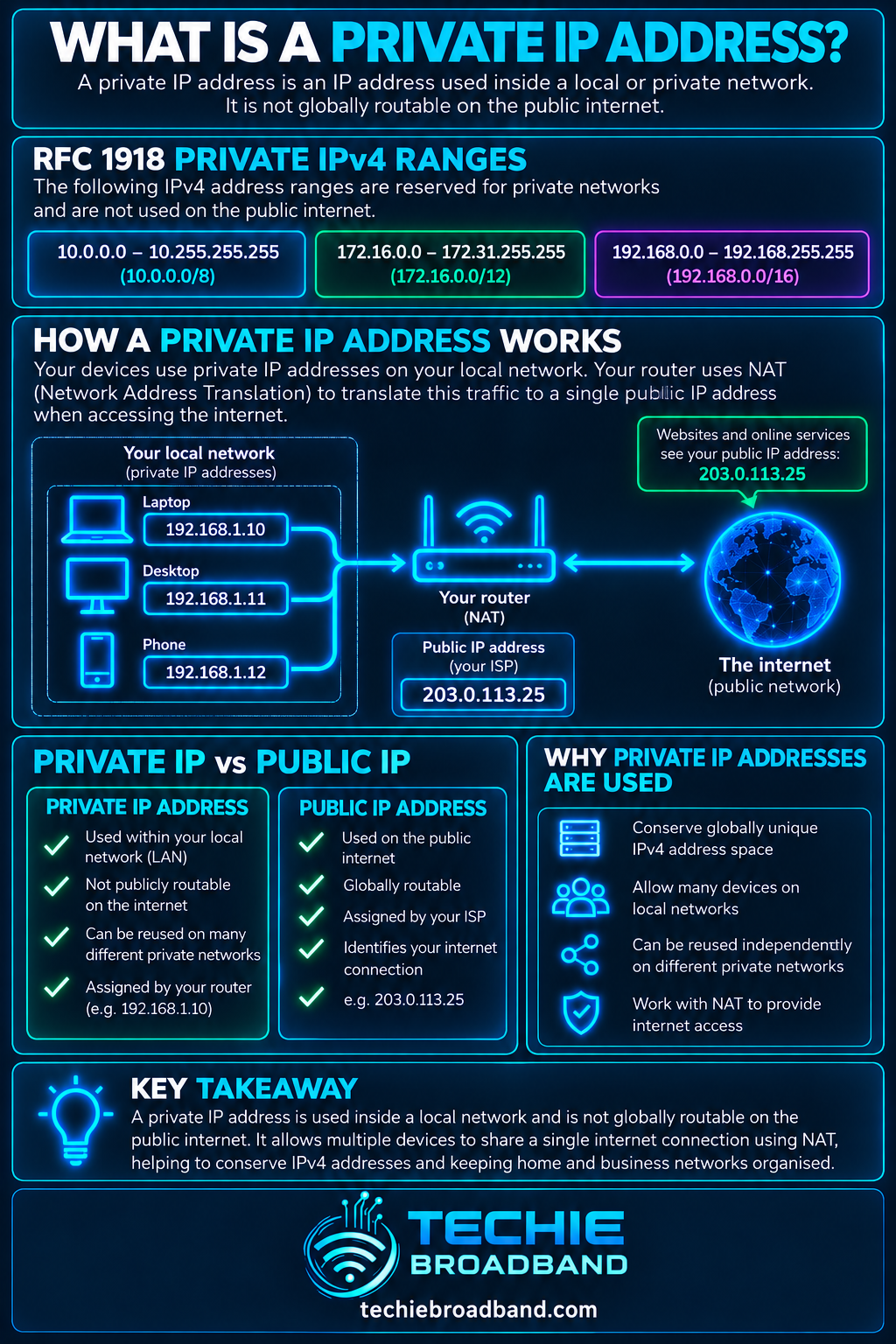
The infographic below shows the three RFC 1918 ranges, how a private device commonly reaches the internet through NAT, and why private home addressing should not be confused with provider-side CGNAT.
What are the private IPv4 address ranges?
RFC 1918 reserves three IPv4 blocks for private internets. These blocks can be used without registration or coordination with an internet registry.
10.0.0.0/8: 10.0.0.0 to 10.255.255.255.
172.16.0.0/12: 172.16.0.0 to 172.31.255.255.
192.168.0.0/16: 192.168.0.0 to 192.168.255.255.
A common mistake is to assume that every 172.x.x.x address is private. It is not. Only 172.16.0.0 through 172.31.255.255 falls inside the RFC 1918 private block.
How many private IPv4 addresses are available?
Techie Broadband calculation: the size of each CIDR block can be calculated as 2 raised to the power of the number of host bits. This is address-space capacity, not a promise that every address is usable as a host address in every subnet design.
10.0.0.0/8 contains 2^24 = 16,777,216 addresses.
172.16.0.0/12 contains 2^20 = 1,048,576 addresses.
192.168.0.0/16 contains 2^16 = 65,536 addresses.
Together the three RFC 1918 blocks contain 17,891,328 IPv4 addresses that can be reused independently across separate private networks.
How does a private IP address work on home broadband?
A typical home router creates a local IPv4 network and assigns private addresses to devices, usually through DHCP. The exact range depends on the router configuration. When a device starts an outbound internet connection, the router can translate the private source address and port into public-side addressing using NAT or NAPT.
A device joins the local network by Ethernet or WiFi.
The router or another DHCP server gives the device a private IPv4 address and other network settings.
The device sends local traffic directly or through the router according to its subnet and routing table.
For internet traffic, the router forwards the packet toward the ISP and commonly applies NAT.
The remote service sees public-side addressing rather than the device's RFC 1918 address.
Return traffic is matched to the translation state and delivered to the correct private device.
Private IP address versus public IP address
A public IP address is globally unique addressing used for communication across the public internet. A private IPv4 address is locally reusable and is not globally routed. The distinction is about address scope and uniqueness, not whether the device can use internet services.
Private IPv4: local significance, reusable in unrelated private networks and not globally routed.
Public IPv4: globally unique public address space used for internet communication.
Private devices can still access internet services through NAT, proxies or other gateways.
A device can have private IPv4 and globally unique IPv6 connectivity at the same time.
Private IP address versus NAT
NAT, or Network Address Translation, is a translation mechanism. A private IP address is an address. Home IPv4 networks commonly use both, which is why the concepts are often blurred together, but neither term means the other.
Private addressing can exist without internet access or without NAT. NAT can also translate between address realms for reasons other than the familiar home private-to-public IPv4 pattern.
Private IP address versus CGNAT
CGNAT is provider-side address sharing. RFC 6598 reserves 100.64.0.0/10 as Shared Address Space for service provider use. That range is not one of the three RFC 1918 private blocks.
RFC 6598 specifies 100.64.0.0/10 for Shared Address Space. This matters when diagnosing a broadband connection because seeing 100.64.x.x to 100.127.x.x on a router WAN interface can indicate provider-side address sharing rather than an ordinary home RFC 1918 LAN address.
What private IP address does your router use?
There is no universal home-router private address. Common gateway examples include 192.168.0.1, 192.168.1.1 and addresses in 10.0.0.0/8, but manufacturers and ISP configurations vary. The correct value is whatever your network is actually configured to use.
On a connected device, the default gateway normally identifies the router or Layer 3 gateway used to reach destinations outside the local subnet. The device's own address, subnet prefix or mask and gateway together help explain which addresses are considered local.
Can two devices have the same private IP address?
Two devices can use the same private IPv4 address when they are on separate, unrelated private networks because RFC 1918 addresses are not globally unique. Two devices should not normally use the same address at the same time on the same IP subnet, because that creates an address conflict and makes delivery ambiguous.
This reuse is one of the main reasons private addressing conserves globally unique IPv4 space. Millions of home routers can independently use 192.168.1.1 without those networks conflicting with each other.
Static private IP versus DHCP reservation
A private address can be assigned dynamically or kept consistent. For devices such as printers, NAS systems, home servers and network controllers, a stable local address can make administration easier.
Manual static private IP: the address is configured on the device itself.
DHCP reservation: the DHCP server is configured to offer the same private address to a particular device.
Dynamic DHCP address: the device receives an address from the available pool and it can change later.
For many home networks, a DHCP reservation is easier to manage than manually configuring addresses on individual devices because the router retains central control of the addressing plan.
Why private IP ranges can cause VPN and network conflicts
Private address reuse is convenient until two networks that need to communicate use overlapping ranges. A remote worker might connect a VPN from a home network using 192.168.1.0/24 to a company network that also uses 192.168.1.0/24. The device then has two different places that appear to contain the same addresses.
RFC 5684 discusses complications caused by overlapping private address space. In practice, overlapping subnets can produce routing ambiguity, inaccessible resources or the need for additional translation and renumbering.
Techie Broadband practical example: overlapping home and VPN networks
Assume a laptop is at home on 192.168.1.50/24 and needs to reach a work server at 192.168.1.80 through a VPN. The laptop's local routing information can treat 192.168.1.80 as being on the directly connected home subnet rather than behind the VPN. The exact behaviour depends on routes and VPN configuration, but the example shows why independently reused private ranges can become a problem when networks are joined.
A business can reduce collision risk by choosing an internal addressing plan deliberately rather than accepting the most common consumer-router defaults everywhere. Renumbering, more specific VPN routes or translation can be required when overlaps already exist.
Are private IP addresses secure?
Private addressing is not a security control by itself. RFC 1918 addresses are not globally routed, but devices still need appropriate firewalling, authentication, software updates and network segmentation. A compromised device already inside the private network can communicate using private addressing just like legitimate devices can.
Private does not mean encrypted.
Private does not mean anonymous.
Private does not replace a firewall.
Private addresses can still be scanned or attacked by devices with access to the same address realm.
NAT can affect unsolicited inbound IPv4 connectivity, but NAT should not be treated as the security policy.
What about private addresses and IPv6?
IPv6 does not use the RFC 1918 ranges. IPv6 has different address types and a much larger address space. Link-local IPv6 addresses use fe80::/10 for communication on the local link, while Unique Local Addresses use fc00::/7 for local communications under the IPv6 addressing architecture.
RFC 4193 defines IPv6 Unique Local Addresses. They are not the same as RFC 1918 private IPv4 addresses, even though both are used for addressing that is not intended to be globally routed in the ordinary way.
Private IP addresses on UK broadband
The private addresses used inside a home or small-business LAN are normally independent of whether the broadband access is FTTP, FTTC, cable, fixed wireless or mobile. The router's LAN configuration determines the local private addressing, while the ISP and product determine what happens on the WAN side.
That WAN side can vary. A product may provide public IPv4, static IPv4, dynamic public IPv4, CGNAT, IPv6 or a combination. Always distinguish the local LAN address from the address or prefix the ISP provides to the broadband connection.
How to find your private IP address
The exact menus and commands vary by operating system, but the goal is the same: inspect the active network interface rather than an external 'what is my IP' website, because an external site normally reports public-side addressing.
Identify the device's active Ethernet or WiFi connection.
Open the network details or interface status.
Find the IPv4 address assigned to that interface.
Check the subnet prefix or mask and default gateway.
Compare the address with the RFC 1918 ranges.
If you are diagnosing internet addressing, separately check the router WAN address and the public address visible externally.
Troubleshooting private IP address problems
Check whether the device has received an IPv4 address at all.
Confirm the address is appropriate for the local subnet and is not an automatic fallback address caused by DHCP failure.
Check the subnet mask or prefix length.
Confirm the default gateway is correct.
Check for duplicate addresses on the same subnet.
Renew the DHCP lease or reconnect the interface where appropriate.
Confirm the DHCP pool has available addresses.
Check whether a manual static address falls outside the intended plan or conflicts with the DHCP pool.
For VPN problems, check whether local and remote private subnets overlap.
For internet reachability, separate LAN addressing problems from NAT, WAN addressing, DNS and ISP-side issues.
Common private IP address misconceptions
Every 172.x.x.x address is private: false. Only 172.16.0.0/12 is RFC 1918 private space.
100.64.x.x is an RFC 1918 private address: false. 100.64.0.0/10 is Shared Address Space reserved by RFC 6598.
Private IP means no internet access: false. Private IPv4 devices commonly reach internet services through NAT.
Private IP means secure: false. Address scope is not a complete security policy.
192.168.1.1 is always the router: false. It is only a common configuration.
Private IP and static IP mean the same thing: false. A private address can be static or dynamic.
Frequently asked questions
Is 192.168.1.1 a private IP address?
Yes. It falls inside 192.168.0.0/16, one of the three RFC 1918 private IPv4 blocks. It is commonly used as a router address, but it is not reserved specifically for routers.
Is 10.0.0.1 a private IP address?
Yes. It falls inside the 10.0.0.0/8 private block.
Is 172.32.0.1 a private IP address?
No. The RFC 1918 private 172 range ends at 172.31.255.255. The private block is 172.16.0.0/12.
Can websites see my private IP address?
Ordinary internet servers normally see the public-side source information used for the connection, not the RFC 1918 address of a device behind home NAT. Browser, application or local-network mechanisms can expose other information in particular circumstances, so this should not be treated as an anonymity guarantee.
Does changing my private IP change my public IP?
Not normally. They are separate layers of addressing. Changing a laptop from 192.168.1.20 to 192.168.1.30 does not by itself change the public address used by the broadband connection.
Should I use 10.x.x.x or 192.168.x.x at home?
Either can work. For a simple home LAN, the choice rarely changes internet performance. Address planning becomes more important when you have multiple VLANs, routed subnets, site-to-site VPNs or networks that may later need to interconnect.
Key takeaway
A private IP address is locally significant addressing used inside a private network rather than globally unique addressing on the public internet. For IPv4, RFC 1918 defines 10.0.0.0/8, 172.16.0.0/12 and 192.168.0.0/16. These ranges can be reused independently, which conserves public IPv4 space but can create conflicts when private networks overlap. Private addressing is commonly paired with NAT on home broadband, but private IP, NAT, CGNAT, static IP and public IP are distinct concepts.
To explore the related technical concepts used in this Private IP Address guide, visit our broadband terminology guide.
