
What is Public IP Address?
Updated: 2 days ago

A public IP address is a globally unique Internet Protocol address used to identify a network interface for communication across the public internet. On a typical UK home broadband connection, the public IPv4 address is normally used on the internet-facing side of the connection, while devices inside the home use private IPv4 addresses and the router translates their traffic using NAT.
The most important distinction is that public does not mean static. A public IP address can be dynamic and change over time, or static and remain consistently assigned. A connection behind CGNAT may not receive its own public IPv4 address at the router at all, because multiple customers share public IPv4 capacity further inside the ISP network.
IPv6 changes the addressing model because its much larger address space supports globally unique addressing without IPv4-style address conservation through NAT. Public reachability still depends on routing and firewall policy, so globally unique does not mean automatically exposed.
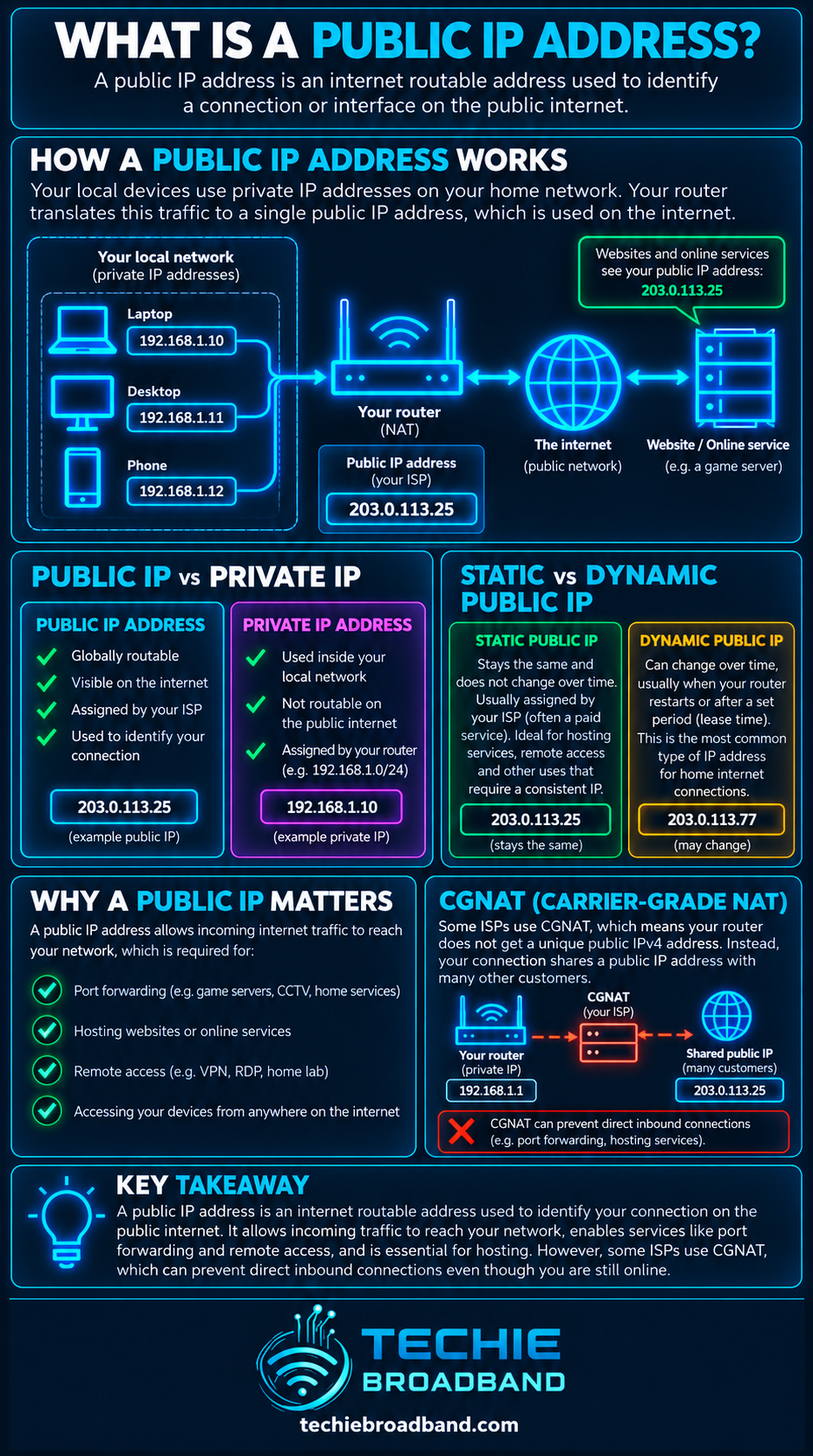
The infographic below shows the practical relationship between private IPv4, router NAT, public IPv4 and the shared address space commonly associated with CGNAT.
What does a public IP address actually do?
IP addresses allow packets to be addressed to network interfaces. For communication across the public internet, the relevant address must be globally unambiguous and routable according to internet routing policy. A public IP address therefore gives the wider internet an address that can identify the public-facing endpoint or network prefix involved in the communication.
RFC 1918 distinguishes private hosts from public hosts and reserves three IPv4 blocks for private internets: 10.0.0.0/8, 172.16.0.0/12 and 192.168.0.0/16.
Public IP address versus private IP address
A private IPv4 address is intended for use inside a private network and has no globally unique meaning. The same private address can exist in many separate homes and businesses without conflict, provided those networks are not directly joined.
Public IPv4: globally unique address space used for public internet communication.
Private IPv4: reusable address space for local networks and not globally routed.
CGNAT shared IPv4: 100.64.0.0/10, reserved for service provider shared address space and not globally routed.
IPv6 global unicast: globally unique IPv6 addressing used for internet communication, subject to routing and firewall policy.
How does a public IPv4 address work on home broadband?
In a common IPv4 home network, laptops, phones, TVs and other devices receive private addresses from the router. When one opens a connection to an internet service, the router translates the private source information into public-side information. Return traffic is matched to the translation state and sent back to the correct device.
A device sends traffic from a private IPv4 address such as 192.168.1.25.
The router receives the packet and applies NAT, commonly including port translation.
The packet leaves the broadband connection using public-side IPv4 information.
The destination sees the public source address rather than the device's private home address.
The reply returns to the public address and the router maps it back to the correct internal device.
Public IP address versus NAT
NAT, or Network Address Translation, is a translation process. A public IP address is an address. NAT is commonly used so multiple private IPv4 devices can communicate through public IPv4 addressing, but the public address itself is not NAT.
Public IP address versus CGNAT
CGNAT moves an additional layer of IPv4 address translation into the provider network. Instead of your router necessarily holding a unique public IPv4 address, the ISP can place customer connections behind shared address space and translate traffic to public IPv4 addresses at a carrier-grade gateway.
RFC 6598 reserves 100.64.0.0/10 as Shared Address Space for service provider use. It distinguishes this range from RFC 1918 private space and states that it is not globally routable.
How can you tell if you have a public IPv4 address?
Compare the IPv4 address shown on your router's internet or WAN interface with the IPv4 address an external internet service sees. Router wording varies, so look for WAN, Internet, Broadband or IPv4 status.
Open your router's connection status and note its WAN or internet IPv4 address.
Check the public IPv4 address reported by a reputable external IP checking service.
Compare the two addresses.
If they match, your router is normally using that public IPv4 address directly, although unusual upstream arrangements can complicate the picture.
If the router shows 100.64.0.0/10, an RFC 1918 private address, or another non-public address while the external service shows something different, address translation exists upstream and CGNAT is a likely explanation on consumer broadband.
Is a public IP address the same as a static IP?
No. A static IP describes address consistency. Public describes whether the address is globally unique and usable for public internet addressing. A public IPv4 address can therefore be either static or dynamic.
Dynamic public IPv4: publicly usable, but the ISP can assign a different address later.
Static public IPv4: publicly usable and intended to remain consistently assigned.
Private static IPv4: fixed inside a local network but not a public internet address.
CGNAT connection: may have stable internal addressing while still sharing public IPv4 upstream.
Why are public IPv4 addresses scarce?
IPv4 uses 32-bit addresses, giving 2^32 possible bit patterns, or 4,294,967,296 theoretical addresses before reserved and special-purpose ranges are considered. The RIPE NCC states that it exhausted its remaining IPv4 pool in November 2019. It explains that scarcity has driven networks toward IPv4 transfers and address-sharing technologies such as CGNAT, while IPv6 is the long-term solution.
Techie Broadband calculation: why sharing one IPv4 address matters
This is a theoretical capacity example, not a claim about how a particular ISP configures CGNAT. TCP and UDP port numbers are 16 bits wide, so there are 65,536 possible values per protocol before operational reservations, allocation policies and active-session constraints are considered.
If a provider hypothetically divided 60,000 usable translated source ports equally across 30 customers sharing one public IPv4 address, that would average 2,000 ports per customer at that moment: 60,000 ÷ 30 = 2,000. Real CGNAT systems use dynamic allocation, multiple public addresses and implementation-specific policies, so this is only an illustration of the resource-sharing problem.
What can a public IP address be used for?
A directly assigned public address can make some inbound use cases simpler because there is no provider-side CGNAT translation between the connection and the public internet. Reachability still depends on the router, host firewall, port forwarding for IPv4 NAT, application configuration and ISP policy.
Remote access to a home or business network.
Hosting a VPN endpoint.
Self-hosted web, game or other services.
IP allowlisting for business systems.
Remote CCTV or network equipment where the design requires inbound connectivity.
DNS records that need to point consistently at a public endpoint.
Does a public IP address make broadband faster?
No. Public addressing does not increase bandwidth, download speed, upload speed or throughput. It changes addressing and can affect whether certain inbound networking designs are practical, but it is not a speed upgrade.
What about public IPv6 addresses?
IPv6 uses 128-bit addresses, creating an address space vastly larger than IPv4. A broadband provider can delegate IPv6 address space to a customer network so devices can use globally unique IPv6 addresses without needing IPv4-style address conservation through NAT.
That does not mean every IPv6 device should be reachable from everywhere. Stateful firewalling and sensible security policy remain important. Global uniqueness, routing and permitted inbound access are separate questions.
Public IP addresses on UK broadband
There is no single UK-wide rule saying every broadband product must provide a dedicated public IPv4 address. The arrangement depends on the ISP, access network, product and location. Some services provide dynamic public IPv4, some offer static IPv4, some use CGNAT by default, and IPv6 support also varies.
When public addressing matters, check the exact product rather than relying only on the access technology. FTTP, FTTC, cable, fixed wireless and mobile services can all be sold with different IP addressing policies by different providers.
Security and privacy misconceptions
A public IP address is not a password and should not be treated as secret authentication data.
Knowing a public IP address does not automatically give somebody access to devices behind it.
NAT is not a substitute for a properly configured firewall.
A static public IP is easier to reference consistently, but that does not inherently make it insecure.
Changing a public IP does not provide meaningful anonymity by itself. Websites and services can use many other identifiers and account signals.
Troubleshooting inbound connectivity
If you need to receive unsolicited inbound IPv4 connections, diagnose the addressing path before changing random router settings.
Confirm whether the router's WAN IPv4 address is genuinely public.
Compare it with the IPv4 address visible from the public internet.
Check whether the ISP uses CGNAT on your product.
If you have public IPv4, verify the router firewall and any required port forwarding.
Verify the destination device has the correct local address and its own firewall permits the traffic.
Confirm the application is listening on the expected protocol and port.
Test from a genuinely external network rather than from inside the same LAN.
If the service requires a consistent destination, determine whether a static public IP or dynamic DNS is appropriate.
Common public IP address misconceptions
Public means static: false. Public addresses can be dynamic.
Public means directly reachable: not necessarily. Firewalls and NAT policy still matter.
Every device at home has the same public IPv4: outbound NAT often makes them appear to share one public address, while their private addresses remain different.
100.64.x.x is an ordinary public IPv4 address: false. 100.64.0.0/10 is Shared Address Space reserved for service provider use.
IPv6 requires NAT for address conservation: generally false. IPv6 was designed with a vastly larger address space, though firewalls remain essential.
Frequently asked questions
Can two people have the same public IP address?
With ordinary globally unique public addressing, the same public IP cannot be independently routed to unrelated endpoints at the same time. With CGNAT, multiple customers can appear to internet services through the same translated public IPv4 address because ports and translation state distinguish their traffic.
Does my phone have a public IP address?
It depends on the mobile network and IP version. Mobile operators commonly use large-scale address sharing for IPv4, while IPv6 can provide globally unique addressing. The exact arrangement varies by operator and product.
Can I host a server without a public IPv4 address?
Yes in some designs, particularly with IPv6, tunnels, reverse proxies or overlay networks. Traditional direct inbound IPv4 hosting is more difficult behind CGNAT because unsolicited traffic cannot simply be forwarded through a provider-controlled translation layer.
Can a public IP address reveal my exact home address?
Not reliably. IP geolocation can associate an address with an ISP and approximate area, but it is not a dependable source of an exact household address. Providers hold the authoritative subscriber assignment records for their own networks.
Do I need a static public IP?
Only when you need a predictable address for a specific purpose. Many ordinary browsing, streaming, gaming and cloud applications work perfectly well with dynamic addressing.
Is a public IP address dangerous?
Internet-facing addressing creates a point that can receive traffic, but risk depends on exposed services, firewall policy, software security and configuration. The address itself is not a vulnerability.
Key takeaway
A public IP address is globally unique addressing used for communication across the public internet. On IPv4 broadband, your router may hold a public address directly, or your ISP may place the connection behind CGNAT and share public IPv4 upstream. Public does not mean static, and it does not mean automatically exposed. Understanding whether an address is public, private, shared, dynamic or static is the key to diagnosing remote access, hosting and inbound connectivity.
To explore the related technical concepts used in this Public IP Address guide, visit our broadband terminology guide.
