
What is IPv4?
Updated: 3 days ago

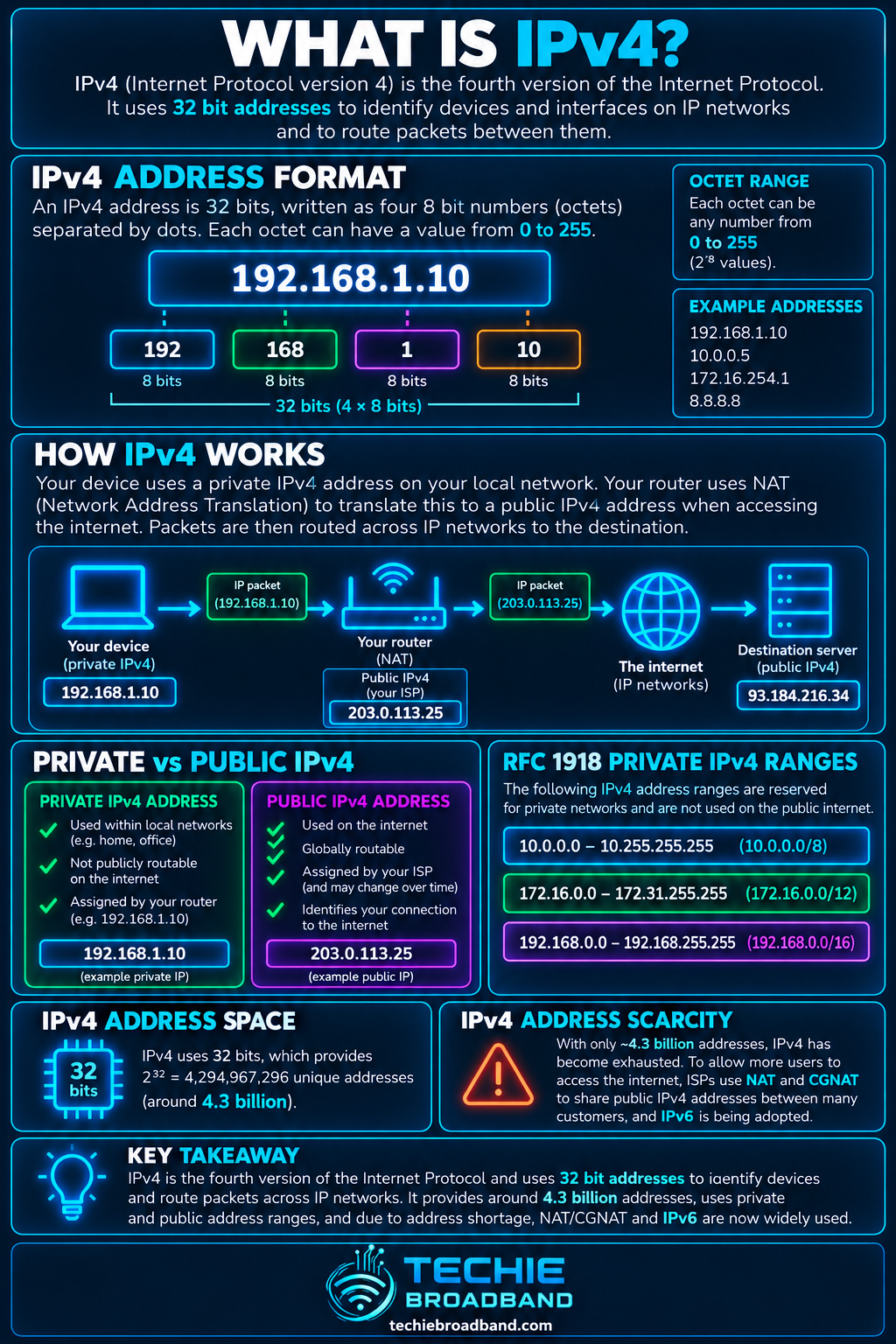
IPv4, or Internet Protocol version 4, is the fourth version of the Internet Protocol and the addressing system that still carries a large proportion of internet traffic. It uses 32-bit addresses, normally written as four decimal numbers such as 192.168.1.25, so an IPv4 packet can identify source and destination addresses as it moves between networks.
The most important limitation is the size of that 32-bit address space. There are 2³², or 4,294,967,296, possible 32-bit values. That does not mean every value is available as a unique public internet address because substantial blocks are reserved, private, special-purpose or otherwise unavailable for ordinary public assignment.
For a UK broadband user, IPv4 usually appears as private IPv4 addresses inside the home, a public IPv4 address on the internet-facing side where one is assigned, and address translation such as NAT or provider-side CGNAT when addresses are shared.
The infographic below summarises IPv4's 32-bit structure, the scale of its address space, the common home NAT relationship and the exhaustion milestones that explain why IPv4 scarcity still matters.
What does IPv4 actually do?
IPv4 provides addressing and packet delivery across interconnected networks. Each IPv4 packet contains a source address and destination address. Routers inspect the destination and use routing information to decide where the packet should go next.
RFC 791, published in 1981, defines IPv4 addresses as four octets, or 32 bits. The protocol also defines the IPv4 header, fragmentation behaviour, Time to Live and other fields used to move datagrams across networks.
Identifies source and destination IPv4 addresses in a packet.
Provides a common packet format that can cross different underlying networks.
Allows routers to forward packets according to destination addressing and routing tables.
Supports IPv4 fragmentation where required by the path.
Uses Time to Live, or TTL, to stop packets circulating indefinitely.
How is an IPv4 address written?
An IPv4 address contains 32 binary bits. For readability, those bits are split into four 8-bit octets and each octet is shown as a decimal number from 0 to 255. The four values are separated by full stops.
For example, 192.168.1.25 contains four octets. In binary those octets are 11000000, 10101000, 00000001 and 00011001. Dotted-decimal notation makes the same 32-bit value far easier for people to configure and recognise.
Techie Broadband calculation: how many IPv4 addresses exist?
A 32-bit field has two possible states for each bit. The theoretical number of different bit patterns is therefore 2³² = 4,294,967,296. That is about 4.29 billion possible IPv4 values.
This is a mathematical property of the protocol, not a count of addresses available to broadband customers. Network, broadcast, private, loopback, link-local, multicast, documentation and other special-purpose ranges reduce the space that can be used as ordinary globally routed unicast addresses.
What are IPv4 prefixes and CIDR notation?
CIDR, or Classless Inter-Domain Routing, expresses how many leading bits identify the network prefix. A /24 means the first 24 bits belong to the prefix and eight bits remain for addresses within that block. A /32 identifies one individual IPv4 address.
These are block sizes. The number usable by hosts depends on the purpose and protocol context. Conventional IPv4 subnets historically reserve network and broadcast addresses, while point-to-point and other designs can follow different rules.
/32 contains 1 address.
/30 contains 4 total addresses.
/29 contains 8 total addresses.
/24 contains 256 total addresses.
/16 contains 65,536 total addresses.
/8 contains 16,777,216 total addresses.
Public IPv4 versus private IPv4
A private IPv4 address is used within a private address realm and is not globally unique. RFC 1918 reserves 10.0.0.0/8, 172.16.0.0/12 and 192.168.0.0/16 for private IPv4 networks. A public IPv4 address is globally unique within the public IPv4 routing system and can be routed across the internet when routing and policy permit.
Private IPv4 can be reused independently in many unrelated networks.
Public IPv4 must be globally coordinated to avoid address conflicts on the public internet.
Private does not mean encrypted or inherently secure.
Public does not mean static. A public address can be dynamic or static.
A device can use private IPv4 locally while its traffic appears on the internet through a translated public IPv4 address.
How NAT extends the practical life of IPv4
NAT changes address information as traffic crosses a network boundary. In a typical home IPv4 network, multiple private devices can share one public IPv4 address because the router maintains translation state for their flows. Port translation is commonly used so simultaneous connections can be distinguished.
NAT was not designed as a replacement for IPv6, but address sharing became one of the mechanisms that allowed IPv4 networks to keep growing despite limited public address space.
What is CGNAT?
Carrier Grade NAT moves address sharing into the service provider network. Instead of each broadband connection necessarily receiving its own public IPv4 address, multiple customers can share public IPv4 capacity behind provider-operated translation.
RFC 6598 reserves 100.64.0.0/10 as Shared Address Space for service-provider NAT deployments. That range is not one of the RFC 1918 private blocks. CGNAT can affect inbound hosting, port forwarding, some peer-to-peer applications and troubleshooting because the customer router may not control the public-facing translation.
Static IPv4 and dynamic IPv4 are different questions
Public versus private describes the addressing scope. Static versus dynamic describes how consistently an address is assigned. These distinctions should not be mixed together.
A public IPv4 address can be static.
A public IPv4 address can be dynamic.
A private IPv4 address can be manually configured.
A private IPv4 address can be assigned dynamically by DHCP.
A connection can be behind CGNAT and therefore not have a dedicated public IPv4 address at the customer router.
Why did IPv4 addresses run out?
IPv4's 32-bit address space was large by early internet standards but far too small for a world containing billions of people, networks, servers, phones, broadband connections, cloud systems and connected devices.
The RIPE NCC records two important exhaustion milestones. IANA's central free pool was exhausted on 3 February 2011. The RIPE NCC, which serves Europe, the Middle East and parts of Central Asia, exhausted its remaining pool in November 2019. Returned addresses can still enter limited waiting-list allocation processes, but there is no fresh pool capable of supporting normal IPv4 growth.
Exhaustion does not mean IPv4 stopped working. Existing allocations continue to be used, transferred and routed. It means the supply of previously unused addresses from the registry system can no longer scale with demand.
What IPv4 scarcity changed for broadband networks
Greater use of NAT and CGNAT to share public IPv4 addresses.
An active transfer market for existing IPv4 address blocks.
More operational value attached to dedicated public or static IPv4 services.
Pressure to deploy IPv6 alongside IPv4.
More complex troubleshooting where multiple layers of translation exist.
IPv4 versus IPv6
IPv6 is IPv4's successor. RFC 8200 increases the address size from 32 bits to 128 bits. That is the fundamental addressing change, but IPv6 also changes packet-header design and operational behaviour.
IPv6 should not be described simply as faster. Addressing protocol version alone does not guarantee lower latency or higher throughput. Real performance depends on routing, peering, congestion, access technology, equipment, remote services and the rest of the end-to-end path.
IPv4 address size: 32 bits.
IPv6 address size: 128 bits.
IPv4 commonly relies on private addressing plus NAT in homes.
IPv6 can provide globally unique addressing at far greater scale without IPv4-style address conservation through NAT.
IPv4 and IPv6 can run together as dual stack.
How IPv4 normally appears on a UK home broadband connection
A common UK home setup has private IPv4 on devices, NAT at the broadband router and either a dedicated public IPv4 address or provider-side CGNAT upstream. The exact arrangement depends on the ISP, access network, product and location.
Your phone or laptop receives a private IPv4 address from the home router.
The router holds or reaches an upstream IPv4 address on its WAN side.
For ordinary outbound traffic, NAT creates translation state.
If the ISP supplies dedicated public IPv4, the router can normally be the public IPv4 endpoint.
If the service uses CGNAT, another translation layer exists inside the provider network.
How to find your IPv4 addresses
Do not assume the IPv4 address shown by a website is the same address configured on your device. They answer different questions.
Check the device network settings to see its local IPv4 address.
Open the router status page and find the WAN or internet IPv4 address.
Use a reputable external IP-checking service to see the public IPv4 address observed by an internet service.
Compare the router WAN address with the externally observed address.
If they differ, investigate whether another router, upstream NAT or CGNAT sits between you and the public internet.
Common IPv4 problems and what they usually mean
Address conflict: two devices use the same IPv4 address in the same local network.
Wrong subnet or prefix: the device decides incorrectly whether a destination is local.
Wrong default gateway: local communication may work while off-subnet communication fails.
DHCP failure: a device may fail to receive the expected address, gateway or DNS settings.
Double NAT: two customer-controlled routers translate traffic.
CGNAT: provider-side sharing can prevent conventional inbound port forwarding.
DNS issue: IPv4 reachability can work while name resolution fails.
IPv4 troubleshooting sequence
Record the device IPv4 address, prefix or subnet mask, default gateway and DNS configuration.
Confirm the address belongs to the expected local subnet.
Test the local router if ICMP is permitted.
Test a known IPv4 destination by address to separate reachability from DNS.
Check the router WAN IPv4 address.
Compare the WAN address with the public address observed externally.
Check for RFC 1918, 100.64.0.0/10 or another upstream translation layer.
If inbound connectivity matters, confirm whether the ISP provides a dedicated public IPv4 address.
Where dual stack is available, test IPv4 and IPv6 separately.
Common IPv4 misconceptions
IPv4 exhaustion does not mean IPv4 no longer works.
A public IPv4 address is not automatically static.
A private IPv4 address is not automatically secure.
NAT and a firewall are different functions even when one router performs both.
100.64.0.0/10 is Shared Address Space, not an RFC 1918 private range.
IPv6 does not require NAT for address conservation.
Changing from IPv4 to IPv6 does not by itself guarantee faster broadband.
Frequently asked questions about IPv4
What does IPv4 stand for?
IPv4 stands for Internet Protocol version 4.
How many bits are in an IPv4 address?
An IPv4 address is 32 bits long, divided into four 8-bit octets.
How many IPv4 addresses are possible?
The 32-bit space contains 2³², or 4,294,967,296, possible values. Not all are available as ordinary public unicast addresses.
Is 192.168.1.1 an IPv4 address?
Yes. It is an IPv4 address inside the RFC 1918 192.168.0.0/16 private range and is commonly used on home networks.
Is IPv4 the same as a public IP address?
No. IPv4 is the protocol and addressing system. IPv4 addresses can be public, private or reserved for other special purposes.
Does IPv4 require NAT?
No. NAT is not an inherent requirement of IPv4. It is widely used because private addressing and address sharing help conserve scarce public IPv4 space.
Can IPv4 and IPv6 work at the same time?
Yes. Dual-stack networks run IPv4 and IPv6 together, allowing each protocol to be used where appropriate.
Is IPv4 being switched off?
There is no single global switch-off date. IPv4 remains widely used while networks progressively deploy IPv6 and coexistence mechanisms.
Key takeaway
IPv4 is a 32-bit internet addressing and packet-delivery protocol with about 4.29 billion possible address values. Its limited address space drove widespread use of private addressing, NAT, CGNAT and an IPv4 transfer market. For UK broadband users, understanding whether an address is private or public, static or dynamic, and dedicated or shared is often more useful than simply knowing that a connection supports IPv4.
To explore the related technical concepts used in this IPv4 guide, visit our broadband terminology guide.
