
What is Routing?
Updated: 3 days ago

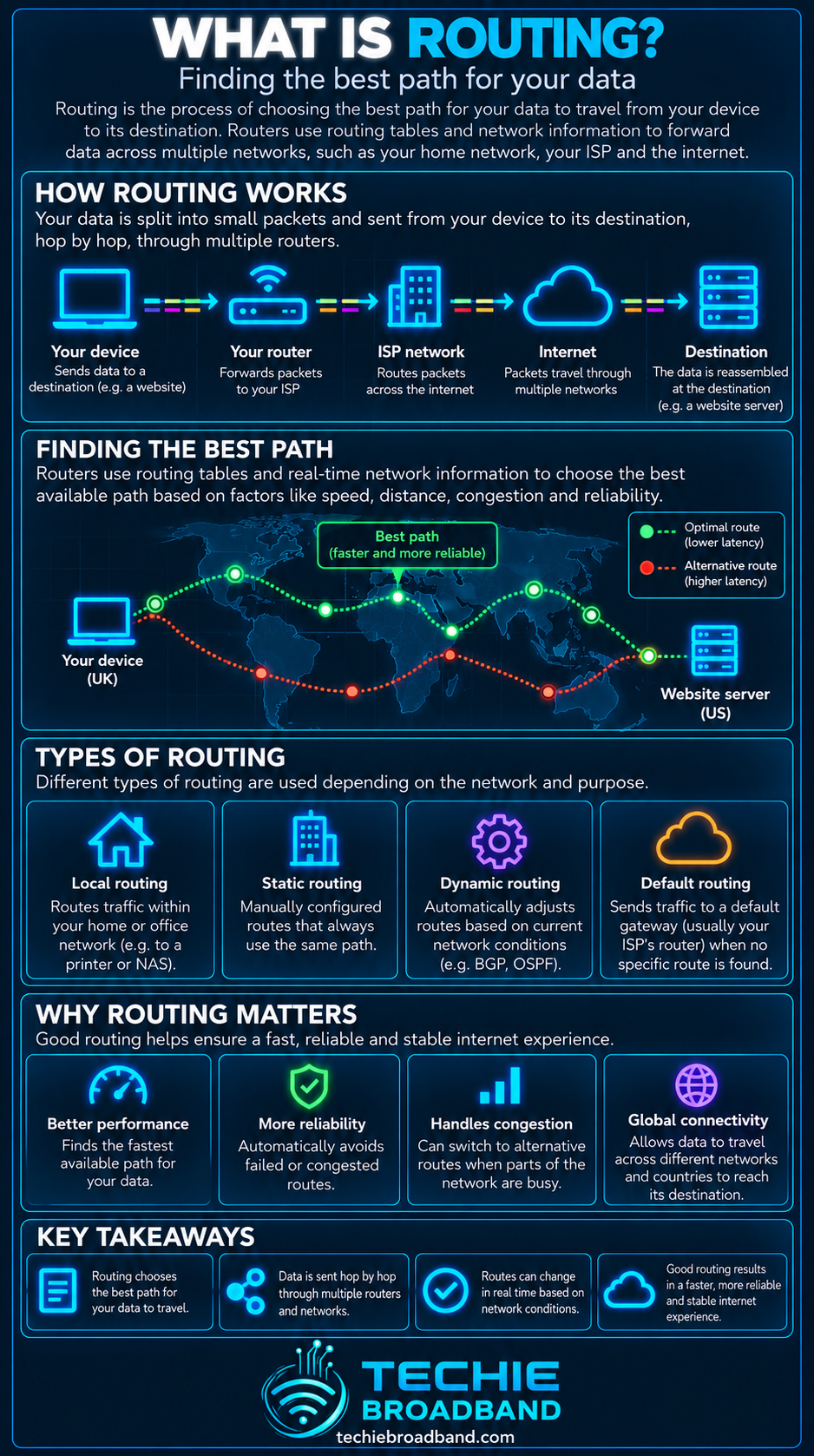
Routing is the process networks use to determine where IP traffic should go next. Routers use destination addresses, routing information and policy to select a next hop, while forwarding is the separate packet-by-packet act of sending traffic through the chosen interface. Routing matters because the path selected across your home network, ISP and the wider internet can influence reachability, resilience, latency and congestion.
Routing in one sentence
Routing builds and selects paths to IP destinations; forwarding uses the resulting information to move each packet towards its next hop.
Routing and forwarding are not the same thing
The distinction is fundamental. RFC 1812 describes an IP router as a device that forwards IP datagrams and explains that the next hop is selected using a route database. Routing is the process that builds or updates that knowledge. Forwarding is what happens when a packet actually arrives.
Routing decides which paths are available and which should be preferred.
Forwarding looks up a packet's destination and applies the installed forwarding decision.
The routing information base can contain multiple candidate routes.
The forwarding information base is normally optimised for fast packet lookup.
A route can change without the physical link itself changing.
How routing works
At a simplified level, a router receives a packet, examines its destination IP address, finds the most specific applicable route, selects the associated next hop and outgoing interface, then forwards the packet. The next router repeats its own local decision until the packet reaches the destination network.
A device creates an IP packet with a destination address.
The local router checks whether the destination is local or remote.
For a remote destination, the router looks for the best matching route.
The selected route identifies an outgoing interface and usually a next hop.
The packet is forwarded to that next hop.
Each subsequent router performs its own lookup.
The final router forwards the packet onto the destination network.

What is a routing table?
A routing table is a set of destination prefixes and associated routing information. Depending on the device and protocol, entries can include a destination prefix, next hop, outgoing interface, preference or metric, and information about how the route was learned.
A small home router may need only directly connected networks and a default route towards the ISP. An internet-facing router can handle a far richer set of routes and policies.
Longest prefix match
When several routes could match a destination, IP forwarding normally prefers the most specific matching prefix. This is called longest prefix match. A route for a specific subnet therefore takes precedence over a less specific aggregate route that also contains the destination.
For example, if a router has routes for 203.0.113.0/24 and 203.0.0.0/16, a packet for 203.0.113.25 matches both prefixes, but /24 is more specific and is selected before the broader /16 route.
What is a default route?
A default route is the fallback used when no more specific route is available. On a typical home broadband router, unknown IPv4 destinations are sent towards the ISP using the default route 0.0.0.0/0. IPv6 has the equivalent default prefix ::/0.
Static routing and dynamic routing
Static routes
A static route is configured deliberately rather than learned through a routing protocol. Static routes are predictable and useful for simple networks, but they do not automatically discover topology changes unless additional mechanisms alter them.
Dynamic routes
Dynamic routing protocols allow routers to exchange reachability information and adapt to network changes. Different protocols solve different problems, and the internet does not use one universal routing protocol for every layer.
Interior and exterior routing
Inside an organisation or ISP, an Interior Gateway Protocol such as OSPF or IS-IS can distribute internal reachability. Between autonomous systems, BGP is the dominant inter-domain routing protocol.
The IETF's BGP-4 specification in RFC 4271 defines BGP as an inter-Autonomous System routing protocol that exchanges network reachability information. That makes BGP central to how independently operated networks connect across the global internet.
What is an autonomous system?
An autonomous system, usually shortened to AS, is a network or group of networks operated under a defined routing policy and identified for inter-domain routing by an Autonomous System Number. ISPs, large content networks, cloud providers and other organisations can operate autonomous systems.
How BGP chooses routes
BGP is policy driven. A network can receive several routes to the same prefix and apply local policy when deciding which path to prefer. The selected route is therefore not necessarily the geographically shortest path, the path with the fewest routers, or the path with the lowest latency.
Local routing policy can influence preference.
AS path information helps identify the autonomous systems a route traverses.
Operators can prefer customer, peering or transit paths according to policy.
Route advertisements can be filtered or modified.
Different networks can legitimately select different paths to the same destination.
Routing, peering and transit
Routing determines which available path is selected, while peering and IP transit describe interconnection relationships that make routes available between networks. A network may learn destinations through several peers and transit providers, then use BGP policy to decide which route to install.
Why routing affects broadband users
Your broadband access speed is only one part of the end-to-end path. Once traffic leaves the access network, routing determines which networks and interconnections are used to reach the destination. A poor or disrupted route can therefore affect an otherwise healthy broadband connection.
A route change can alter round trip latency.
Congested interconnection can reduce real-world performance.
A routing failure can make a destination unreachable even while the broadband line remains connected.
Different destinations can perform differently at the same moment.
IPv4 and IPv6 traffic can take different network paths.
This is why bandwidth and routing should not be treated as the same problem. A fast access connection does not guarantee an efficient path to every internet destination.
Routing and latency
Routing can influence latency because path length, interconnection location, queueing and network topology all contribute to delay. A route with fewer AS hops is not automatically faster, and a route that looks geographically indirect may exist because of commercial policy, resilience or available interconnection.
Routing and congestion
A selected path can encounter network congestion even when alternative physical capacity exists elsewhere. Routing protocols do not simply move every flow to whichever path happens to have the lowest instantaneous utilisation. Route choice follows the protocol and policy in use.
Routing and packet loss
A routing event can temporarily coincide with packet loss if traffic is reconverging, a path fails, or a new route has not yet propagated consistently. Persistent loss, however, should not automatically be blamed on routing because local WiFi, access links, congestion and equipment can also be responsible.
Routing on a UK broadband connection
For a UK home or business connection, the route commonly begins on the local LAN, reaches the broadband router, crosses the access network and enters the ISP's network. From there the ISP may carry traffic across its own backbone and exchange it with other networks through peering, private interconnection or transit.
The exact path depends on the ISP, access network, destination, protocol family, interconnection arrangements and current routing policy. FTTP, FTTC, cable, fixed wireless and mobile access describe how the customer reaches the provider; they do not by themselves determine the complete internet route.
Does Openreach or CityFibre decide the whole internet route?
No. An access network can carry the customer connection into the service provider environment, but the end-to-end internet route also depends on the retail ISP and its upstream connectivity, backbone, peering, transit and destination network. The commercial and technical model varies by provider and product.
IPv4 and IPv6 routing
IPv4 and IPv6 maintain separate reachability information and can take different paths. A service that supports both protocols may therefore behave differently over IPv4 and IPv6 if the provider has different upstreams, peering arrangements or route policies for each.
This is separate from CGNAT, which is an IPv4 address-sharing mechanism. CGNAT can change how subscriber traffic is translated, but it is not itself a routing protocol.
Route convergence
Convergence is the process by which routers reach a consistent view after a topology or route change. If a link or router fails, routing protocols can withdraw or replace affected routes. Convergence is not instantaneous, and the time involved depends on the protocol, topology, timers, policy and failure mode.
Routing loops
A routing loop occurs when routers repeatedly send traffic around a cycle instead of progressing towards the destination. IP limits the damage using the TTL field in IPv4 and Hop Limit in IPv6. Each forwarding router reduces the value, and the packet is discarded when it expires.
Asymmetric routing
The forward and return paths between two endpoints do not have to be identical. Internet routing is commonly asymmetric because each network makes its own policy decisions. This matters when interpreting traceroute results, troubleshooting firewalls or comparing one-way performance.
Route flapping
Route flapping describes reachability information repeatedly appearing and disappearing or changing rapidly. It can cause instability, repeated reconvergence and unnecessary routing updates. The effect visible to an end user depends on whether alternative routes remain available.
Equal-cost multipath routing
Routers can sometimes install multiple paths with equal routing cost and distribute traffic between them. The exact load-sharing behaviour varies by implementation and is often flow based rather than packet by packet, helping avoid packet reordering.
Policy routing
Not every forwarding decision has to depend only on the destination prefix. Policy-based routing can use additional criteria, such as source address or traffic classification, to direct selected traffic differently. This is common in more advanced enterprise and service-provider networks.
What traceroute can tell you about routing
Traceroute sends packets in a way that exposes routers which return time-exceeded responses as the hop limit is increased. It is useful for identifying responding hops and where a path appears to change, but it is not a complete map of internet routing.
Some routers do not respond to traceroute probes.
A hop can prioritise or rate-limit control-plane responses.
The return path of the reply may differ from the forward path.
Load balancing can make successive probes show different hops.
MPLS and tunnelling can hide or abstract parts of the underlying path.
A practical routing diagnostic workflow
Confirm the broadband connection itself is online.
Test more than one destination to determine whether the issue is destination specific.
Use wired Ethernet where possible to remove WiFi as a confounding factor.
Compare IPv4 and IPv6 behaviour if both are available.
Run ping to establish basic reachability and round trip behaviour.
Run traceroute or an equivalent path tool and save the result.
Repeat the test at another time rather than relying on one snapshot.
Compare results from another connection if available.
Check whether the affected service or destination network reports an incident.
Only attribute the problem to ISP routing when the evidence actually supports that conclusion.
Techie Broadband path analysis example
Consider two available paths from an ISP to the same content network. Path A crosses three autonomous systems and measures 18 ms RTT. Path B crosses two autonomous systems but measures 27 ms RTT. The route with fewer AS hops is 9 ms slower in this illustrative test.
Techie Broadband calculation: (27 − 18) ÷ 18 × 100 = 50%. In this example, Path B has 50% higher RTT despite crossing fewer autonomous systems. This is a theoretical example designed to show why AS path length should not be treated as a direct latency measurement.
Common routing misconceptions
The shortest geographic route is not necessarily selected.
The fewest traceroute hops do not guarantee the lowest latency.
BGP does not simply choose the route with the highest bandwidth.
A routing table and a forwarding table are related but not identical concepts.
A default route does not mean every packet follows exactly the same end-to-end path.
A broadband speed test does not directly reveal the routing quality to every other destination.
A route change is not automatically evidence of a fault.
Routing FAQs
What is routing in networking?
Routing is the process of learning, selecting and maintaining paths to IP destinations so routers know where traffic should be sent next.
What is the difference between routing and forwarding?
Routing determines and installs path information, while forwarding applies that information to individual packets.
What is a routing table?
A routing table stores destination prefixes and information used to select paths, such as next hops, interfaces, preferences or metrics.
What is a default route?
A default route is the fallback route used when no more specific destination prefix matches.
Does BGP route traffic inside my home?
Normally no. A typical home router uses directly connected routes and a default route, while BGP is primarily used between autonomous systems and in advanced networks.
Can routing affect broadband speed?
Yes, the selected path can affect latency, congestion and achievable throughput to a particular destination, although access speed and local network limits remain separate factors.
Why can IPv4 and IPv6 take different routes?
They use separate routing information and providers can have different peering, transit and policy for each protocol family.
Is traceroute a complete map of the route?
No. Traceroute shows responding hops observed by its probes, but routing asymmetry, tunnelling, load balancing and filtered responses can hide or alter what appears.
Key takeaway
Routing is the decision-making system that connects IP networks. It determines which paths are available and preferred, while forwarding moves individual packets according to those decisions. For broadband users, understanding routing explains why two destinations can behave very differently even when the access line itself is healthy.
To explore the related technical concepts used in this Routing guide, visit our broadband terminology guide.
