
What is Traffic Prioritisation Quality of Service (QoS)?
Updated: 3 days ago

Traffic Prioritisation Quality of Service, usually shortened to QoS, is a set of network techniques used to classify competing traffic and give different traffic classes different forwarding treatment when a link, queue or device becomes busy. It can protect delay-sensitive traffic such as voice, video calls, gaming or network control traffic from being trapped behind large bulk transfers, but it does not create extra bandwidth or make every packet travel faster.
The most important distinction is that QoS is about how limited network resources are shared. If there is no meaningful contention at the relevant bottleneck, changing packet priority may make little or no practical difference.
What does Quality of Service (QoS) mean?
In IP networking, Quality of Service describes mechanisms that differentiate traffic so a network can provide different forwarding behaviours. The IETF's Differentiated Services architecture uses classification, packet marking and per-hop behaviours to provide scalable service differentiation. RFC 2475: An Architecture for Differentiated Services
That does not mean there is one universal QoS algorithm. A home router, managed switch, enterprise network and ISP core can all implement traffic prioritisation differently. The useful question is not simply whether a device has a QoS button, but what traffic it can identify, which resource it controls and what scheduling or queueing policy it applies.
Why traffic prioritisation exists
Packets from different applications can compete for the same finite output link. When the offered traffic is below available capacity, packets can normally be forwarded without building a substantial queue. When demand reaches or exceeds that capacity, packets wait, are marked for congestion signalling or are dropped.
This is where network congestion and queue depth become important. A bulk upload can fill an upstream queue while a tiny voice packet arrives behind it. Without appropriate queue management or scheduling, the voice packet can experience avoidable delay even though it needs very little bandwidth.
Interactive voice and video generally care strongly about delay, jitter and loss.
Online gaming and remote control traffic can be sensitive to delay and jitter while using relatively modest bandwidth.
Web browsing is interactive but can tolerate more variation than real-time voice.
Large downloads, cloud backups and software updates often care more about sustained throughput than a few extra milliseconds of delay.
Network control traffic can require predictable treatment so the network itself remains stable.
How QoS traffic prioritisation works
A practical QoS system usually combines several functions rather than relying on one priority flag.
Classify the traffic. The device identifies packets using information such as interface, IP address, protocol, port, VLAN, application recognition or an existing DSCP marking.
Mark or re-mark packets where policy requires it. A packet can carry a Differentiated Services Code Point so downstream QoS-capable devices can map it to a forwarding behaviour.
Place traffic into queues or traffic classes. Packets with similar treatment requirements can be aggregated rather than maintaining a separate queue for every application flow.
Schedule transmission. The device decides which queue is served and how much forwarding capacity different classes can use.
Police or shape traffic where appropriate. Policing can discard traffic that exceeds a profile, while shaping deliberately delays traffic to bring it into a configured profile.
Apply queue management. A device may actively manage queues instead of waiting for a buffer to become completely full.
RFC 2475 describes traffic conditioners that can include meters, markers, shapers and droppers. The architecture deliberately separates complex classification and conditioning at boundaries from simpler forwarding behaviours in the network core.
What is DSCP and how does it relate to QoS?
DSCP stands for Differentiated Services Code Point. RFC 2474 defines a six-bit DSCP field within the IP Differentiated Services field. A DSCP value can be used by a Differentiated Services-capable node to select a particular per-hop behaviour. RFC 2474: Definition of the Differentiated Services Field
A DSCP value is not an end-to-end promise. It is a marking. A router or switch still needs policy that maps the marking to a queue, scheduler or other treatment. Another network can preserve it, re-mark it, ignore it or apply a different policy.
Common QoS forwarding concepts
Default Forwarding: ordinary best-effort traffic that has not been assigned differentiated treatment.
Expedited Forwarding (EF): a per-hop behaviour intended as a building block for low loss, low delay and low jitter services.
Assured Forwarding (AF): four forwarding classes, each with three levels of drop precedence.
Lower Effort (LE): treatment for low-urgency traffic where other traffic should take precedence during congestion.
The EF behaviour is defined by RFC 3246, Assured Forwarding by RFC 2597 and the current Lower Effort behaviour by RFC 8622. These are technical building blocks. They do not mean every residential broadband router or ISP implements the same service classes.
Priority queueing, weighted scheduling and fair queueing are not the same
The word priority is often used loosely, but queue schedulers can behave very differently.
Strict priority queueing serves a higher-priority queue before lower-priority queues. Without safeguards, lower classes can be starved.
Weighted scheduling allocates service between queues according to configured weights rather than allowing one class to consume everything.
Fair queueing separates competing flows or traffic aggregates so one heavy flow is less able to dominate queue time.
Rate limiting constrains a traffic rate. It is not the same thing as giving another class priority.
Traffic shaping delays traffic to fit a rate profile. It can complement QoS but is not synonymous with QoS.
For the separate mechanics of delaying traffic to a configured rate, see What is Traffic Shaping?.
QoS does not create bandwidth
Suppose a broadband upstream can forward 100 Mbps and two applications simultaneously offer 80 Mbps each. The total offered load is 160 Mbps, or 160% of the available upstream capacity. The missing 60 Mbps does not appear because QoS is enabled.
Techie Broadband theoretical example: if policy gives one class access to 30 Mbps during contention and the other can use the remaining 70 Mbps, QoS has changed the allocation of the existing 100 Mbps. It has not increased the physical capacity. If the first class only needs 5 Mbps, a well-designed scheduler may allow spare capacity to be used by other traffic rather than leaving it idle.
This is why QoS and bandwidth must not be confused. Bandwidth is capacity. QoS is policy and forwarding treatment when traffic competes for resources.
Techie Broadband analysis: queue time can matter more than bandwidth for a small packet
Consider a simplified 100 Mbps output link. A 1,500-byte packet contains 12,000 bits. Ignoring lower-layer overhead, serialising that packet onto a 100 Mbps link takes 12,000 ÷ 100,000,000 seconds, which is 0.00012 seconds or 0.12 milliseconds.
If a delay-sensitive packet arrives behind 100 full-size packets already waiting in a simple FIFO queue, the theoretical serialization time represented by those packets is about 12 milliseconds. Behind 1,000 packets it is about 120 milliseconds. These are theoretical queueing examples, not predictions of a particular router, because real packet sizes, link overheads, schedulers and queue management vary.
The point is important: a voice or gaming packet may require almost no bandwidth, yet still suffer because it waits behind traffic already queued at the bottleneck. QoS can reduce that waiting time by controlling queue behaviour.
Traffic prioritisation and bufferbloat
Bufferbloat is excessive network delay caused by packets spending too long waiting in oversized or persistently full buffers. QoS can help in some designs, but simply creating a high-priority queue does not automatically solve bufferbloat.
Modern queue management and fair queueing can be more useful than manually prioritising dozens of applications. The objective is to keep queues under control while sharing capacity sensibly. That is closely related to latency under load.
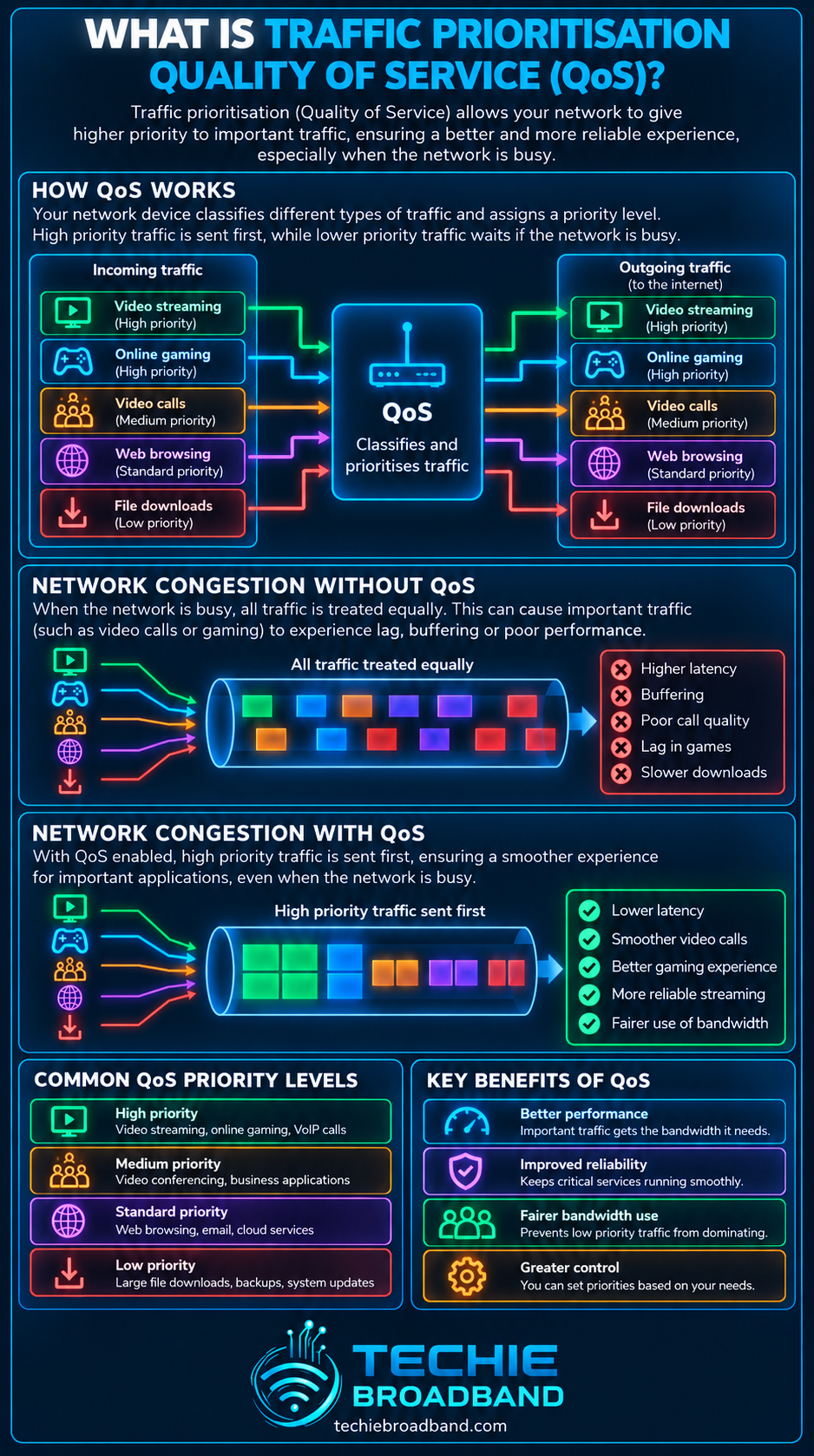
The infographic below shows the central idea: traffic can be classified, marked, queued and scheduled differently at a busy bottleneck, but prioritisation cannot manufacture extra line capacity.
When does QoS actually help?
QoS is most useful where a device controls a real bottleneck and traffic classes have different performance needs.
An asymmetric broadband connection where a relatively small upload can be saturated by cloud backup or file synchronisation.
A home or small-business network where video calls or voice need protection from bulk transfers.
An enterprise WAN where defined application classes share constrained links.
A managed network where traffic markings and forwarding policy are consistently controlled.
A router deliberately shaping slightly below the true bottleneck so its own queueing system, rather than an unmanaged upstream queue, controls contention.
When might QoS make little difference?
The connection has ample spare capacity and no meaningful queue is forming.
The congestion sits somewhere the QoS device does not control, such as a remote server or external interconnection.
Packets are marked but downstream devices ignore or re-mark the DSCP value.
The router is too slow to classify, shape or schedule traffic at the broadband line rate.
The rules identify the wrong traffic or prioritise so much traffic that the priority class is no longer selective.
The real problem is WiFi interference, packet loss, a faulty link or another bottleneck rather than queue contention.
Does QoS work across the public internet?
Not reliably as one continuous end-to-end policy. Differentiated Services can operate across multiple domains, but each administrative domain controls its own policy. A DSCP marking that receives special treatment inside your LAN may receive default treatment, be changed or be ignored after traffic crosses another network boundary.
RFC 4594 provides configuration guidelines for DiffServ service classes and explicitly treats service-class implementation as a matter for network administrators. RFC 4594: Configuration Guidelines for DiffServ Service Classes
For residential UK broadband, therefore, home-router QoS should usually be understood as control over traffic at bottlenecks the router can actually manage, not a guarantee that the entire internet path will preserve the same priority.
QoS on download and upload traffic
Upload QoS
Upload traffic is often the easier direction for a home router to control because it decides when packets leave towards the broadband connection. If the router shapes just below the effective upstream bottleneck, it can keep the controllable queue locally and schedule competing traffic.
Download QoS
Download traffic has already crossed the ISP and access network before it reaches the home router. By the time the router sees an incoming packet, capacity upstream may already have been consumed. A router can still manage queues and local delivery, but it cannot undo congestion that occurred earlier in the path.
This distinction is particularly relevant on asymmetric services where upload speed is much lower than download speed.
QoS, WiFi QoS and WMM
WiFi has its own medium-access and prioritisation mechanisms. WiFi Multimedia, or WMM, defines access categories intended to differentiate traffic such as voice, video, best effort and background traffic over the wireless link. That is not the same as a router controlling the WAN bottleneck.
A packet can therefore receive one treatment on WiFi, another in the router and another again inside an ISP network. End-to-end performance depends on the complete path, not one QoS setting.
QoS and multi gigabit broadband
Faster broadband can reduce how often the access link becomes the bottleneck, but it also raises the processing requirement for the router. Classification, shaping, queue management, firewalling and NAT can all consume processing resources.
A router capable of forwarding several gigabits per second with QoS disabled may achieve less when advanced traffic management is enabled. The exact impact depends on hardware acceleration, CPU architecture, firmware and the QoS implementation, so there is no universal percentage penalty.
Quality of Service versus traffic shaping
Traffic shaping and QoS overlap but are not interchangeable. Shaping deliberately delays packets so traffic conforms to a configured rate. QoS is broader and can include classification, marking, queueing, scheduling, policing and shaping.
A common home-network design uses shaping to move the effective bottleneck into the router, then a queue management or fair-queueing system decides how traffic shares that controlled capacity.
Quality of Service versus throttling
Throttling generally means deliberately limiting a traffic rate. QoS can include rate controls, but prioritisation can also allow a class to use spare capacity while changing how it is treated only when contention occurs. A lower-priority bulk transfer does not necessarily need a permanently low fixed speed.
What can go wrong with QoS?
Over-prioritisation: marking too much traffic as high priority defeats the purpose of differentiation.
Starvation: strict priority policies can deprive lower classes of service if the high-priority class is not controlled.
Incorrect classification: encrypted applications, changing ports and shared services can make simplistic rules unreliable.
DSCP trust: accepting markings from untrusted devices can allow endpoints to claim preferential treatment.
Double bottlenecks: controlling the router queue does not fix congestion elsewhere in the path.
Router performance: complex shaping or classification can reduce maximum throughput on underpowered hardware.
How to test whether QoS is helping
Establish the real bottleneck. Test with a suitable wired Ethernet connection and confirm the router and Ethernet interfaces can support the broadband rate.
Measure the connection while idle. Record throughput, latency, jitter and packet loss before adding load.
Create a controlled load in the direction you want to test, such as a large upload for an upstream QoS test.
Measure latency under load. A large increase suggests queueing at a bottleneck even if headline throughput remains high.
Enable the QoS, shaping or queue-management policy without changing unrelated settings.
Repeat the same load and interactive tests using the same endpoints and similar conditions.
Check whether the protected application improves without creating unacceptable starvation or throughput loss elsewhere.
Repeat at different times and with multiple destinations before concluding that one result represents the broadband service.
Useful companion measurements include latency, jitter, packet loss and actual throughput.
Common QoS misconceptions
QoS makes broadband faster. It does not increase the physical capacity of the bottleneck.
A higher DSCP number means higher priority. DSCP values identify codepoints and behaviours; they are not a simple universal ranking from slowest to fastest.
Gaming always needs the highest bandwidth priority. Most gaming traffic needs predictable low delay far more than huge bandwidth.
QoS only matters on slow broadband. Fast links can still queue when demand bursts above capacity, although additional capacity can make contention less frequent.
Setting every important device to highest priority is good QoS. If everything is high priority, meaningful differentiation disappears.
A home router can force an ISP or remote network to honour its markings. Each administrative domain controls its own forwarding policy.
Traffic prioritisation on UK broadband
The practical value of QoS depends on the ISP, access network, retail product, location and equipment. FTTC, cable, FTTP, fixed wireless and mobile broadband can have very different upload ratios and bottleneck behaviour. Even two FTTP services can expose different upstream capacity, router hardware and network paths.
On a connection with limited upstream capacity, a cloud backup can create a much more obvious loaded-latency problem than on a symmetrical multi gigabit service with substantial spare headroom. That does not make QoS irrelevant on faster services, but it changes where and how often contention occurs.
Do not assume a poor loaded-latency result is automatically an ISP problem. The constrained queue can sit in the router, WiFi network, Ethernet path, access network, ISP, interconnection or remote service.
FAQ
What is QoS in networking?
QoS is a collection of network mechanisms used to classify traffic and provide different forwarding treatment when packets compete for resources. It can include marking, queueing, scheduling, policing, shaping and active queue management.
Does QoS increase internet speed?
No. QoS does not increase the physical line rate. It changes how existing capacity and queue time are allocated between competing traffic.
What traffic should be prioritised?
Traffic should be prioritised according to performance requirements and actual contention. Delay-sensitive voice, interactive video or control traffic may justify preferential treatment, while bulk backups and software updates can often tolerate lower urgency.
Is DSCP the same as QoS?
No. DSCP is a packet marking used by Differentiated Services. QoS is the broader policy and forwarding system that may use DSCP alongside classification, queues, schedulers, shaping and other mechanisms.
Should I enable QoS on my home router?
Enable it when you have a specific contention problem that the router can control and you can test the result. On a connection with ample spare capacity, enabling complex QoS may provide little benefit and can reduce maximum throughput on some hardware.
Can QoS reduce bufferbloat?
It can form part of the solution, particularly when combined with appropriate shaping, fair queueing or active queue management. Simple priority rules alone are not a guarantee of low latency under load.
Key takeaway
Traffic Prioritisation Quality of Service is not a speed boost. It is a way of deciding how competing packets are treated when network resources become scarce. Good QoS identifies traffic accurately, controls the real bottleneck and protects applications that are sensitive to delay, jitter or loss without starving everything else.
For home broadband, the strongest test is practical: measure idle performance, deliberately create load, measure latency under load and compare the same workload with and without the QoS policy. If the bottleneck is under your router's control, the difference can be measurable. If the bottleneck is elsewhere, no local priority setting can rewrite the rest of the internet.
To explore the related technical concepts used in this Traffic Prioritisation Quality of Service (QoS) guide, visit our broadband terminology guide.
