
What is CGNAT (Carrier-Grade Network Address Translation)?
Updated: 2 days ago

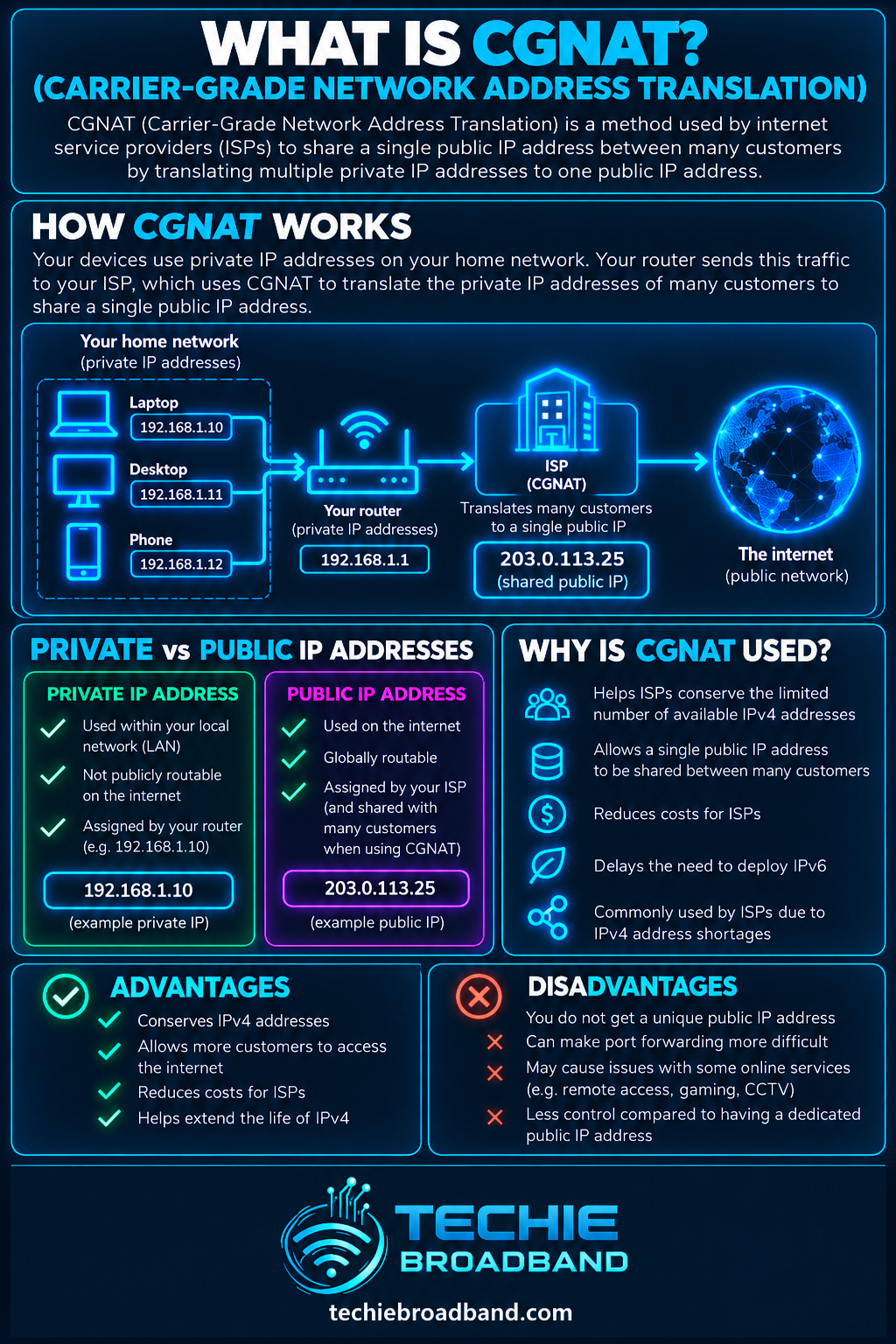
CGNAT, or Carrier-Grade Network Address Translation, is a technique used by internet service providers to let multiple customers share a smaller pool of public IPv4 addresses. Instead of assigning your router its own public IPv4 address, the provider performs an additional layer of address and port translation inside its network. Ordinary outbound browsing, streaming and downloads can work normally, but direct inbound IPv4 connectivity becomes more difficult because you do not control the provider's translation layer.
The important distinction is that CGNAT is not simply the NAT performed by your home router. Your router may already translate private addresses used by your devices. CGNAT adds another provider-controlled translation stage upstream, potentially placing many subscribers behind the same public IPv4 address.
What does CGNAT mean?
The IETF defines a Carrier-Grade NAT as a NAT function used to share the same IPv4 address among several subscribers. RFC 6888 also makes an important operational distinction: the CGN sits in the ISP network and is not managed by the subscriber.
The technology exists largely because public IPv4 addresses are finite. An ISP can conserve public IPv4 space by giving customer connections non-public addressing internally, then translating many simultaneous customer sessions through one or more public IPv4 addresses.
How CGNAT works
A conventional home IPv4 connection often already uses Network Address Translation. Devices on the LAN might use addresses such as 192.168.1.20, while the router holds a public IPv4 address on its WAN interface. The router tracks each outbound connection and maps the internal source address and port to its public address and an external port.
With CGNAT there is another translation boundary. A simplified path becomes:
Device private IPv4 address
Home router NAT
ISP-side shared address space or another non-public addressing layer
Carrier-grade NAT platform in the ISP network
Shared public IPv4 address
Wider IPv4 internet
The CGN platform maintains state so return packets can be mapped back to the correct subscriber and session. That is why many customers can appear on the internet from the same public IPv4 address without their normal outbound connections colliding.
What is the 100.64.0.0/10 address range?
RFC 6598 reserves 100.64.0.0/10 as Shared Address Space. That range runs from 100.64.0.0 to 100.127.255.255 and was created for service-provider address-sharing deployments.
If your router's WAN IPv4 address falls inside 100.64.0.0/10, that is a strong indication that the router is not holding a globally routable public IPv4 address. However, the absence of a 100.64.x.x address does not prove that CGNAT is absent. Providers can use other internal addressing designs, and a second router in your own premises can also create an upstream NAT.
CGNAT compared with ordinary home NAT
Home NAT is normally under your control. You can usually change firewall rules and port forwards on your own router.
CGNAT is operated upstream by the ISP. You normally cannot create arbitrary mappings in the provider's translator.
Home NAT commonly translates many local devices behind one customer-facing IPv4 address.
CGNAT can translate traffic from many separate subscribers behind a shared pool of public IPv4 addresses.
A connection can contain both layers at once, creating a NAT444-style path for IPv4.
Why does CGNAT affect port forwarding?
A port-forwarding rule on your home router only controls traffic that reaches that router. Under CGNAT, unsolicited IPv4 traffic from the internet first reaches a public address controlled by the ISP's CGN. Unless the provider has created an appropriate mapping, the CGN does not know that a new inbound connection should be sent to your particular line.
This is why repeatedly changing a local port-forwarding rule cannot fix provider-side CGNAT. The packet can be stopped before it ever reaches the WAN interface of your router.
IETF RFC 6888 includes requirements intended to improve application behaviour across CGNs, including explicit control of mappings through the Port Control Protocol. That does not mean every UK broadband provider exposes user-controlled inbound mappings in practice.
What can CGNAT affect?
Hosting a web, game, media or other server directly from home over IPv4
Traditional IPv4 port forwarding
Some peer-to-peer applications
Some online gaming connectivity and NAT traversal scenarios
Direct remote access to home equipment over IPv4
Certain VPN server configurations where your home connection must accept unsolicited inbound sessions
IP-based allow lists when the shared public address can change or is also used by other subscribers
IP reputation, rate limits or anti-abuse systems that see many unrelated customers behind one public address
The impact is application dependent. RFC 7021 documented application behaviour in carrier-grade NAT environments and found that some peer-to-peer applications and gaming scenarios could fail, while other applications continued to operate.
What CGNAT usually does not stop
CGNAT does not automatically make ordinary internet access unusable. Web browsing, streaming, cloud applications and most client-initiated connections are designed around outbound sessions and their return traffic. For many households the presence of CGNAT may therefore go unnoticed until somebody needs inbound reachability or encounters an application with difficult NAT traversal behaviour.
Does CGNAT make broadband slower?
CGNAT and broadband speed are different concepts. CGNAT is an addressing and translation architecture. It does not by definition reduce the provisioned bandwidth of your broadband service.
Real performance can still depend on implementation, capacity and load. A poorly dimensioned or malfunctioning translation platform could become a bottleneck, just as another network element could. But a slow speed test is not evidence of CGNAT by itself. See bandwidth, download speed and upload speed for the separate performance concepts.
Does CGNAT increase latency?
It introduces another stateful network function into the IPv4 path, but the existence of CGNAT alone does not tell you how many milliseconds will be added. Actual latency depends on path distance, routing, processing, queueing and the implementation and load of each network element.
If latency is poor, compare wired and wireless tests, test multiple destinations and times, and look for congestion or packet loss rather than assuming the addressing architecture is the cause.
CGNAT and online gaming
Modern games use a mixture of dedicated servers, peer-to-peer connectivity, relays and NAT traversal techniques. As a result, two games on the same CGNAT connection can behave differently. One may work perfectly through an outbound session or relay, while another may report a restrictive NAT condition or struggle to accept peer connections.
Console labels such as Open, Moderate or Strict are application or platform interpretations, not universal measurements of one standardised NAT property. Do not assume that a Strict result proves CGNAT. Double NAT inside the home, firewall policy and other NAT behaviour can produce similar symptoms.
CGNAT and IPv6
CGNAT is fundamentally an IPv4 address-sharing technique. Native IPv6 gives devices globally unique addressing from a much larger address space, so the IPv4 address-shortage reason for CGNAT disappears on the IPv6 path.
That does not mean IPv6 exposes every device automatically. A router firewall can still block unsolicited inbound IPv6 traffic, and both endpoints and applications need suitable IPv6 support. IPv6 changes the addressing model; it does not remove the need for security policy.
CGNAT and static IP addresses
A public static IPv4 address and CGNAT solve different problems. A public static IPv4 gives a connection a stable, globally routable address, while CGNAT deliberately shares public IPv4 resources across subscribers. Providers that use CGNAT may offer a public or static IPv4 option on some products, but availability, pricing and eligibility vary.
As a current UK example, Community Fibre states that CGNAT is the default for customers signing up or renewing from 4 June 2026, with a paid dynamic public IP option and static IP availability on qualifying business services. This is provider-specific and should not be generalised to other ISPs.
How to check whether you are behind CGNAT
Connect directly to your main router, preferably using Ethernet so local WiFi issues do not confuse the test.
Open the router status page and record the IPv4 address shown for its WAN or internet interface.
Check the public IPv4 address seen by an external service.
Compare the two addresses.
If the router WAN address is inside 100.64.0.0/10, treat that as strong evidence of service-provider shared address space.
If the WAN address is in RFC 1918 private space such as 10.0.0.0/8, 172.16.0.0/12 or 192.168.0.0/16, check whether another router or modem in your premises is performing NAT before concluding that the ISP uses CGNAT.
If the WAN address and public address differ, investigate the upstream topology or ask the provider how IPv4 addressing is delivered on your exact product.
Why comparing the two addresses matters
Seeing a private or shared address on the WAN side tells you that your router is not directly holding the public IPv4 address seen by internet services. But diagnosis still needs topology context. A second home router can produce exactly that mismatch without any carrier-grade translation at the ISP.
CGNAT versus double NAT
Double NAT simply means traffic passes through two NAT devices. CGNAT can create a double-NAT path when your home router performs NAT and the ISP performs another translation upstream, but not every double-NAT setup is CGNAT.
For example, plugging your own router behind an ISP router without bridge or modem mode can create two local NAT layers. In that case you may control both devices and can potentially change the topology. With CGNAT, the upstream translation belongs to the provider.
Techie Broadband practical address-sharing example
The following is an illustrative calculation, not a claim about any particular ISP deployment.
Assume 500 subscribers are active behind a public IPv4 pool and each subscriber has, on average, 200 simultaneous translated IPv4 sessions at a particular moment.
Techie Broadband calculation: 500 subscribers × 200 active sessions = 100,000 simultaneous translation entries.
Those sessions must be distinguished by combinations of addresses, ports and protocol state. The simple calculation demonstrates why CGNAT is not merely one extra address substitution. At provider scale it is a large state-management problem involving session tables, port allocation, logging, resilience and capacity planning.
The example does not imply that 500 subscribers must share one public address, that each subscriber will have exactly 200 sessions, or that all CGN platforms allocate ports in the same way. Real deployments vary significantly.
Why logging matters under CGNAT
When many subscribers can appear behind the same public IPv4 address, the public address alone may not identify which subscriber generated a particular connection. Time, protocol and port information can become important to attribution. This is one reason carrier-grade NAT systems have substantial operational logging requirements.
It also explains why IP-based reputation can become awkward. An online service may see activity from several unrelated households as originating from one public IPv4 address.
What to do if CGNAT is causing a problem
Confirm that CGNAT is actually present and rule out a second router in your own network.
Define the real requirement. Do you need a public IPv4 address, one inbound port, remote access to a single device, peer-to-peer gaming, or general self-hosting?
Ask the ISP whether your exact broadband product can be moved to a public IPv4 address or a static IPv4 option.
Check whether the application and your broadband service support native IPv6 end to end.
For remote administration, consider an authenticated overlay or reverse tunnel rather than exposing broad inbound access.
If using a tunnel or VPN workaround, check whether it provides the inbound reachability you need and measure any additional latency or routing impact.
If public addressing is a hard requirement and the existing product cannot provide it, compare alternative broadband products or providers based on addressing capability as well as headline speed.
Can UPnP bypass CGNAT?
UPnP on your home router can request mappings on that router. It cannot normally command an unrelated ISP CGN unless the provider supports an appropriate upstream control mechanism. Therefore a successful local UPnP mapping does not prove that the same port is reachable through the provider's IPv4 edge.
Can a VPN bypass CGNAT?
A tunnel can provide an alternative path when its remote endpoint has suitable public reachability and supports the forwarding you need. This can be useful for remote access or self-hosting, but not every commercial VPN provides inbound port forwarding. A tunnel can also change routing, add encapsulation overhead and potentially add latency.
Is CGNAT a security feature?
CGNAT can make unsolicited inbound IPv4 connections harder because the subscriber does not have a directly reachable public IPv4 mapping. That should not be treated as a substitute for a firewall or endpoint security. Security and address translation are separate functions, and outbound sessions, application vulnerabilities and IPv6 paths still need appropriate controls.
CGNAT in the UK broadband market
There is no single UK-wide CGNAT policy. Addressing depends on the ISP, access network, product and sometimes when the customer joined or renewed. Two broadband products delivered over similar physical fibre infrastructure can therefore use different IPv4 and IPv6 designs.
For technically demanding users, IP addressing belongs on the pre-purchase checklist alongside download speed, upload speed, latency expectations, router capability and contract terms. Ask specifically whether the product provides a public IPv4 address, whether it is dynamic or static, whether CGNAT is used, and whether native IPv6 is available.
Common CGNAT misconceptions
CGNAT does not mean your broadband is automatically slow.
A 100.64.x.x WAN address is not an ordinary public IPv4 address.
A different WAN and public IPv4 address suggests upstream translation, but you should rule out local double NAT.
Port forwarding on your own router cannot by itself control a provider's CGN.
IPv6 does not require IPv4 CGNAT, but IPv6 firewalls still matter.
Static IP, public IP and CGNAT are related addressing choices, not measures of broadband bandwidth.
A console reporting Strict NAT does not by itself prove the ISP uses CGNAT.
CGNAT FAQs
Why do ISPs use CGNAT?
Primarily to conserve public IPv4 addresses by allowing multiple subscribers to share a pool of public IPv4 addresses. It can be deployed alongside IPv6 or other IPv4 services.
How do I know if my ISP uses CGNAT?
Compare the WAN IPv4 address shown by your router with the public IPv4 address seen on the internet. An address in 100.64.0.0/10 is strong evidence of Shared Address Space, but rule out local double NAT and confirm the product design with your ISP.
Can I port forward with CGNAT?
A normal forwarding rule on your home router cannot create a mapping in an ISP-controlled CGN. Some provider architectures may offer mapping controls or public IPv4 options, but conventional local port forwarding alone is insufficient.
Does CGNAT affect gaming?
It can affect games that need peer-to-peer or unsolicited inbound IPv4 connectivity. Many modern games use dedicated servers, NAT traversal or relays and may work normally.
Does CGNAT affect Netflix or normal streaming?
Usually not in the same way as self-hosting or inbound services because streaming is normally initiated from inside your network. Other performance problems can still exist independently of CGNAT.
Is 100.64.0.0/10 a private IP range?
It is IETF Shared Address Space reserved by RFC 6598 for service-provider address-sharing use. It is distinct from the RFC 1918 private ranges commonly used inside homes and businesses.
Will IPv6 fix CGNAT problems?
IPv6 can restore end-to-end addressing for applications that support IPv6, removing the IPv4 address-sharing requirement on that path. It does not guarantee that inbound traffic is allowed because firewall policy and application support still matter.
Can I get a public IP instead of CGNAT?
That depends on the ISP and the exact product. Some providers offer a dynamic public IPv4 or static IPv4 option, sometimes at additional cost or only on certain services.
Is CGNAT the same as double NAT?
No. CGNAT can create a double-NAT path when combined with home NAT, but double NAT can also be created entirely within your premises by placing one router behind another.
Does CGNAT change my public IP address?
A CGN deployment can use a pool of public IPv4 addresses, so the address visible to external services may be shared and may change depending on provider design. Behaviour is provider specific.
Key takeaway
CGNAT is an ISP-side IPv4 address-sharing system. It allows multiple subscribers to use a smaller pool of public IPv4 addresses by adding a provider-controlled translation layer between the customer and the public IPv4 internet. For ordinary outbound internet use it can be almost invisible. The practical differences appear when you need inbound IPv4 connectivity, port forwarding, self-hosting or applications that depend heavily on peer-to-peer NAT traversal.
If those capabilities matter, do not judge a broadband service only by Mbps or Gbps. Check the exact product's public IPv4, static IP, CGNAT and IPv6 policy before ordering.
To explore the related technical concepts used in this CGNAT (Carrier-Grade Network Address Translation) guide, visit our broadband terminology guide.
