
What is IPv6?
Updated: 3 days ago

IPv6, or Internet Protocol version 6, is the current Internet Protocol designed as the successor to IPv4. It expands IP addresses from 32 bits to 128 bits, giving networks an enormously larger address space and allowing globally unique addressing without relying on IPv4-style address sharing simply to conserve addresses.
For a UK broadband user, the most important point is that IPv6 is not a faster version of the internet. It is a different network-layer protocol and addressing system. A well-routed IPv6 path can perform differently from IPv4, but IPv6 itself does not automatically increase broadband bandwidth, reduce latency or improve WiFi.
IPv6 also changes how home networks are normally designed. Devices can have globally unique IPv6 addresses, routers advertise network information, hosts can configure addresses automatically, and inbound reachability is controlled by routing and firewall policy rather than assuming NAT is the security boundary.
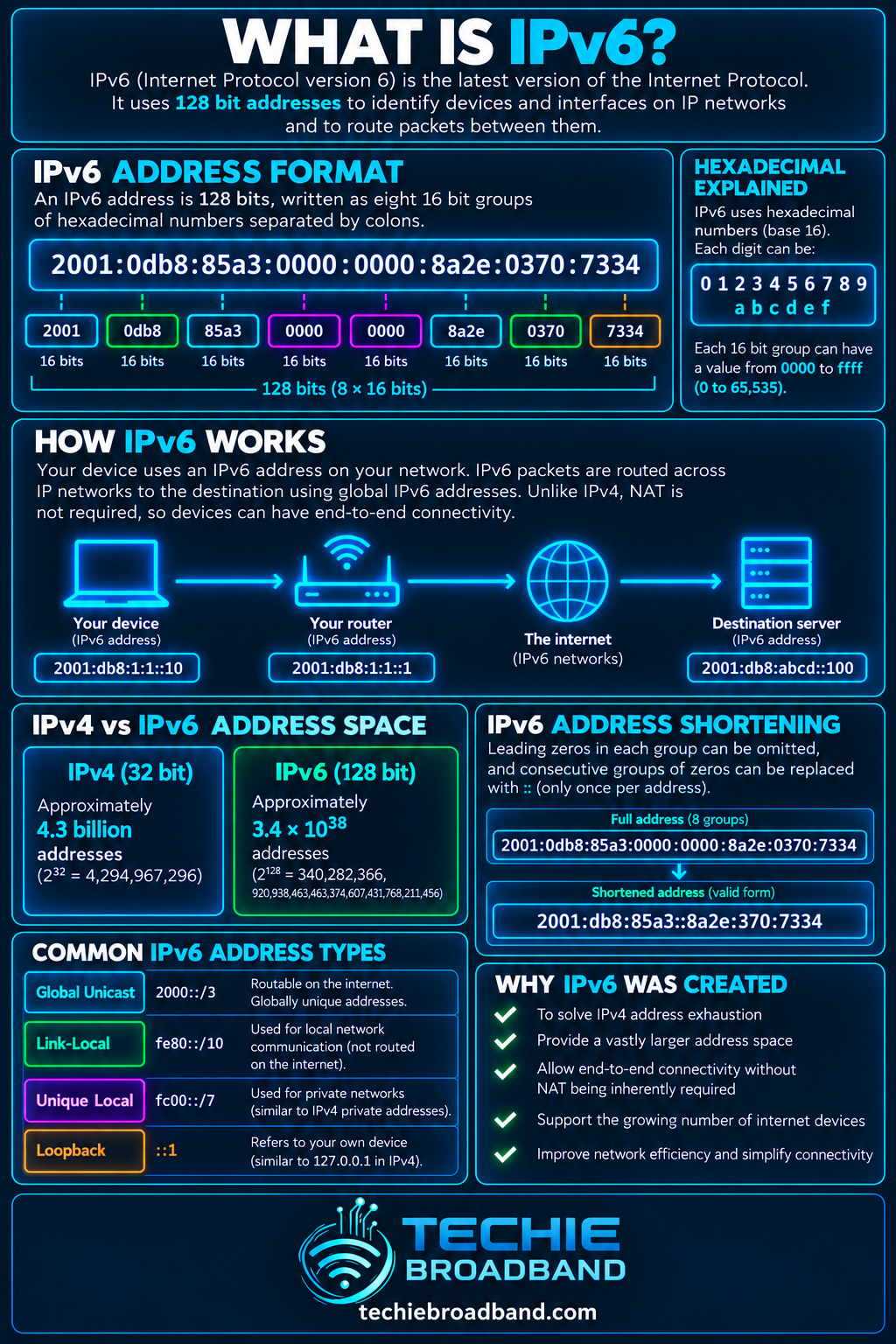
The infographic below summarises the 128-bit address space, IPv6 notation, a typical /64 subnet and the practical home broadband relationship between device, router and internet.
What does IPv6 actually do?
IPv6 provides addressing and packet delivery across interconnected IP networks. Each IPv6 packet carries 128-bit source and destination addresses so routers can forward it towards the intended destination. The core protocol is defined by RFC 8200, which describes IPv6 as the successor to IPv4 and increases the address size from 32 bits to 128 bits.
Like IPv4, IPv6 does not guarantee delivery, ordering or a particular performance level. Those properties depend on the wider protocol stack and network path. TCP, UDP and applications still sit above IP, while Ethernet, WiFi, FTTP and other access technologies sit below it.
Addressing: identifies IPv6 interfaces and destinations.
Routing: gives routers destination addresses they can use to forward packets.
Autoconfiguration: allows hosts to learn network information and form addresses automatically.
Multicast: replaces several functions that IPv4 commonly handles with broadcast.
Extension headers: provide a structured way to carry optional network-layer information.
How big is the IPv6 address space?
An IPv6 address is 128 bits long. That creates 2¹²⁸ possible bit patterns, approximately 3.4 × 10³⁸. By comparison, IPv4 uses 32 bits and therefore has 2³², or 4,294,967,296, possible values before reserved and special-purpose ranges are considered.
Techie Broadband calculation: dividing 2¹²⁸ by 2³² gives 2⁹⁶. The raw IPv6 address space therefore contains about 7.9 × 10²⁸ times as many possible values as the raw IPv4 address space. This comparison describes mathematical address-space size, not the number of addresses that can or should be assigned to end devices.
A common IPv6 LAN subnet uses a /64 prefix. A /64 leaves 64 bits after the network prefix, which means 2⁶⁴, or 18,446,744,073,709,551,616, possible interface-identifier values within that subnet. IPv6 subnet sizing is therefore not approached like IPv4 conservation.
How is an IPv6 address written?
IPv6 addresses are written in hexadecimal as eight 16-bit groups separated by colons. A full example is 2001:0db8:1234:5678:9abc:def0:1234:5678. The documentation prefix 2001:db8::/32 is reserved for examples, so it is useful for explaining notation without implying a real live address.
Leading zeros inside a group can be omitted, so 0db8 can be written db8.
One consecutive sequence of all-zero groups can be compressed using ::.
The :: compression can appear only once in an address because the omitted number of groups must remain unambiguous.
Prefix length uses CIDR notation such as /64, showing how many leading bits form the network prefix.
For example, 2001:db8:1234:5678::1 is a compressed representation of a 128-bit address. The text is shorter, but the underlying address is still exactly 128 bits.
What are the main IPv6 address types?
The IPv6 Addressing Architecture in RFC 4291 defines unicast, anycast and multicast addressing. IPv6 has no broadcast addresses; multicast replaces the functions that would otherwise require broadcast.
Global unicast: globally routable unicast addressing used for ordinary internet communication.
Link-local: addresses in fe80::/10 used for communication on the local link and essential to normal IPv6 operation.
Unique local: locally scoped addressing from fc00::/7, commonly implemented from the fd00::/8 locally assigned space, for networks that need non-global internal addressing.
Multicast: one-to-many delivery to a defined group of interfaces.
Anycast: the same address assigned to multiple interfaces, with routing delivering traffic to one of them according to the routing system's path selection.
An interface can hold several IPv6 addresses at the same time. A device may simultaneously have a link-local address, one or more global addresses and temporary privacy addresses.
How does IPv6 address configuration work?
IPv6 can configure hosts without an IPv4-style DHCP lease being required for every address. Stateless Address Autoconfiguration, defined by RFC 4862, allows a host to combine information advertised by a router with an interface identifier to form an address.
Router Advertisements are fundamental. They can tell hosts about prefixes, the default router and other network information. DHCPv6 can also be used where a network needs additional managed configuration, and the two approaches can coexist.
The interface creates a link-local IPv6 address.
The host listens for a Router Advertisement or sends a Router Solicitation.
The router advertises relevant prefix and configuration information.
The host forms one or more IPv6 addresses according to the advertised policy.
Duplicate Address Detection checks that a tentative address is not already in use on the link.
The host installs routes and can then use IPv6 where a suitable destination and path exist.
What is IPv6 prefix delegation?
On a broadband connection, the ISP can delegate an IPv6 prefix to the customer router. The router can then use that delegated space to create one or more LAN subnets rather than translating many private addresses behind a single scarce public IPv4 address.
The exact delegated prefix size is an ISP and product design choice. A /64 provides one conventional IPv6 subnet. A shorter delegated prefix, such as /56, contains 256 separate /64 subnets because eight bits remain available for subnetting. A /48 contains 65,536 /64 subnets because 16 bits remain for subnet selection.
Techie Broadband calculation: /56 to /64 leaves 8 subnet bits, so 2⁸ = 256 /64s. /48 to /64 leaves 16 subnet bits, so 2¹⁶ = 65,536 /64s. These are mathematical prefix calculations, not a claim that every UK ISP delegates /56 or /48.
Does IPv6 use NAT?
IPv6 does not require IPv4-style NAT for address conservation. The address space is large enough for normal networks to use globally unique addresses directly. That does not mean every device is automatically reachable from the public internet.
A stateful firewall can block unsolicited inbound connections while allowing return traffic for connections initiated from inside the network. This is the distinction that matters: NAT translates addresses; a firewall enforces traffic policy. Treating the two as interchangeable creates confusion when moving from IPv4 to IPv6.
IPv6-to-IPv6 Network Prefix Translation exists for specialised cases, but it is not the normal mechanism required to make ordinary IPv6 internet access work.
IPv6 vs IPv4: what actually changes?
Address length: IPv4 uses 32-bit addresses; IPv6 uses 128-bit addresses.
Notation: IPv4 is normally dotted decimal; IPv6 uses colon-separated hexadecimal.
Address conservation: IPv4 scarcity drove widespread private addressing, NAT and CGNAT; IPv6 is designed around a vastly larger address space.
Broadcast: IPv4 supports broadcast; IPv6 does not use broadcast addresses and relies on multicast instead.
Neighbour discovery: IPv6 uses ICMPv6 Neighbour Discovery rather than IPv4 ARP.
Autoconfiguration: IPv6 includes Router Advertisements and SLAAC as core deployment mechanisms.
DNS: IPv4 destinations are normally published in A records; IPv6 destinations are published in AAAA records.
Does IPv6 make broadband faster?
Not inherently. IPv6 changes addressing and packet handling, not the physical capacity of an FTTP, cable, mobile or fixed wireless connection. A 1 Gbps service does not become faster simply because traffic uses IPv6.
Real measurements can still differ between IPv4 and IPv6 because the two protocols may follow different routes, use different peering, terminate on different CDN infrastructure or encounter different network policies. If IPv6 is faster to one service, the useful conclusion is usually that the IPv6 path performed better, not that 128-bit addressing itself created extra bandwidth.
The same distinction applies to bandwidth, latency, jitter and packet loss. IPv6 can change the path and therefore the observed result, but it does not redefine those performance measures.
How do IPv4 and IPv6 work together?
The internet is still in a long coexistence period. A common approach is dual stack, where a device and network have both IPv4 and IPv6 connectivity. DNS can return both A and AAAA records, and the client chooses an address family and destination.
Modern clients can use the Happy Eyeballs approach in RFC 8305 to reduce user-visible delays when one address family or path is broken or slower to establish. It can race connection attempts while preferring IPv6 according to the host's policy.
IPv6-only networks can still reach IPv4-only services through transition mechanisms. NAT64 translates between IPv6 and IPv4, while DNS64 can synthesise IPv6 DNS answers for IPv4-only destinations. These mechanisms solve coexistence problems but are different from native dual-stack connectivity.
What does IPv6 mean for UK broadband?
For UK broadband, IPv6 availability is not determined by FTTP, FTTC, cable or an altnet label alone. It depends on the retail ISP, the underlying access network, the specific product, the router or customer equipment and how the service is configured. Two customers using similar fibre access can therefore have different IPv6 capabilities.
A provider may supply native IPv6 alongside IPv4, use dual stack, delegate a prefix to the router, or not provide residential IPv6 on a particular service. The access technology tells you how the broadband reaches the premises; it does not by itself tell you the IP addressing model.
This matters particularly for technically demanding users running servers, VPNs, homelabs, remote access or advanced routing. A service's IPv6 prefix policy, firewall controls, static or stable delegation behaviour and router support can matter just as much as headline download speed.
IPv6 and home network security
A globally unique IPv6 address should not be confused with an automatically exposed device. The security control is the firewall policy. A properly configured home router will normally maintain state and reject unsolicited inbound traffic unless the user deliberately permits it.
Do not disable the IPv6 firewall merely to make an application work.
Create specific inbound firewall rules only where needed.
Keep router and endpoint software updated.
Remember that each device can have multiple IPv6 addresses.
Do not assume an IPv4 port forwarding guide maps directly to IPv6. With native IPv6, the usual task is permitting traffic through the firewall to the destination address, not translating a public port to a private IPv4 address.
How can you tell whether your broadband has working IPv6?
Check the router WAN or internet status page for an IPv6 address and a delegated prefix.
Check a connected device for a non-link-local IPv6 address. An fe80:: address alone only proves local-link IPv6.
Confirm the router has installed an IPv6 default route.
Resolve a known dual-stack hostname and confirm that an AAAA record is returned.
Test IPv6 connectivity to a known IPv6-capable destination.
Compare IPv4 and IPv6 behaviour separately rather than relying on one generic speed test.
If the router has no delegated prefix or WAN IPv6 information, first confirm that the ISP and exact broadband product actually provide IPv6. If they do, check whether the router requires IPv6, DHCPv6 Prefix Delegation or an ISP-specific WAN mode to be enabled.
IPv6 troubleshooting: a practical diagnostic sequence
Confirm scope: determine whether IPv6 is absent completely or only failing for one device, application or destination.
Check the WAN: verify that the router has IPv6 connectivity from the ISP.
Check prefix delegation: confirm the router has received usable IPv6 space for the LAN.
Check Router Advertisements: clients need correct network information to configure and route IPv6 normally.
Check the client address: distinguish link-local fe80:: addressing from usable global addressing.
Check DNS: verify that AAAA records resolve where expected.
Check routing: confirm a default IPv6 route and, where useful, compare IPv4 and IPv6 traceroutes.
Check firewall policy: make sure ICMPv6 and required application traffic are not being blocked incorrectly.
Test another device: this separates a local operating-system issue from a router or ISP issue.
Test another destination: one broken IPv6 service does not prove the broadband connection's IPv6 is broken.
ICMPv6 deserves particular care. IPv6 relies on ICMPv6 for functions including Neighbour Discovery and Path MTU Discovery. Blocking ICMPv6 indiscriminately can therefore break connectivity in ways that are less obvious than simply blocking ping.
Common IPv6 misconceptions
“IPv6 is automatically faster.” False. Performance depends on the end-to-end path.
“IPv6 means every device is exposed.” False. Global addressing and firewall policy are separate concepts.
“IPv6 does not need a firewall because there is no NAT.” False. NAT and firewalling solve different problems.
“An fe80:: address means I have IPv6 internet.” False. It proves link-local IPv6 exists on that interface.
“IPv6 replaces DNS.” False. DNS remains essential and uses AAAA records for IPv6 destinations.
“IPv4 disappears as soon as IPv6 is enabled.” False. Dual stack allows both to operate together.
IPv6 privacy addresses
Because IPv6 devices can use globally unique addresses, operating systems may create temporary addresses for outbound connections so the interface identifier used for general client traffic changes over time. This reduces the usefulness of a stable interface identifier for correlating activity across networks.
Temporary addresses do not make browsing anonymous. Websites and services can still use accounts, cookies, browser characteristics and many other signals. IPv6 privacy addressing is an address-management feature, not a complete privacy system.
Key takeaway
IPv6 is the 128-bit successor to IPv4. Its huge address space removes the need to conserve public addresses through IPv4-style sharing, while introducing an addressing and autoconfiguration model built around prefixes, Router Advertisements, multicast and direct end-to-end routing.
For a UK broadband user, the practical questions are whether the exact ISP product provides native IPv6, what prefix is delegated, whether the router handles it correctly, how the firewall is configured and whether the services you use are reachable over IPv6. IPv6 should be judged as part of the complete broadband service, not as a speed badge.
IPv6 FAQs
What does IPv6 stand for?
IPv6 stands for Internet Protocol version 6, the successor to IPv4.
How many bits are in an IPv6 address?
An IPv6 address is 128 bits long.
How many IPv6 addresses are possible?
The 128-bit address space contains 2¹²⁸ possible values, approximately 3.4 × 10³⁸.
Does IPv6 need NAT?
IPv6 does not require IPv4-style NAT for address conservation. Firewall policy still controls inbound traffic.
Is IPv6 faster than IPv4?
Not inherently. The IPv4 and IPv6 paths can perform differently, but IPv6 does not itself add broadband capacity.
Can IPv4 and IPv6 run together?
Yes. Dual-stack networks provide both protocols and let clients use either as appropriate.
Does an IPv6 address make my device public?
A global IPv6 address is globally routable in addressing terms, but actual inbound reachability still depends on routing and firewall policy.
What is an IPv6 /64?
A /64 uses the first 64 bits as the network prefix and leaves 64 bits for the interface identifier portion of the address.
Why do I have more than one IPv6 address?
An interface can simultaneously use link-local, global and temporary privacy addresses, so multiple IPv6 addresses are normal.
How do I know if my ISP supports IPv6?
Check the exact broadband product and router status. Working service normally shows WAN IPv6 information, a delegated prefix for the LAN and successful connectivity to IPv6 destinations.
To explore the related technical concepts used in this IPv6 guide, visit our broadband terminology guide.
