
What is DHCP (Dynamic Host Configuration Protocol)?
Updated: 3 days ago

DHCP, or Dynamic Host Configuration Protocol, automatically gives devices the IP configuration they need to communicate on an IP network. On a typical home broadband LAN, the router's DHCP server leases an IPv4 address and can also provide the subnet mask, default gateway and DNS server addresses. The key distinction is that DHCP supplies configuration; it does not route packets, translate addresses or resolve domain names.
What problem does DHCP solve?
Without DHCP, every client would need suitable network settings entered manually. That is manageable for a tiny static environment, but error-prone once phones, laptops, TVs, consoles, smart-home devices and guests repeatedly join and leave a network.
DHCP uses a client-server model. A DHCP server manages address allocation and configuration information, while a DHCP client asks for the parameters it needs. RFC 2131 defines the core DHCPv4 protocol and describes automatic allocation of reusable network addresses alongside delivery of configuration parameters.
How DHCP works: Discover, Offer, Request, Acknowledge
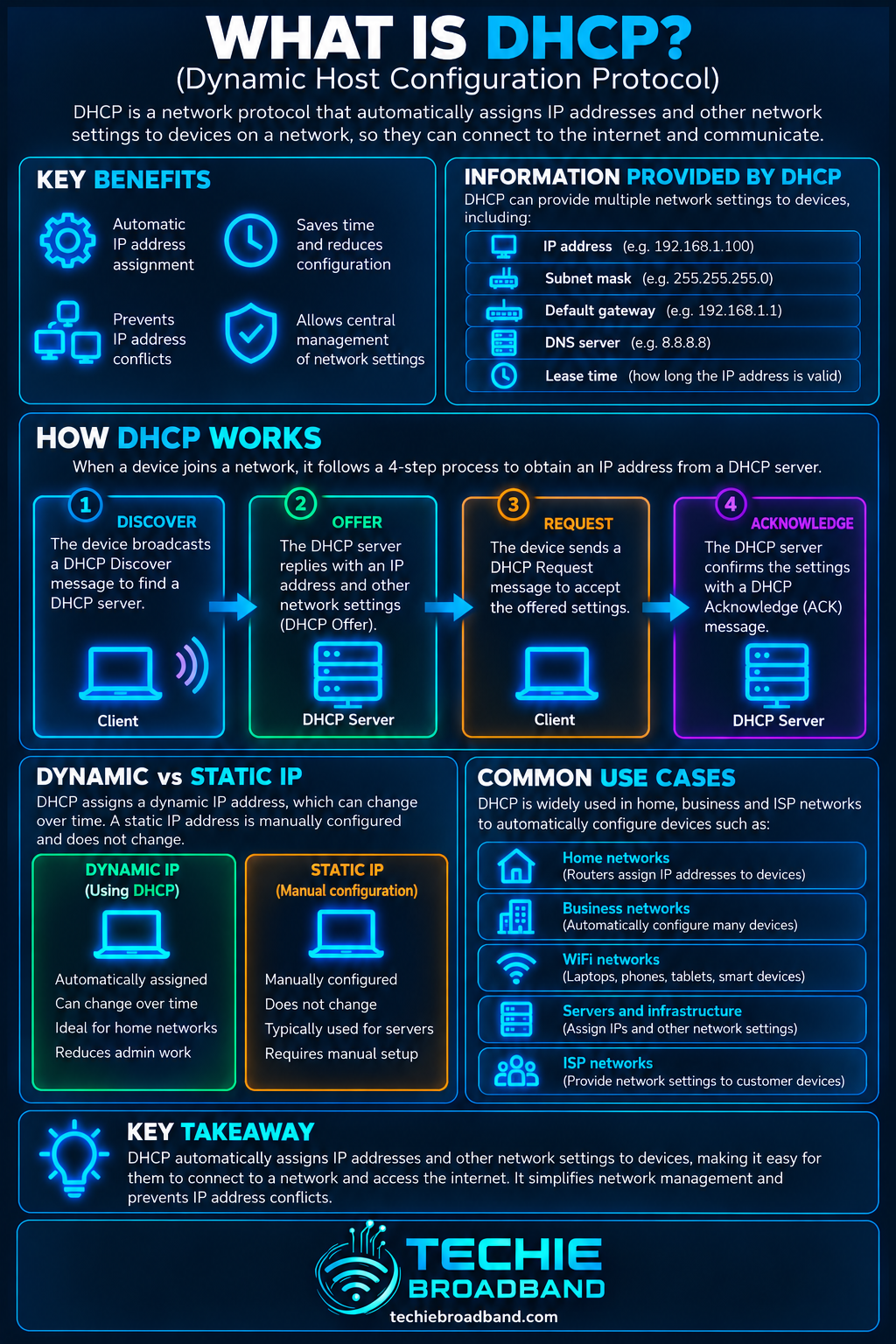
The familiar DHCPv4 exchange is often shortened to DORA. It is a useful teaching model for a client obtaining a new lease, although DHCP also defines other messages and different exchanges for renewal, rebinding, release, decline and information requests.
DHCPDISCOVER: a client that does not yet know its network configuration sends a discovery message to locate available DHCP servers.
DHCPOFFER: a server can offer an address and associated configuration to the client.
DHCPREQUEST: the client requests the selected offered configuration and identifies the server it has chosen.
DHCPACK: the selected server confirms the configuration and lease. The client can then configure the interface, subject to the protocol's normal checks and state transitions.
DHCPv4 uses UDP. RFC 2131 assigns server port 67 and client port 68. Initial exchanges need special broadcast behaviour because the client may not yet have a usable IP address or know the server address.
What information can DHCP provide?
DHCP is not just an automatic IP-address dispenser. Its options mechanism can carry many configuration parameters. Common home-network examples include:
IPv4 address: the address leased to the client.
Subnet mask: DHCP option 1 in RFC 2132.
Router or default gateway: DHCP option 3 can supply router addresses on the client's subnet.
DNS servers: DHCP option 6 can supply Domain Name System server addresses.
Lease timing: DHCP communicates the lease duration and renewal/rebinding timing information.
Other options: DHCP supports many additional parameters, depending on the network and client.
The subnet mask and gateway matter for different reasons: the prefix tells the client what is local, while the gateway is a next hop for off-link traffic. DNS is yet another function.
DHCP lease: why the address is not necessarily permanent
A dynamically allocated IPv4 address is normally leased rather than permanently assigned. The server records the allocation for a defined period, and the client attempts to renew it before expiry. This lets addresses be reused as devices leave and join the network.
A lease does not mean an address must change every time it is renewed. A server can continue leasing the same address to a client. Equally, a device should not assume that a dynamically assigned address is permanent simply because it has remained unchanged for months.
DHCP lease renewal and rebinding
RFC 2131 describes renewal and rebinding states. A client normally first tries to renew with the server that supplied the lease. If that does not succeed, it can later broaden the attempt during rebinding so another suitable server can respond.
The important operational point is that a device can remain online while renewing a valid lease. DHCP is not necessarily a four-message DORA exchange every time a lease timer moves.
DHCP address allocation types
Dynamic allocation: the server leases an address for a limited period and can later reuse it.
Automatic allocation: the server assigns an address permanently from its pool.
Manual allocation: an administrator determines the client's address and DHCP communicates it to the client.
Home routers overwhelmingly present DHCP as a convenient automatic LAN service, but the protocol is capable of more controlled allocation models.
DHCP reservation vs static IP address
A DHCP reservation and a manually configured static address can produce the same visible result: a device repeatedly using the same IPv4 address: but they are administered differently.
DHCP reservation: the DHCP server is configured to offer a particular address to a particular client identity. The client can remain configured for DHCP and still receive predictable settings.
Static address on the device: the address, subnet prefix, gateway and DNS settings are entered locally on the client, so the device does not depend on DHCP for those values.
For many home networks, reservations are easier to manage because addressing remains centralised on the router. Static configuration still has valid uses, but it creates a responsibility to avoid the DHCP pool or otherwise ensure that the server cannot lease the same address to another client.
Techie Broadband: treat the DHCP lease as a configuration bundle
A useful diagnostic mistake to avoid is checking only whether a device has an IP address. A plausible-looking address does not prove the rest of the configuration is correct.
Treat the lease as a bundle: client address + subnet information + gateway + DNS + lease state. A wrong value in any one of those can produce a different symptom. This gives a faster diagnostic sequence than repeatedly reconnecting WiFi and hoping DHCP was the problem.
Worked home-network example
Assume a home router uses 192.168.1.1/24 and operates a DHCP pool from 192.168.1.100 to 192.168.1.199. A new laptop might receive 192.168.1.101, subnet mask 255.255.255.0, router 192.168.1.1 and one or more DNS server addresses.
That client address is not the same thing as the router address. The /24 prefix defines the local 192.168.1.0/24 network, while the gateway identifies the router used for traffic leaving that local subnet.
The infographic below shows the DORA exchange and the configuration bundle a DHCP lease can deliver.
DHCP and private IPv4 addresses
Home DHCP servers commonly allocate addresses from RFC 1918 private IPv4 space. These addresses are intended for private internets and are not globally unique public internet addresses.
The broadband router may then use NAT between the private LAN and an upstream IPv4 connection. DHCP and NAT are separate: DHCP configures clients, while NAT translates addresses or ports across a boundary.
DHCP vs DNS
DHCP supplies configuration. DNS maps names to addresses and other DNS data. DHCP can tell a client which DNS resolver to use, but DHCP does not itself resolve a hostname such as example.com.
This distinction is useful when troubleshooting. A client can have a perfectly valid DHCP lease but fail name lookups because its DNS configuration or resolver is unavailable.
DHCP vs default gateway
DHCP can provide the address of a router, but the DHCP server and the default gateway do not have to be the same system. Consumer routers often perform both roles, which hides the distinction.
The default gateway participates in packet forwarding. DHCP's role is to communicate the configuration that tells the client which gateway to use.
DHCP vs subnet mask
The subnet mask defines the IPv4 network/host boundary. DHCP option 1 can deliver that mask to a client. DHCP does not create the subnet merely by sending the value; the subnet is part of the network design and routing configuration.
DHCP vs NAT and firewalling
DHCP is not a security boundary. A firewall controls traffic according to policy, while NAT performs address translation. A device obtaining a lease says nothing by itself about whether traffic will be permitted or translated.
DHCP relay: why the server does not need to be on every subnet
Initial DHCP clients use broadcasts that routers would not normally forward between IP subnets. DHCP relay solves this by forwarding DHCP information between clients and a server on another network.
This matters more in business and larger routed networks than in a simple flat home LAN. A single DHCP service can support multiple subnets when routers or relay agents are configured appropriately.
What happens if there are two DHCP servers?
Multiple DHCP servers are not inherently wrong; resilient enterprise designs can deliberately use more than one. The problem is an unintended or incorrectly configured server answering clients with the wrong address range, gateway or DNS information.
On a home network, this can happen after connecting a second router LAN-to-LAN without disabling its DHCP service. Different clients can then receive offers from different servers, producing intermittent and confusing behaviour.
What is a rogue DHCP server?
A rogue DHCP server is an unauthorised or unintended server that supplies configuration to clients. It can be accidental, such as a misconfigured router, or malicious. Because DHCP influences addressing, gateways and DNS configuration, a rogue server can disrupt connectivity or redirect traffic paths.
What happens when DHCP fails?
The symptom depends on the client and operating system. A device may retain an existing valid lease for a time, fail to obtain new configuration, or fall back to a link-local mechanism. Seeing an address is therefore not enough to prove that normal DHCP succeeded.
On IPv4 networks, some systems can self-assign a link-local address in 169.254.0.0/16 when normal configuration is unavailable. That can permit limited communication on the local link, but it is not a normal routed home-LAN lease and is a strong clue that DHCP or upstream configuration needs investigation.
Why DHCP can appear to work when the internet does not
The client received an address but the gateway is wrong or unreachable.
The lease supplied unusable DNS servers.
The router's WAN connection is down even though its LAN DHCP server is healthy.
A firewall or routing problem blocks traffic after local configuration succeeds.
A second DHCP server supplied settings for the wrong network.
A VPN or virtual adapter installed routes that change the active path.
This is why ‘I got an IP address’ and ‘my broadband works’ are different statements.
DHCP and WiFi are separate
WiFi association and DHCP occur at different stages. A device can successfully join a wireless network at the link layer and then fail to obtain DHCP configuration. Conversely, a valid lease does not prove that the WiFi link is fast, stable or free from packet loss.
DHCP on Ethernet
The same principle applies on wired Ethernet. Once the link is up, a client configured for DHCP can request IP configuration. A working Ethernet link light or negotiated 1 Gbps/2.5 Gbps interface rate does not prove that DHCP, routing or DNS is correct.
DHCP and IPv6
DHCPv4 is not the whole story for IPv6. IPv6 hosts can learn network information through Router Advertisements and Stateless Address Autoconfiguration, and DHCPv6 can provide stateful addresses or other configuration depending on the network design.
Do not assume that an IPv6 device must obtain its default gateway from DHCPv6. IPv6 default-router information comes from Router Advertisements/Neighbor Discovery, not the DHCPv6 default-router option model familiar from DHCPv4.
DHCP in UK home broadband
For most UK households, DHCP is visible in two different places. On the LAN side, the home router commonly acts as the DHCP server for local devices. On the WAN side, the method the router uses to obtain broadband configuration depends on the ISP, access network and retail product.
Some broadband services use DHCP/IPoE on the WAN, while others use PPPoE or other provisioning arrangements. Do not infer the WAN method merely because the router uses DHCP for devices inside the home.
DHCP with a BYO router
When replacing an ISP-supplied router, preserve the distinction between WAN and LAN DHCP. Your own router can run a fresh DHCP server for the home LAN regardless of how its WAN interface authenticates or receives upstream configuration.
If the replacement router obtains no WAN address, check the exact ISP requirements rather than changing the LAN DHCP pool at random. VLAN tagging, PPP credentials, DHCP options, authentication and ONT/modem hand-off requirements vary by service.
DHCP and guest or IoT networks
A guest WiFi or IoT VLAN commonly uses a different IP subnet and therefore a different DHCP scope. This lets the router or firewall apply routing and security policy between network segments.
The DHCP scope should match the subnet it serves. If a VLAN carries 192.168.20.0/24 but clients are offered a gateway or mask for another network, they can receive leases yet still fail to communicate correctly.
DHCP pool sizing: a simple Techie Broadband calculation
Suppose a /24 home subnet uses 192.168.50.0/24. There are 256 IPv4 values in the block. In a conventional multi-access subnet, .0 is the network address and .255 the broadcast address, leaving 254 ordinary host addresses.
If the router reserves .1 for itself and the DHCP pool is .100 through .199 inclusive, the dynamic pool contains 100 addresses. That is independent of the total 254 conventional host addresses available in the /24. Pool size and subnet size are related, but they are not the same number.
Lease duration and address pressure
A shorter lease can allow abandoned addresses to return to the available pool sooner, while a longer lease reduces how often clients need to renew. There is no universal best lease time: it depends on client churn, pool size, network policy and operational requirements.
For a normal home network with a large private subnet and relatively few devices, address exhaustion is rarely caused by the theoretical IPv4 subnet size. It is more useful to check the configured DHCP pool and active leases.
Common DHCP mistakes
Running two unintended DHCP servers on the same LAN.
Creating a DHCP pool that overlaps manually assigned static addresses.
Supplying the wrong default gateway or subnet mask.
Assuming a reserved address and a locally static address are identical management methods.
Changing LAN DHCP settings to troubleshoot a WAN authentication problem.
Assuming DHCP failure because DNS is broken.
Assuming DHCP succeeded merely because the device displays an IPv4 address.
Treating DHCPv4 and DHCPv6 as the same configuration model.
DHCP troubleshooting workflow
Record the client's address, subnet mask or prefix, gateway, DNS servers and lease information.
Check whether the address belongs to the expected subnet and DHCP pool.
If the address is 169.254.x.x on IPv4, investigate why normal configuration was not obtained.
Check the physical Ethernet link or WiFi association separately from IP configuration.
Confirm the expected DHCP server is active and the available pool is not exhausted.
Look for a second router, access point in router mode, virtualisation platform or other unintended DHCP server.
Renew the lease and inspect whether Discover, Offer, Request and Acknowledge messages occur where packet capture is practical.
Check VLAN membership and DHCP relay configuration on routed or segmented networks.
Test the gateway by IP address, then test a remote IP address, then test DNS resolution. This separates local configuration, routing and name resolution.
For WAN problems on a BYO router, verify the ISP's exact access and authentication requirements rather than assuming LAN DHCP is responsible.
Authoritative standards behind DHCP
The core DHCPv4 behaviour is defined in RFC 2131. DHCP options including subnet mask, router and DNS server information are defined in RFC 2132. These are protocol specifications rather than vendor-specific descriptions.
Frequently asked questions
What does DHCP stand for?
DHCP stands for Dynamic Host Configuration Protocol.
What does DHCP do?
DHCP automatically supplies IP configuration to clients. On an IPv4 home network that commonly includes an address, subnet mask, default gateway and DNS server information.
Is DHCP the same as an IP address?
No. DHCP is a protocol used to allocate addresses and deliver configuration. An IP address is one of the values a DHCP server can provide.
Should DHCP be enabled on a home router?
Usually yes for the main LAN, because it lets ordinary client devices configure themselves automatically. More complex networks may centralise DHCP elsewhere, but two unintended DHCP servers on one LAN can cause problems.
Does DHCP give you a public IP address?
It depends which interface and network are being configured. A home router commonly gives private IPv4 addresses to LAN clients. An ISP may separately use DHCP on the WAN side to configure the router with upstream addressing.
Can DHCP give the same IP address every time?
Yes. A server can repeatedly lease the same address, and an administrator can configure a reservation so a client predictably receives a chosen address.
Does DHCP configure DNS?
DHCP can provide DNS server addresses to clients. DNS itself remains a separate protocol and service.
Does IPv6 use DHCP?
IPv6 can use DHCPv6, but IPv6 also uses Router Advertisements and SLAAC. In particular, IPv6 default-router information is learned through Router Advertisements rather than a DHCPv6 default-gateway option.
Key takeaway
DHCP is the automation layer that turns a connected interface into a correctly configured IP client. The most useful way to understand it is not as ‘the thing that gives me an IP address’, but as a lease and configuration system. When troubleshooting, inspect the whole configuration bundle and then separate DHCP from WiFi, routing, DNS, NAT, firewalling and the broadband WAN.
To explore the related technical concepts used in this DHCP (Dynamic Host Configuration Protocol) guide, visit our broadband terminology guide.
