
What is DPI (Deep Packet Inspection)?
Updated: 3 days ago

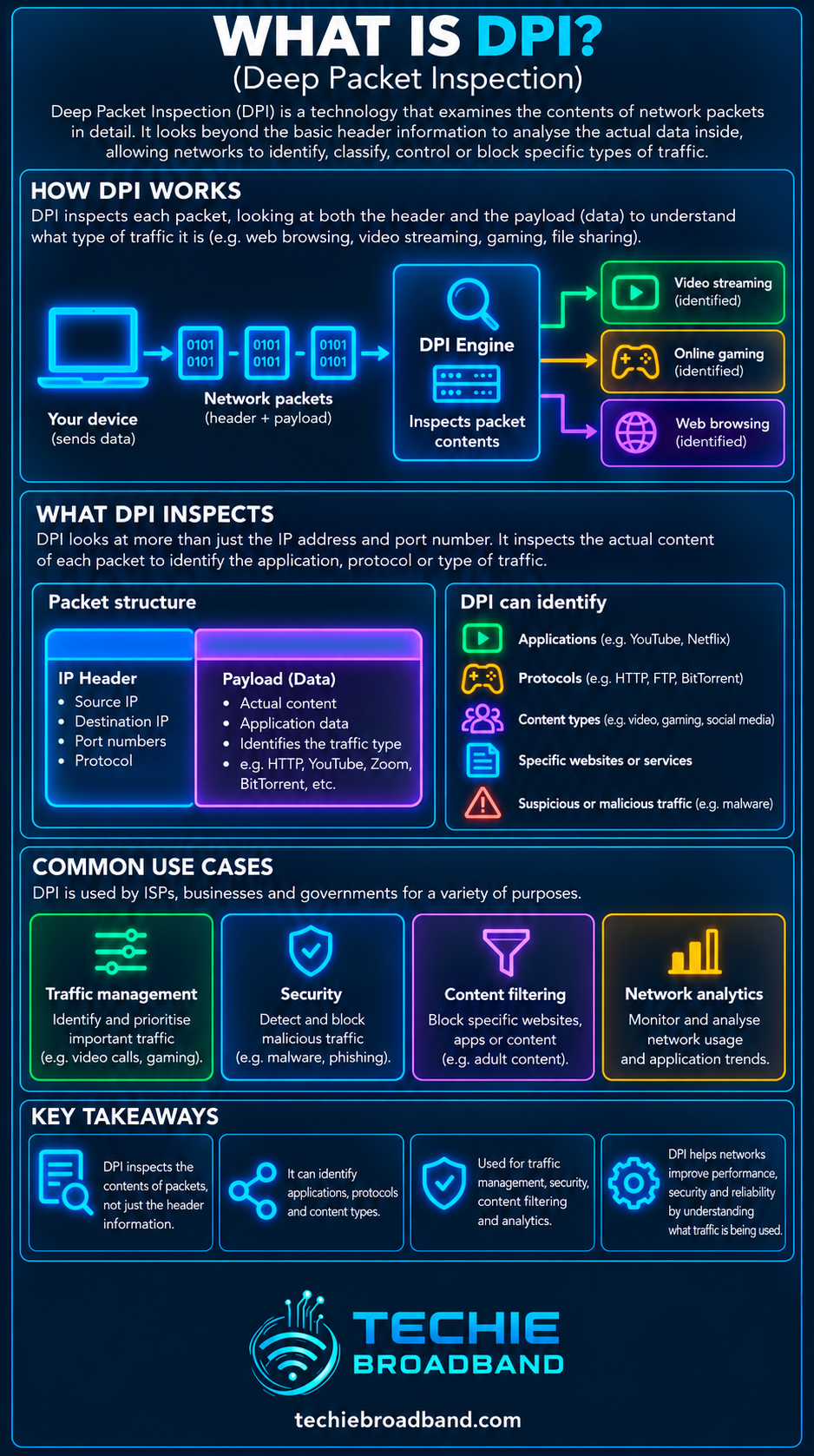
Deep Packet Inspection (DPI) is network traffic analysis that looks beyond basic addressing information such as IP addresses and port numbers to identify characteristics of the protocol, application, flow or visible packet payload. It matters because DPI can give networks much richer visibility than ordinary packet forwarding, but encryption, privacy rules, processing cost and where inspection takes place all limit what it can actually see and do.
The most important distinction is that DPI is not simply ‘reading everything you do online’. The IETF describes DPI broadly as packet analysis beyond IP address and port number, while ETSI describes its use for identifying Layer 4 to Layer 7 characteristics of packets or flows. Modern encrypted traffic means payload content is often unavailable to an ordinary on-path observer even though useful metadata and traffic patterns may remain visible.
What is Deep Packet Inspection?
Deep Packet Inspection is a family of techniques used to examine network traffic in more detail than conventional forwarding needs. A normal router can forward an IP packet using destination addressing and routing information without understanding the application inside it. A DPI system tries to classify or analyse more of the traffic.
Depending on the implementation and whether traffic is encrypted, DPI may examine or infer:
IP and transport-layer header fields.
TCP or UDP ports, flags and connection state.
Application protocol signatures and message structure.
Visible payload content in unencrypted traffic.
Packet sizes, directions, timings and flow behaviour.
Patterns that help classify an application even when a conventional port number is not reliable.
Security signatures or policy conditions used by firewalls, intrusion prevention and data-loss controls.
NIST SP 800-215 distinguishes DPI from stateful inspection by describing DPI as examination of packet content, including header and payload, while stateful inspection focuses on connection state and packet-header information.
How DPI works
There is no single universal DPI algorithm. Commercial and open systems combine different techniques according to their purpose, performance target and the traffic they expect to encounter. A typical process looks like this:
Capture or receive traffic at an inspection point, either inline or from a mirrored copy.
Parse packet headers and associate packets with a flow or session.
Reassemble enough of the flow where necessary to understand protocol behaviour across multiple packets.
Classify the protocol or application using ports, signatures, message formats, heuristics and flow characteristics.
Inspect visible content or metadata against security, policy or measurement rules.
Record, alert, allow, block, rate-limit, redirect or otherwise act according to the system's role and policy.
The action stage is separate from inspection itself. A passive monitoring platform may only classify and record. An inline firewall or policy enforcement system may be able to block or modify treatment. This distinction matters when somebody says a network ‘uses DPI’ without explaining what happens after traffic is identified.
DPI compared with ordinary packet inspection
The word ‘deep’ describes how far analysis goes beyond the minimum information needed to move packets. It does not correspond to one fixed OSI layer boundary.
Basic IP forwarding: primarily needs network-layer addressing and routing information.
Port-based classification: uses transport-layer information such as TCP or UDP ports.
Stateful inspection: tracks connection state and checks packets in the context of an established flow.
Deep Packet Inspection: can combine headers, state, application signatures, payload patterns and flow behaviour to classify or analyse traffic more deeply.
This is why describing every firewall as DPI is inaccurate. Some devices perform simple filtering, some are stateful, and others include application-aware inspection, intrusion prevention, TLS inspection or several of these functions together.
What can DPI actually see?
Visibility depends on the protocol, encryption, inspection position and whether the operator controls either endpoint. On clear-text traffic, application data can potentially be visible to an on-path DPI system. With correctly implemented end-to-end encryption, the application payload is protected from ordinary intermediate inspection.
Encryption does not make a flow invisible. Network devices still need enough information to route packets, and observable characteristics can include source and destination IP addresses, packet lengths, direction, timing, volume and connection patterns. Some protocol metadata can also remain exposed depending on the protocol and configuration.
NIST's TLS visibility guidance explains why encrypted traffic changes enterprise network monitoring and why organisations that require inspection may use controlled architectures that terminate or decrypt TLS inside environments they manage. That is materially different from an unrelated ISP simply being able to read arbitrary HTTPS payloads in transit.
DPI and HTTPS encryption
HTTPS normally protects HTTP application content using TLS. An ISP carrying an ordinary HTTPS session can route the encrypted packets and observe network metadata, but it cannot simply read the protected web-page contents from those ciphertext packets.
There are environments where encrypted traffic is deliberately decrypted for inspection. A managed business network might install a trusted enterprise certificate on managed devices and terminate TLS through an inspection gateway before creating a separate encrypted connection onward. That gives the organisation visibility into traffic it is authorised to manage, but it changes the trust model and creates security, privacy and operational responsibilities.
Newer encryption also reduces some traditional visibility. TLS 1.3 changed enterprise monitoring assumptions, while encrypted DNS technologies can hide DNS query content from network observers that are not the selected resolver. DPI therefore increasingly combines the signals that remain observable rather than assuming every payload is readable.
What is DPI used for?
DPI is a technique, not a purpose. The same ability to classify traffic can support legitimate security and operational functions or more controversial surveillance and censorship functions. Context and governance matter.
Network security: intrusion detection and prevention, malware signatures, protocol validation and threat analysis.
Application identification: recognising traffic that does not reliably use one fixed port.
Traffic management: identifying classes of traffic so a separate policy can shape, prioritise or rate-limit them where lawful and appropriate.
Network analytics: understanding application mix, traffic patterns and capacity demand.
Enterprise policy: controlling applications or data flows on networks and devices the organisation manages.
Data loss prevention: identifying sensitive information or prohibited transfers where content inspection is technically and legally available.
Censorship and filtering: identifying content or services for blocking, a use documented by the IETF in its survey of censorship techniques.
DPI, traffic shaping and QoS are not the same thing
DPI identifies or analyses traffic. What the network does with that classification is a separate decision. This distinction is important in broadband discussions.
Traffic shaping controls the rate or timing of traffic to fit a policy or capacity limit.
Traffic Prioritisation Quality of Service (QoS) changes how competing traffic is treated when resources are busy.
Network congestion describes demand exceeding available capacity at a resource for long enough to create queues, delay or loss.
DPI can supply a traffic classification to any of those systems, but DPI by itself does not create bandwidth, reduce latency or shape traffic.
A network can also prioritise traffic without DPI. It might use DSCP markings, subscriber policy, interface information, VLANs, known endpoints or explicit application signalling. Conversely, a DPI platform can classify traffic purely for security analytics without applying any QoS treatment.
DPI and UK net neutrality
For UK broadband users, technical capability is not the same as regulatory permission. Ofcom is responsible for monitoring compliance with the UK's net neutrality framework, which protects equal and non-discriminatory treatment of internet access traffic while allowing defined forms of reasonable traffic management and other permitted measures.
Ofcom's current net neutrality information says the rules govern how broadband and mobile providers manage data traffic. Ofcom's revised guidance gives providers room for measures such as congestion management and certain specialised services, but that does not mean an ISP has unrestricted permission to inspect, discriminate between or monetise customers' communications.
Privacy law creates a separate layer of obligations. The ICO's guidance on traffic data explains that traffic data includes information processed for conveying a communication or billing, including routing, duration and timing, and that its processing is limited to specified purposes. The legal position depends on exactly what data is processed, why, and under which legal framework, so DPI should not be treated as one simple yes-or-no privacy category.
Does your UK broadband provider use DPI?
You cannot reliably answer that question from a speed test, traceroute or the presence of CGNAT. Providers may use different traffic-analysis and security systems in different parts of their networks, and public documentation may describe outcomes rather than the exact inspection technology.
If a provider makes a specific claim about traffic management, security filtering or application treatment, check the current contract information, traffic-management policy and privacy notice for the exact retail product. The relevant combination is ISP + access network + product + location. Do not assume every service sold under one brand uses identical network policy.
Can DPI slow down a broadband connection?
It can if the inspection platform becomes a processing bottleneck, but the existence of DPI does not automatically mean a connection is slower. Inline systems must classify traffic at the rate they are expected to carry, while passive systems can analyse a mirrored copy without sitting directly in the forwarding path.
ETSI's DPI acceleration use case explicitly discusses the processing demands of identifying Layer 4 to Layer 7 characteristics and the use of acceleration to improve efficiency. On modern multi-gigabit networks, the important engineering questions include throughput under inspection, concurrent flows, packet rate, enabled signatures, encryption handling and whether hardware acceleration is available.
If an inline appliance can forward 5 Gbps without inspection but only 1 Gbps with every security engine enabled, a 2.5 Gbps broadband service could be bottlenecked by that appliance. That is a practical example, not a claim about a particular product. Always use the vendor's tested performance for the exact enabled feature set.
Techie Broadband calculation: why packet rate matters
DPI performance is not determined by Gbps alone. The same bit rate can contain very different numbers of packets, and every packet may require parsing, classification or state lookup.
Techie Broadband theoretical calculation: at 1 Gbps of IP traffic, ignoring lower-layer overhead, 1,500-byte packets represent about 83,333 packets per second because 1,000,000,000 ÷ (1,500 × 8) ≈ 83,333. If packets averaged 100 bytes, the same 1 Gbps would represent about 1.25 million packets per second.
That is roughly 15 times as many packets for the DPI engine to process at the same bit rate. Real Ethernet packet rates depend on framing, inter-packet gap, encapsulation and packet-size distribution, so these figures are deliberately labelled as an IP-layer theoretical comparison rather than wire-rate performance.
The practical lesson is that a firewall advertised for ‘multi-gigabit’ throughput still needs to be evaluated against the traffic profile and inspection features you intend to enable.
DPI, VPNs and encrypted tunnels
A VPN changes what an intermediate network can inspect. Between the VPN client and VPN endpoint, the original traffic is encapsulated inside an encrypted tunnel. The broadband provider can normally still observe the outer connection to the VPN endpoint, traffic volume, packet sizes and timing, but not the original application payload inside a correctly encrypted tunnel.
The VPN provider or destination-side network occupies a different observation point, so a VPN does not make traffic universally invisible. It changes who can observe which part of the path and which metadata remains available.
DPI and CGNAT are different
Carrier Grade NAT and Deep Packet Inspection solve different problems. CGNAT translates private customer addresses and ports onto shared public IPv4 addresses. DPI analyses traffic characteristics. A network can use one, both or neither.
Neither the presence of CGNAT nor a shared public IPv4 address proves that DPI is being used. Likewise, DPI does not require CGNAT.
How to investigate suspected traffic classification or DPI
A home user usually cannot prove the internal mechanism an ISP uses from outside the network, but you can test whether a repeatable traffic-dependent behaviour exists before jumping to conclusions.
Establish a wired baseline so WiFi is not confused with an ISP-side effect.
Record download speed, upload speed, latency, jitter and packet loss when the connection is otherwise quiet.
Repeat the test with multiple reputable destinations and protocols.
Compare the same application at different times of day to separate application-specific behaviour from peak-time congestion.
Where appropriate and lawful, compare behaviour with and without a reputable VPN. A change can be a clue, but it is not proof of DPI because the VPN also changes routing, endpoints, MTU and congestion conditions.
Check the provider's current traffic-management policy, privacy notice and product terms for disclosed filtering, prioritisation or security services.
Use packet capture on your own devices or network where appropriate to understand protocol behaviour, retransmissions and connection resets.
Only attribute the result to DPI when simpler explanations such as WiFi, routing, congestion, server limits, packet loss and local hardware have been eliminated and the evidence supports traffic-specific classification.
For related diagnostics, see What is Routing?, What is Packet Loss?, What is Latency? and What is Jitter?.
Common DPI misconceptions
‘DPI means my ISP can read all HTTPS traffic.’ Not normally. Correctly implemented end-to-end TLS protects application payload content from ordinary on-path inspection.
‘DPI and traffic shaping are the same.’ No. DPI can classify traffic; shaping controls rate or timing.
‘DPI always slows the internet.’ No. Performance depends on whether inspection is inline, platform capacity, traffic profile and enabled features.
‘A VPN makes DPI impossible.’ It can hide the original payload from observers between the client and VPN endpoint, but outer tunnel metadata remains and inspection may occur at other observation points.
‘Port numbers tell you the application.’ Sometimes, but modern applications can share ports, use dynamic infrastructure or deliberately avoid simple port-based identification.
‘Encryption makes traffic invisible.’ No. It protects content, while varying amounts of metadata and flow behaviour remain observable.
‘DPI is automatically malicious.’ No. It is also used for network defence, intrusion prevention, policy enforcement and diagnostics. Governance and purpose determine the privacy and policy implications.
DPI, bandwidth and end-to-end performance
DPI should be considered as one possible processing stage in an end-to-end path. A broadband session may cross the remote service, internet peering or transit, ISP core, access network, ONT or modem, router, Ethernet or WiFi, and the end device. The narrowest or most heavily loaded relevant component can become the bottleneck.
More bandwidth does not remove a DPI processing limit if an inline security appliance is the bottleneck. Equally, a capable DPI platform does not solve congestion somewhere else in the path. This is why throughput, latency and application behaviour need to be measured separately.
Frequently asked questions about DPI
What does DPI stand for?
DPI stands for Deep Packet Inspection. It describes analysis that goes beyond basic addressing and port information to identify more detailed characteristics of network traffic.
Can DPI read encrypted HTTPS traffic?
An ordinary on-path DPI system cannot simply read correctly encrypted HTTPS payload content. Managed enterprise environments can deliberately terminate or decrypt TLS for inspection where devices and trust configuration permit it.
Is DPI legal in the UK?
DPI is a technical capability, so legality depends on what is inspected, the purpose, the parties involved and the applicable communications, privacy and data-protection rules. UK ISPs must also comply with the net neutrality framework. A blanket statement that DPI itself is simply legal or illegal would be misleading.
Does a VPN stop DPI?
A VPN can prevent an intermediate observer from inspecting the original application payload between the VPN client and endpoint, but it does not hide the existence of the tunnel or all metadata, and it does not prevent inspection elsewhere in the end-to-end path.
Is DPI the same as packet capture?
No. Packet capture records packets for analysis. DPI describes deeper classification or inspection of traffic and can operate live, passively or inline. A packet capture can provide data to a DPI or analysis system, but capturing packets alone is not the same as applying DPI.
Key takeaway
Deep Packet Inspection gives a network more information about traffic than basic packet forwarding alone. It can classify protocols, applications and visible content, support security and traffic policy, and analyse flow behaviour. But what DPI can see is constrained by encryption, where the inspection occurs and what signals remain exposed.
For UK broadband users, keep three questions separate: what can the technology technically identify, what does a particular provider actually deploy, and what is the provider permitted to do with that information. Treating those as the same question is the source of many DPI misconceptions.
To explore the related technical concepts used in this DPI (Deep Packet Inspection) guide, visit our broadband terminology guide.
