
What is Dual Stack?
Updated: 3 days ago

Dual Stack is a network configuration in which IPv4 and IPv6 operate at the same time. A dual stack device or router has usable support for both Internet Protocol versions, so it can communicate with IPv4 destinations using IPv4 and IPv6 destinations using IPv6. The important distinction is that Dual Stack is not a tunnel and it does not translate one protocol into the other: both protocol stacks exist independently.
For UK broadband users, Dual Stack matters because the internet is still in a long coexistence period. IPv6 provides modern addressing and removes the need for IPv4-style address conservation, while IPv4 remains necessary for services and systems that have not moved fully to IPv6. A well implemented Dual Stack connection gives a device both paths and lets the operating system and application choose a working destination.
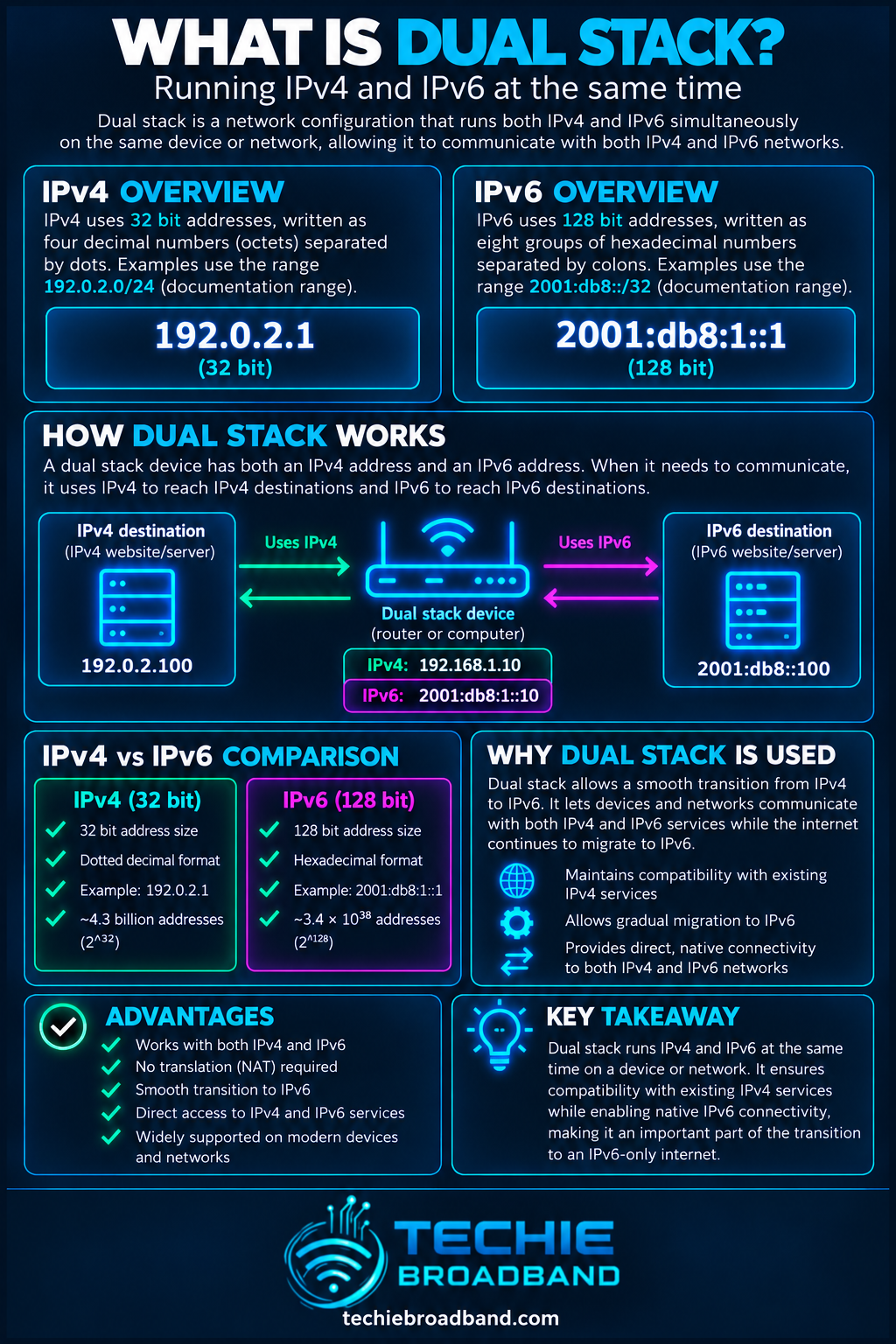
In networking, Dual Stack means implementing and enabling both IPv4 and IPv6 on the same host, router or network. RFC 4213 describes an IPv6/IPv4 node as a node with complete implementations of both protocols. Such a node can send and receive both IPv4 and IPv6 packets and can directly interoperate with nodes using either protocol.
That makes Dual Stack a coexistence mechanism. It allows IPv6 deployment without requiring every IPv4-only service, device and network to disappear first.
What Dual Stack is not
Dual Stack is not IPv6 carried inside an IPv4 tunnel.
Dual Stack is not NAT64 or another IPv4 to IPv6 translation mechanism.
Dual Stack does not mean every connection uses both protocols simultaneously.
Dual Stack does not guarantee that IPv6 is preferred for every destination.
Dual Stack does not guarantee that the IPv4 side uses a public IPv4 address. An ISP can provide native IPv6 while placing IPv4 traffic behind CGNAT.
How Dual Stack works
A working Dual Stack path depends on more than a router displaying both IPv4 and IPv6 addresses. The client needs usable configuration for each address family, DNS needs to provide suitable destination information, and the network needs working routes to the destination.
The broadband connection establishes IPv4 connectivity, IPv6 connectivity, or both with the ISP.
The router provides the LAN with IPv4 configuration and IPv6 configuration appropriate to the service.
A client obtains an IPv4 address and one or more IPv6 addresses.
When an application resolves a hostname, DNS may return an A record for IPv4 and an AAAA record for IPv6.
The client orders the available destination addresses according to its address selection policy and application behaviour.
A modern connection algorithm may attempt more than one candidate path so a broken or slow address family does not create a long user-visible delay.
Once a connection succeeds, that session uses the selected address family. Other sessions can independently use the other family.
A records, AAAA records and protocol choice
DNS is central to normal Dual Stack behaviour. An A record maps a hostname to an IPv4 address. An AAAA record stores an IPv6 address. A service that publishes both can give a Dual Stack client destinations in both address families.
The existence of both records does not by itself decide which protocol will carry the connection. RFC 6724 defines default source and destination address selection behaviour for IPv6 implementations and explicitly covers Dual Stack cases where both IPv4 and IPv6 destinations are available. Applications can also implement connection logic such as Happy Eyeballs.
What is Happy Eyeballs?
Happy Eyeballs is a connection establishment approach designed for clients that can reach destinations over IPv4 and IPv6. RFC 8305 describes asynchronous DNS resolution, destination sorting and staggered connection attempts so that a broken or suboptimal address family is less likely to create a noticeable delay.
The practical point is important: a modern Dual Stack client does not necessarily try IPv6, wait for a long timeout, then finally try IPv4. Implementations can race candidate connections with short delays and keep the connection that succeeds.
Dual Stack does not mean one connection uses two IP versions
A common misconception is that Dual Stack somehow combines IPv4 and IPv6 into one faster connection. It does not. For an ordinary TCP or QUIC connection to one destination address, the selected path uses the address family associated with that destination. Another browser tab, application or service can simultaneously use the other family.
Dual Stack therefore increases compatibility and path choice. It does not aggregate IPv4 and IPv6 bandwidth.
Dual Stack vs IPv4 only vs IPv6 only
IPv4 only: the device or network uses IPv4 and cannot communicate natively with IPv6-only destinations.
IPv6 only: the device or network uses IPv6. Reaching IPv4-only services normally requires a transition or translation mechanism elsewhere, such as NAT64 where deployed.
Dual Stack: both IPv4 and IPv6 are available natively to the node, allowing direct use of either protocol when the destination and path support it.
Dual Stack vs tunnelling
Tunnelling and Dual Stack solve different problems. In native Dual Stack, both protocols are present and can operate directly on the network. A tunnel encapsulates traffic from one protocol so it can cross infrastructure that does not natively carry it. RFC 4213 specifies Dual Stack and configured IPv6 over IPv4 tunnelling as separate transition mechanisms.
Dual Stack vs NAT64 and DNS64
NAT64 and DNS64 are commonly associated with IPv6-only client networks that still need access to IPv4 services. DNS64 can synthesise IPv6 destination information and NAT64 performs protocol translation at the network boundary. Dual Stack avoids that translation for ordinary native IPv4 and IPv6 destinations because the client has both protocol families available.
Neither design is automatically superior in every network. Dual Stack is straightforward and highly compatible, but it means operating two protocol families. IPv6-only designs can reduce dependence on IPv4 inside a network, but compatibility with IPv4-only destinations then depends on transition infrastructure.
Can Dual Stack still use CGNAT?
Yes. Dual Stack describes the availability of IPv4 and IPv6, not how the ISP allocates the IPv4 address. A broadband service can provide native, globally routable IPv6 while its IPv4 side uses CGNAT.
That creates an important practical split. A service hosted on your network may be reachable directly over IPv6 if firewall policy allows it, while unsolicited inbound IPv4 remains blocked by the provider's CGNAT layer. Testing only IPv4 can therefore give a misleading picture of the connection's overall reachability.
Dual Stack and inbound connectivity
Inbound connectivity must be considered separately for each protocol. On IPv4, a home router commonly uses NAT, so reaching an internal service may require port forwarding. If the ISP also uses CGNAT, ordinary port forwarding on your own router cannot create a direct public IPv4 path through the provider's translation layer.
On IPv6, global addresses can be routed without IPv4-style NAT, but that does not mean every device should be exposed. A stateful firewall should still enforce inbound policy. Globally routable addressing and permitted inbound access are not the same thing.
Does Dual Stack make broadband faster?
Not inherently. Dual Stack does not increase the provisioned bandwidth of a broadband service. IPv4 and IPv6 can take different routes, use different peering relationships or encounter different congestion, so one family may perform better to a particular destination. That is a routing and path difference, not extra access-line capacity created by Dual Stack.
The useful measurement is therefore comparative: test the same destination over IPv4 and IPv6 where possible, then compare latency, packet loss, route and throughput. A blanket statement that IPv6 is always faster, or that IPv4 is always more reliable, is not technically defensible.
Techie Broadband analysis: Dual Stack creates two end to end paths to test
A Dual Stack broadband connection should be treated as two related but independently testable internet paths. The local Ethernet or WiFi link may be identical, but after protocol selection the addressing, gateway behaviour, ISP routing, peering and destination endpoint can differ.
This changes troubleshooting. A speed test that works over IPv4 does not prove IPv6 is healthy. A website that loads successfully does not prove both families work, because the client may have silently selected the working family. The correct diagnostic question is not simply 'do I have IPv6?' but 'can this client establish useful end to end connections over IPv4 and IPv6 independently?'
Four useful Dual Stack states
Both IPv4 and IPv6 work: normal Dual Stack operation.
IPv4 works but IPv6 is broken: applications with good fallback may hide the fault, while other software can pause or fail.
IPv6 works but IPv4 is restricted or unavailable: modern IPv6 services work, but IPv4-only destinations require working IPv4 or a translation mechanism.
Both addresses exist locally but neither has usable end to end connectivity: configuration alone is not proof of internet reachability.
Why broken IPv6 can be difficult to notice
A device can possess a global IPv6 address yet still have unusable IPv6 connectivity because of routing, firewall, prefix delegation, DNS or upstream problems. RFC 6724 specifically discusses broken IPv6 as a condition where a host has IPv4 internet connectivity and a global IPv6 address but is disconnected from the IPv6 internet.
Modern fallback behaviour can make this surprisingly subtle. A browser may fall back to IPv4 quickly enough that the user sees only a small delay, while command line tools forced to IPv6 reveal the failure immediately.
Dual Stack on a UK home broadband connection
The exact implementation depends on the ISP, access network, broadband product, router and location. FTTP does not automatically mean IPv6, and IPv6 support does not automatically mean the IPv4 side is free from CGNAT. The access technology and the IP service are related layers, not interchangeable features.
For a technically capable UK connection, useful questions include whether the ISP provides native IPv6, what prefix is delegated to the customer router, whether the IPv4 address is public or shared, whether a static IPv4 option exists, whether a customer router can be used, and whether inbound policy can be controlled independently for IPv4 and IPv6.
Router requirements for Dual Stack
A WAN implementation that supports the ISP's IPv4 and IPv6 configuration methods.
IPv6 prefix delegation where the ISP uses it to provide LAN prefixes.
Router advertisements and suitable IPv6 LAN configuration.
IPv4 DHCP or other appropriate LAN configuration.
Independent IPv4 and IPv6 firewall policy.
DNS handling that does not accidentally suppress AAAA responses.
Enough visibility to inspect WAN addresses, delegated prefixes, routes and firewall state.
Dual Stack security
Running two protocol families means securing two protocol families. An IPv4 firewall rule does not automatically describe IPv6 policy, and a network that has been carefully hardened for IPv4 can accidentally expose or break services if IPv6 is enabled without equivalent consideration.
Check IPv4 and IPv6 firewall rules separately.
Do not treat NAT as a security policy. Use an explicit firewall policy.
Audit listening services on both address families.
Check VPN and remote access products for IPv6 handling and possible traffic leaks.
Include IPv6 in monitoring, logging, IDS and security testing.
Understand which devices receive global IPv6 addresses and which inbound flows the router permits.
How to test whether Dual Stack is really working
Confirm the router shows working IPv4 WAN information and working IPv6 WAN or delegated-prefix information.
Confirm the client has a usable IPv4 address, default route and DNS configuration.
Confirm the client has an appropriate IPv6 address and IPv6 default route.
Resolve a known Dual Stack hostname and check that both A and AAAA answers are available.
Test an IPv4 destination explicitly rather than relying on an automatic browser connection.
Test an IPv6 destination explicitly.
Compare traceroute or equivalent path information separately for IPv4 and IPv6.
Measure latency and packet loss over each family to the same or equivalent destination.
If one family fails, inspect router firewall rules, prefix delegation, DNS, routes and ISP status before changing unrelated WiFi or bandwidth settings.
Repeat from another capable client to distinguish a device problem from a router or ISP problem.
Common Dual Stack problems
IPv6 address present but no usable IPv6 route.
Prefix delegation succeeds on the WAN but the LAN is not receiving the expected prefix.
AAAA records resolve but outbound IPv6 is blocked by a firewall.
IPv4 works through CGNAT but an application expects inbound IPv4 connectivity.
A VPN carries IPv4 but leaks or blocks IPv6 unexpectedly.
Custom DNS or filtering software handles A records correctly but mishandles AAAA records.
An old router, firewall or application has partial IPv6 support.
Different IPv4 and IPv6 routes produce noticeably different latency or packet loss.
Should you disable IPv6 if something breaks?
Disabling IPv6 can make a symptom disappear by forcing everything onto IPv4, but that is not the same as fixing the network. If the broadband service is intended to provide working Dual Stack, the better approach is to identify why IPv6 is failing and correct the routing, firewall, DNS, prefix delegation or client issue.
Temporary protocol isolation is useful during diagnosis. Permanent disablement should be a deliberate design choice, not the default response to a fault that can be understood.
Does every website need both IPv4 and IPv6?
A Dual Stack client can only use IPv6 to a service that is reachable over IPv6. If a destination publishes only IPv4, the client uses IPv4 unless some separate translation mechanism provides access from an IPv6-only environment. Dual Stack is valuable precisely because it preserves direct compatibility with both worlds during the transition.
Dual Stack FAQs
What does Dual Stack mean in networking?
Dual Stack means IPv4 and IPv6 are both implemented and enabled so a host or router can communicate using either protocol.
Does Dual Stack use IPv4 and IPv6 at the same time?
Both protocol stacks can be active at the same time, but an individual connection normally uses one selected destination address and therefore one address family. Different simultaneous connections can use different families.
Does Dual Stack mean I have a public IPv4 address?
No. The IPv4 side can use a public address, ordinary NAT or ISP-level CGNAT. Dual Stack only tells you that both IPv4 and IPv6 are available.
Is Dual Stack better than IPv6 only?
It depends on the network. Dual Stack provides direct compatibility with both protocol families but requires both to be operated and secured. IPv6-only networks can simplify the internal protocol model but need a transition mechanism when users must reach IPv4-only services.
Can Dual Stack cause delays?
A broken or slow address family can delay connection establishment in poorly behaving clients. Modern Happy Eyeballs implementations are specifically designed to reduce user-visible delay by trying suitable candidate addresses with controlled concurrency.
Can I have IPv6 even if my IPv4 is behind CGNAT?
Yes. An ISP can provide native IPv6 while sharing public IPv4 addresses through CGNAT. Inbound reachability can therefore be very different between the two protocols.
How do I know which protocol a connection used?
Inspect the remote address in the application or operating system, use browser or developer networking tools where available, or run protocol-specific diagnostic commands. An IPv4 destination and an IPv6 destination are visibly different address families.
The key point
Dual Stack is not a halfway version of IPv6. It is the deliberate operation of two complete Internet Protocol families side by side. Its strength is compatibility: IPv6-capable services can use IPv6 while IPv4-only services remain reachable through IPv4.
For Techie Broadband users, the important part is observability. Verify both paths independently. Know whether IPv4 is public or behind CGNAT. Know what IPv6 prefix reaches your LAN. Apply firewall policy to both. When performance or reachability differs, compare the two routes instead of treating 'the internet connection' as one indivisible path.
To explore the related technical concepts used in this Dual Stack guide, visit our broadband terminology guide.
