
What is Gateway?
Updated: 3 days ago

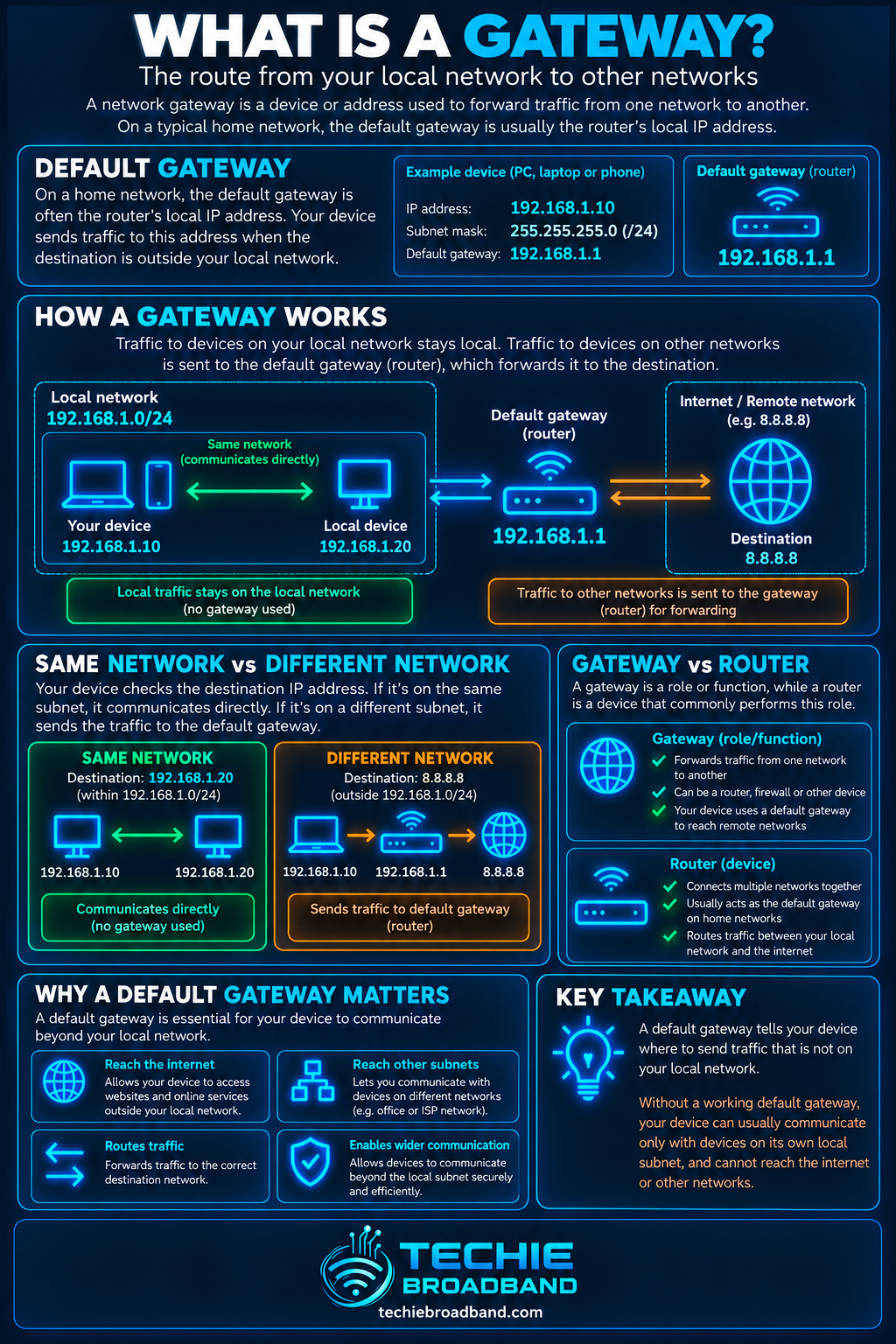
A gateway is the network device or next-hop address that traffic uses to leave one IP network and reach another. On a typical home broadband network, the default gateway is the LAN address of your router. Your device sends traffic to it when the destination is not on the local network. The important distinction is that a gateway is a routing role or next hop; it is not automatically the same thing as DNS, a subnet mask, NAT or the internet connection itself.
What does a gateway actually do?
A device does not send every packet to the gateway. It first decides whether the destination is on-link — reachable directly on the local network — or off-link and therefore requires a router. The local IP configuration and routing table determine that decision.
With IPv4, a host commonly uses its address and subnet mask to identify the local prefix. With IPv6, on-link prefixes and default routers are learned through mechanisms including Neighbor Discovery. In either case, the core idea is the same: local traffic can be delivered locally; traffic for elsewhere needs an appropriate next hop.
Default gateway vs gateway
Gateway is the broader term. A default gateway is the router a host normally uses when its routing table has no more specific route for a destination. A network can have many gateways and many specific routes, while still having one preferred default route.
On a simple home LAN, the distinction is easy to miss because the broadband router usually performs several jobs at once. It may be the default gateway, DHCP server, DNS forwarder, firewall, WiFi access point and NAT device. Those are separate functions even when one physical box provides all of them.
A practical IPv4 gateway example
Imagine a laptop with address 192.168.1.42/24 and a default gateway of 192.168.1.1. The /24 prefix — equivalent to subnet mask 255.255.255.0 — places 192.168.1.42 in the 192.168.1.0/24 network. For a deeper explanation of that boundary, see subnet mask.
Destination 192.168.1.80: local /24 network, so the laptop can deliver directly on the LAN.
Destination 192.168.2.80: different /24 network, so the laptop uses a router according to its routing table.
Destination 1.1.1.1: not local, so in a normal home setup the default route points the packet to 192.168.1.1.
The gateway does not magically know every destination. It receives the packet, examines the destination IP address, consults its own routing table and forwards the packet towards another next hop or directly connected network.
Techie Broadband route-decision model
A useful way to troubleshoot gateways is to separate the decision into three questions rather than treating ‘the internet is down’ as one problem.
Is the destination on-link? If yes, the default gateway may not be involved at all.
If the destination is off-link, which route matches it most specifically? A specific route can take precedence over the default route.
Is the selected next hop actually reachable on the relevant interface? If not, the route can exist while forwarding still fails.
This model explains why changing the default gateway cannot fix every connectivity problem. If a local neighbour cannot be reached, the fault can sit below the routing decision. If a VPN installs a more-specific route, traffic can bypass the normal home gateway even though the configured default gateway has not changed.
How a default route works
A routing table is evaluated using the most specific matching route. The default route is the least-specific fallback: it is used only when no more-specific route wins.
In IPv4, the default route is written as 0.0.0.0/0. In IPv6, it is ::/0. The /0 means that zero leading destination bits need to match, so every address can match — but any more-specific route should be preferred.
Gateway, router and modem are not the same thing
A router forwards packets between IP networks. A gateway describes the next-hop role used to reach another network. A modem or optical network terminal terminates an access technology. Consumer broadband equipment often combines functions, which is why the words are casually mixed together.
For FTTP, the ONT normally terminates the optical access connection while the customer router provides the home LAN's routing function. On some services the router may also establish PPPoE or DHCP-based WAN connectivity. The exact access and authentication method depends on the network and retail product.
Gateway vs subnet mask
The subnet mask or prefix tells an IPv4 host which addresses belong to its local network. The gateway is where off-link traffic is sent. A correct gateway paired with the wrong subnet mask can still break connectivity because the host can make the wrong local-versus-routed decision.
Gateway vs DNS
DNS translates names such as example.com into IP addresses. A gateway forwards IP packets between networks. If DNS fails, direct connectivity to an IP address may still work. If the gateway path fails, successful DNS resolution does not create a working route.
Gateway vs DHCP
DHCP can automatically provide an IPv4 client with addressing information including a router option. RFC 2132 defines DHCP option 3 as a list of router IP addresses on the client's subnet. DHCP distributes configuration; the gateway is the next hop that actually forwards traffic.
Gateway vs NAT
NAT changes address information as traffic crosses a translation boundary. Routing and NAT are different operations. A router can forward between networks without performing NAT, and a home broadband router commonly performs both because private IPv4 addresses need translation when sharing a public IPv4 address.
Gateway vs firewall
A firewall decides which traffic is permitted by policy. A gateway decides where off-link traffic should go. The same router can provide both functions, but a correct route does not imply the firewall will allow the packet, and a permissive firewall cannot compensate for a missing route.
The diagram below summarises the gateway's place in the forwarding decision and the concepts most often confused with it.
How IPv4 devices reach their gateway
On an Ethernet or WiFi LAN, an IPv4 host needs the link-layer address associated with its next-hop IPv4 address. It normally uses ARP for that local resolution. The IP packet still contains the final remote destination; the Ethernet frame is addressed to the next hop on the local link.
This distinction matters in packet captures. When a laptop sends an IPv4 packet to a remote website, the destination IP remains the website's address, while the local Ethernet destination is normally the router's MAC address.
How IPv6 gateways differ
IPv6 does not use ARP. IPv6 Neighbor Discovery lets hosts discover routers, prefixes and neighbour link-layer addresses. Router Advertisements can populate a host's default-router list, and the host selects an appropriate default router for off-link traffic.
IPv6 therefore preserves the next-hop idea but changes the discovery machinery. It also means that an IPv6 host can have more than one candidate default router and can react when a router becomes unreachable.
Can a network have more than one gateway?
Yes. Hosts and routers can have multiple routes and multiple possible next hops. Business networks commonly use redundant routers, policy routing or dynamic routing. IPv6 explicitly supports a Default Router List. Even a home device can have several route sources at once when a VPN, virtual machine platform or container network is installed.
The existence of several gateways does not mean traffic is duplicated across all of them. Route selection chooses a path according to prefix specificity, metrics, policy and implementation behaviour.
What is a gateway metric?
Operating systems can attach metrics or preferences to routes. When multiple routes are otherwise suitable, these values help choose which path to prefer. Exact behaviour varies by operating system and route type, so a low metric should be interpreted within the host's routing implementation rather than as a universal internet-quality score.
Why the gateway must normally be reachable locally
A next-hop router normally needs to be reachable on the interface through which the host intends to send. If a PC is configured with 192.168.50.10/24 but its gateway is entered as 192.168.60.1, that next hop is outside the PC's local /24. Without some special route or implementation-specific handling, the configuration is internally inconsistent.
This is one of the fastest checks when a manually configured static address cannot reach anything beyond the LAN: verify the IP address, prefix and gateway as one set rather than inspecting each value in isolation.
What happens when the default gateway is wrong?
Local devices may still work because their traffic never needs the default route.
Internet access and other remote networks can fail while the LAN appears healthy.
DNS may appear broken simply because the configured DNS server is remote and unreachable.
A host may ARP or route in unexpected ways if the prefix is also wrong.
A VPN can hide or complicate the symptom by installing its own routes.
Gateway behaviour with VPNs
A VPN commonly installs routes that direct some or all traffic into a tunnel. In a full-tunnel configuration, the effective path to internet destinations can therefore become the VPN interface and its virtual next hop. Split tunnelling installs more selective routes so only chosen destinations use the tunnel.
The physical home router has not disappeared. It can still carry the encrypted tunnel packets towards the VPN server, while the host's logical routing table sends protected traffic into the tunnel first. This is a good example of why ‘my gateway is 192.168.1.1’ does not fully describe the active network path.
Gateway behaviour with multiple routers
Two consumer routers connected carelessly can create nested networks, double NAT or conflicting DHCP configuration. A client might receive a gateway from the wrong DHCP server, or traffic may cross two routing and firewall boundaries before reaching the broadband connection.
When troubleshooting, draw the actual path: client → selected gateway → upstream router → access equipment → ISP. The physical cable layout alone does not reveal which Layer 3 next hop the host selected.
Does the gateway affect broadband speed?
A gateway can become a performance bottleneck if the router performing that role lacks enough forwarding, NAT, firewall, VPN or queue-management capacity for the broadband service. The word gateway itself does not imply a speed limit.
On multi-gigabit broadband, check the complete path: WAN interface rate, router forwarding capability, LAN interface rate, switches, Ethernet adapters and WiFi. A 2.5 Gbps broadband service cannot deliver 2.5 Gbps through a router path that is limited to 1 Gbps.
Gateway problems on UK broadband
Most UK home broadband users receive a router that automatically provides the LAN gateway through DHCP, so they rarely type a gateway address manually. Problems become more likely with a BYO router, static LAN configuration, multiple routers, VLANs, VPNs, homelabs or manually configured servers.
On FTTP, do not assume the ONT is your computer's default gateway simply because internet traffic physically passes through it. In a conventional routed home setup, the LAN client normally uses the customer's router as its local default gateway.
How to find your default gateway
Open the device's network or routing information rather than relying on the address printed on the router.
Identify the default route for the protocol you are troubleshooting. IPv4 and IPv6 can have different default routes.
Note the interface as well as the next-hop address. This is particularly important with Ethernet, WiFi, VPN and virtual interfaces present together.
Compare the gateway with the device's local address and prefix to confirm the next hop makes sense for that interface.
Gateway troubleshooting workflow
Record the device's IPv4 address, prefix or subnet mask, default gateway and DNS settings.
Test a known local address on the same subnet. If local connectivity fails, fix that before blaming the gateway.
Check that the gateway address belongs on the expected local network and is not a typo or stale static setting.
Test reachability to the gateway itself, while remembering that some devices can restrict diagnostic responses.
Inspect the routing table and identify the route that should match the failing destination.
Temporarily account for VPN, virtualisation and container routes that can override the normal path.
Test a remote IP address separately from a hostname to distinguish routing from DNS resolution.
Check router firewall, WAN status and upstream connectivity only after the local next-hop path is understood.
For IPv6, inspect the default router and prefix information separately from IPv4.
If the problem is intermittent, inspect neighbour/ARP state and route changes over time rather than relying on one snapshot.
Common gateway misconceptions
‘The gateway is always 192.168.1.1.’ No. That is only a common private LAN convention.
‘The gateway is the internet.’ No. It is a next hop towards another network.
‘The gateway and DNS server are the same thing.’ They can share one device address, but the functions are different.
‘All traffic goes through the default gateway.’ Local traffic and traffic matching more-specific routes can bypass it.
‘The router is always the modem.’ Consumer hardware can combine roles, but the networking functions are distinct.
‘A working ping to the gateway proves the internet is working.’ It proves only that a particular local exchange succeeded.
Authoritative standards behind gateway behaviour
For IPv4 DHCP, RFC 2132 defines the router option used to supply router addresses to clients. For IPv6, RFC 4861 defines Neighbor Discovery, router discovery, default-router selection and next-hop determination.
Frequently asked questions
What is a gateway in networking?
A gateway is a device or next-hop address used to reach another network. In a home LAN, the default gateway is normally the local IP address of the broadband router.
Is a gateway the same as a router?
Not exactly. Router describes a device that forwards packets between IP networks. Gateway describes the role or next hop used to reach another network. A router commonly acts as a gateway.
What is a default gateway?
A default gateway is the router used when the routing table has no more-specific route for the destination. It is associated with the default route.
Does every device need a default gateway?
A device only needs a default route if it must reach destinations for which it has no more-specific route. An isolated device that communicates solely with its local network may not require one.
Can the default gateway and DNS server have the same IP address?
Yes. Home routers often act as both the default gateway and a DNS forwarder, so the same address can appear in both settings. The functions remain different.
Why can I reach local devices but not the internet?
One possibility is a missing or incorrect default route or unreachable gateway. Other causes include router WAN failure, firewall policy, DNS problems or upstream ISP connectivity, so the gateway should be tested as one stage in the path.
Does IPv6 have a default gateway?
Yes, conceptually. IPv6 hosts maintain default routers and use ::/0 as the default route, but router discovery and neighbour resolution use IPv6 Neighbor Discovery rather than IPv4 ARP.
Key takeaway
A gateway is best understood as a routing decision, not a box with a particular sticker on it. Your device sends off-link traffic to an appropriate next hop, often the broadband router. Once you separate local-prefix decisions, route selection, next-hop reachability, DNS, firewalling and NAT, gateway problems become much easier to diagnose.
To explore the related technical concepts used in this Gateway guide, visit our broadband terminology guide.
