
What is Subnet Mask?
Updated: 3 days ago

A subnet mask tells an IPv4 device which part of an IP address identifies the network and which part identifies an individual address inside that network. It is not a speed setting, a security feature or another name for a router. It is part of the addressing information a device uses to decide whether a destination is local or must be reached through a router.
What does a subnet mask actually do?
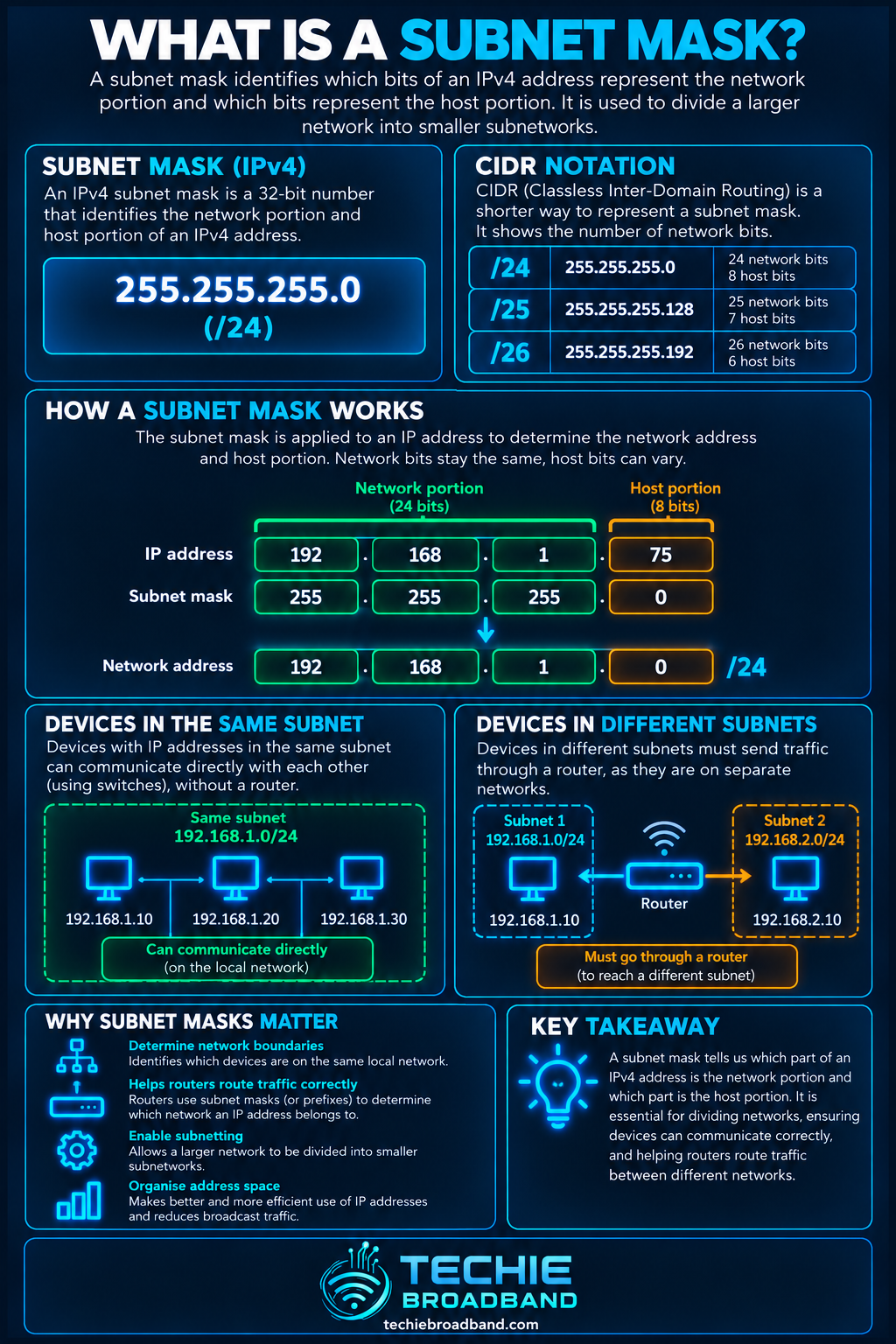
Every IPv4 address is 32 bits long. A subnet mask is also 32 bits long. Its leading 1 bits mark the network prefix and its trailing 0 bits leave room for host addresses. Devices combine their own IP address with the mask to calculate the network they belong to.
For example, 192.168.1.42 with the mask 255.255.255.0 belongs to the network 192.168.1.0/24. The /24 is CIDR notation: it says that the first 24 bits are the network prefix. The remaining eight bits can vary inside that IPv4 subnet.
Subnet mask and CIDR notation
255.255.255.0 and /24 describe the same 24-bit prefix boundary. CIDR notation is normally clearer because it states the prefix length directly. A larger prefix number means fewer host bits and therefore a smaller address block.
/24 = 255.255.255.0 = 256 IPv4 addresses
/25 = 255.255.255.128 = 128 IPv4 addresses
/26 = 255.255.255.192 = 64 IPv4 addresses
/27 = 255.255.255.224 = 32 IPv4 addresses
/28 = 255.255.255.240 = 16 IPv4 addresses
/29 = 255.255.255.248 = 8 IPv4 addresses
/30 = 255.255.255.252 = 4 IPv4 addresses
A worked /24 example
Take 192.168.1.42/24. The /24 mask keeps the first three octets as the network portion. That produces the network address 192.168.1.0. In a conventional /24 IPv4 LAN, 192.168.1.255 is the broadcast address and addresses 192.168.1.1 through 192.168.1.254 are available for ordinary host assignment.
That gives 256 total addresses and, in the conventional case, 254 usable host addresses. The familiar ‘subtract two’ rule is not universal: /31 point-to-point links are specifically usable under RFC 3021, while /32 identifies a single IPv4 address or host route.
Splitting a /24 into smaller subnets
If 192.168.1.0/24 is split into two equal /25 networks, the first is 192.168.1.0/25 and the second is 192.168.1.128/25. Each contains 128 addresses. In conventional multi-access IPv4 use, each /25 has 126 assignable host addresses because its network and broadcast addresses are reserved.
The important detail is the boundary. 192.168.1.127 belongs to the first /25, while 192.168.1.128 is the network address of the second /25. Two addresses can therefore look almost identical to a person while being in different subnets.
How a device decides whether traffic is local
When an IPv4 device wants to send a packet, it applies its subnet mask to its own address and to the destination address. If both calculations produce the same network, the destination is treated as local. The sender can resolve the destination's link-layer address using ARP and send directly across the local network.
If the calculated networks differ, the device normally sends the packet towards its default gateway. The router then makes a routing decision. This is why a wrong subnet mask can break connectivity even when the IP address itself appears sensible.
The subnet mask is not the default gateway
The subnet mask defines the local IPv4 prefix. The default gateway is a router address used to reach destinations outside that local prefix. They work together, but they are different settings. A device can have the correct IP address and gateway yet still behave incorrectly if its mask is wrong.
Subnet mask vs DHCP
DHCP can supply a device with its IPv4 address, subnet mask, default gateway and DNS server information. DHCP therefore distributes the mask, but it does not create the mathematical boundary represented by that mask. Static configurations need the same information entered correctly.
Subnet mask vs VLAN
A subnet and a VLAN are also different concepts. A VLAN creates a Layer 2 broadcast domain. An IP subnet defines a Layer 3 address prefix. Network designs commonly map one IP subnet to one VLAN because that produces clean routing boundaries, but the terms are not interchangeable.
Subnet mask vs NAT
NAT translates addresses; a subnet mask identifies an IPv4 prefix boundary. Private address space such as 10.0.0.0/8, 172.16.0.0/12 and 192.168.0.0/16 can be divided into many subnets without NAT being involved in those internal divisions.
Does a subnet mask provide security?
No. Subnetting can separate address ranges and force traffic between them through a router, but the addressing boundary does not itself block traffic. Security comes from firewall rules, access-control policy and correct network design. Treating ‘different subnet’ as automatically ‘secure’ is a common mistake.
What changes with IPv6?
IPv6 uses prefix lengths rather than dotted-decimal subnet masks. A typical IPv6 LAN is a /64. IPv6 also has no broadcast address; it uses mechanisms including multicast and Neighbor Discovery instead. Do not carry IPv4 rules such as ‘network address plus broadcast address means subtract two’ into IPv6.
A broadband provider may delegate a larger IPv6 prefix to a customer, which can then be divided into /64 LANs. The exact delegation size is provider-specific, so the useful principle is to design around the prefix actually delegated rather than assume every ISP supplies the same size.
Why subnet masks matter on home broadband
A simple home router often hides subnetting because it provides one LAN and configures clients automatically. The subject becomes much more visible when you add guest networks, IoT isolation, managed VLANs, a home lab, static routes, multiple routers or VPNs.
For example, a main LAN could use 192.168.10.0/24 while an IoT network uses 192.168.20.0/24. Routing and firewall policy can then control what crosses between them. The masks define the address boundaries; the router and firewall define what traffic is actually permitted.
Common subnet mask mistakes
Assuming the first three octets always define the network. That is only true for a /24 boundary.
Thinking a larger CIDR number means a larger subnet. It means the opposite: more network bits leave fewer host bits.
Using overlapping subnets on different routed interfaces or VPNs, which can make route selection ambiguous.
Giving a device an address from one subnet but a gateway that is not reachable on that local subnet.
Applying the IPv4 ‘subtract two’ host-count shortcut to /31, /32 or IPv6.
Assuming a subnet is automatically a security boundary without firewall or ACL enforcement.
Troubleshooting a subnet problem
Check the device's IP address and subnet mask or CIDR prefix together.
Calculate the expected network address instead of judging the address by eye.
Confirm the default gateway is reachable inside the device's local subnet.
Check the DHCP lease if the settings are automatic.
Check VLAN assignment when the physical link works but the device lands in the wrong network.
Inspect the routing table for overlapping local, VPN or static routes.
Test IPv4 and IPv6 separately. One protocol can work while the other has a completely different addressing or routing problem.
If traffic must cross between subnets, check the router and firewall policy as well as the addressing.
A practical diagnostic example
Suppose a PC is configured as 192.168.50.130/25 with gateway 192.168.50.1. A /25 divides the /24 at 128, so 192.168.50.130 belongs to 192.168.50.128/25. The gateway 192.168.50.1 belongs to 192.168.50.0/25. The PC therefore sees that gateway as off-link. The addresses look close, but the prefix calculation exposes the fault immediately.
The useful way to think about a subnet mask
Do not memorise subnet masks as a table of mysterious numbers. Think of the mask as a boundary used in a routing decision: these bits identify my network; the remaining bits identify addresses inside it. Once that boundary is understood, host ranges, gateways, route selection and most subnetting faults become much easier to reason about.
Frequently asked questions
Is 255.255.255.0 always a /24?
Yes. Its binary form contains 24 leading 1 bits, so 255.255.255.0 corresponds to /24.
How many usable hosts are in a /24?
A /24 contains 256 IPv4 addresses. In a conventional multi-access IPv4 subnet, 254 are assignable to ordinary hosts because the network and broadcast addresses are reserved.
Is /25 bigger or smaller than /24?
/25 is smaller. It has one more network bit and one fewer host bit, so it contains 128 addresses rather than 256.
Do IPv6 networks use subnet masks?
IPv6 uses prefix lengths such as /64 rather than dotted-decimal masks such as 255.255.255.0.
Does changing the subnet mask make broadband faster?
No. A subnet mask changes address boundaries and local-versus-routed decisions. It does not increase line rate, Wi-Fi capacity or internet throughput.
Can two devices have the same subnet mask but be on different subnets?
Yes. The mask describes the prefix length, not the prefix value. 192.168.10.0/24 and 192.168.20.0/24 use the same mask but are different networks.
To explore the related technical concepts used in this Subnet Mask guide, visit our broadband terminology guide.
