
What is Latency?
Updated: 2 days ago

Latency is the delay between an action on a network and the corresponding data reaching its destination or returning a result. In broadband it is usually measured in milliseconds (ms). Lower latency makes interactive activity feel more immediate, but latency is not the same thing as bandwidth or download speed: a connection can have enormous capacity and still respond slowly.
The most useful way to understand broadband latency is to separate one way delay from round trip time. One way delay measures a packet travelling in one direction. Round trip time measures a journey to a destination and back. Most consumer ping tests report a round trip result because accurately measuring one way delay requires synchronised clocks at both ends.
What is latency?
Network latency is the time data takes to move through a network path. The delay can come from physical distance, the time required to transmit bits onto a link, processing inside network equipment, packets waiting in queues, wireless contention, retransmissions and the destination system itself.
Latency therefore describes time, not capacity. A 100 Mbps connection with a 10 ms round trip can feel more responsive than a 1 Gbps connection with a 60 ms round trip for interactive work, even though the gigabit connection can transfer far more data per second.
How is broadband latency measured?
Latency is normally expressed in milliseconds. One millisecond is one thousandth of a second. The number shown by a typical speed test or ping tool is usually round trip time, often abbreviated to RTT.
The IETF defines a round trip delay metric in RFC 2681. A round trip measurement combines the outward and return paths, which matters because internet routing can be asymmetric. The forward path and return path do not have to traverse the same routers, networks or congestion points.
5 ms RTT means the measured request and response completed in about 0.005 seconds.
20 ms RTT means the round trip took about 0.020 seconds.
100 ms RTT means the round trip took about one tenth of a second.
One way delay cannot safely be assumed to be exactly half of RTT because the two directions can follow different paths or experience different queues.
Latency, ping and round trip time are related but not identical
People often use latency, ping and RTT interchangeably, but they describe slightly different things. A ping is a test method. RTT is a particular measurement of a there and back journey. Latency is the broader concept of delay. See What is Round Trip Time (RTT)? for the deeper distinction.
This distinction matters when troubleshooting. A high ping result proves that the measured round trip took longer, but it does not by itself identify whether the extra delay occurred on your WiFi, your broadband access network, inside the ISP, at an interconnection point, on the wider internet, on the return path or at the destination.
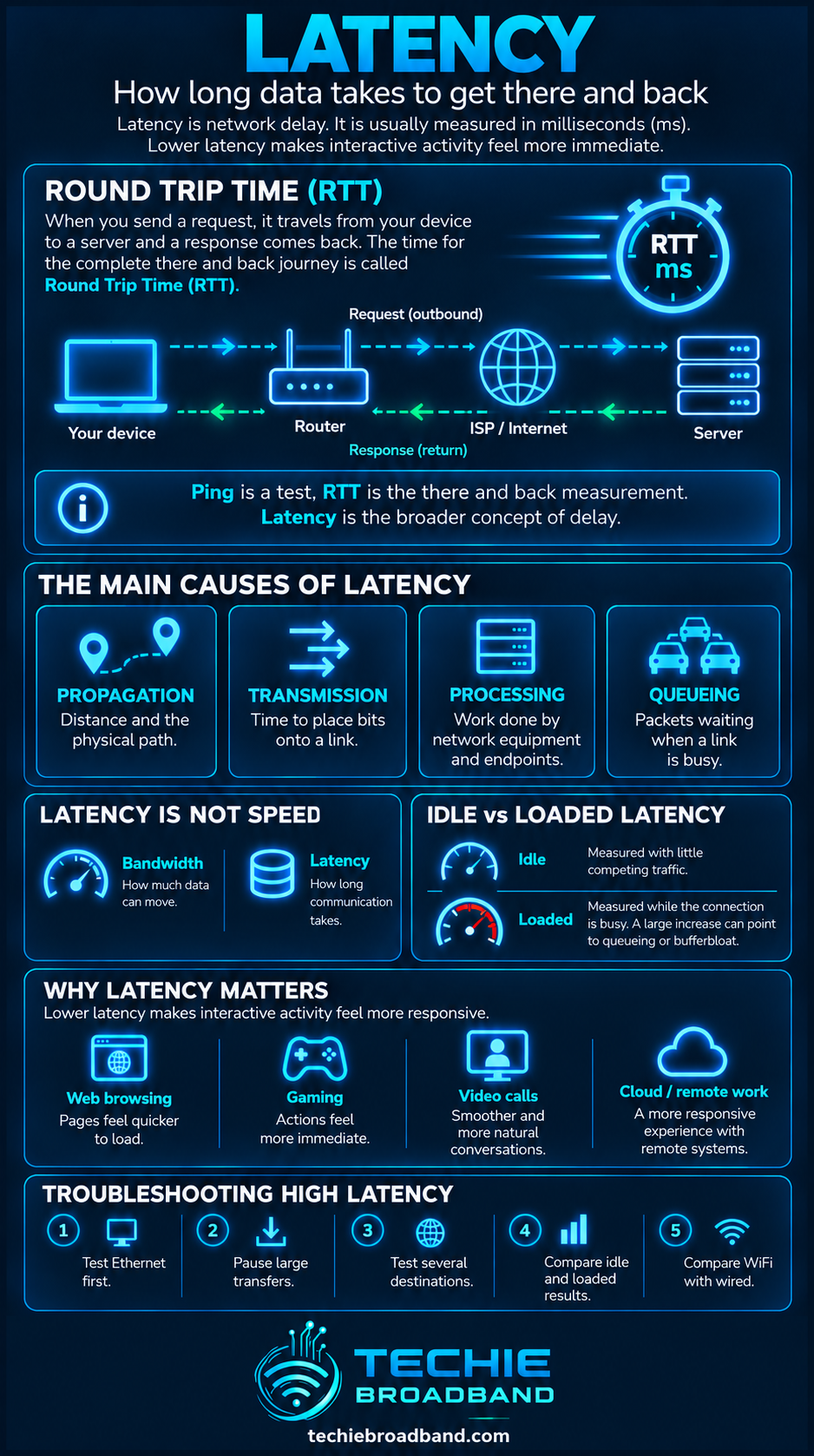
The infographic separates a simple RTT measurement from the individual mechanisms that create delay. Physical propagation provides a floor, but real broadband latency also contains transmission, processing and queueing time.
What creates latency?
Propagation delay
Signals cannot travel instantaneously. Distance therefore creates an unavoidable latency floor. In optical fibre, a useful engineering approximation is roughly 200,000 kilometres per second, although the exact propagation velocity depends on the fibre and optical characteristics.
Techie Broadband calculation: using 200,000 km/s as an illustrative propagation speed, 500 km of fibre path takes about 2.5 ms in one direction. An idealised 1,000 km there and back path therefore contributes about 5 ms of propagation delay before routers, longer physical routes, transmission, queueing or server processing are considered.
Transmission delay
A packet also takes time to be placed onto a link. The effect is larger on slower links and for larger packets. This is separate from propagation: transmission is about serialising the bits onto the medium, while propagation is about those signals travelling through the medium.
Processing delay
Routers, switches, firewalls, ONTs, modems and endpoints perform work on traffic. Modern network equipment can process packets very quickly, but processing still forms part of the end to end path and overloaded or underpowered equipment can become significant.
Queueing delay
When packets arrive faster than a link can immediately transmit them, they wait in a queue. Queueing can add little delay on an uncongested path and a great deal under load. This is why queue depth and queue management matter when diagnosing latency.
Wireless delay
WiFi is a shared radio system. Devices contend for airtime, interference can require retransmission and weak signal conditions can reduce efficiency. A WiFi latency problem can therefore exist even when the broadband connection beyond the router is performing normally.
Application and server delay
A network packet reaching a server is not necessarily the end of the user's wait. DNS resolution, TLS setup, application logic, database work and server load can add response time. That is why web responsiveness should not be diagnosed from a broadband speed number alone.
Latency across the complete broadband path

The diagram shows why there is no single component called the latency. The result you observe is created by the whole path, and the narrowest or slowest stage can change from one test to another.
Device and operating system processing
WiFi or Ethernet local network
Router processing and queues
ONT or modem where applicable
FTTP, FTTC, cable, fixed wireless or mobile access network
ISP aggregation and core routing
Peering or transit to another network
The remote network and server
The return path, which may differ from the outward path
Latency is not broadband speed
Bandwidth describes how much data a connection can carry. Latency describes how long an exchange takes. Read What is Bandwidth? for the capacity side of the relationship.
Buying a faster package can reduce latency in some circumstances, particularly if the old connection regularly saturated and created queues. But increasing a quiet connection from 500 Mbps to 1 Gbps does not inherently halve a 20 ms RTT. The physical route and network path may be essentially unchanged.
Why high bandwidth can still have high latency
A multi gigabit connection can move huge amounts of data while still having a relatively long path to a distant server. Conversely, a lower bandwidth connection to a nearby destination can have very low latency. Capacity and delay are different dimensions of network performance.
Actual application transfer performance depends on both. Sustained throughput can be affected by RTT, congestion control, packet loss, server capability and the rest of the end to end path.
What is idle latency?
Idle latency is measured when the connection is carrying little competing traffic. It provides a useful baseline for the underlying path. If idle latency is already high, investigate the local link, access technology, routing, geographic distance, VPN use and destination before assuming congestion.
What is loaded latency?
Loaded latency measures delay while the connection is busy. This can reveal a problem that an idle ping completely misses. If RTT is low when idle but rises dramatically during a large upload or download, queueing under load is a strong suspect.
That behaviour connects directly to network congestion and the way queues are managed. More capacity can provide additional headroom, but effective queue management can also materially improve responsiveness under load.
Latency and bufferbloat
Bufferbloat describes excessive latency caused by persistently full buffers. Large buffers can prevent immediate packet loss, but if traffic waits for too long the connection becomes sluggish for interactive applications.
The practical symptom is often a perfectly respectable idle ping followed by a very large latency increase when somebody starts a cloud backup, uploads a file, downloads a game or otherwise saturates the connection.
Why upload traffic can cause latency problems
Upstream capacity is often lower than downstream capacity on asymmetric UK broadband products. That makes the upload direction easier to saturate. A cloud backup or large file transfer can therefore fill an upstream queue and delay small interactive packets. See What is Upload Speed? for the upstream capacity side of the problem.
Latency, jitter and packet loss
Latency is delay. Jitter is variation in delay over time. Packet loss means packets fail to arrive successfully. They are related but should not be treated as synonyms.
The IETF notes in RFC 7679 that erratic variation in delay can harm real time applications, and that values above the minimum one way delay can indicate congestion on the path. A useful diagnosis therefore looks at the distribution and stability of measurements, not only one average number.
How latency affects different applications
Web browsing: latency affects DNS, connection setup and request response cycles, so a page can feel slow before bandwidth becomes the limiting factor.
Gaming: interactive games are sensitive to delay and variation because state updates must travel between player and server.
Video calls: latency affects conversational interaction, while jitter and packet loss can affect media quality.
Remote desktops and cloud applications: repeated user actions and screen updates make responsiveness highly visible.
Large downloads: bandwidth usually dominates bulk transfer time, but RTT can still influence transport behaviour and connection ramp up.
Cloud backup and uploads: saturation can create queueing that raises latency for other users on the same connection.
What is a good broadband latency?
There is no universal threshold that separates good from bad latency because the destination, application and measurement method matter. A test to a nearby UK server and a test to another continent are measuring different physical and routing conditions.
For practical comparison, use the same destination, connection method and test conditions. A change from 10 ms to 30 ms to the same nearby endpoint is more diagnostically useful than comparing 10 ms to London with 70 ms to a server thousands of kilometres away.
Why distance matters more than many people expect
Even perfect networking cannot eliminate propagation delay. Fibre routes are also not straight lines between two points. They follow ducts, roads, subsea cable systems, network topology and interconnection locations. The actual path can therefore be materially longer than geographic straight line distance.
This is one reason a faster headline broadband tier cannot remove all latency. Once local queueing and processing are under control, physics and routing still remain.
Does FTTP reduce latency?
FTTP can provide excellent latency characteristics, but full fibre does not create one universal latency number. The result depends on the access network design, ISP routing, handover, congestion, destination and local network.
FTTC, cable, fixed wireless and mobile services use different access mechanisms and can show different delay characteristics. However, technology labels alone are not enough to predict a specific user's RTT. Measure the actual product and path.
GPON and XGS PON latency
GPON and XGS PON are passive optical network technologies used for FTTP. Both share optical infrastructure among multiple premises. Their capacity and scheduling characteristics differ, but the end to end latency seen by an application also includes every stage beyond the PON.
Do not infer that one retail broadband service will always have lower latency simply because it uses a particular PON generation. ISP architecture, utilisation, routing and the destination remain important.
Can a VPN increase latency?
Yes. A VPN can add processing and may send traffic through a longer route via the VPN provider's server. The effect varies by protocol, server location, provider architecture, congestion and hardware acceleration.
A useful test is to compare the same destination with and without the VPN while keeping everything else as similar as possible.
Can DNS affect latency?
DNS lookup time can delay the start of an application request, but it is not the same metric as packet RTT to the final service. A slow resolver can make the first connection feel slower even when the underlying broadband path has low latency.
Can IPv4 and IPv6 have different latency?
Yes. IPv4 and IPv6 can use different routes, peering arrangements or network paths. The protocol itself does not guarantee lower latency, so measure both where a destination supports dual stack connectivity rather than assuming they will be identical.
How to test broadband latency properly
Connect a capable computer to the router using Ethernet to establish a wired baseline.
Pause large transfers and background synchronisation, then measure idle RTT to several suitable destinations.
Record more than one result. Look at minimum, typical values and variation rather than one isolated ping.
Run a sustained download and repeat the latency measurement to observe downstream loaded latency.
Run a sustained upload and repeat the measurement to observe upstream loaded latency.
Compare Ethernet with WiFi. If Ethernet is stable but WiFi is not, investigate the local wireless network first.
Repeat at different times of day if peak time congestion is suspected.
Test more than one destination so a single remote server or route is not mistaken for a broadband wide problem.
If using a VPN, compare with and without it.
Only after local causes are isolated should you attribute the remaining pattern to the access network, ISP routing or wider internet path.
How to interpret the result
Low idle RTT and low loaded RTT usually indicate a responsive path under the conditions tested. Low idle RTT with much higher loaded RTT points towards queueing when the connection is busy. High idle RTT across several nearby destinations suggests looking at the local network, access technology, routing or an unusually long path.
Testing at different times can also help separate persistent characteristics from demand related behaviour. See What is Peak Time Performance? for the wider busy period context.
Latency and network congestion
Congestion does not simply mean that speed falls. Packets can begin waiting in queues before loss becomes obvious, so latency can rise while a throughput test still appears fast. That makes loaded latency a valuable complement to headline Mbps.
Persistent queues can eventually overflow and cause packet loss. The combination of rising delay, loss and throughput changes can therefore reveal more about a bottleneck than any one metric in isolation.
Latency and goodput
An application cares about useful data delivered successfully, not only raw line capacity. Higher RTT, loss and retransmissions can affect transport behaviour and application completion time. What is Goodput? explains the useful payload side of this relationship.
Latency and line rate
Line rate is the raw signalling or interface rate, while latency is time. A 2.5 Gbps Ethernet interface can transmit bits faster than a 1 Gbps interface, but the wider path can still dominate RTT. See What is Line Rate? for that distinction.
Common latency misconceptions
More Mbps always means lower ping. It does not.
Ping and latency are exactly the same thing. Ping is a test, while latency is the underlying delay concept.
RTT divided by two always equals one way latency. Asymmetric paths and queueing mean that assumption is unsafe.
Full fibre means zero latency. Fibre still has propagation delay and the rest of the internet path remains.
A high latency result proves the ISP is at fault. The problem can exist on WiFi, the device, a VPN, the destination or elsewhere on the path.
One speed test is enough. Latency changes with destination, load, time and network conditions.
Frequently asked questions about latency
Is latency the same as ping?
No. Latency is the delay being measured. Ping is a common diagnostic tool that sends probe traffic and reports a round trip time.
Is lower latency always better?
For otherwise equivalent conditions, lower delay generally improves responsiveness. But the number must be interpreted with the destination, test method, jitter, packet loss and application requirements.
Does faster broadband reduce latency?
Sometimes, but not automatically. More capacity can reduce queueing when the old connection was saturating. It does not remove propagation distance, routing or server delay.
Why does latency increase when I upload?
A saturated upstream can build a queue in the router or another bottleneck. Interactive packets then wait behind bulk traffic, increasing RTT.
Can WiFi increase latency?
Yes. Airtime contention, interference, weak signal, retransmissions and busy channels can all increase delay or its variation.
What is the difference between latency and jitter?
Latency is delay. Jitter describes how much that delay varies from packet to packet or over time.
What is the difference between latency and RTT?
Latency is the general concept of network delay. RTT is a specific there and back measurement. One way latency measures only one direction.
Key takeaway
Latency tells you how long network communication takes, not how much data the connection can carry. A useful broadband diagnosis separates idle from loaded latency, distinguishes RTT from one way delay, tests Ethernet before blaming the ISP, and considers the entire path from device and WiFi through the access network, ISP, internet routing and destination. The best broadband experience comes from sufficient capacity and consistently low delay, not from headline Mbps alone.
To explore the related technical concepts used in this Latency guide, visit our broadband terminology guide.
