
What is Ping?
Updated: 3 days ago

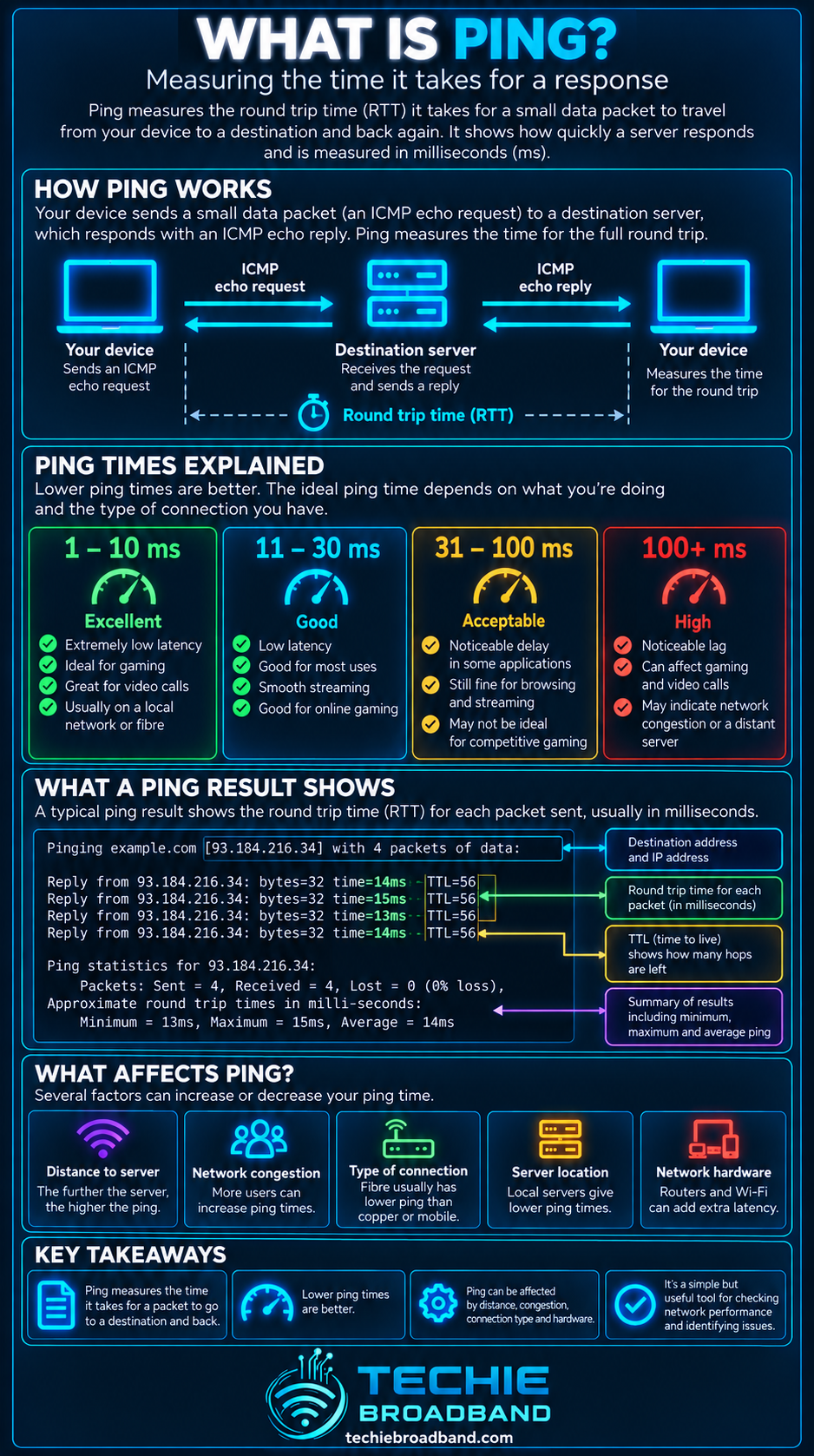
Ping is a network diagnostic test that measures how long a probe takes to travel from your device to a destination and for a reply to return. The result is normally expressed in milliseconds (ms), so ping is primarily a measure of round trip responsiveness, not broadband download or upload speed. A lower and more stable ping usually means a more responsive path, but the destination, protocol, network conditions and whether the target answers probes all matter.
What does ping mean?
In everyday broadband language, ping can mean both the test and the round trip time reported by that test. Strictly, the test sends probes and measures replies. The number you see, such as 8 ms or 35 ms, is the elapsed round trip time for that probe.
Classic IPv4 ping commonly uses ICMP Echo Request and Echo Reply, defined by RFC 792. A host or firewall can filter or rate limit echo traffic, so a missing reply needs context.
Ping, latency and RTT are related but not identical
Ping is a test. Latency is delay. Round Trip Time (RTT) is the there and back elapsed time. A ping result is one way of observing RTT, but latency exists whether or not you run ping. One way latency cannot normally be derived safely by simply halving a ping result.
How does ping work?
A ping utility sends a probe, starts a timer and waits for a matching response. With classic IPv4 ICMP ping, identifiers and sequence numbers allow replies to be matched to probes. Repeated probes can produce minimum, average and maximum RTT plus a loss figure.

The reported RTT contains delay accumulated across the complete path in both directions. That can include the local network, broadband access network, ISP routing, interconnection, the wider internet, the destination network and endpoint processing.
What does a ping result show?
Useful fields include the RTT for each successful reply, minimum RTT, average RTT, maximum RTT, variation between replies and the percentage of probes for which the expected reply was not received.
Ping does not measure broadband speed
A 5 ms ping does not mean you have a fast download connection, and a 1 Gbps package does not guarantee low ping. Bandwidth describes capacity while ping observes delay. A 100 Mbps path can have lower RTT than a 1 Gbps path if its route, queues and destination are more favourable.
Techie Broadband example: same bandwidth, different responsiveness
Consider two hypothetical 500 Mbps connections testing the same nearby destination. Connection A returns 8, 9, 8, 10 and 9 ms. Connection B returns 12, 18, 75, 24 and 110 ms. Both can deliver similar bulk throughput, yet Connection B is far less consistent.
Techie Broadband calculation: Connection A averages 8.8 ms. Connection B averages 47.8 ms and spans 98 ms from its 12 ms minimum to 110 ms maximum. This demonstrates why one headline ping or a speed result is not enough to describe responsiveness.
What is a good ping?
There is no universal good ping because RTT depends heavily on the destination. As a practical guide to a nearby destination, under about 10 ms is exceptionally responsive, 10 to 30 ms is generally very responsive, 30 to 60 ms is usually usable, 60 to 100 ms becomes clearly noticeable in some interactive uses, and above 100 ms is increasingly obvious. These are interpretation bands, not technical pass or fail thresholds.
Why physical distance matters
Signals cannot travel instantly. Even before routers, queues and servers add delay, geographic distance creates a propagation floor. Internet routes follow fibre paths and interconnection points rather than a perfect straight line.
Why ping changes from one destination to another
There is no single ping value for your broadband line. Every destination can have a different route, distance, interconnection arrangement and server behaviour. A useful test names the destination and context.
Ping over WiFi versus Ethernet
WiFi can add variable delay because devices share radio airtime and contend with neighbouring networks, interference, retransmissions and changing signal quality. Ethernet removes the radio segment and is the better diagnostic baseline.
Ping under load
A connection can show an excellent idle ping and become sluggish while traffic fills queues. Excessive queueing can create bufferbloat, so loaded latency should be measured separately from idle latency.
Techie Broadband loaded ping calculation
Suppose idle ping averages 9 ms and download load raises it to 42 ms. Added delay is 33 ms. If upload load raises it to 128 ms, added delay is 119 ms. The connection has not suddenly lost bandwidth; responsiveness has deteriorated while queues are busy.
Ping and jitter
Average ping can hide instability. If most replies are 15 ms but occasional replies jump to 120 ms, real time applications can feel inconsistent. Jitter describes variation in packet delay and should be considered alongside average RTT.
Ping and packet loss
Missing ICMP replies do not automatically prove ordinary application traffic is being lost because devices can deprioritise, rate limit or block ICMP. Persistent loss to the final destination across repeated controlled tests is more meaningful.
Why one ping is not enough
One probe is a snapshot. WiFi airtime changes, queues fill and drain, routes change and servers vary in load. Run a sequence long enough to see the distribution and repeat under different conditions.
Ping and UK broadband technologies
FTTP
Full fibre removes the copper access segment and can provide very low access network delay, but FTTP does not guarantee a particular internet ping. ISP architecture, routing, interconnection, home networking and the destination still contribute.
FTTC
FTTC retains copper between the street cabinet and premises. Its access characteristics differ from FTTP, but final ping still depends on the complete path.
Cable
Cable can deliver high downstream capacity while latency depends on local access utilisation, queue management, ISP network and destination. Headline Mbps alone does not predict ping.
Mobile and fixed wireless
Radio scheduling, signal conditions and load can make mobile RTT more variable. Ofcom's 2025 Mobile Matters research, based on crowdsourced measurements from October 2024 to March 2025, reported average latency of 18.2 ms on 5G and 21.1 ms on 4G in that measured dataset. These figures are evidence from that programme, not a promise for every UK mobile connection.
UK fixed broadband latency context
Ofcom's March 2023 home broadband performance report showed median average 24 hour latency of roughly 4.9 to 7.3 ms for listed full fibre packages, around 12.5 to 14.8 ms for listed cable packages, around 10.1 to 12.5 ms for listed FTTC packages, and 24.2 ms for ADSL2+. These are historical measured package results, not universal technology guarantees.
How to test ping properly
Use wired Ethernet where possible. Pause competing traffic for an idle baseline. Ping the local router first, then a nearby reliable internet destination and a second independent destination. Run enough probes to observe variation. Repeat while deliberately loading download and upload. Compare different times if you suspect peak time congestion, and use traceroute when you need path information.
How to run ping
Windows
Open Command Prompt and run ping followed by a hostname or IP address. Windows normally sends a small set of probes by default. The -t option can continue until stopped.
macOS and Linux
Open Terminal and run ping followed by a hostname or IP address. Many Unix-like systems continue until stopped, commonly with Control+C. Command options vary, so record packet size, interval, count and IP version when making controlled comparisons.
Ping and IPv6
IPv6 has its own ICMPv6 echo mechanism. IPv6 and IPv4 to the same service can follow different paths and return different RTTs. That does not by itself mean one protocol is inherently faster.
Ping and CGNAT
Carrier Grade NAT can add another IPv4 translation layer, but CGNAT does not automatically imply high ping. Capacity, implementation, routing and wider path conditions matter.
Ping and gaming
Gaming makes ping visible because actions and state updates are interactive. The relevant RTT is to actual game infrastructure, not necessarily a generic speed test. Server location, game netcode, matchmaking region, WiFi, jitter and loss all matter.
Ping and video calls
Video calls are sensitive to delay, variation and loss. A stable 30 ms path can feel better than a path averaging 20 ms but repeatedly jumping above 150 ms.
Does faster broadband reduce ping?
Not necessarily. More capacity can reduce queueing when a slower connection would saturate, but buying more Mbps does not change propagation delay, shorten an internet route or guarantee better interconnection.
Can DNS affect ping?
DNS can affect hostname resolution and which service endpoint an application reaches, but once you ping a specific IP address, DNS lookup time is not part of each ICMP RTT.
Can a VPN increase ping?
Often, because traffic may first travel to a VPN gateway and then onward to the destination, adding distance and processing. Test the same destination before and after enabling the VPN.
Why a destination may not reply to ping
No reply does not necessarily mean the destination is offline. Firewalls can block ICMP Echo, hosts can rate limit replies and networks can filter diagnostic traffic.
Ping versus traceroute
Ping asks whether a destination replied and how long the round trip took. Traceroute investigates responding hops along a path. Use ping for end to end responsiveness and traceroute for visible path investigation.
A practical ping troubleshooting workflow
Start with the local router over Ethernet. Then test two internet destinations while idle, compare loss and RTT variation, load download and upload separately, investigate bufferbloat if loaded delay rises sharply, compare times of day if several destinations degrade together, and use traceroute for path context. Only escalate after separating local WiFi, device and router limitations from the wider network.
Common ping mistakes
Common mistakes include treating ping as download speed, comparing different destinations as equivalent tests, assuming one low result proves consistency, treating every missing ICMP reply as application packet loss, blaming the ISP before testing Ethernet, and assuming FTTP guarantees single digit ping to every server.
Ping FAQs
Is ping the same as latency?
No. Ping is a diagnostic method. Latency is delay. Ping can observe round trip delay.
Is ping the same as RTT?
Not exactly. Ping normally reports RTT, but RTT also applies to other protocols and transactions.
Is lower ping always better?
For the same destination and conditions, lower stable RTT is generally preferable for interactive traffic.
Is 20 ms ping good?
For a nearby or regional destination, 20 ms is generally responsive. Expected performance depends on location, access technology, route and destination.
Why does my ping spike when uploading?
The upload may be saturating and packets can wait behind queued traffic. Queue management and upstream headroom matter.
Why is my ping low but gaming still lags?
The game may use a different server or path. Jitter, loss, WiFi, server performance and game processing can also cause lag.
Can a router affect ping?
Yes. Router CPU load, queue management, shaping, firmware and WiFi behaviour can influence delay.
Does zero packet loss mean my ping is good?
No. A path can deliver every probe but still have high or highly variable RTT.
The key point
Ping is simple to run but requires context to interpret. It measures round trip responsiveness to a particular destination under particular conditions. Use repeated tests, compare idle and loaded behaviour, separate WiFi from the broadband path, and consider jitter and loss alongside average RTT.
To explore the related technical concepts used in this Ping guide, visit our broadband terminology guide.
