
What is Jitter?
Updated: 3 days ago

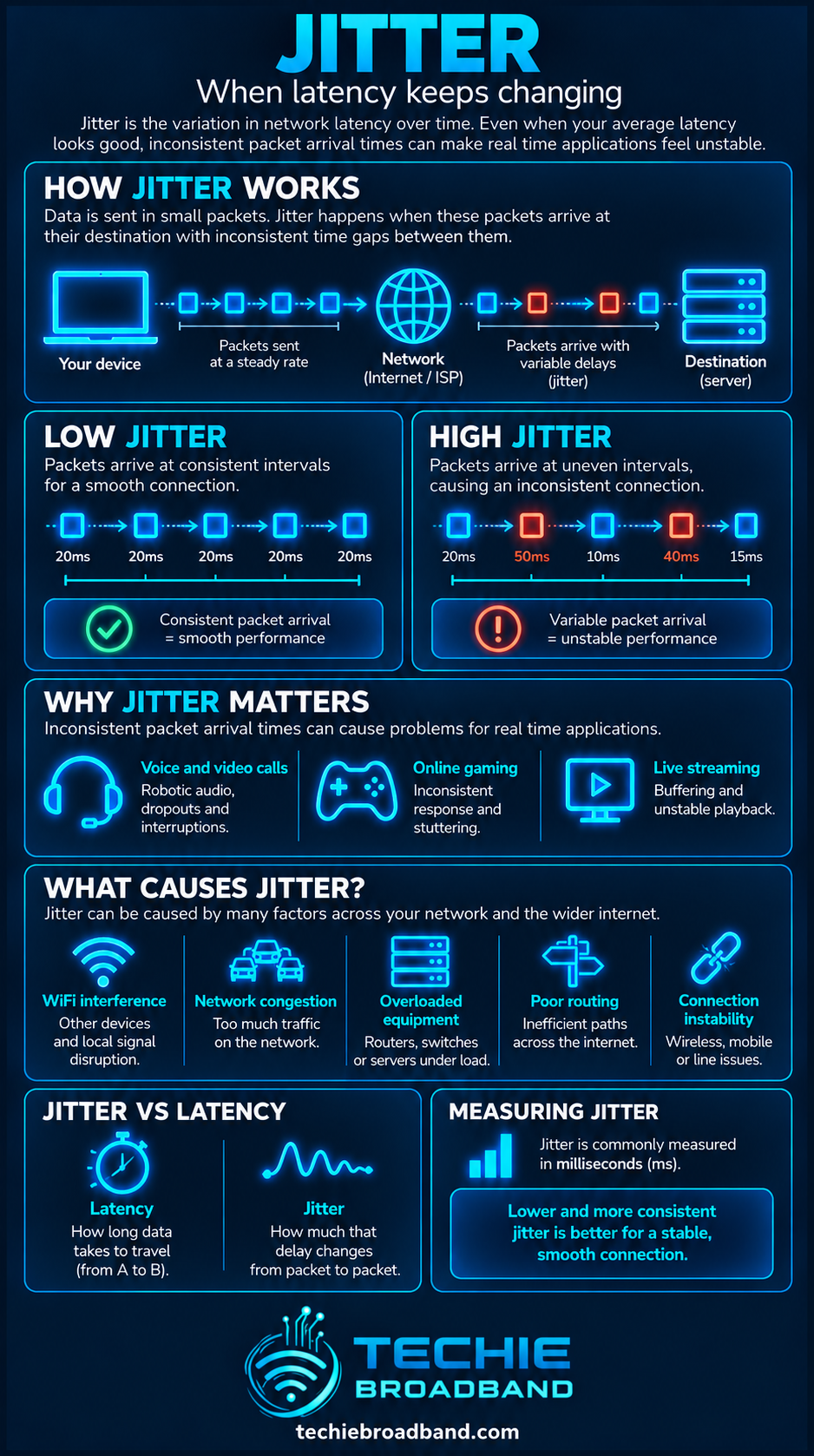
Jitter is variation in packet delay. If packets that should arrive at roughly regular intervals instead experience changing transit times, the connection has delay variation. That matters because voice calls, video meetings, cloud gaming and online games depend not only on low latency, but on packets arriving consistently.
The most important distinction is that latency and jitter are not the same thing. Latency describes delay. Jitter describes how much that delay changes from packet to packet or over time. A connection can have a respectable average latency and still feel unstable if its delay varies sharply.
What does jitter mean on broadband?
On an IP network, the more precise technical term is packet delay variation. In everyday broadband testing, jitter is commonly used as shorthand for variation in latency between packets or repeated measurements.
The IETF's RFC 3393 defines IP packet delay variation as the difference between the one way delay of selected packets. The RFC deliberately notes that the word jitter is used in several different ways, so measurement results only make sense when you know what a particular tool is calculating.
Jitter versus latency
If you first understand latency, jitter is easier to separate from it.
Latency: how long a packet or exchange takes.
Jitter: how much that delay varies.
Packet loss: packets that fail to arrive successfully.
Throughput: how much data is successfully transferred over time.
Bandwidth: the capacity available to carry traffic.
For example, repeated round trip measurements of 20 ms, 21 ms, 19 ms and 20 ms are consistent. Measurements of 8 ms, 34 ms, 15 ms and 27 ms are far less consistent, even if a longer sample eventually produces a similar average.
A Techie Broadband jitter example
Consider two illustrative paths. Path A records 20, 21, 19, 20, 20, 21, 19 and 20 ms. Path B records 8, 34, 15, 27, 12, 39, 9 and 16 ms. Both examples average 20 ms, but Path B varies far more.
A simple range calculation for Path B is 39 ms minus 8 ms, giving a 31 ms spread between the lowest and highest observed delay. This is a Techie Broadband explanatory calculation, not a universal jitter formula. Different tools use different statistical methods, so two services can legitimately report different jitter values from the same traffic.
How is jitter measured?
There is no single consumer facing jitter number that every test must calculate in exactly the same way. Some tools compare consecutive latency samples, some report a statistical spread, and real time protocols can maintain their own running estimator.
For RTP voice and video traffic, RFC 3550 defines interarrival jitter using a smoothed estimate based on the difference in packet spacing at the receiver compared with the sender. This is one reason a jitter figure should always be interpreted alongside the test method.
Why jitter matters
Bulk downloads can often tolerate variable packet timing because transport protocols and buffers can continue moving data. Interactive and real time applications are more sensitive because they need timely, predictable delivery.
Voice over IP can sound broken, robotic or uneven when packets arrive too irregularly.
Video meetings can suffer audio gaps, lip sync problems or quality reductions.
Online games can feel inconsistent even when the average ping appears acceptable.
Cloud gaming and remote desktop sessions can develop uneven input response.
Live streaming and other real time media may need larger buffers to absorb variation.
Jitter buffers
Real time applications often use a jitter buffer, also called a playout buffer. It deliberately holds arriving packets briefly so irregular arrival times can be smoothed before playback.
The trade off is important: a larger buffer can absorb more delay variation, but it also adds delay. Too small a buffer risks late packets missing their playback deadline. Too large a buffer can make a conversation feel sluggish. This is why low jitter and low latency are both valuable.
What causes jitter?
Queueing and network congestion
When traffic demand changes, packets can spend different amounts of time waiting in queues. Read What is Network Congestion? for the wider capacity problem.
Queue behaviour itself is covered in What is Queue Depth?. A queue that repeatedly grows and drains can create changing delay even before packet loss becomes obvious.
WiFi contention and interference
WiFi is a shared radio medium. Devices contend for airtime, transmissions can be deferred, and frames may need retransmission. A speed test can therefore show plenty of throughput while packet timing remains less consistent than a wired Ethernet test.
Upload saturation
On an asymmetric broadband connection, filling the upstream can create rapidly changing queue delay. This is particularly relevant when cloud backups, camera uploads or file transfers run alongside interactive traffic. See What is Upload Speed?.
Route and path changes
Packets do not necessarily experience identical network conditions throughout a session. Routing changes, traffic engineering and changing load at intermediate links can alter delay. Testing several destinations helps distinguish a local issue from one associated with a particular remote path.
Device and router load
A busy router, firewall, VPN endpoint or end device can introduce variable processing and queueing delay. On faster broadband services, local hardware limitations become increasingly important because the access line may no longer be the narrowest part of the path.

Jitter under load
A connection may look stable while idle and become erratic when busy. That is why jitter should be considered alongside latency under load.
If idle latency is stable but delay variation rises sharply during a download or upload, queueing is a strong diagnostic clue. It does not prove which device or network segment owns the queue, but it tells you to investigate the busy path rather than treating the issue as a simple distance problem.
Jitter and bufferbloat
Bufferbloat is excessive latency caused by oversized or poorly controlled queues. Jitter can accompany it because queue occupancy changes over time. The two terms are not interchangeable: bufferbloat describes a queueing behaviour, while jitter describes variation in delay.
Jitter and packet loss
Jitter can rise before packets are actually dropped. RFC 3550 notes that its interarrival jitter field can provide a short term indication of transient congestion, whereas packet loss tends to track persistent congestion. High jitter therefore deserves attention even when a basic test reports zero packet loss.
Jitter on UK broadband technologies
FTTP
Full fibre removes the copper access segment and can provide very low, consistent access latency, but FTTP does not make jitter impossible. WiFi, router queues, shared PON capacity, ISP aggregation, interconnects and remote services can still vary.
For UK context, Ofcom's March 2023 Home Broadband Performance report found the full fibre packages it measured had the lowest median average 24 hour latency values among the technologies in that study. That is latency evidence rather than a universal jitter benchmark, but it helps explain why access technology can influence the baseline from which variation occurs.
FTTC
FTTC retains a copper VDSL segment between the street cabinet and the premises. Line conditions, retransmission mechanisms, access load and the rest of the network path can all influence timing. Do not assume that every jitter problem on FTTC originates in the copper segment.
Cable
Cable broadband uses shared access capacity and scheduling. Performance can be excellent, but timing can vary with local utilisation and network configuration. Compare wired idle and loaded measurements at different times before drawing conclusions.
Mobile and fixed wireless
Radio conditions, scheduling, signal quality, cell load and mobility can all vary rapidly, so mobile and fixed wireless links can show more variable delay than a stable wired path. The result depends heavily on location, network and current radio conditions.
Does faster broadband reduce jitter?
Not automatically. More capacity can reduce the chance that your own traffic fills a bottleneck, but buying a faster tier does not remove WiFi contention, poor queue management, route variation, overloaded hardware or a congested remote path.
This is the same reason bandwidth should not be treated as a synonym for responsiveness.
How to test jitter properly
Use wired Ethernet where possible so WiFi is not mixed into the first baseline.
Pause large downloads, uploads, cloud backups and other competing traffic.
Measure idle latency and jitter to more than one destination.
Repeat the test while deliberately loading the download direction.
Repeat while deliberately loading the upload direction.
Compare the wired results with WiFi from the same device and location.
Repeat at different times, including the evening busy period.
Record packet loss alongside latency and jitter.
If only one destination is poor, investigate that path or service rather than assuming the whole broadband connection is unstable.
How to interpret a jitter result
A single number needs context. The same reported jitter can matter differently depending on baseline latency, packet loss, application buffering, packet rate and whether the variation occurs occasionally or continuously.
Low average latency + low jitter: generally a responsive and consistent path.
Low average latency + high jitter: fast on average but inconsistent.
High average latency + low jitter: consistently delayed, often a distance or path characteristic.
High latency + high jitter: both slow to respond and inconsistent, requiring broader diagnosis.
Good idle result + poor loaded result: investigate queueing and competing traffic.
How to reduce jitter
Test with Ethernet and fix WiFi problems before changing the broadband service.
Move important devices to wired Ethernet where practical.
Improve WiFi placement, channel conditions and access point capacity.
Stop or schedule heavy uploads that saturate an asymmetric connection.
Use router queue management or Smart Queue Management where appropriate and correctly configured.
Check that router WAN, LAN and CPU capacity match the broadband service.
Compare performance at different times to identify busy hour patterns.
Test without VPNs or security tunnels where appropriate to isolate additional paths and processing.
If wired jitter remains abnormal across multiple destinations and times, collect repeatable evidence before contacting the ISP.
Why Smart Queue Management can help
Modern queue management can keep queues shorter and distribute capacity more fairly when a link is busy. It cannot remove propagation delay or fix every source of jitter, but it can materially improve consistency when the problem is a saturated local bottleneck.
This is particularly useful when peak time performance is good but your own heavy traffic causes loaded latency and jitter to jump.
Jitter, gaming and video calls
For gaming, consistency matters because the application is continuously exchanging small time sensitive updates. A connection that alternates between very quick and much slower delivery can feel worse than a slightly higher but stable ping.
For voice and video, applications can hide some variation with buffering, but the buffer has limits. Once packets arrive too late for their playback deadline, quality can degrade even if the broadband connection has ample download bandwidth.
Frequently asked questions about jitter
Is jitter the same as ping?
No. Ping commonly reports round trip latency. Jitter describes variation in delay between packets or measurements.
Is zero jitter possible?
A displayed zero can occur because of rounding or a short, stable sample, but real packet paths are not perfectly invariant. Treat the test method and precision as part of the result.
What is a good jitter figure?
There is no universal number that applies to every tool and application because jitter metrics differ. Lower and more stable is preferable. Compare like for like tests and judge the result alongside latency, loss and the application you care about.
Can WiFi cause jitter?
Yes. Contention, interference, retransmissions and changing radio conditions can all make packet timing less consistent.
Can I have high jitter with fast download speed?
Yes. Throughput and delay variation measure different properties. A connection can move large amounts of data while still delivering individual packets at inconsistent times.
Does FTTP eliminate jitter?
No. FTTP can provide an excellent access baseline, but jitter can still arise from WiFi, routers, queues, shared network stages, routing and remote services.
Can jitter cause packet loss?
Jitter itself is delay variation, not packet loss. However, both can be symptoms of congestion, and in real time applications a packet arriving after its playback deadline may be effectively unusable even though it was delivered by the network.
Key takeaway
Jitter is about consistency. Do not judge a broadband connection only by its average ping or headline speed. Measure how delay changes, test idle and loaded conditions, isolate WiFi from the fixed connection, and compare multiple destinations and times. The most useful diagnosis comes from understanding where variation enters the end to end path.
To explore the related technical concepts used in this Jitter guide, visit our broadband terminology guide.
