
What is Round Trip Time (RTT)?
Updated: 10 hours ago

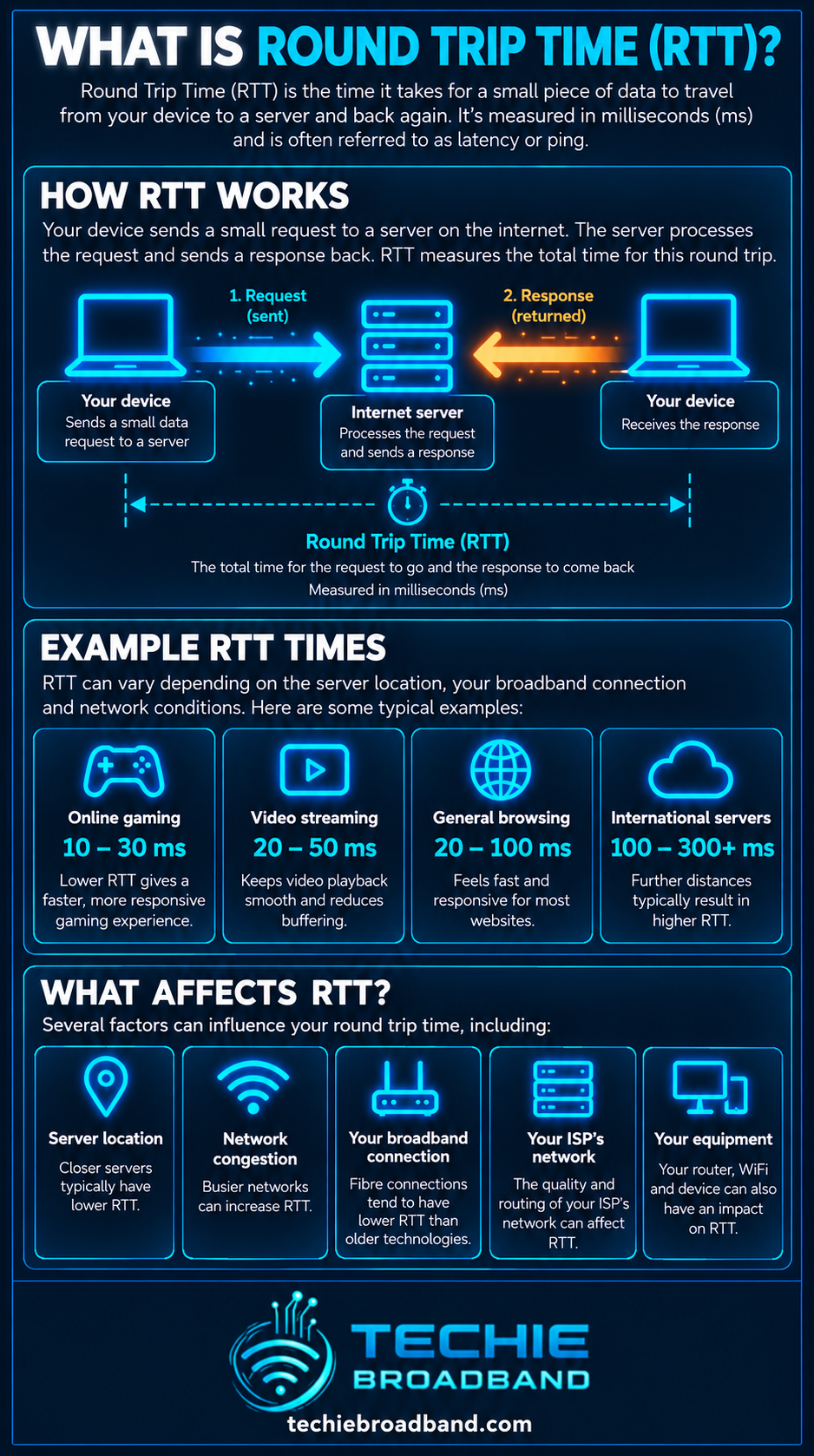
Round Trip Time, usually shortened to RTT, is the time it takes for data to travel from your device to a destination and for a response to come back. It is normally measured in milliseconds. If a ping to a server reports 20 ms, that is approximately a 20 ms round trip between your device and that destination.
RTT is one of the most useful measurements for understanding how responsive a broadband connection feels. It is not the same thing as bandwidth or download speed. A connection can deliver gigabit throughput and still feel slow in an interactive application if its RTT is high.
What does Round Trip Time mean?
A network exchange has two directions. A packet travels out towards the remote system, the remote system processes or responds to it, and traffic returns to you. RTT measures the complete there-and-back exchange rather than only one direction.
A 20 ms RTT does not prove that each direction takes exactly 10 ms. Internet routes can be asymmetric, meaning the outbound and return paths can differ. Dividing RTT by two is therefore only a rough one-way estimate unless one-way delay is measured directly with suitably synchronised clocks.
RTT, latency and ping are related but not identical
Latency is the broader concept of delay in a network. RTT is a specific way of measuring that delay over a complete round trip. Ping is a common diagnostic utility that sends ICMP echo requests and reports the time taken for the echo reply to return.
Latency describes delay generally.
RTT measures a complete there-and-back exchange.
Ping is a tool commonly used to observe RTT.
Bandwidth describes how much data a connection can carry, not how quickly an individual exchange completes.
Throughput describes the rate of useful data transfer achieved over the path.
This distinction is important because a high-bandwidth connection can still have high RTT. For the capacity side of the equation, see What is Bandwidth?.
How is RTT measured?
The simplest practical measurement is to timestamp when a request leaves, timestamp when the corresponding response returns, and subtract the first time from the second. The result includes delay across the local network, access network, ISP, wider internet path, remote endpoint and return path.
ICMP ping is useful, but it is not a perfect proxy for every application. Routers and servers can deprioritise or filter ICMP, while applications may use TCP, QUIC or other protocols with different processing and transport behaviour.
What affects Round Trip Time?
Physical distance between you and the destination.
The route selected through your ISP and upstream networks.
Peering and transit arrangements.
WiFi contention, interference and retransmissions.
Queueing inside routers and network equipment.
Access network behaviour.
Congestion and cross traffic.
The performance and location of the remote server.
Packet loss that causes retransmission or recovery behaviour.
VPNs or tunnels that add processing or a longer route.
RTT is therefore an end-to-end measurement. It should not automatically be treated as a measurement of the ISP alone.
Physical distance sets a lower bound
Signals do not travel instantaneously. Even fibre has propagation delay. The longer the physical path, the higher the minimum possible RTT. A server in the same UK region can normally be reached with much less propagation delay than a server on another continent.
Routing also matters. The geographical distance shown on a map is not necessarily the distance your packets travel. Traffic may pass through multiple networks and interconnection points before reaching the destination.
RTT and broadband access technology
FTTP removes several limitations associated with older copper access networks, but FTTP does not make RTT disappear. GPON, XGS-PON and other fibre access technologies still sit inside a wider end-to-end path containing routers, queues, interconnection and remote systems.
FTTC adds a copper section between the cabinet and the premises. Depending on line conditions and the technologies in use, that can influence delay and stability. The important point is that access technology is only one component of total RTT.
RTT on WiFi versus Ethernet
WiFi can add variable delay because devices share radio airtime. Interference, weak signal, busy channels, retransmissions and power-saving behaviour can all move individual RTT samples. Ethernet is normally the better baseline when diagnosing broadband latency because it removes the wireless layer from the test.
If wired RTT is stable but WiFi RTT jumps around, investigate the local wireless network before assuming the broadband connection is responsible.
RTT under load and bufferbloat
One of the most revealing tests is to compare RTT when the connection is quiet with RTT while upload or download traffic is saturating the link. Large increases under load often indicate queueing.
For example, imagine a wired baseline RTT of 10 ms. During a heavy upload, repeated RTT rises to 110 ms. The connection has added about 100 ms of loaded delay. The bandwidth may still be high, but interactive traffic now has to wait behind queued data.
This is why speed tests that report loaded latency can reveal problems that a headline Mbps result misses.
RTT and download speed
RTT does not directly equal download speed, but it can affect how quickly protocols ramp up, recover from loss and exchange acknowledgements. See What is Download Speed? for the throughput side of broadband performance.
RTT and upload speed
Upload saturation can be particularly noticeable because upstream queues can delay acknowledgements and interactive traffic. See What is Upload Speed? for a deeper explanation of upstream capacity.
RTT and symmetrical broadband
A symmetrical service provides equal headline upload and download rates, but symmetry does not guarantee low RTT. Capacity and delay are separate properties. See What is Symmetrical Speeds?.
RTT and TCP performance
TCP uses measured round-trip behaviour when managing acknowledgements, retransmissions and congestion control. RFC 6298 describes how TCP maintains a smoothed RTT estimate, commonly called SRTT, together with RTT variation, RTTVAR, to calculate its retransmission timeout.
This matters because a network path is not defined by bandwidth alone. The amount of data that can be in flight before acknowledgements return grows as either bandwidth or RTT increases.
Bandwidth-delay product
Bandwidth-delay product is a useful way to visualise how much data could be in flight on a path. Using decimal networking units, multiply the path bandwidth in bits per second by RTT in seconds, then divide by eight to express the result in bytes.
1 Gbit/s × 20 ms = 20,000,000 bits in flight, or about 2.5 MB.
1 Gbit/s × 100 ms = 100,000,000 bits in flight, or about 12.5 MB.
2.5 Gbit/s × 20 ms = about 6.25 MB in flight.
2.5 Gbit/s × 100 ms = about 31.25 MB in flight.
These are theoretical path calculations, not guarantees of application throughput. Protocol behaviour, congestion control, receive windows, packet loss, server limits and other factors still matter.
Why RTT matters for gaming
Online games are interactive. Player inputs and game state updates must cross the network repeatedly, so delay is much more noticeable than it is during a large background download. Stable RTT is also important because large variation can make timing inconsistent.
The game server location and routing path can matter as much as the access speed. Upgrading from 500 Mbps to 1 Gbps does not automatically halve gaming RTT.
Why RTT matters for video calls and remote work
Voice and video conversations depend on timely two-way communication. High RTT makes conversations feel less natural, while jitter and packet loss can compound the problem. Remote desktops, SSH sessions and cloud applications are also sensitive because many small interactions can require repeated network exchanges.
RTT and web browsing
Modern web protocols reduce some historical round trips, but RTT still matters. DNS lookups, connection establishment, security handshakes and application requests can all contribute to how quickly a page begins responding. A fast throughput result cannot remove the physical and network delay of those exchanges.
Why one ping result is not enough
A single RTT sample is only one observation. Networks vary. A useful test looks at repeated samples, minimum values, typical values, variation and behaviour under load.
Test more than one destination.
Use a nearby reliable target for a baseline.
Repeat the same test at different times.
Compare Ethernet with WiFi.
Compare idle and loaded conditions.
Look for packet loss and large variation, not just the average.
Keep the destination constant when comparing results.
How to test RTT properly
Connect a capable device by Ethernet where possible.
Stop large downloads, uploads and cloud backups to establish an idle baseline.
Ping the same reliable destination repeatedly rather than relying on one sample.
Record minimum, average and maximum RTT and any packet loss.
Run a throughput test and observe RTT while the connection is under load.
Repeat the test during different periods, including busy evening periods.
Test a second destination to separate destination-specific routing from a broader pattern.
If the problem appears only on WiFi, investigate the wireless network.
If wired RTT rises dramatically only under load, investigate queue management and bufferbloat.
Repeat over several days before drawing conclusions about persistent ISP or routing behaviour.
What is a good RTT?
There is no universal RTT number that is good for every destination because distance and routing matter. Lower and stable is generally better for interactive applications, but a UK user should not expect the same RTT to a nearby UK server and a server thousands of miles away.
Treat RTT as contextual. Compare like with like: the same device, connection method, destination and test conditions.
Common RTT misconceptions
A faster broadband package does not automatically mean lower RTT.
A low idle ping does not prove the connection stays responsive under load.
High RTT does not automatically prove ISP congestion.
WiFi latency is not the same thing as access-network latency.
Ping measures a round trip, not necessarily one-way delay.
A symmetrical connection can still have high RTT.
A nearby server can still have an inefficient route.
RTT, jitter and packet loss
RTT tells you the delay of a round trip. Jitter describes variation in delay between samples or packets. Packet loss describes traffic that fails to arrive. These measurements should be considered together when diagnosing real-time applications.
Technical standards behind RTT
The IETF defines a formal Round-trip Delay metric in RFC 2681. TCP retransmission timing is specified in RFC 6298, which uses smoothed RTT and RTT variation when calculating retransmission timeouts.
Frequently asked questions
Is RTT the same as ping?
Not exactly. RTT is the measured round-trip delay. Ping is a tool that commonly measures RTT using ICMP echo requests and replies.
Is RTT the same as latency?
RTT is a specific latency measurement covering a complete round trip. Latency is the broader term for delay.
Does faster broadband reduce RTT?
Not necessarily. More bandwidth can reduce queueing when capacity was the bottleneck, but RTT also depends on distance, routing, local networking, queue management and the remote destination.
Can WiFi increase RTT?
Yes. Wireless contention, interference, retransmissions and signal conditions can add delay and variation. Use Ethernet when establishing a broadband baseline.
Why does RTT rise during uploads?
If an upload fills queues in the router or network path, small interactive packets can wait behind bulk traffic. That added queueing delay can push RTT far above the idle baseline.
Can a 1 Gbps connection have worse RTT than a 100 Mbps connection?
Yes. Bandwidth and RTT measure different things. Routing, queueing, access technology, local networking and destination location can make the lower-bandwidth path more responsive.
The key point
Round Trip Time tells you how long a complete network exchange takes there and back. It is one of the clearest measurements of responsiveness, but it must be interpreted alongside bandwidth, throughput, jitter, packet loss and loaded latency. Test it repeatedly, test it wired, and compare the same destination under quiet and loaded conditions before deciding where a problem sits.
To explore the related technical concepts used in this Round Trip Time (RTT) guide, visit our broadband terminology guide.
