
What is Latency Spikes?
Updated: 3 days ago

Latency spikes are short or intermittent jumps in network delay above the connection's normal baseline. A broadband connection might normally return a 12 ms round trip time and then suddenly jump to 80 ms, 150 ms or more before recovering. The important distinction is that a latency spike is a change in delay over time, not simply a connection that always has high latency.
They matter because interactive applications depend on consistent response time. Gaming, voice calls, video meetings, remote desktops and other real time activity can feel disrupted even when download speed remains high. A spike can be caused by queue build-up, WiFi contention, packet retransmission, route changes, overloaded equipment or congestion elsewhere along the path. Related measurements such as jitter and packet loss can occur at the same time, but they are not the same measurement.
What are latency spikes?
Latency is the time it takes data to travel through a network path. Latency spikes describe moments when that delay rises sharply above the usual level and later falls back. Consumer tests commonly observe this as a sudden increase in ping or round trip time (RTT).
A single high result is not enough to diagnose a network. What matters is the pattern across repeated measurements. The IETF's IP Packet Delay Variation metric in RFC 3393 defines delay variation from differences in one way delay between selected packets and notes that the word jitter is used inconsistently. For practical broadband troubleshooting, repeated RTT samples are often easier to collect, but they still need careful interpretation.
Latency spikes, jitter and packet loss are different
Latency measures delay. It answers how long a packet journey takes.
Latency spikes are unusually large increases in delay compared with the normal baseline.
Jitter describes variation in delay over time. A connection can have moderate jitter without one dramatic spike.
Packet loss means packets fail to reach their destination. Loss can accompany a spike, but a delayed packet is not automatically a lost packet.
Bandwidth describes capacity. A fast connection can still suffer latency spikes.
This is why a speed test result on its own can miss an interactive performance problem. Bandwidth and throughput can remain high while short periods of queueing or contention make individual packets wait.
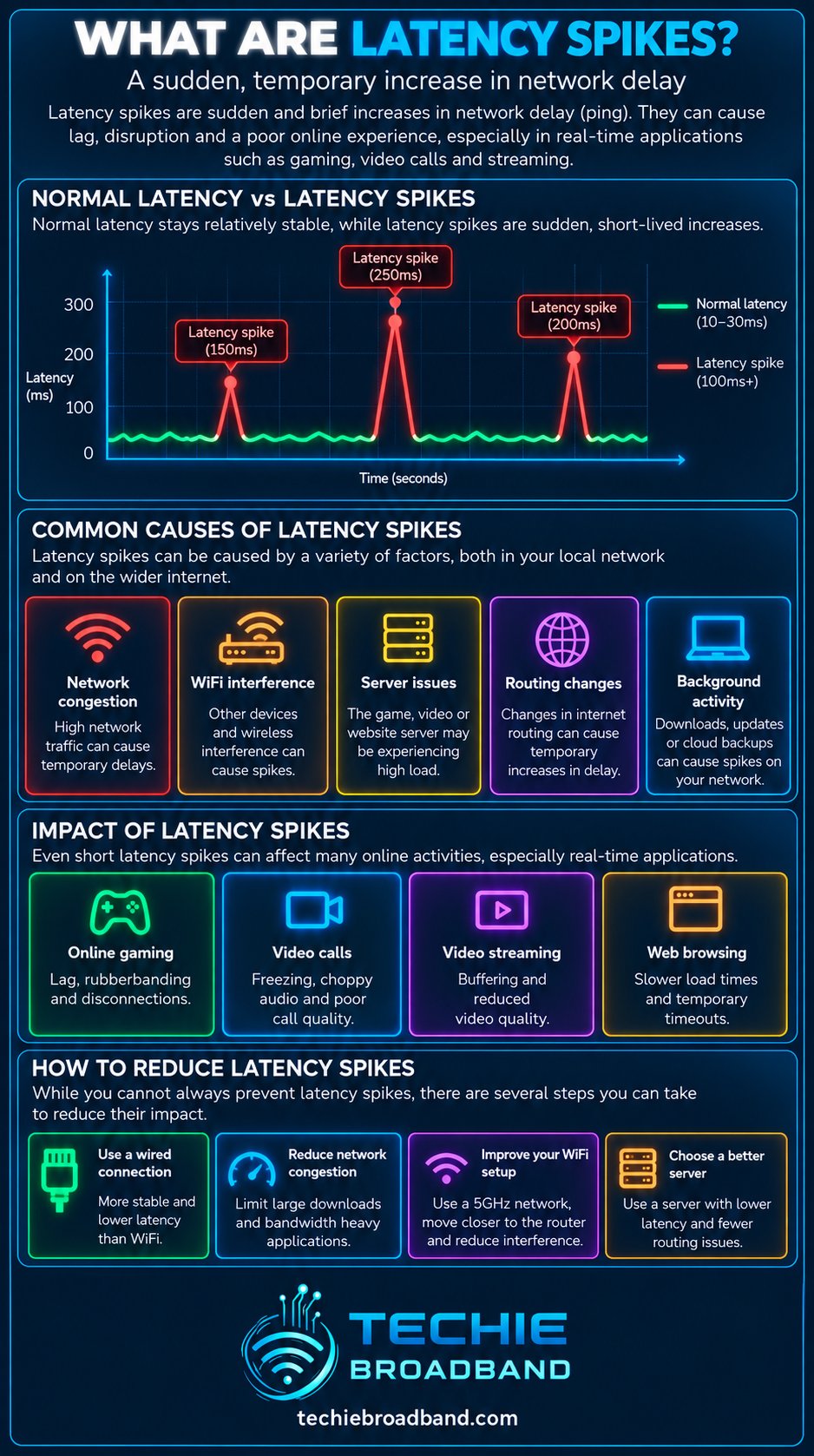
The infographic shows the defining pattern: a stable baseline, a sudden delay increase and recovery. It also separates the most common causes from the metrics people often confuse with the symptom.
What causes latency spikes?
A latency spike can originate anywhere between the application and the remote service. The useful diagnostic question is not simply whether latency increased, but where the extra waiting time was introduced.
Queue build-up and bufferbloat
When packets arrive at a bottleneck faster than they can leave, they wait in a queue. If that queue grows, delay rises. The IETF's RFC 7567 recommendations on Active Queue Management explain that excessive queueing can create unwanted delay and that keeping average queues small can reduce delays experienced by flows.
On a home broadband connection this is often most obvious when an upload or download saturates the narrowest link. Bufferbloat is the extreme form where oversized or persistently full buffers allow substantial delay to accumulate. Latency under load is therefore one of the most useful related tests.
WiFi contention and retransmissions
WiFi uses shared radio airtime. Competing devices, interference, weak signal, channel congestion and retransmissions can make a packet wait before it is successfully transmitted. If wired Ethernet remains stable while WiFi shows spikes, investigate the local wireless network before blaming the broadband provider.
Network congestion
A shared network resource can become temporarily busy. Network congestion can occur in the home, access network, ISP, interconnection or remote network. The location matters because adding capacity at one point does not fix a bottleneck somewhere else.
Routing changes and path changes
Internet routes are dynamic. A path can change because of routing policy, a failure, maintenance or reconvergence. The replacement path may be longer, traverse different networks or encounter different queues. A brief routing event can therefore produce a cluster of high RTT samples even though the access line itself remains healthy.
Router, firewall or endpoint processing
A router, firewall, VPN appliance or endpoint can add variable processing delay when CPU, memory or packet-processing resources are stressed. Multi gigabit broadband can make this easier to expose because the internet connection may be faster than some local processing path.
Remote server or application delay
Not every apparent latency spike is a broadband problem. An application can respond slowly because the destination server is busy. A network ping to the same destination may remain stable while the application itself stalls, which is a useful clue that the delay is above the network layer.
Techie Broadband calculation: how large is a latency spike?
Consider a connection with a normal 12 ms RTT that occasionally reaches 150 ms.
Absolute increase: 150 ms minus 12 ms = 138 ms of additional round trip delay.
Multiple of baseline: 150 ÷ 12 = 12.5 times the normal RTT.
Percentage increase: (138 ÷ 12) × 100 = 1,150% above the baseline.
This is a Techie Broadband calculation, not a threshold defining when a spike becomes unacceptable. The practical impact depends on the application, how often the event occurs, how long it lasts and whether it is accompanied by jitter or packet loss.
Why queues can create a spike very quickly
A 1,500 byte packet contains 12,000 bits. On a 100 Mbps bottleneck, the theoretical serialisation time for one such packet is 12,000 ÷ 100,000,000 seconds, or 0.12 ms.
If 500 packets of that size were already waiting ahead in a simple illustrative queue, their serialisation time alone would be about 60 ms. At 1,000 packets it would be about 120 ms. Real queues contain varying packet sizes and scheduling behaviour, so this is a theoretical example rather than a prediction, but it shows why a queue can turn a low baseline into a large temporary delay.
Latency spikes across the end to end broadband path
Application and operating system on the device
WiFi or Ethernet local network
Router, firewall, VPN or traffic management
ONT or modem where applicable
FTTP, FTTC, cable, fixed wireless or mobile access network
ISP aggregation and core network
Peering or transit between networks
Remote network and destination server
Return path, which may differ from the outward path
The narrowest or busiest stage can change from one moment to the next. This is why a repeatable diagnostic process is more valuable than assuming that every spike comes from the ISP.
Latency spikes on UK broadband
The underlying access technology changes the possible causes, but no UK access network is immune to variable delay. FTTP removes copper access line behaviour from the path, yet latency can still vary because of home WiFi, router queues, PON or access-network contention, ISP routing, interconnection and the remote service.
FTTC adds a copper last-mile segment and its associated line conditions. Cable, fixed wireless and mobile broadband use different shared-medium and scheduling mechanisms. With mobile, radio conditions and cell loading can change rapidly. The correct comparison is always ISP + access network + product + location rather than assuming one behaviour applies universally.
Why upload activity often exposes latency spikes
Many UK broadband products have less upload capacity than download capacity. A large cloud backup, photo sync or file upload can therefore fill the upstream sooner than the downstream. When that bottleneck queues traffic, small interactive packets can wait behind bulk traffic. Read What is Upload Speed? for the capacity side of this behaviour.
Traffic management can help when the bottleneck is under your control. Traffic Prioritisation Quality of Service (QoS) can classify and schedule traffic, while modern queue management can reduce excessive queue delay. It cannot remove latency introduced at a remote bottleneck that your router does not control.
How to test latency spikes properly
Connect a capable computer to the router using wired Ethernet so WiFi is removed from the first baseline.
Pause cloud backups, game downloads, software updates and other large transfers, then record idle RTT for several minutes.
Use more than one destination. A spike to one remote host may be specific to that host or route.
Record the baseline, typical value, maximum value and the time at which each spike occurs rather than relying on one average.
Run a sustained upload and repeat the latency test. A large increase points towards upstream queueing or another load-sensitive bottleneck.
Run a sustained download and repeat the test to examine downstream loaded latency.
Compare the wired result with WiFi. If only WiFi spikes, investigate signal, interference, channel use and local airtime contention.
Test at different times of day. A pattern concentrated at busy periods is different from random spikes throughout the day.
Temporarily remove VPNs or security tunnels where practical and compare the result.
Only after local causes are isolated should you investigate the access network, ISP path, interconnection or remote service.
How to interpret a latency spike test
Idle stable, loaded high: investigate queueing, bufferbloat and traffic management.
Ethernet stable, WiFi high: investigate the local wireless network.
Several destinations spike together: suspect a shared local, access or ISP path before a single remote server.
Only one destination spikes: investigate that route or destination.
Latency spike plus packet loss: the bottleneck may be dropping traffic as well as delaying it.
Spikes at consistent busy times: investigate recurring contention or scheduled traffic.
Spikes after a route change: compare traceroute or path information before and during the event where possible.
Can faster broadband fix latency spikes?
Sometimes, but not automatically. More bandwidth can reduce queueing if the existing bottleneck is being saturated. It does not remove WiFi interference, routing changes, remote server delay, overloaded hardware or congestion beyond the upgraded link.
This is why download speed should not be used as a proxy for responsiveness. A 1 Gbps service can still experience a 150 ms spike if packets are forced to wait somewhere along the path.
Frequently asked questions about latency spikes
Are latency spikes the same as jitter?
No. A latency spike is a large temporary increase in delay. Jitter is the variation in delay over time. A spike contributes to variation, but the terms are not interchangeable.
Can WiFi cause latency spikes?
Yes. Contention, interference, weak signal and retransmissions can all create variable delay. Compare with wired Ethernet to isolate WiFi.
Can bufferbloat cause latency spikes?
Yes. When queues become excessively full under load, packets can wait long enough for RTT to rise sharply.
Why do latency spikes happen when uploading?
A saturated upstream can build a queue at the router or another bottleneck. Interactive packets then wait behind bulk traffic.
Does packet loss cause latency spikes?
They can occur together, but they are different. A delayed packet eventually arrives. A lost packet does not reach its destination and may trigger retransmission or application recovery.
Can an ISP cause latency spikes?
Yes, but so can the home network, WiFi, access network, interconnection, wider internet or remote service. Isolate local causes before attributing the problem to the ISP.
What is the best way to find intermittent latency spikes?
Run repeated timestamped measurements over time, compare idle and loaded conditions, test Ethernet and WiFi separately, and use multiple destinations.
Key takeaway
Latency spikes are temporary jumps in network delay above the normal baseline. They matter because interactive applications depend on consistent response time, not just headline broadband speed. The most effective diagnosis is to measure repeatedly, separate idle from loaded conditions, compare Ethernet with WiFi, test several destinations and work through the complete end to end path before deciding where the delay is being introduced.
To explore the related technical concepts used in this Latency Spikes guide, visit our broadband terminology guide.
