
What is Loopback Address?
Updated: 2 days ago

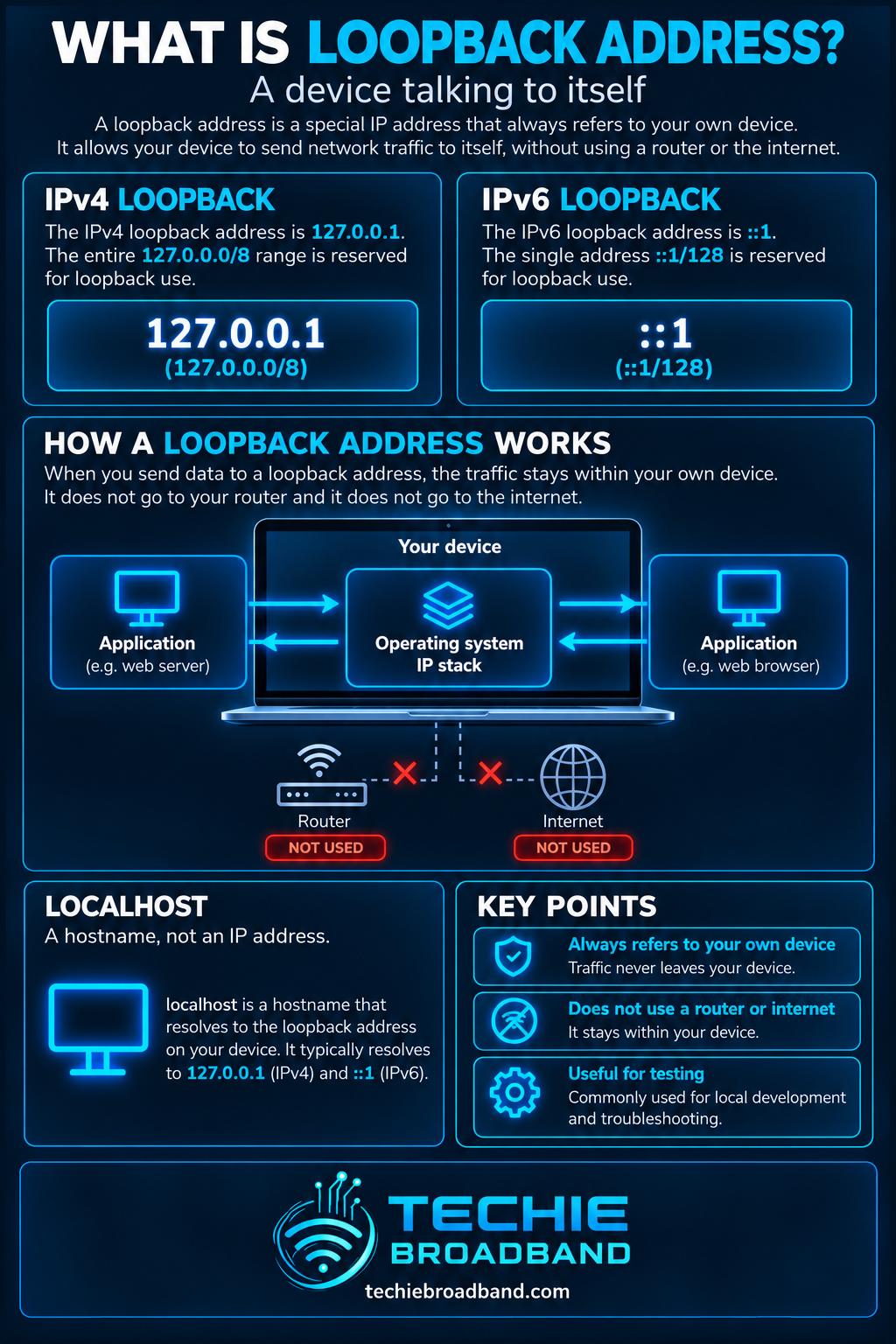
A loopback address is a special IP address that lets a device communicate with itself using its own networking software. The familiar IPv4 loopback address is 127.0.0.1, and the IPv6 equivalent is ::1. Traffic sent to these addresses stays within the device rather than travelling through your router, broadband connection or the public internet. That makes loopback useful for testing networking software, running local services and separating problems on your computer from problems elsewhere on the network.
The name localhost normally resolves to a loopback address, but localhost is a hostname, not the address itself. A successful loopback test proves that part of the local networking stack is responding. It does not prove that Ethernet, WiFi, your router or your UK broadband service is working.
What are the IPv4 and IPv6 loopback addresses?
127.0.0.1: the conventional IPv4 address for communicating with the same device.
127.0.0.0/8: the IPv4 loopback block. It contains 16,777,216 numerical addresses, from 127.0.0.0 to 127.255.255.255; implementations and applications may differ in how they handle particular addresses.
::1/128: the single IPv6 loopback address. Its expanded notation is 0:0:0:0:0:0:0:1.
localhost: a special-use hostname normally mapped locally to 127.0.0.1, ::1 or both, depending on the operating system and name-resolution configuration.
Techie Broadband calculation: the IPv4 block has 32 minus 8 equals 24 host-position bits, giving 2^24 = 16,777,216 numerical addresses. This is the size of the reserved block, not a claim that every operating system exposes 16.7 million separately configured interfaces.
The IANA IPv4 Special-Purpose Address Registry identifies 127.0.0.0/8 as loopback and not forwardable between devices.
The IANA IPv6 Special-Purpose Address Registry identifies ::1/128 as the IPv6 loopback address.
How does a loopback address work?
When an application connects to 127.0.0.1 or ::1, the operating system handles the traffic through its local IP networking stack. The packet is delivered back to the same host rather than sent to a physical network interface for transmission. No request needs to reach a router, ONT, ISP or remote server.
A web developer might start a service listening on 127.0.0.1:3000 and open that address in a browser on the same computer. The browser and the server exchange TCP traffic locally. Another computer on the household network normally cannot reach that service through its own 127.0.0.1, because that address refers to the second computer, not the developer's machine.
Loopback is not a physical cable bent into a circle. The traffic follows a logical path implemented by the host operating system. A loopback interface is usually shown as lo on Linux and macOS; Windows exposes the capability through its IP stack even though the interface presentation differs.
Loopback vs localhost vs your local IP address
Loopback IP: 127.0.0.1 or ::1 refers to the current device itself.
Localhost: a name that normally resolves to loopback, but the chosen IPv4 or IPv6 address can vary.
Private LAN address: 192.168.x.x, 10.x.x.x or 172.16–31.x.x identifies a device within a private network and can be reached by other authorised devices when routing and firewall rules permit.
Public IP address: an address used for communication across external networks, subject to NAT, routing and firewall policy.
0.0.0.0 as a server bind address: often means listening on all IPv4 interfaces, not the same thing as connecting to 127.0.0.1.
For the difference between private, public and special-use addresses, see What is IPv4?.
For IPv6 notation and addressing, see What is IPv6?.
What is loopback used for?
Testing the local IP stack with ping, without relying on a router or broadband connection.
Developing websites, APIs and databases that should initially accept connections only from the same machine.
Running local dashboards, monitoring agents and software administration interfaces.
Connecting applications to local services over TCP or UDP, including services that would otherwise use a Unix-domain socket or named pipe.
Checking whether a service is listening locally before troubleshooting firewall, LAN or internet access.
How to test loopback on Windows, macOS and Linux
Open Command Prompt, PowerShell or a terminal.
Run ping 127.0.0.1 to test IPv4 loopback.
Run ping ::1 to test IPv6 loopback, if IPv6 is enabled and the command supports it.
Try ping localhost and observe which address the operating system selects.
If testing a local web service, open http://127.0.0.1:PORT or http://[::1]:PORT with the actual listening port. Check the application log if it fails.
These commands are examples, not measurements of your broadband. Some systems require the ping count to be limited manually, such as ping -c 4 127.0.0.1 on many Unix-like systems or ping -n 4 127.0.0.1 on Windows. A local firewall or application configuration can affect particular tests.
What does a successful loopback ping prove?
A reply to ping 127.0.0.1 indicates that the local IPv4 stack is able to process and return that ICMP request. It does not confirm that DNS works, a remote site is reachable, your Ethernet cable is connected or your broadband provider is delivering service. It is a narrow diagnostic, not an end-to-end network test.
The latency is normally extremely low because the packet never traverses a physical network. However, the measured time includes operating-system scheduling and test-tool overhead. It should not be compared directly with ping to an internet game server.
Troubleshooting: loopback works but the internet does not
Test 127.0.0.1 and ::1 separately to identify whether either local IP family is responding.
Check the device's Ethernet or WiFi connection and its assigned LAN address.
Ping your router's actual LAN address to test local network reachability.
Check whether you can reach an external IP address without relying on DNS.
Test name resolution separately if external IP connectivity works but hostnames fail.
Inspect the router's WAN status, modem or ONT connection and the exact broadband product.
Compare a second device on the same network before concluding that the ISP is responsible.
If the loopback test fails, investigate the local operating system, network stack, interface configuration and security software first. If loopback works but the router does not respond, the fault is more likely to be within the device-to-LAN path. If the router responds but external connectivity fails, the issue may be further along the route. These are diagnostic clues, not absolute proofs.
Can other devices connect to 127.0.0.1 on my computer?
Not by connecting to 127.0.0.1 on their own machines. Their 127.0.0.1 points back to themselves. To offer a service to another device, the server usually needs to listen on an appropriate LAN address or interface and allow connections through the host firewall. Exposing a service beyond your LAN introduces additional security considerations.
Binding a development server to 127.0.0.1 is therefore a useful way to reduce its exposure. It is not a complete security boundary: software running on the same device may still be able to reach the service, and proxies or port-forwarding software can deliberately make it accessible elsewhere.
Does loopback work without broadband?
Yes. Loopback communication is local to the device. It can work when the router is switched off, the fibre ONT is disconnected or the broadband service is down, provided the local operating system and relevant applications are functioning. That makes it especially useful when diagnosing a UK FTTP or FTTC connection: it helps establish whether a basic local networking function works before checking the access network.
Loopback and IPv6: what changes?
IPv6 uses exactly one standard loopback address, ::1/128, rather than an entire /8 block. A local service may listen only on IPv4 loopback, only on IPv6 loopback, or on both. A browser that resolves localhost to ::1 may fail to connect to an IPv4-only service even while http://127.0.0.1:PORT works.
The IPv6 loopback semantics are defined in RFC 4291: it must not be sent outside the node or forwarded by a router.
The IPv4 requirement is set out in RFC 1122: addresses in 127/8 must not appear outside a host.
Common misconceptions about loopback
127.0.0.1 is not the router's IP address.
A successful loopback ping does not mean the internet is online.
localhost and 127.0.0.1 are related but not identical: one is a name, the other is an address.
The 127.0.0.0/8 range is reserved for loopback; it is not an ordinary private LAN subnet.
A loopback service is not automatically accessible from another computer.
Loopback performance is not a broadband speed test.
Frequently asked questions
Is 127.0.0.1 always localhost?
It is the conventional IPv4 loopback address and is commonly associated with localhost. The hostname may also resolve to IPv6 ::1, and the exact name-resolution behaviour depends on local configuration.
Is 127.0.0.1 a public IP address?
No. It belongs to the special-purpose 127.0.0.0/8 loopback range and is not globally reachable or forwarded between external network interfaces.
Can I use 127.0.0.2?
The wider 127.0.0.0/8 range is reserved for loopback. Some operating systems support other 127.x.x.x addresses for local use, but application and platform behaviour can vary. 127.0.0.1 remains the most portable conventional choice.
Why does localhost work but my LAN IP does not?
The service may be bound only to the loopback interface, or the host firewall may block connections through the LAN interface. Check the application's listen address, port and firewall rules.
Does ::1 require an internet connection?
No. ::1 is the IPv6 loopback address and works entirely within the local node when the IPv6 stack is enabled.
Key takeaway
Loopback is a self-test and local-communication mechanism, not a path to the internet. Use 127.0.0.1 for IPv4, ::1 for IPv6 and localhost when you specifically want name resolution to choose a local address. When diagnosing broadband problems, test loopback first, then the LAN, router, external IP connectivity and DNS in that order.
To explore the related technical concepts used in this Loopback Address guide, visit our broadband terminology guide.
