
What is IP Address?
Updated: 3 days ago

An IP address is a numerical identifier used by the Internet Protocol so devices and network interfaces can send and receive data across IP networks. It tells the network where traffic is coming from or going to at the IP layer. The most important distinction is that an IP address is not the same thing as a device, a person, a broadband connection or a physical location: addresses can be private or public, static or dynamic, shared through NAT, and assigned differently in IPv4 and IPv6.
For a typical UK home broadband connection, devices such as laptops and phones usually use local IP addresses inside the home network, while the router communicates with the wider internet using addressing supplied by the broadband provider. Network Address Translation can allow many local IPv4 devices to share one public IPv4 address, and some providers add another translation layer through CGNAT.
IP addressing is fundamental to routing. Routers examine IP information to move packets towards their destination, while DNS translates human-friendly names into address information that software can use.
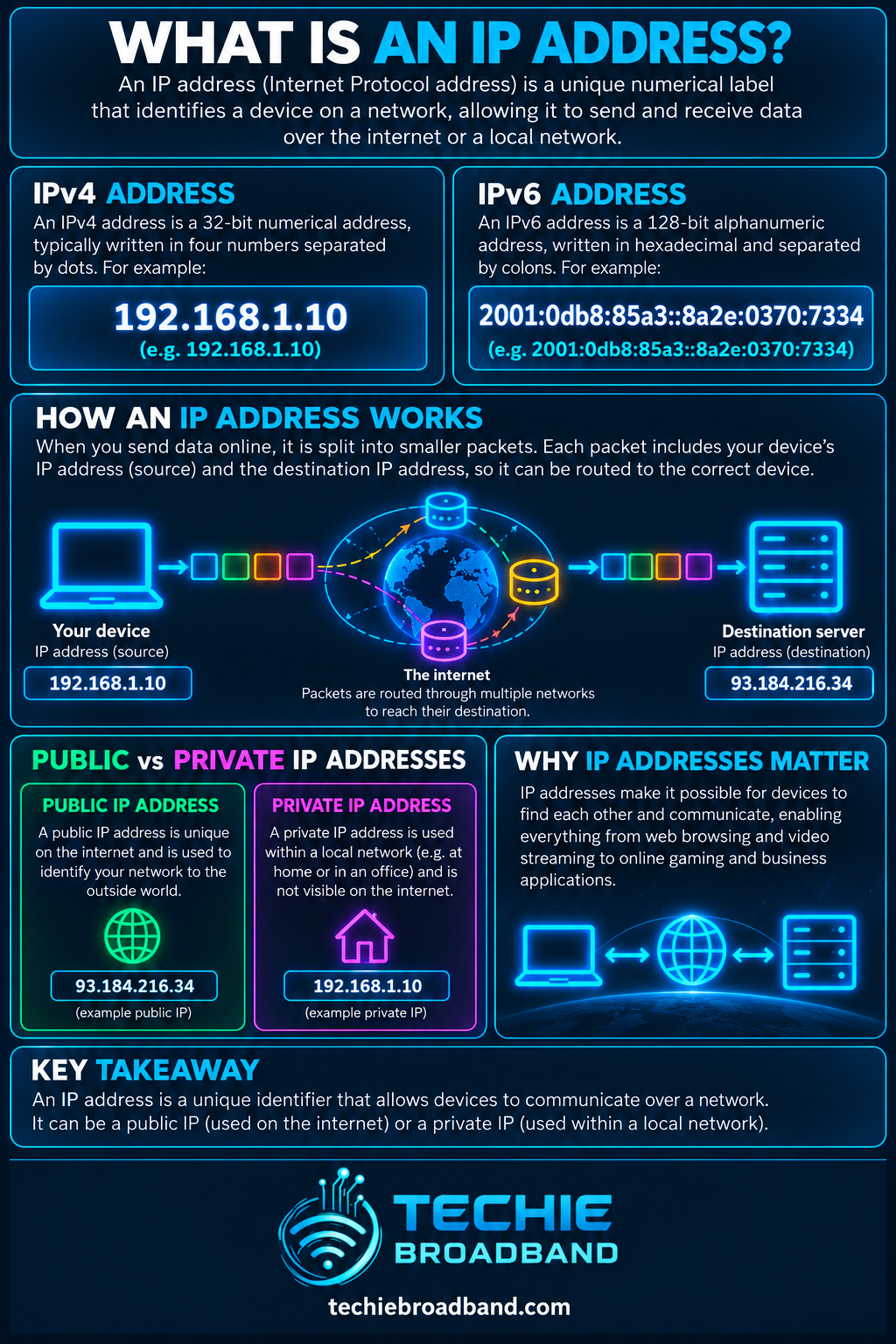
The infographic below shows the basic relationship between a device, router and the public internet, then separates IPv4 from IPv6 and public, private, static and dynamic addressing.
What does an IP address actually identify?
An IP address identifies an interface participating in an IP network for the purpose of delivering packets. In everyday language people often say that a computer, router or broadband connection has an IP address, but the technically useful model is that addresses are assigned to network interfaces and used by the IP layer.
A single device can therefore have several IP addresses at the same time. A laptop might have an IPv4 address and one or more IPv6 addresses on WiFi, different addresses on Ethernet, and additional addresses created by VPN or virtual network interfaces.
An IP address is a network-layer address.
A device can have more than one IP address.
An address can change without the physical device changing.
Several devices can appear to share one public IPv4 address because of NAT or CGNAT.
An IP address does not inherently identify a named human being or exact physical location.
How does an IP address work?
When an application sends data over an IP network, packets contain source and destination IP addresses. Routers use the destination information, together with their routing tables, to decide where to forward the packet next. Each router does not need to know the complete physical journey in advance. It needs a suitable next hop towards the destination prefix.
This connects IP addressing directly with routing. The address identifies where the packet needs to go at the IP layer, while routing determines how the network attempts to get it there.
On a home network, the process commonly includes a private local address, a default gateway on the router and a public-facing connection towards the ISP. With IPv4 NAT, the router can translate traffic between the private and public address realms while tracking the relevant transport connections.
IPv4 addresses
IPv4 uses 32-bit addresses. A familiar written form is four decimal numbers separated by dots, such as 192.0.2.25. Each part represents eight bits, giving 32 bits in total.
A 32-bit field provides 2^32 possible bit patterns, which equals 4,294,967,296. That is the theoretical size of the IPv4 address space, not the number of addresses that can simply be allocated to broadband customers. Parts of the space are reserved or used for particular purposes, and address allocation is hierarchical.
The original IPv4 specification is RFC 791. Modern IPv4 networks also depend on later standards covering subnetting, CIDR, private addressing, NAT behaviour and many other extensions.
IPv6 addresses
IPv6 uses 128-bit addresses, creating an address space vastly larger than IPv4. IPv6 addresses are normally written in hexadecimal groups separated by colons, and established notation allows runs of zeroes to be compressed.
The current core IPv6 specification is RFC 8200. IPv6 changes much more than the visual length of an address, including aspects of packet handling, addressing architecture and neighbour discovery.
IPv4 and IPv6 can operate alongside one another in dual-stack networks. A broadband connection can therefore have usable IPv4 and IPv6 connectivity at the same time, and the route to the same online service can differ between the two protocols.
IPv4 uses 32-bit addresses.
IPv6 uses 128-bit addresses.
Dual-stack networks can operate IPv4 and IPv6 concurrently.
IPv4 and IPv6 routes to the same service do not have to be identical.
Techie Broadband calculation: how much larger is IPv6?
IPv4 has 2^32 possible address values. IPv6 has 2^128. Dividing the two address spaces gives 2^96, or approximately 7.9 × 10^28.
This means the theoretical IPv6 address space contains roughly 79 octillion times as many possible address values as IPv4. This is a mathematical comparison of address-space size, not a claim about how many end-user devices can or should be assigned addresses.
IPv4 address bits: 32
IPv4 theoretical values: 4,294,967,296
IPv6 address bits: 128
IPv6 theoretical values: approximately 3.4 × 10^38
IPv6 ÷ IPv4 address-space ratio: approximately 7.9 × 10^28
Public IP addresses vs private IP addresses
A public IP address is intended to be globally routable in the public internet routing system. A private IPv4 address is intended for use inside private networks and is not globally routed in the same way.
RFC 1918 reserves three IPv4 blocks for private internets: 10.0.0.0/8, 172.16.0.0/12 and 192.168.0.0/16. These ranges can be reused independently by many homes and organisations.
Your laptop might therefore use 192.168.1.24 inside your home while the router uses a different public IPv4 address towards the internet. NAT on the router maps the relevant traffic between those address realms.
Public address: intended for global internet routing.
Private IPv4 address: reused inside local networks.
Private IPv4 ranges are not unique to one household or business.
NAT commonly connects private IPv4 networks to public IPv4 connectivity.
What is a static IP address?
A static IP address is intended to remain consistently assigned rather than changing through normal provider reallocation. For broadband users, the term usually refers to a stable public address supplied by the ISP, although static addressing can also be configured inside a private network.
A static public IP can be useful for services that need a predictable address, such as remote access, VPN endpoints, allowlists, monitoring or self-hosted systems. It does not make the broadband connection faster and does not inherently reduce latency.
What is a dynamic IP address?
A dynamic IP address is allocated in a way that allows it to change. A residential ISP might keep the same address assigned for a long period, but that does not make it contractually or technically static. Reconnection, lease behaviour, network changes or provider policy can result in another address being assigned.
Dynamic addressing is suitable for most ordinary internet use because clients usually initiate connections towards services identified through DNS rather than requiring other systems to know the customer's current public IP address.
What is NAT?
Network Address Translation changes address information as traffic crosses between address realms. In a typical IPv4 home network, NAT allows multiple private-addressed devices to communicate through a smaller number of public addresses, commonly one public IPv4 address on the broadband connection.
NAT is often discussed together with firewalling, but they are not the same function. Address translation changes addressing information. Firewall policy decides which traffic is permitted or blocked. Consumer routers commonly perform both, which is why the concepts are easily blurred.
NAT translates addressing information.
Firewalling applies traffic policy.
A home router can perform both functions.
NAT does not automatically mean provider-side CGNAT.
What is CGNAT?
CGNAT moves an additional IPv4 translation function into the service provider network so a public IPv4 address can be shared across multiple subscribers. This helps providers conserve scarce IPv4 address space.
The IETF's RFC 6888 describes common requirements for Carrier-Grade NATs and notes that subscribers do not receive unique public IPv4 addresses in this model.
CGNAT can matter for inbound connectivity. Port forwarding on your own router cannot by itself create an unsolicited inbound mapping through a provider's separate CGN device. Users who host services, require some VPN configurations or need direct inbound IPv4 reachability should therefore check what their specific ISP product provides.
Home NAT normally translates within the customer's router.
CGNAT adds translation inside the provider network.
Multiple subscribers can share public IPv4 addressing.
Inbound IPv4 requirements deserve specific checking when CGNAT is used.
Shared address space used with CGN
RFC 6598 defines the shared IPv4 address block 100.64.0.0/10 for service-provider use in CGN environments. It is different from the RFC 1918 private ranges commonly used inside homes.
Seeing a WAN-side address within 100.64.0.0/10 can therefore be a useful clue that a connection is using provider-side address sharing, although diagnosis should consider the complete network setup rather than relying on one observation alone.
IP address vs MAC address
An IP address and a MAC address solve different problems. An IP address is used by IP for logical addressing and routing across networks. A MAC address is a link-layer identifier used within technologies such as Ethernet and WiFi.
IP address: network-layer addressing used across routed IP networks.
MAC address: link-layer identification used on a local network segment.
Routers forward IP packets between networks.
Ethernet switches primarily forward frames using link-layer information.
IP address vs DNS
DNS and IP addressing are complementary rather than competing systems. People prefer names such as a website domain, while network software ultimately needs address information to communicate using IP.
A DNS lookup can return IPv4 A records, IPv6 AAAA records or other information. The returned address tells the client where the service can be reached at the IP layer. DNS can change which address is returned without the human-facing domain name changing.
IP address vs default gateway
Your device's own IP address identifies its interface on the local IP network. The default gateway is the router to which the device normally sends traffic when the destination is outside a more specific directly reachable route.
These values are related but not interchangeable. A device can have a valid local IP address and still fail to reach the internet if its gateway, routing, DNS or upstream connectivity is wrong.
What is a subnet and prefix length?
An IP prefix groups addresses for routing and local network design. In CIDR notation, the slash number describes how many leading bits form the network prefix. For example, /24 in IPv4 means the first 24 bits are the prefix and the remaining 8 bits vary within that address block.
That gives 2^8, or 256, total address values in the mathematical /24 block. Traditional IPv4 subnetting often reserves particular values for network and broadcast purposes, but usable-address rules depend on the context and should not be reduced to a universal minus-two shortcut.
IPv6 also uses prefix lengths. A /64 is extremely common for an IPv6 LAN, while an ISP may delegate a larger prefix to a customer so multiple /64 networks can be created.
/24 IPv4 leaves 8 host-position bits.
2^8 gives 256 total bit combinations.
IPv6 prefix lengths use the same slash notation concept.
A delegated IPv6 prefix can be divided into multiple LAN prefixes.
Techie Broadband calculation: what does a /48 IPv6 prefix contain?
If a customer receives an IPv6 /48 prefix, 48 bits identify the delegated prefix and 16 additional bits remain before the common /64 LAN boundary.
2^16 = 65,536. So a /48 can be divided into 65,536 separate /64 prefixes. This calculation demonstrates why IPv6 prefix delegation is fundamentally different from trying to conserve individual IPv4 addresses inside a home network.
Can an IP address reveal your location?
An IP address can support approximate geolocation because databases associate address ranges with networks and observed locations. It should not be treated as a precise household location system. Results can identify the ISP, a broad region, a network exit point or a location that is simply wrong.
VPNs, mobile networks, CGNAT, provider architecture and address reassignment can all make simplistic IP-to-location assumptions unreliable. An IP address should therefore not be described as a GPS coordinate for an internet connection.
Can an IP address identify a person?
Not by itself. An address identifies network addressing at a point in time, not a named individual. Connecting an observed public IP address to a subscriber may require provider records, timestamps and, where addresses are shared, additional information such as source ports.
This distinction is particularly important with dynamic addressing and CGNAT because the same public IPv4 address may be associated with different customers at different times or multiple subscribers at the same time.
How do IP addresses work on UK broadband?
The exact addressing setup depends on the ISP, access network, product and location. FTTP, FTTC, cable, fixed wireless and mobile broadband can all carry IP traffic, but the retail provider decides how customer addressing and upstream routing are delivered.
A service may provide public IPv4, CGNAT IPv4, IPv6, or a combination.
IPv4 may be static or dynamic depending on the product.
IPv6 may be native, tunneled, unavailable or provided with different prefix delegation policies.
Business and technically focused broadband products may expose different addressing options from mass-market residential products.
The underlying access network does not by itself determine every IP addressing feature of the retail ISP.
Do not assume that buying FTTP automatically gives you a static public IPv4 address, native IPv6 or freedom from CGNAT. Those are provider and product characteristics that must be checked separately.
How to find your public IP address
The simplest method is to use an external service that reports the source address it sees for your connection. Remember that an IPv4 result and an IPv6 result answer different questions, and a device can have both.
If the address reported by an external service differs from the IPv4 WAN address shown by your router, NAT exists somewhere between the router and the public internet. That might be ordinary upstream architecture or CGNAT, depending on the addresses and provider design.
How to find your local IP address
Your operating system can display the addresses assigned to its network interfaces. Look for the active Ethernet or WiFi interface and distinguish IPv4 from IPv6.
Windows: inspect the active adapter in network settings or use ipconfig.
macOS: inspect the active network interface in System Settings or use command-line network tools.
Linux: use the desktop network interface or the ip address command.
Router: inspect the connected-device or DHCP client view to see local assignments.
How to diagnose an IP addressing problem
Addressing faults can look like general internet failures, so work from the local interface outwards rather than changing random settings.
Confirm the device has an address on the expected local network.
Confirm the subnet or prefix information is sensible for that network.
Confirm the default gateway is present and reachable.
Test the gateway by IP address before testing a remote destination.
Test a known remote IP address to separate basic reachability from DNS resolution.
Check whether IPv4, IPv6 or both are affected.
Inspect the router WAN addressing and connection status.
Compare the router's WAN IPv4 address with the public IPv4 observed externally when investigating NAT or CGNAT.
Check for VPN software, virtual adapters or manually configured addresses that may be overriding the expected route.
Only after local checks should you investigate ISP-side addressing, routing or service faults.
Common IP address misconceptions
My IP address is my exact location. False: IP geolocation is approximate and can be wrong.
Every device on my WiFi has its own public IPv4 address. Usually false: home IPv4 networks commonly use private addresses behind NAT.
A static IP makes broadband faster. False: it does not inherently increase bandwidth or reduce latency.
IPv6 is just IPv4 with more digits. False: it is a different version of IP.
NAT and a firewall are the same thing. False: they are distinct functions.
If I know an IP address, I know who used it. False: attribution can require provider records, accurate timestamps and sometimes port information.
Related Techie Broadband concepts
IP addressing connects directly with CGNAT, traceroute, ping, ICMP and BGP. These cover address sharing, diagnostics, control messages and inter-network route exchange.
IP address FAQs
What is my IP address used for?
It provides addressing information that allows IP traffic to be delivered between interfaces and networks. Public and private addresses have different scopes, and NAT can translate between address realms.
Does every device have an IP address?
A device participating in an IP network needs appropriate IP configuration on the relevant interface, but it can have multiple addresses and may use IPv4, IPv6 or both.
Why does my IP address change?
If your ISP supplies dynamic addressing, the address can change because of lease behaviour, reconnection, network changes or provider allocation policy. A local device address can also change when DHCP reallocates it.
Is 192.168 an IP address?
192.168 by itself is only the beginning of a range. RFC 1918 reserves 192.168.0.0/16 for private internets, covering addresses from 192.168.0.0 through 192.168.255.255.
What is the difference between IPv4 and IPv6?
IPv4 uses 32-bit addresses while IPv6 uses 128-bit addresses. IPv6 provides a vastly larger address space and is a distinct protocol version rather than merely a different way to write IPv4.
Do I need a static IP address?
Most households do not. A static public address becomes useful when another system needs to reach your connection predictably, such as for some hosting, remote-access, VPN, monitoring or allowlisting requirements.
Can I have IPv4 and IPv6 at the same time?
Yes. Dual-stack networks can provide both protocols concurrently, allowing applications to use IPv4 or IPv6 depending on destination support and network policy.
Key takeaway
An IP address is the logical addressing information used by the Internet Protocol to deliver packets between network interfaces. Understanding IP addresses properly means separating IPv4 from IPv6, public from private, static from dynamic, and direct public addressing from NAT or CGNAT.
For UK broadband users, the practical addressing experience depends on the combination of ISP, access network, product and location. If inbound connectivity, static IPv4, native IPv6 or prefix delegation matters to you, check those capabilities specifically rather than assuming they come automatically with a particular broadband speed or access technology.
To explore the related technical concepts used in this IP Address guide, visit our broadband terminology guide.
