
What is Open Ports?
Updated: 3 days ago

Open ports are TCP or UDP transport endpoints that are reachable and have a service accepting traffic on a particular IP address. An open port does not mean an entire device or network is “open”. It means a specific protocol and port responded from the location where it was tested.
That distinction matters on UK broadband because the same service can appear open from one network and closed or filtered from another. Host firewalls, router firewalls, NAT, port forwarding, CGNAT, IPv4, IPv6 and the service’s own listening configuration can all change the result.
What does an open port actually mean?
A network port is a numbered transport-layer endpoint. When a scanner reports a port as open, it has received a response consistent with a service listening on that destination address, transport protocol and port.
The complete statement therefore needs context. “Port 443 is open” is less precise than “TCP 443 on this IPv4 address was reachable from this external test location”. TCP 443 and UDP 443 are different endpoints, and the same number on IPv4 and IPv6 can have different reachability.
An open port is also not proof that the service behind it is safe, vulnerable, correctly configured or even the application normally associated with that port. IANA explicitly warns that traffic using a registered port does not necessarily correspond to the registered service.
The infographic below summarises the path-dependent way to interpret open-port tests.
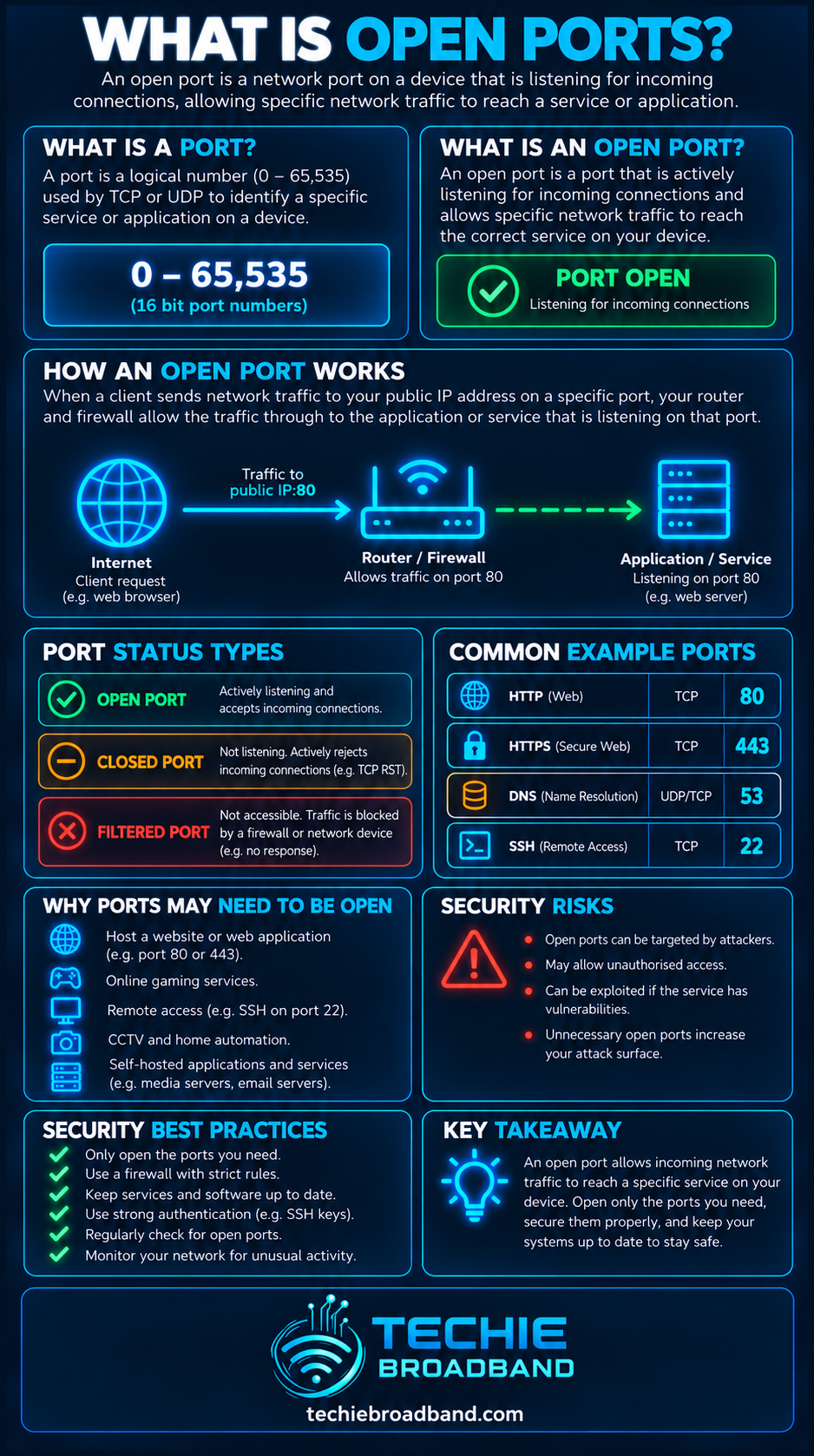
Open, closed and filtered ports are different
Port scanners commonly classify a result using terms such as open, closed and filtered. The exact behaviour depends on the transport protocol and scanner, but the practical distinction is:
Open: a service responded in a way consistent with accepting or listening for traffic on that endpoint.
Closed: the destination was reachable, but no service accepted the connection on that port.
Filtered: a firewall or other network control prevented the scanner from receiving enough information to classify the port normally.
No response or timeout: the test did not obtain a decisive reply. That can be caused by filtering, routing, packet loss, an unreachable host or deliberate non-response.
These are observations from a particular test path, not permanent labels attached to a port number.
TCP open ports and UDP open ports are not the same
TCP is connection-oriented. A TCP scanner can use the TCP handshake behaviour to determine whether a service is listening. An accepted SYN normally produces a SYN-ACK, while a reachable but closed TCP port commonly produces a reset.
UDP has no equivalent connection handshake. A UDP service may respond to a valid request, remain silent, or be hidden by a firewall. That makes UDP scanning more ambiguous: no reply does not by itself prove that a UDP port is open.
Always include the transport protocol when discussing an open port. TCP 53 and UDP 53 are separate endpoints even though both are associated with DNS.
How many ports can be open?
TCP and UDP use 16-bit port-number spaces, giving values from 0 to 65,535 for each transport protocol. IANA divides the number space into three ranges:
System Ports: 0–1023.
User Ports: 1024–49151.
Dynamic or Private Ports: 49152–65535.
The ranges describe registration and allocation conventions, not a rule about which ports may be opened. A service can listen on a high-numbered port, and a firewall can block a well-known port.
Common open port examples
Some port numbers are strongly associated with familiar services, but the number is only a convention. Common examples include:
22/TCP: SSH.
53/UDP and 53/TCP: DNS.
80/TCP: HTTP.
443/TCP: HTTPS; UDP 443 is also used by modern HTTP transports such as QUIC.
123/UDP: NTP.
A scanner finding TCP 22 open suggests something is accepting connections there, but it does not prove that the software is OpenSSH or that the service is insecure. Service identification requires additional evidence.
An open port is not automatically a security problem
Internet-facing services need reachable ports. A web server cannot serve HTTPS to the public if the required network path is completely blocked. The security question is therefore not simply whether a port is open, but whether the exposed service is intended, necessary and securely maintained.
Is the exposure intentional?
Is the software patched and supported?
Is strong authentication required?
Is encryption appropriate for the service?
Can access be restricted to trusted source networks or a VPN?
Are logs and alerts monitored?
Does the service expose an unnecessary management interface?
Reducing unnecessary exposure is useful because every reachable service creates an additional interface that can be probed. But closing every port is not a meaningful objective for a system whose job is to provide network services.
Open ports and firewalls
A firewall decides which traffic is permitted according to policy and state. It can allow a service to be reachable from one source while blocking the same destination port from another.
This means a service can be listening locally while an external scanner reports the port as filtered. Conversely, a permissive firewall rule does not make a port open if no application is listening behind it.
For diagnosis, separate two questions: is a service listening, and is the network path allowing traffic to reach it?
Open ports and NAT
On a typical private IPv4 home network, NAT changes the addressing seen between the LAN and internet. Unsolicited inbound traffic normally has no existing translation state telling the router which internal device should receive it.
A port forwarding rule can deliberately create that inbound mapping. For example, public TCP 8443 could be forwarded to TCP 443 on an internal server. The external port can then appear open only if the mapping, firewall policy and internal service all work.
Open ports and CGNAT
Carrier-Grade Network Address Translation (CGNAT) adds another IPv4 translation layer inside the provider network. If your router does not hold the public IPv4 address, a local port forward normally cannot make unsolicited inbound IPv4 traffic traverse the provider’s CGNAT mapping.
This creates a common UK broadband troubleshooting trap: the service is listening, the host firewall is correct and the router port forward is correct, yet an external IPv4 scan still cannot reach it because the inbound path ends upstream.
Open ports with IPv4 and IPv6
Ports work with both IPv4 and IPv6. A service can therefore be reachable over one IP version and blocked over the other.
Native IPv6 normally removes the need for NAT44-style inbound port translation, but it does not remove the need for firewall policy. A globally addressed IPv6 host can still be protected by a stateful router firewall and a host firewall.
When a broadband connection is dual stack, test IPv4 and IPv6 separately. A successful IPv6 connection does not prove the equivalent IPv4 path is open, and vice versa.
Why online port checkers can give misleading results
A public port-checking website tests from its own internet location towards the public address it sees or the address you supply. That is useful for external reachability, but it does not reveal every layer of the problem.
The checker may test TCP while your application uses UDP.
The service may be bound only to localhost or a different interface.
The router may not support NAT loopback, making an internal test behave differently from an external test.
The public IPv4 address may belong to CGNAT rather than your router.
IPv4 and IPv6 may take different paths and have different firewall rules.
Source-address filtering may permit some remote networks and reject others.
The application may respond only after receiving valid protocol data rather than to a generic probe.
Techie Broadband diagnostic model: four conditions must align
A useful way to diagnose an intended inbound service is to treat reachability as four separate conditions. The port is externally usable only when all relevant conditions align:
The application is running and listening on the expected TCP or UDP port.
The service is bound to the correct local address or interface.
Every relevant firewall permits the intended traffic.
The end-to-end address and translation path reaches the host, including any NAT, port forwarding or provider CGNAT layer.
This model is more useful than repeatedly changing router settings because it identifies which layer has actually failed.
How to check whether a port is open
Confirm the service is running on the destination device.
Check the listening socket locally and confirm the transport protocol and local address.
Test from another device on the same LAN where appropriate.
Check the host firewall.
For inbound IPv4 behind NAT, verify the router port-forward rule and the internal destination address.
Compare the router WAN IPv4 address with the public IPv4 address to identify possible CGNAT or upstream NAT.
Test from a genuinely external network such as a separate mobile connection.
If IPv6 is available, repeat the test separately over IPv6.
Record whether the result is open, closed, filtered or inconclusive rather than treating every failure as 'closed'.
How to close an unwanted open port
Do not begin by blocking random port numbers without identifying the service. First establish why the endpoint is reachable.
Identify the process or service listening on the port.
Decide whether the service is required.
If it is unnecessary, stop or disable the service.
Remove unnecessary port forwards, automatic mappings or permissive firewall rules.
Restrict required services to trusted sources where practical.
Patch and harden any service that must remain reachable.
Retest from the same external vantage point and over the same IP version.
Disabling the application is often cleaner than leaving an unnecessary service running behind a firewall rule, because it removes the listener as well as the network exposure.
UPnP can create port mappings automatically
Universal Plug and Play can allow applications on a LAN to request inbound mappings from a compatible router. This can be convenient for gaming, peer-to-peer applications and communications software, but it means an external mapping may exist even if you did not manually create a port-forward rule.
If an unexpected IPv4 port appears reachable, inspect both manual port forwards and automatic mappings.
Open ports on a router are not the same as open ports on a device
A router can itself run services on its WAN interface, and it can also forward traffic to devices behind it. Those are different exposure models. Remote administration enabled on the router exposes the router; a port forward exposes a service on an internal destination.
The troubleshooting and security response should therefore identify the actual endpoint rather than assuming every open port belongs to the router.
Does a port scan show every vulnerability?
No. A port scan is primarily a reachability and service-discovery technique. It can reveal exposed endpoints, but it does not prove that a reachable service is vulnerable and it cannot show every weakness in an application, account, configuration or device.
Likewise, a scan showing no unexpected open ports does not prove a network is secure. Outbound compromise, malicious browser activity, cloud account weaknesses and attacks against permitted services can exist without an unusual inbound port.
Common open port misconceptions
“Open” does not mean the whole device is exposed.
A registered port number does not prove which application is using it.
TCP and UDP with the same number are different endpoints.
A firewall rule allowing traffic does not create a listening service.
NAT and a firewall are different functions even when one router performs both.
Changing a service to an unusual port does not make it secure.
A failed port checker does not automatically mean the local port-forward rule is wrong.
IPv4 and IPv6 reachability must be considered separately.
The key point
An open port is best understood as evidence of reachability to a listening transport endpoint from a specific test location. It is not a universal property of a port number and it is not, by itself, a verdict on security.
For UK broadband users running servers, remote-access tools, CCTV, games or self-hosted services, the useful diagnostic question is: which protocol, which IP version, which address, which port, which firewall and which translation path are involved?
What is Open Ports? FAQs
What does it mean if a port is open?
It means a service was reachable on a specific IP address, transport protocol and port from the location where the test was performed.
Are open ports dangerous?
Not automatically. Internet services need reachable ports. Risk depends on whether the exposure is intended and on the security, patching, authentication and configuration of the service behind it.
Why is my port open locally but closed from the internet?
Common causes include a host or router firewall, missing or incorrect IPv4 port forwarding, CGNAT, testing the wrong transport protocol, testing the wrong IP version or a service bound only to a local interface.
Can CGNAT stop an open port being reachable?
Yes. A service can be listening correctly inside your network while unsolicited inbound IPv4 traffic cannot traverse the provider’s CGNAT layer.
Do I need open ports for normal web browsing?
You do not normally need to create inbound port forwards for ordinary outbound browsing. Stateful firewalls and NAT track outbound connections so expected reply traffic can return.
Is port 443 always safe?
No. Port 443 is conventionally associated with HTTPS, but the port number alone says nothing about whether the service is correctly configured, patched or trustworthy.
To explore the related technical concepts used in this Open Ports guide, visit our broadband terminology guide.
