
What is Time To First Byte (TTFB)?
Updated: 9 hours ago

Time To First Byte, usually shortened to TTFB, is the elapsed time between starting a request for a web resource and receiving the first byte of the response. It is measured in milliseconds. TTFB matters because it reveals how long the browser is waiting before useful response data begins to arrive, but it is not the same thing as page load time and it is not a broadband speed test.
A high TTFB can be caused by several different stages of the request path, including name resolution, connection establishment, encryption setup, network distance, CDN or proxy behaviour, server processing, database work and cache misses. That is why TTFB is most useful as a diagnostic metric when it is broken down rather than treated as a single verdict on a website or broadband connection.
What does Time To First Byte measure?
At its simplest, TTFB measures time to the start of an HTTP response. MDN describes it as the time between the browser requesting a page and receiving the first byte of information from the server. In a navigation measurement, that can include DNS lookup and the work required to establish the connection, including TCP and TLS where applicable.
There is an important measurement detail here. Different tools can define the start point slightly differently. Browser navigation timing, synthetic monitoring and server-side observability can therefore report related but not perfectly interchangeable numbers. When comparing TTFB results, use the same tool, location and test conditions.
TTFB is not the same as latency
Latency describes delay across a network path. Round Trip Time measures how long a packet or message takes to travel to a destination and back. TTFB contains network delay, but it can also contain DNS work, connection setup and server processing. A server can therefore have a high TTFB even when network RTT is low.
The distinction matters when troubleshooting. If RTT to the server is 20 ms but the first response byte arrives 700 ms after the request begins, most of that 700 ms cannot be explained by propagation delay alone.
For the underlying network-delay measurement, read What is Round Trip Time (RTT)?. RTT is especially useful beside TTFB because it helps separate path delay from the additional waiting introduced by connection setup, edge behaviour and server processing.
The TTFB request path
A useful way to understand TTFB is to follow the request from the user's device to the first response byte.
The browser resolves the hostname through DNS if a suitable answer is not already cached.
A transport connection is established. With conventional HTTPS over TCP this includes TCP connection setup; HTTP/3 uses QUIC instead.
Encryption and protocol setup take place as required.
The browser sends the HTTP request.
A CDN, reverse proxy or edge platform may answer from cache or forward the request to an origin.
The origin may run application code, query a database, call another service, read storage or generate a response.
The first byte of that response travels back to the client. At that point the TTFB measurement ends.
A simple TTFB model
For diagnostic thinking, TTFB can be approximated as the sum of the delays before the first response byte arrives:
TTFB ≈ DNS + connection setup + TLS/protocol setup + request travel + server or edge processing + first-byte return travel.
This is a conceptual model rather than a universal browser formula because connection reuse, cached DNS, HTTP/2, HTTP/3, 0-RTT behaviour, proxies and Early Hints can change which stages occur and how a tool records them.
What is a good TTFB?
There is no universal threshold that makes every request good or bad. However, the widely used web performance guidance treats 800 ms or less as a useful target for the 75th percentile of navigation requests. Treat that as a diagnostic benchmark, not as a broadband specification.
A 150 ms TTFB can still lead to a slow page if the browser then has to download and process heavy JavaScript, CSS, fonts and images. Conversely, a higher TTFB may precede a page that renders efficiently once the response starts.
For browser terminology, MDN's Time to First Byte reference defines TTFB and explains the 103 Early Hints measurement caveat.
For the widely used 800 ms guidance, see web.dev's TTFB guidance. Use it as a web performance reference rather than a promise about a broadband connection.
Techie Broadband TTFB reference
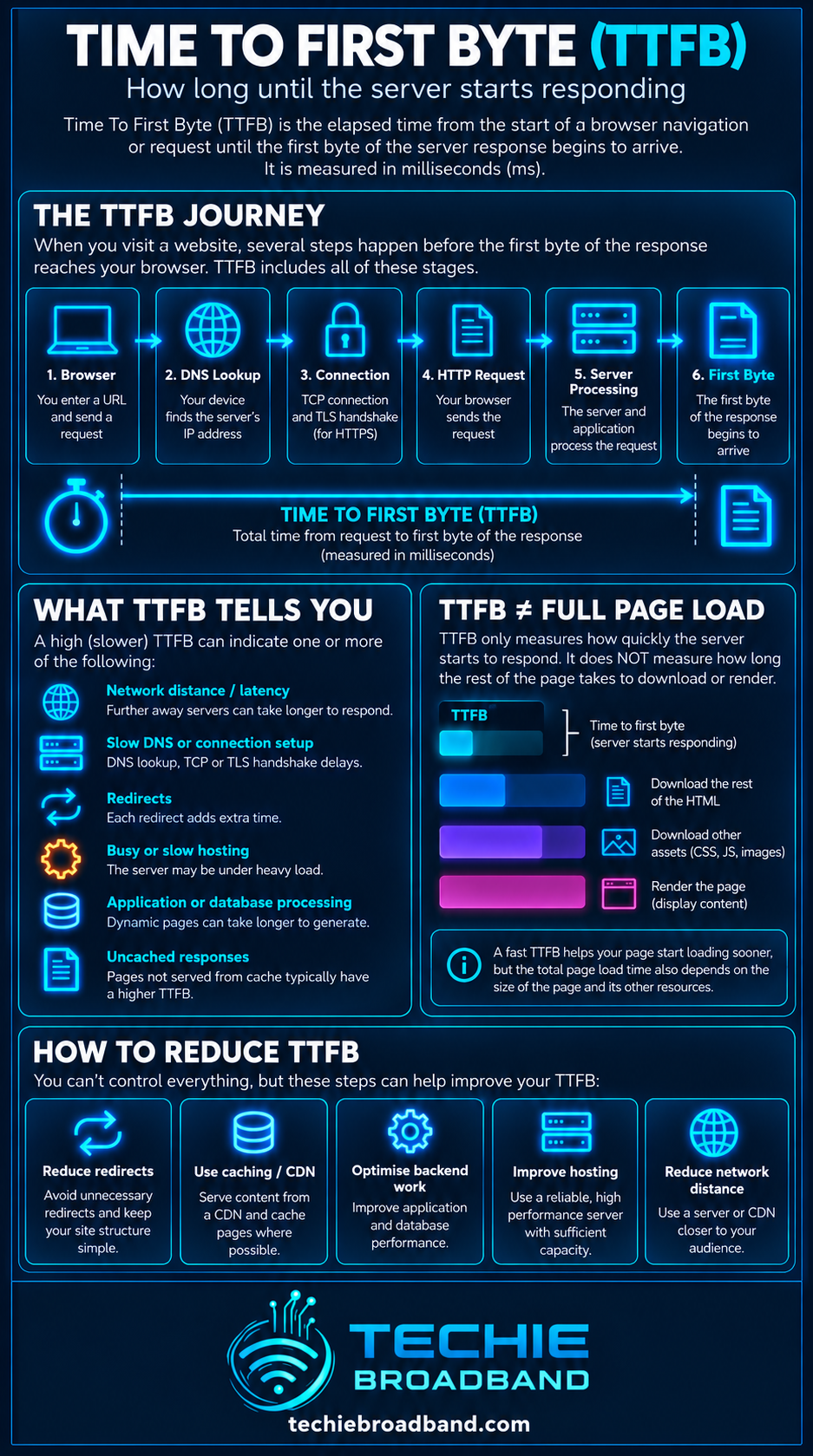
The following Techie Broadband infographic separates what TTFB tells you from what it does not tell you and shows the stages worth investigating.
Why TTFB matters on a broadband connection
TTFB is primarily a web and server response metric, but the broadband path still contributes. The request and response have to cross the home network, access network, ISP routing and wider internet before reaching the destination. Higher network RTT can therefore raise the floor beneath which an uncached remote request cannot realistically fall.
This becomes more obvious when the destination is geographically distant or routing is inefficient. Faster download bandwidth does not remove propagation delay. Upgrading from 100 Mbps to 1 Gbps can dramatically increase transfer capacity while leaving the RTT to a particular server broadly similar.
Techie Broadband calculation: network delay versus server delay
Consider a simplified HTTPS request where the measured TTFB is 420 ms and the measured network RTT to the serving location is about 30 ms. It would be wrong to conclude that the broadband connection is creating 420 ms of network latency. The 420 ms includes the wider request process.
If a comparable cached response from the same edge location begins in 70 ms while an uncached origin response begins in 420 ms, the difference is 350 ms. That does not prove the origin application itself used exactly 350 ms, but it strongly shifts the investigation towards origin access, cache status, application work or upstream dependencies rather than raw access-line bandwidth.
Why faster broadband does not guarantee lower TTFB
TTFB is mostly about delay before data transfer gets properly underway. A faster package increases how much data can be carried per second once data is flowing, but it does not automatically shorten DNS resolution, physical distance, server processing or database queries.
A 1 Gbps FTTP connection can have a poor TTFB to a slow server.
A 100 Mbps connection can have an excellent TTFB to a nearby cached edge response.
WiFi interference can add local delay and variability even when the broadband service itself is healthy.
A distant server can have a higher minimum response time than a nearby server regardless of package speed.
This is the same distinction explained in What is Bandwidth?: bandwidth is capacity, while TTFB is dominated by delay before the response begins. More capacity can help when a link is saturated, but it does not make a distant server physically closer.
TTFB and Round Trip Time (RTT)
RTT is one of the most useful companion measurements for TTFB. RTT tells you about the round trip across the path. TTFB tells you when the requested application data starts coming back.
If both RTT and TTFB rise at the same time, network conditions may be contributing. If RTT remains stable while TTFB rises sharply, server processing, cache behaviour or an upstream dependency becomes more suspicious.
TTFB and DNS
A first navigation may need a DNS lookup before a connection can be made. A slow resolver, an uncached chain of lookups or a problematic DNS path can therefore increase navigation TTFB as observed by the browser. Repeat tests may be faster because the answer is cached.
This is one reason a single browser refresh is weak evidence. Test repeatedly and understand whether DNS and connection reuse are changing between runs.
TTFB and TCP, TLS and QUIC
Traditional HTTPS over TCP requires transport and TLS setup before application data can be exchanged. Each round trip has a cost, so physical distance and network RTT matter. Reused connections can avoid some setup work.
HTTP/3 runs over QUIC rather than TCP and integrates secure transport differently. The practical lesson is not that one protocol guarantees a particular TTFB, but that protocol and connection state affect how much setup must happen before the response begins.
TTFB and CDNs
A Content Delivery Network can reduce TTFB when it serves a cached response from an edge location close to the user. The origin server may not need to be contacted at all for that request.
A cache miss is different. The edge may need to contact the origin, wait for the origin response and then return it to the user. Comparing cache-hit and cache-miss timings can therefore reveal a large difference without anything changing on the user's broadband line.
TTFB and server processing
Server processing is often the part developers care about most, but end-user TTFB does not isolate it automatically. Application code may need to authenticate a user, query databases, render a page, call APIs, access storage or wait on another service before response bytes are available.
The HTTP Server-Timing header can expose selected backend timings to browser developer tools. Used properly, it can help distinguish database, application or other server-side work from the total end-to-end TTFB.
Caching can transform TTFB
Caching avoids repeated work. A cached HTML response at an edge can remove an origin round trip and much of the application processing. Application caches can also avoid repeated database or computation work.
When diagnosing TTFB, always record cache state where possible. Comparing one cached result with one uncached result as though they are identical tests can lead to the wrong conclusion.
TTFB is not page load time
This is the most important misconception to avoid. TTFB stops at the first byte. The browser may still need to receive the rest of the HTML, discover resources, download CSS, JavaScript, fonts and images, execute scripts, calculate layout and paint the page.
Cloudflare has highlighted this limitation directly: TTFB can be useful for connection and server responsiveness, but it does not describe when a page becomes visible, stable or interactive.
TTFB and Largest Contentful Paint
Largest Contentful Paint, or LCP, measures when the largest relevant content element is rendered. TTFB is an upstream component of the loading journey, so an excessive TTFB can delay LCP, but a good TTFB does not guarantee a good LCP.
After the first byte arrives, slow resource discovery, render-blocking CSS, large images, fonts and JavaScript can still dominate the experience.
TTFB and Time To Last Byte (TTLB)
TTLB measures when the complete response has arrived. For a single file, the distinction is useful: TTFB tells you how quickly delivery starts, while TTLB includes the transfer of the response body.
A large file can have a fast TTFB and a long TTLB. That may simply mean the server responded immediately but the object was large or the transfer throughput was limited.
TTFB and bandwidth
Bandwidth becomes more important after the response starts to flow, particularly for large resources. TTFB is much less sensitive to raw capacity because only the first response bytes need to arrive to stop the timer.
That is why using TTFB alone to compare 100 Mbps, 500 Mbps and 1 Gbps broadband packages is not meaningful. The higher-capacity line may transfer the full response faster while showing a similar TTFB to the same nearby server.
See What is Download Speed? for the difference between the rate at which response data transfers and the time spent waiting for that response to begin.
Upstream saturation can also increase request delay. What is Upload Speed? explains why a busy upstream can affect the responsiveness of the whole connection.
TTFB and WiFi
WiFi can influence TTFB because it is part of the end-to-end path. Congestion, interference, retransmissions, weak signal or a busy access point can add delay and variability before the request even reaches the router.
For diagnosis, repeat the test over wired Ethernet where possible. If wired TTFB is consistently lower or less variable, investigate the local wireless network before blaming the ISP or server.
Techie Broadband WiFi isolation test
Run the same request repeatedly on wired Ethernet and then on WiFi from the same device if possible. If Ethernet remains stable while WiFi produces large spikes, the local radio link is contributing to the result. If both move together, continue outward through the router, access network, ISP path and remote service.
TTFB, loaded latency and bufferbloat
A connection can show good TTFB while idle and much worse TTFB during a large upload or download. If queues build in the router or access network, request and response packets may wait behind bulk traffic.
That behaviour is closely related to loaded latency and bufferbloat. It is particularly relevant in homes where cloud backups, game downloads or large uploads run while people browse or use interactive services.
Techie Broadband practical example: suppose an idle request has a 90 ms TTFB. During a saturated upload the same request rises to 540 ms while the destination and server are unchanged. That is an extra 450 ms, or six times the idle TTFB. The result does not prove bufferbloat by itself, but it is a strong reason to compare loaded RTT and queue behaviour before blaming the website.
If the broadband product is symmetrical, additional upstream headroom can reduce the chance that ordinary uploads fill the link, but symmetry itself does not guarantee low TTFB. See What is Symmetrical Speeds?.
How to test TTFB properly
Use browser developer tools or a reputable web performance tool and identify the main document request.
Record DNS, connection, TLS and waiting timings where the tool exposes them.
Repeat the test rather than trusting one run.
Test with a cold cache and a warm cache where relevant, and label the results.
Repeat over wired Ethernet to remove WiFi as a variable.
Test from more than one geographic location if the service has a national or international audience.
Compare TTFB with RTT, not just with broadband download speed.
If you control the application, inspect server and database timing using backend observability or Server-Timing.
Compare cache-hit and origin responses separately.
Use LCP, INP and other user-centric metrics when the real question is page experience rather than server responsiveness.
Using curl to inspect TTFB
Command-line tools such as curl can expose individual timing phases. This is useful because a single total number can hide whether the delay occurred during name lookup, connection establishment or the wait for the first response byte.
When comparing results, run tests from the same machine and network, use multiple samples and note whether the connection or DNS result was reused. A one-off curl result is a sample, not a diagnosis.
Why TTFB changes between tests
DNS answers may be cached after the first request.
TCP, TLS or QUIC connections may be reused.
CDN and application caches may be warm or cold.
Server load and database load can vary.
Routing and congestion can change.
Dynamic pages may execute different backend work.
The test device or WiFi environment can change.
A 103 Early Hints response can affect what some tools regard as the first response.
Cold connection versus reused connection
A first visit can include DNS resolution, transport establishment and security setup. A later request may reuse DNS information and an existing connection. Comparing those two results as though they are identical tests can exaggerate the apparent variability of the server.
Cache hit versus origin fetch
A CDN cache hit may answer close to the user. A cache miss may travel to an origin, wait for application processing and then return through the edge. Record cache status where possible before comparing TTFB.
103 Early Hints and a TTFB trap
HTTP 103 Early Hints allows a server or intermediary to send an informational response before the final response. This can let the browser begin work on critical resources earlier.
It also complicates TTFB interpretation. MDN notes that TTFB can correspond to the first bytes of a 103 response, while a separate finalResponseHeadersStart timing can represent the final response headers where supported. Two tools can therefore appear to disagree while measuring different response milestones.
Frequently asked questions about TTFB
Does a low TTFB mean a website is fast?
No. It means the response started quickly according to the measurement being used. The rest of the page can still be slow.
Does a high TTFB mean the ISP is slow?
No. The ISP and access network are part of the path, but high TTFB can originate in DNS, geographic distance, routing, CDN behaviour, server processing, databases, APIs or local WiFi. Compare RTT, wired tests and server-side timings before assigning blame.
Can FTTP improve TTFB?
FTTP can provide a clean, high-capacity access path and may improve some aspects of network performance compared with an older access technology, but TTFB remains end to end. The destination, route, server and application still matter. Do not treat FTTP as a guarantee of a specific TTFB.
Does 1 Gbps broadband have a lower TTFB than 100 Mbps?
Not necessarily. If both connections have similar RTT and use the same route to the same server, their TTFB can be similar. The 1 Gbps service has far more transfer capacity, which matters after data begins flowing.
Can a VPN change TTFB?
Yes. A VPN changes the network path and adds a VPN endpoint plus encryption and forwarding work. It can raise TTFB, occasionally lower it if routing happens to improve, or simply make results more variable. Test with and without the VPN when diagnosing.
Can IPv6 and IPv4 produce different TTFB?
Yes. IPv4 and IPv6 can follow different routes and terminate on different infrastructure. A difference in TTFB does not prove one protocol is inherently faster. It tells you that the actual paths and service behaviour should be compared.
A practical TTFB troubleshooting sequence
Confirm the problem across several requests rather than one refresh.
Test the same URL over wired Ethernet.
Measure RTT to a relevant destination and compare it with TTFB.
Inspect DNS, connect and TLS timing.
Check whether the slow request is a cache hit or cache miss.
Test another server or geographic location.
Pause heavy household uploads and downloads and retest.
Check whether loaded latency or bufferbloat is increasing delay.
If you control the site, inspect application, database and upstream API timings.
Compare TTFB with LCP and other page metrics before deciding the user experience problem has been found.
The end-to-end view
For a Techie Broadband diagnosis, think about the complete chain: remote service, CDN or edge, wider internet routing, ISP network, access network, ONT or modem, router, Ethernet or WiFi, device, operating system and browser. TTFB is the outcome of the relevant stages before the first response byte reaches the application.
As broadband capacity rises, the bottleneck can move away from the access line. A multi-gigabit service cannot make a distant application server execute a database query faster.
Where the bottleneck can move on faster broadband
On a slower or heavily loaded connection, queueing in the home or access link can dominate. On a fast FTTP or multi-gigabit connection, that local capacity constraint may disappear and expose other delays such as WiFi, routing, CDN cache misses, application processing or database calls. Faster access therefore changes where you should look, not just the headline number.
UK access network context
UK broadband users can reach the same website over FTTC, FTTP, cable, fixed wireless or mobile networks. These technologies can have different latency and queueing characteristics, but TTFB still measures the complete request path. It should never be used to declare one retail ISP or access technology universally faster without controlling the destination, location, protocol, connection state and test conditions.
For FTTP specifically, GPON and XGS-PON provide high access capacity, but the request still traverses the customer's router, the retail ISP, interconnection and the remote service. A multi-gigabit access rate cannot eliminate server think time.
Techie Broadband TTFB diagnostic reference
Use the relationship between RTT and TTFB as a starting point rather than judging TTFB in isolation. The figures below are illustrative diagnostic scenarios, not universal performance thresholds.
Low RTT + low TTFB: the path is responsive and the response begins quickly.
Low RTT + high TTFB: investigate DNS, connection state, CDN cache status, origin processing, databases and upstream APIs.
High RTT + moderately higher TTFB: physical distance, routing or network path delay may explain a large share of the result.
High RTT + very high TTFB: both network delay and server or edge processing may be contributing.
Good idle TTFB + poor loaded TTFB: investigate queueing, upload saturation, WiFi contention and loaded latency.
Techie Broadband calculation: separating a 420 ms result
Assume a request records 420 ms TTFB. A comparable cached response from the same edge location records 70 ms. The difference is 350 ms. In percentage terms, the uncached result is six times the cached result, while the additional wait represents about 83.3% of the 420 ms total.
That calculation does not prove the origin application consumed exactly 350 ms because connection state and other stages can differ. It does, however, show why comparing controlled cache states can be much more informative than comparing TTFB with broadband Mbps.
Techie Broadband calculation: loaded TTFB increase
If a request rises from 90 ms idle to 540 ms during a saturated upload, the increase is 450 ms. The loaded result is 500% higher than the idle result. That is a queueing diagnostic signal, not evidence that the remote server suddenly became six times slower.
What TTFB should be compared with
RTT to a relevant destination, to understand network path delay.
DNS lookup time, to identify name-resolution delay.
Connection and TLS timing, to identify setup cost.
Cache status, to separate edge delivery from origin work.
Server-Timing or backend observability, where you control the service.
Loaded latency, to expose queueing while the broadband connection is busy.
LCP and other user-centric metrics, when the real question is perceived page performance.
Key takeaway
Time To First Byte is a useful measurement of how quickly a requested response begins, not a universal score for broadband or website speed. Use it alongside RTT, connection timing, cache state, server observability and user-centric page metrics. The most valuable question is not simply “is my TTFB high?” but “which part of the end-to-end request path is creating the wait?”
To explore the related technical concepts used in this Time To First Byte (TTFB) guide, visit our broadband terminology guide.
