
What is DHCP Reservation?
Updated: 3 days ago

A DHCP reservation is a rule on a DHCP server that gives a particular client the same local IP address whenever that client asks for network configuration. The device can remain set to obtain its address automatically, but the DHCP server recognises the client and selects the reserved address instead of choosing any free address from the normal dynamic pool.
That distinction matters: a DHCP reservation creates a predictable local address without requiring you to type a static address directly into the device. The address is still delivered by DHCP, so the server can continue to supply the subnet mask, default gateway, DNS servers and other DHCP options.
How DHCP reservation works
A normal DHCP client asks a DHCP server for configuration. The server identifies the client using information available in the DHCP exchange, commonly including a hardware address or client identifier, and chooses an address according to its configured policy.
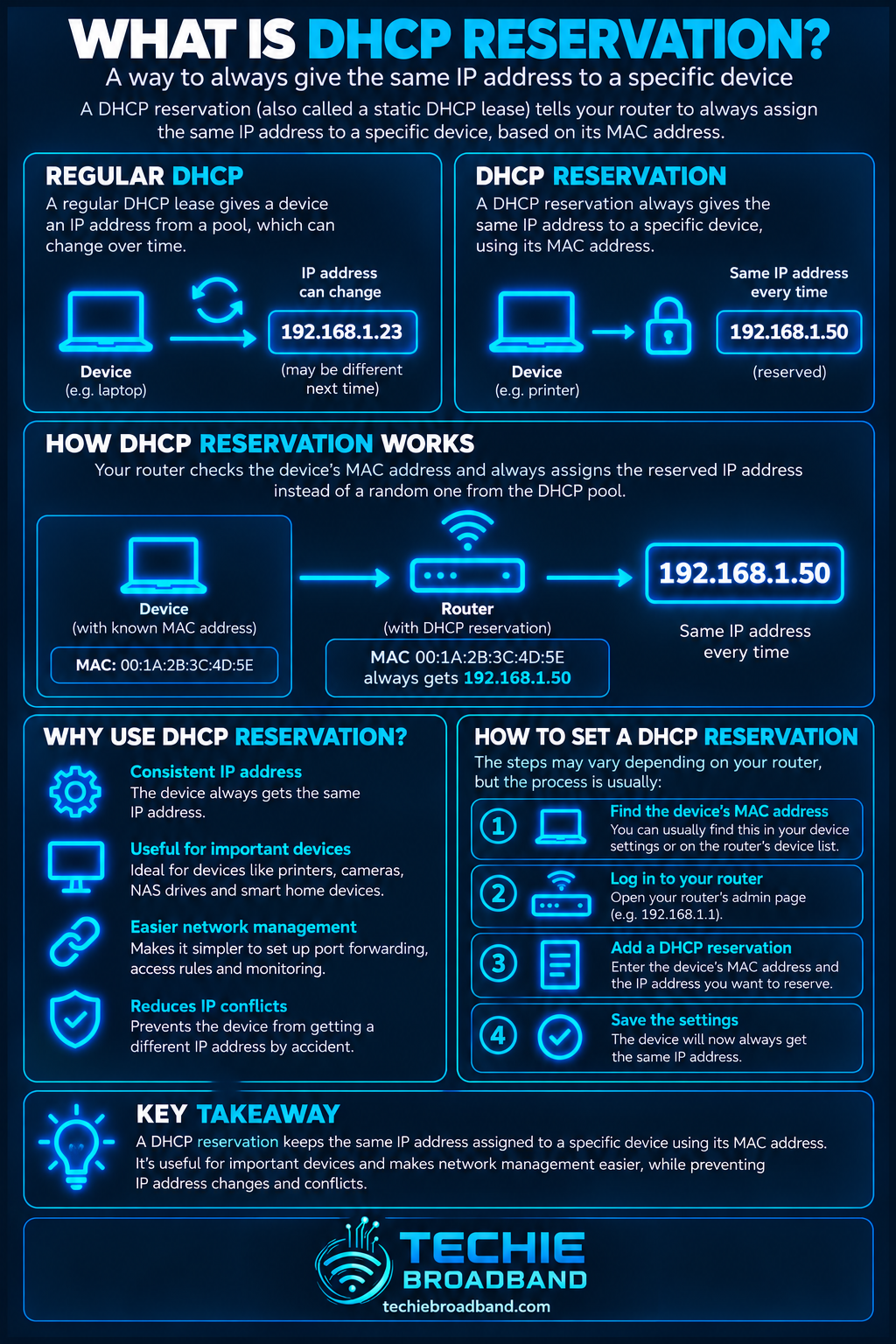
With a reservation configured, the server has an administrator-defined association between that client identity and a chosen IPv4 address. When the recognised client requests configuration, the server can return the reserved address. The client still receives a DHCP lease: reservation does not mean DHCP has disappeared.
RFC 2131 describes manual allocation as the mechanism where a network administrator assigns a client's address and DHCP conveys that assigned address to the client. Consumer routers commonly expose this idea through names such as DHCP reservation, address reservation, reserved IP or static lease.
DHCP reservation vs a manually configured static IP
The two approaches can produce the same visible result: a device repeatedly uses the same local IPv4 address. They achieve it in different places.
DHCP reservation: the mapping is managed centrally on the DHCP server or router, while the client normally stays configured for automatic addressing.
Manual static IP: the address is configured on the client itself, so that device does not rely on DHCP to obtain its address.
Reservation: DHCP can continue supplying gateway, DNS and other options from one central configuration.
Manual static IP: those settings may also need to be entered and maintained on the device, depending on its operating system and network setup.
For many home and small-business networks, a DHCP reservation is easier to manage because the addressing policy remains visible in one place. A manual static address can still be appropriate for infrastructure or devices whose configuration must not depend on the local DHCP service.
What information identifies the device?
Many router interfaces ask for the device's MAC address and the IPv4 address you want to reserve. That is common, but it is safer to think in terms of client identity rather than assuming every DHCP implementation always keys a reservation only from the visible MAC address.
DHCP supports a client identifier option, and implementations can use identifiers in their lease databases. Modern devices may also use private or randomised WiFi MAC addresses. If a phone or laptop changes the identity presented to the network, a reservation tied to the previous identity may no longer match.
A practical DHCP reservation example
Assume a home LAN uses 192.168.1.0/24. The router is 192.168.1.1 and its DHCP service dynamically assigns addresses from 192.168.1.20 to 192.168.1.200. A NAS needs a predictable address because computers, backup jobs and monitoring tools need to find it reliably.
You create a reservation that associates the NAS client identity with 192.168.1.100. The NAS itself remains configured for automatic IPv4 configuration. When it requests DHCP configuration, the server selects 192.168.1.100 for that recognised client.
The important point is not merely that 192.168.1.100 stays familiar. The reservation also allows the DHCP server to remain the authoritative place where you manage the network's address, gateway and DNS configuration.
Where should a reserved address sit?
A reserved IPv4 address must belong to the correct subnet. On a 192.168.1.0/24 LAN, an address such as 192.168.1.100 belongs to that subnet. An address from an unrelated subnet would not become usable merely because it was typed into a reservation field.
Routers differ in how they manage reservation addresses relative to the ordinary dynamic pool. Some allow reserved addresses inside the configured pool and exclude them from general allocation internally. Others encourage or require reservations to use a particular range. Follow the behaviour of the DHCP server you are actually configuring rather than assuming every router implements the user interface identically.
Techie Broadband address planning example
Consider a /24 home or lab network with 254 conventional usable host addresses. If the DHCP pool is 192.168.1.50 to 192.168.1.199 inclusive, that pool contains 150 addresses. The remaining usable addresses can be organised for infrastructure or other policies, subject to how the router handles reservations.
Techie Broadband calculation: 199 - 50 + 1 = 150 dynamically pooled addresses. This does not mean you should automatically reserve the other 104 usable addresses. It simply shows why documenting the pool boundary matters when mixing dynamic clients, reservations and manually configured devices.
When a DHCP reservation is useful
Network printers that applications need to find at a consistent address.
NAS devices and home servers referenced by IP address.
CCTV cameras, NVRs and other local management interfaces.
Home automation controllers and hubs.
DNS filtering or local DNS servers such as a Pi-hole-style resolver.
Devices used as targets for remote administration inside the LAN.
Systems referenced by firewall rules, access-control rules or monitoring.
A device receiving an inbound port-forwarding rule on an IPv4 NAT network.
For the last example, a stable internal destination matters because NAT or port-forwarding rules need to send traffic to the intended device. A reservation can prevent a rule silently pointing at the wrong client after ordinary DHCP leases change.
DHCP reservation does not create a public static IP
A DHCP reservation on your home router controls an address on your local network. It does not turn your broadband connection into a static public IPv4 address, remove CGNAT, or guarantee that your ISP-facing WAN address will remain unchanged.
This is an important UK broadband distinction. If you need a stable public address for hosting, remote access, VPN termination or another internet-facing requirement, that is a separate ISP product and network-design question. A LAN reservation only stabilises the local address selected for a client.
Reservations, gateways and DNS
The reserved address is only one part of the client's configuration. The DHCP server can also provide the default gateway and DNS server addresses. If those values are wrong, the device can retain its expected local IP yet still fail to reach the internet or resolve names.
That is why troubleshooting should inspect the complete lease rather than treating a familiar IP address as proof that the network configuration is correct.
Reservations and IPv6
DHCP reservation is most commonly discussed in home networking as an IPv4 feature. IPv6 uses different address configuration mechanisms, including Router Advertisements, SLAAC and DHCPv6. Do not assume an IPv4 reservation automatically creates an equivalent fixed IPv6 address.
If a service needs predictable addressing over both protocols, plan IPv4 and IPv6 deliberately rather than treating IPv6 as an extension of the IPv4 reservation table.
The diagram below shows the central idea: the client still asks through DHCP, but the server's policy maps that recognised client to a predictable local address.
How to set up a DHCP reservation
The exact menu names vary by router, but the workflow is usually similar.
Open the router or DHCP server management interface.
Find the LAN, DHCP server, address reservation, reserved IP or static lease settings.
Identify the correct client. Confirm its current MAC address or client identity rather than choosing a similarly named device by guesswork.
Choose an unused IPv4 address in the correct subnet and in a range supported by that DHCP server's reservation policy.
Create and enable the reservation.
Renew the client's DHCP lease, reconnect it, or restart its network connection if the new reservation does not take effect immediately.
Confirm the client receives the reserved address plus the expected subnet mask, gateway and DNS servers.
Document the reservation so future network changes do not accidentally reuse the address.
Common DHCP reservation mistakes
Reserving an address for the wrong MAC address or client identity.
A phone or laptop using MAC randomisation and therefore appearing as a different client.
Choosing an address outside the LAN subnet.
Manually assigning the same address to another device and creating an IP conflict.
Assuming the reservation is active before the client's existing lease has been renewed.
Changing the router or DHCP server and forgetting to recreate the reservation database.
Assuming a local reservation provides a static public internet address.
Building port-forwarding or firewall rules around an address before confirming the reservation actually works.
How to troubleshoot a DHCP reservation
Check the device's current IPv4 address, subnet mask, gateway, DNS servers and DHCP lease state.
Confirm the reservation is enabled on the DHCP server you expect to be authoritative.
Verify the reservation matches the identity the client is actually presenting now.
Check that the reserved address belongs to the correct subnet.
Check whether another device is already using the reserved address.
Look for a second DHCP server on the LAN, such as an old router or access point accidentally running DHCP.
Renew the lease or reconnect the client, then check whether it receives the reserved address.
If the address is correct but connectivity still fails, test the gateway first, then a remote IP address, then DNS resolution.
If the problem appeared after replacing a router, confirm that the reservation and DHCP options were recreated on the new device.
Why reservations become more useful as a home network grows
A simple home network may contain only a router, phones and laptops, where changing local addresses rarely matter. A larger network can include NAS systems, cameras, smart-home controllers, managed switches, access points, servers and monitoring tools. Those systems create dependencies between addresses and services.
Reservations provide a middle ground: predictable addressing for selected infrastructure without abandoning central DHCP management for every device. The goal is not to reserve everything. Reserve addresses where predictability has a practical purpose.
DHCP reservation and UK broadband routers
Many ISP-supplied and third-party routers provide some form of address reservation, but terminology and capabilities differ by model and firmware. Some expose a simple device list, while more advanced routers, firewalls and DHCP servers allow detailed pools, multiple subnets, VLAN-specific scopes and richer client policies.
If you use your own router on a UK FTTP or other broadband service, remember that DHCP reservation is a LAN-side function. It is separate from the method your router uses to obtain WAN connectivity from the ISP.
Frequently asked questions
Is DHCP reservation the same as static IP?
Not exactly. A reservation tells the DHCP server to give a recognised client a predictable address. A manually configured static IP is entered on the client itself. Both can produce a stable local address, but control sits in a different place.
Does a DHCP reservation expire?
The client can still receive a DHCP lease with normal lease behaviour. The reservation is the server-side policy associating that client with the chosen address, so the same reserved address can be selected again when the client renews or returns, while that reservation remains configured.
Should DHCP reservations be outside the DHCP pool?
There is no universal rule for every router interface. Some DHCP servers safely manage reservations within the pool; others use or recommend a separate range. Follow the behaviour and documentation of the specific DHCP server.
Do I need a DHCP reservation for a printer?
Not always, but it can be useful when software, scanning workflows or administration tools need the printer to remain at a predictable address.
Can I reserve the same IP for two devices?
No. Two active devices must not use the same IPv4 address on the same subnet. A reservation should map the chosen address to the intended client only.
Does a DHCP reservation help port forwarding?
Yes, on networks where an IPv4 port-forwarding rule targets a local client. Keeping that client's LAN address predictable prevents the rule from becoming stale when a normal dynamic address changes.
Key takeaway
A DHCP reservation gives a selected client a predictable local IP address while keeping address delivery under DHCP control. It is usually cleaner than manually configuring static addresses on ordinary home-network devices, but it must be planned inside the correct subnet and tied to the identity the client actually presents.
To explore the related technical concepts used in this DHCP Reservation guide, visit our broadband terminology guide.
