
What is Media Access Control (MAC) Address?
Updated: 3 days ago

A Media Access Control (MAC) address is a link-layer identifier used by network interfaces to send and receive frames on a local network. On common Ethernet and Wi-Fi networks it is usually a 48-bit value written as six hexadecimal octets, such as 3C:52:82:9A:1F:4D. A MAC address is not the same thing as an IP address: MAC addresses identify interfaces for local Layer 2 delivery, while IP addresses provide logical addressing that can be routed between networks.
What does MAC address mean?
MAC stands for Media Access Control. Ethernet and Wi-Fi use MAC addressing so devices on the same local link can identify the source and destination of a frame. The important word is local: routers rebuild local-link framing as traffic moves between networks.
What does a MAC address look like?
A common MAC address is an EUI-48-style 48-bit identifier. Forty-eight bits equals six 8-bit octets. Each octet is normally shown as two hexadecimal digits.
48 bits in the common EUI-48 form
6 octets
12 hexadecimal digits
Often separated by colons or hyphens
Example: 3C:52:82:9A:1F:4D
Techie Broadband calculation: the 48-bit address space
A 48-bit field has 2^48 possible bit patterns: 281,474,976,710,656, or about 281.5 trillion. This is the mathematical field size, not a claim that every value is available as an ordinary globally assigned device address.
What do the first bits mean?
IEEE addressing uses two special low-order bits in the initial octet. The I/G bit distinguishes an individual address from a group address. The U/L bit distinguishes universally administered addressing from locally administered addressing.
I/G = 0: individual address
I/G = 1: group address
U/L = 0: universally administered
U/L = 1: locally administered
This is why an observed MAC address is not necessarily a permanent factory identity. Software can use locally administered addresses.
MAC address vs IP address
A MAC address and an IPv4 address solve different problems. A MAC address is used for local-link frame delivery. An IP address is a logical address used for routed communication.
MAC address: local Layer 2 identity
IP address: logical Layer 3 address
MAC addresses are used in Ethernet and Wi-Fi frames
IP addresses can be routed between networks
Both can change, but for different reasons
How MAC addresses work on a local network
If a laptop sends an IPv4 packet to a NAS on the same subnet, it needs the local-link destination corresponding to the NAS IP address. ARP is commonly used with IPv4 to resolve that IP address to a MAC address. The Ethernet frame carries source and destination MAC addresses while the enclosed IP packet carries source and destination IP addresses.
Whether the destination is local depends on the device's IP address and subnet mask. If the target is outside the local subnet, the device normally frames the packet for its default gateway's MAC address.
A practical local-frame example
Laptop 192.168.1.10/24 sending to NAS 192.168.1.20/24 can address the local frame towards the NAS MAC. If the laptop instead contacts 1.1.1.1, the IP destination remains 1.1.1.1 but the Layer 2 destination on the first hop is the local gateway's MAC.
Why switches care about MAC addresses
An Ethernet switch learns which source MAC addresses appear on which ports. Its forwarding database helps it send frames towards the port associated with the destination MAC. If a destination is unknown, the switch can flood the frame within the relevant broadcast domain.
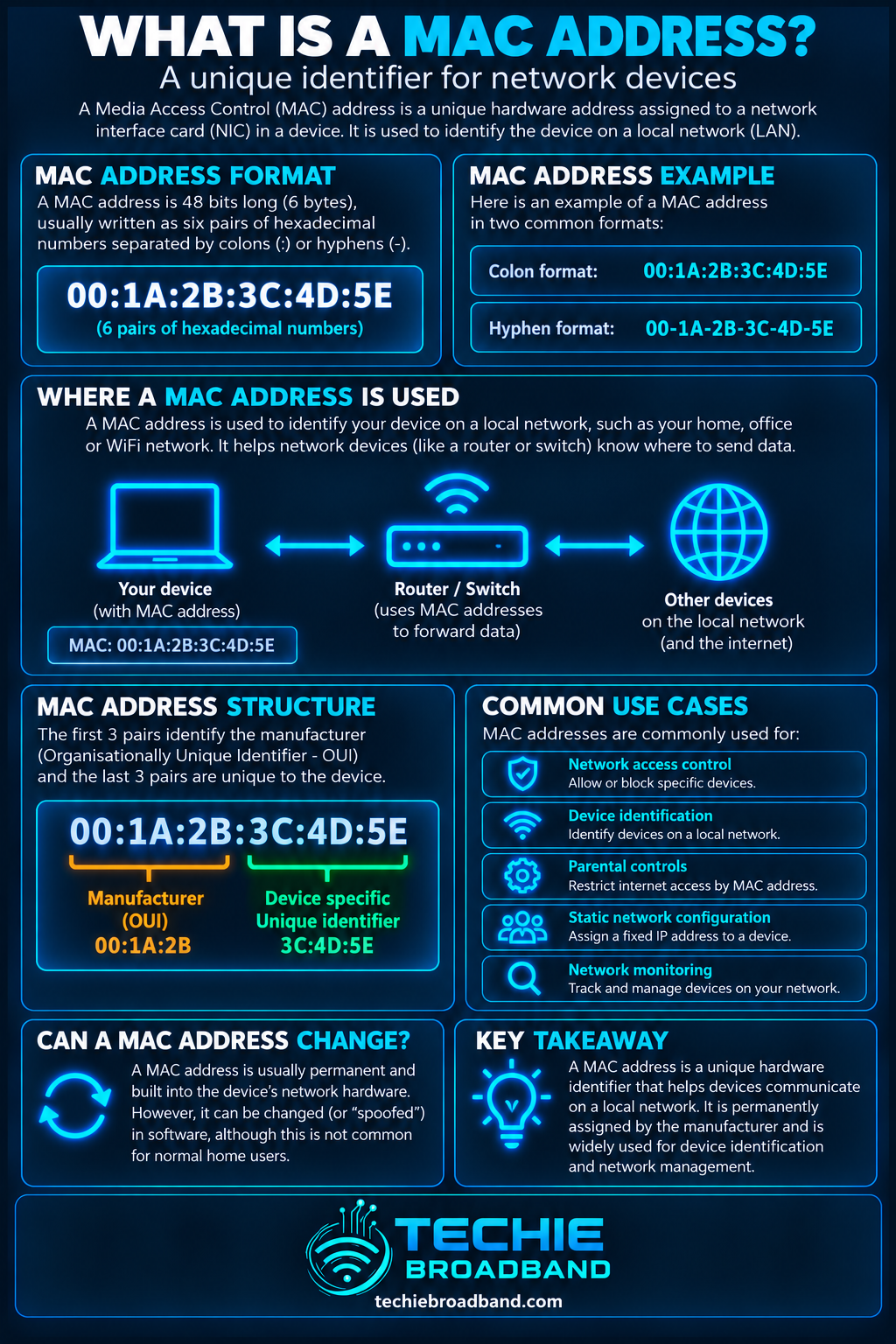
The infographic below shows the 48-bit format, local frame delivery and the difference between MAC and IP addressing.
MAC addresses on Wi-Fi
Wi-Fi also uses MAC addressing. IEEE 802.11 frames have addressing fields designed for wireless operation, so a Wi-Fi interface has a MAC identity visible to the wireless network.
Private and randomised MAC addresses
Modern devices can reduce tracking by using private Wi-Fi addresses. Apple documents fixed and rotating private-address modes on current operating systems. This is a privacy feature, not a fault, and means a network may see an address different from the hardware Wi-Fi address.
Rules or reservations that assume the factory MAC will always be presented can therefore stop matching when the client uses a different private address.
MAC address and DHCP
A DHCP server allocates IP configuration such as an IPv4 address, subnet mask, gateway and DNS information. MAC addressing remains a separate local-link concept.
MAC address and DHCP reservations
A DHCP reservation often maps a known client identity to a predictable IP address. Private or rotating Wi-Fi addresses can complicate that mapping if the client address changes.
Can two devices have the same MAC address?
They should not present the same individual MAC address on the same Layer 2 network. Duplicate addresses can produce unstable forwarding because a switch may repeatedly relearn the same source address on different ports. Cloning, virtualisation, locally administered addresses or misconfiguration can make duplicates possible.
Is a MAC address permanent?
No. Treating every MAC address as an immutable hardware serial number is outdated. Interfaces can use manufacturer-assigned addresses, locally administered addresses, virtual addresses or privacy-oriented randomised addresses.
Can a MAC address identify the manufacturer?
Sometimes. IEEE Registration Authority assignments can associate globally administered address blocks with organisations. Locally administered and randomised addresses are not dependable manufacturer identifiers, and an assignee is not necessarily the consumer-facing brand or exact device model.
Can websites see your MAC address?
Ordinary internet websites do not receive your home Ethernet or Wi-Fi MAC address through normal routed IP communication. Local-link framing changes at routers, so the MAC used between your device and home router is not carried end to end to a remote website.
Is a MAC address a security credential?
No. A MAC address is an identifier, not a secret. MAC filtering can be an administrative convenience but is not strong authentication because addresses can be observed locally and can often be changed or spoofed.
How to find a MAC address
Windows: inspect network adapter details or use ipconfig /all
macOS: inspect Wi-Fi or network interface details
iPhone and iPad: inspect Wi-Fi details and the Private Wi-Fi Address setting
Android: inspect network or device information and note per-network randomisation
Router: inspect its connected-device, DHCP or client list
Check the correct interface. Ethernet and Wi-Fi on the same computer have different MAC addresses, and virtual adapters can add more.
Troubleshooting a MAC address problem
Identify the exact interface involved.
Record the MAC address currently presented on that network.
Check whether private or randomised Wi-Fi addressing is enabled.
Check the router or switch client table to see which address is learned.
If a DHCP reservation fails, compare its identity with the address currently used.
Investigate duplicate MAC behaviour if forwarding moves unpredictably.
Clear stale neighbour, forwarding or DHCP state only when evidence points to stale state.
Verify IP configuration separately. Correct MAC identity does not guarantee correct IP, subnet, gateway or DNS settings.
Common MAC address misconceptions
A MAC address is not an IP address.
A MAC address is not necessarily permanent.
The prefix does not always reveal the manufacturer because locally administered addresses exist.
A public website does not normally learn your home interface MAC through routed traffic.
MAC filtering is not strong security.
Changing a MAC address does not inherently change your public IP address.
MAC addresses and IPv6
IPv6 still operates over link-layer technologies that use MAC addressing, but modern IPv6 address generation and privacy mechanisms mean you should not assume an IPv6 address directly exposes the interface's hardware MAC address.
Why MAC addresses matter on UK home broadband
The principles are universal, but they matter in UK homes using ISP routers, third-party routers, FTTP, FTTC, cable, fixed wireless or mobile broadband. MAC addressing is part of the local Ethernet and Wi-Fi environment regardless of the WAN access network.
It becomes especially visible with DHCP reservations, managed switches, mesh systems, Wi-Fi troubleshooting, home servers, NAS devices, printers, cameras and BYO-router setups.
Key takeaway
A MAC address is best understood as a local-link interface identifier, not a permanent internet identity. It helps Ethernet and Wi-Fi deliver frames locally, while IP addressing handles routed communication. Private and locally administered addresses mean the MAC you see may intentionally differ from a device's factory address.
MAC address FAQs
What does MAC stand for in networking?
MAC stands for Media Access Control.
How many bits are in a MAC address?
The common EUI-48 form is 48 bits, represented as six 8-bit octets.
Is a MAC address unique?
Globally administered identifiers are intended to be unique, but locally administered, virtual, cloned and randomised addresses mean an observed MAC should not automatically be treated as a permanent globally unique hardware identity.
Does a router change the MAC address used for a packet?
Routing re-encapsulates the packet for each link. The MAC addresses used on your home LAN are not carried unchanged across every router to the final internet destination.
Why does my phone show a different MAC address on Wi-Fi?
Modern phones can use private or randomised Wi-Fi addresses to reduce tracking, so the address shown for a network may differ from the hardware Wi-Fi address.
Does a MAC address affect broadband speed?
Not as a bandwidth setting. Duplicate addresses, filtering or incorrect network state can disrupt connectivity, but changing a normal working MAC address does not make the broadband line intrinsically faster.
To explore the related technical concepts used in this Media Access Control (MAC) Address guide, visit our broadband terminology guide.
