
What is Dynamic IP?
Updated: 3 days ago

A dynamic IP address is an IP address that can change over time rather than being permanently assigned to the same broadband connection or device. On typical UK home broadband, the public IPv4 address used by the router may be allocated from a provider-managed pool and retained for a period before it is renewed, reassigned or replaced. Dynamic does not mean constantly changing. It means the address is not guaranteed to remain the same indefinitely.
For most households this is perfectly adequate because browsing, streaming, gaming, video calls and cloud applications normally create outbound connections. A static IP becomes more useful when another system needs to find your connection reliably for an inbound VPN, self-hosting, IP allowlisting or another service that depends on a predictable endpoint.
A dynamic IP is one method of assigning an IP address, not a different type of broadband connection.
How does a dynamic IP address work?
With IPv4, dynamic address allocation is commonly associated with DHCP. A provider or network maintains addresses that can be allocated to clients for a lease period. The lease can normally be renewed and renewal may result in the same address continuing to be used. If the lease ends, the connection is rebuilt or provider policy changes, a different address can be allocated.
The IETF's DHCP specification in RFC 2131 defines dynamic allocation as assigning an address for a limited period and allows leases to be extended.
An address is selected from an available pool.
The address is associated with the client or connection for a lease period.
The lease can be renewed before expiry.
The same address may continue after renewal.
A different address can be allocated when the lease or network circumstances change.
Dynamic IP does not mean constantly changing
There is no universal change interval. A dynamically allocated address can remain the same for days, weeks or longer if the provider keeps renewing it. Another connection may receive a different address after a reconnection, maintenance event or address-pool change.
Rebooting a router does not guarantee a new public IP because the provider can allocate the previous address again.
Dynamic IP vs static IP
The difference is primarily address consistency, not broadband performance. A static IP is intended to remain assigned consistently. A dynamic IP can change. Neither arrangement inherently increases bandwidth, improves WiFi, lowers latency or raises download speed.
See the fixed-address comparison in What is Static IP?.
Dynamic IP: can be reallocated by the provider.
Static IP: intended to remain consistently assigned.
Dynamic IP: normally sufficient for ordinary consumer use.
Static IP: useful when a remote system must reliably reach a known address.
Neither automatically changes line speed, throughput or latency.
What can cause a dynamic public IP to change?
The trigger depends on the ISP, access network, product and network design. There is no single UK-wide rule.
A DHCP lease expires and a different address is allocated.
The broadband session is rebuilt after a disconnection.
The ISP changes address-pool management or routing arrangements.
Maintenance or network migration changes the allocation.
A customer changes product, access network or provider.
Does turning your router off change your IP?
It can, but it is not guaranteed. A short reboot may return the same address because the earlier allocation remains valid or is offered again. A longer disconnection may make reassignment more likely on some networks, but this is provider-specific and should not be treated as a dependable privacy technique.
Public dynamic IP vs private dynamic IP
Dynamic addressing can happen in two places. The broadband provider may dynamically assign the public IPv4 address on the internet-facing side of the router. Separately, the router normally uses DHCP to allocate private addresses to devices inside the home.
Public dynamic IP: used on the internet-facing side of the broadband connection.
Private dynamic IP: used inside the local network.
Changing a private address does not necessarily change the public address.
Multiple private devices can share one public IPv4 address through NAT.
Dynamic IP, NAT and CGNAT are different concepts
Dynamic IP describes whether an address can change. NAT describes address translation. CGNAT describes translation inside the provider network so multiple customers can share public IPv4 address space. They are related but not interchangeable.
If your provider uses CGNAT, the public IPv4 address visible to websites may be shared and may not be directly assigned to your router.
A changing public address can often be handled with Dynamic DNS. CGNAT can prevent unsolicited inbound IPv4 connections unless the provider offers a public address or another supported method.
Dynamic IP and Dynamic DNS
Dynamic DNS, or DDNS, keeps a hostname updated so it points to the connection's current public IP. When the address changes, software on the router or another device reports the new value. DDNS solves the changing address problem but does not bypass CGNAT, firewalls or blocked inbound ports.
What about dynamic IPv6 addresses?
IPv6 requires more precise terminology because one device can hold multiple IPv6 addresses. A broadband connection may receive an IPv6 prefix from the provider while devices generate addresses from that prefix. Some may be stable and others may deliberately change for privacy.
The IETF's RFC 8981 temporary IPv6 address specification describes temporary addresses whose interface identifiers change over time to reduce straightforward address-based correlation.
A changing temporary IPv6 address on a laptop is not directly equivalent to an ISP reallocating the public IPv4 address of a broadband router. For hosting, check both delegated-prefix stability and device address behaviour.
Does a dynamic IP improve privacy?
A changing address can reduce its usefulness as a long-lived identifier, but it does not make internet activity anonymous. Accounts, cookies, browser characteristics and other identifiers can still correlate activity. Dynamic addressing is an addressing and resource-management mechanism, not a privacy product.
Does a dynamic IP affect gaming or broadband performance?
A dynamic IP does not inherently increase latency, jitter or packet loss. Most games work normally because sessions start from inside the home. Problems blamed on a dynamic IP are more often caused by NAT type, CGNAT, port reachability, firewall behaviour or the wider network path.
Does a dynamic IP matter when working from home?
For cloud applications, email, video calls and browser-based work, usually not. It matters when a company firewall only accepts pre-approved source IP addresses or when the home connection must accept inbound VPN or remote-access traffic at a predictable address.
Techie Broadband practical analysis
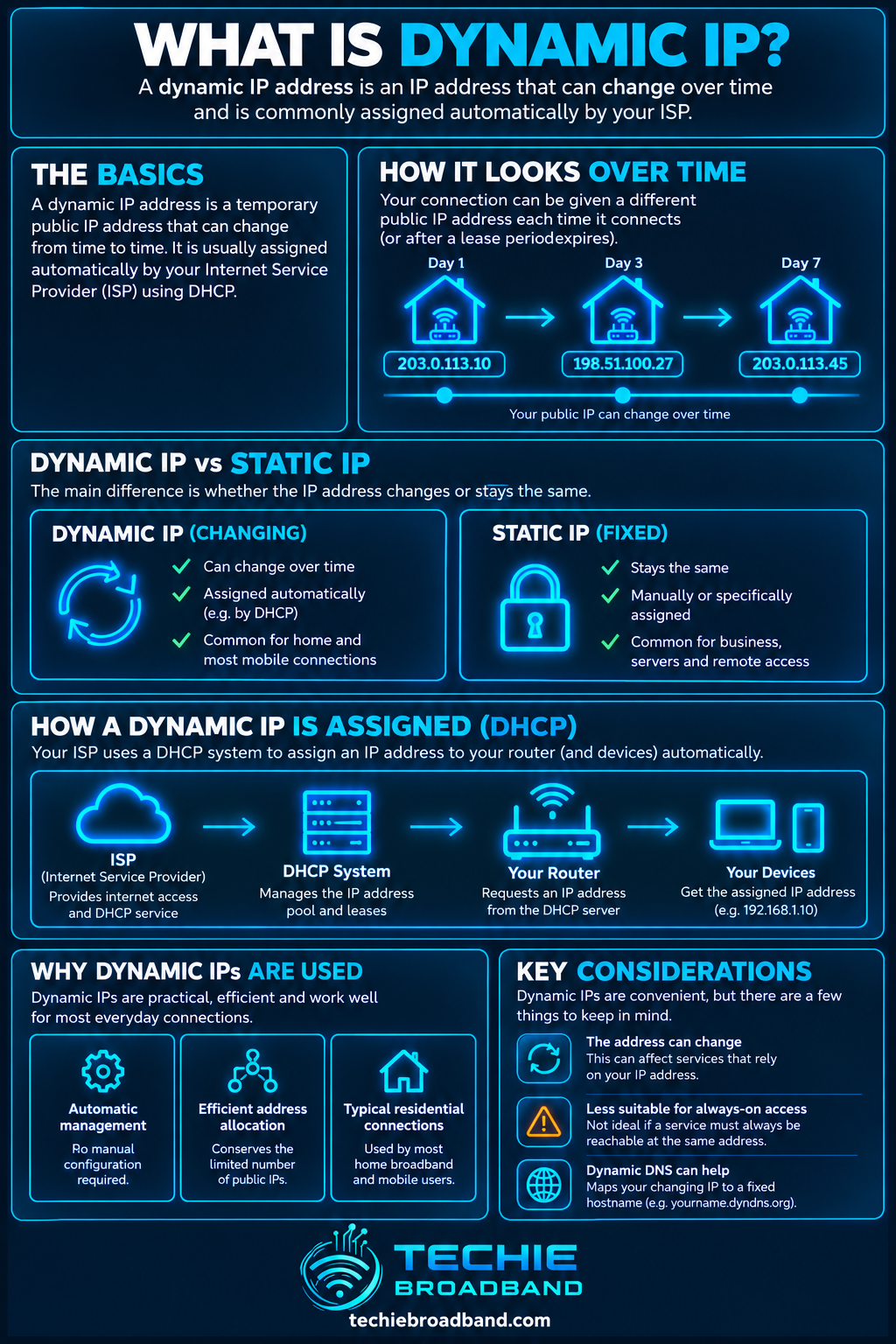
Imagine a home connection keeps the same dynamically allocated IPv4 address for 30 days. It may look static throughout that month, but it remains dynamic if the provider can legitimately assign a different address later. The useful test is not how long the address has remained unchanged. It is whether the allocation is intended or guaranteed to remain consistent.
The infographic below shows the key distinction: lease renewal may keep the same address, but a dynamic allocation can still change later.
How to check whether your public IP is changing
Observe normal behaviour rather than repeatedly disrupting a working connection just to force a change.
Record the current public IPv4 and IPv6 information shown by your router or a reputable IP-checking service.
Note the date, time and whether the broadband session recently reconnected.
Check again later without deliberately changing the network.
Compare the address after a genuine broadband reconnection.
Check whether the router receives a public IPv4 address or is behind CGNAT.
If inbound access matters, ask the ISP about static IPv4 and stable IPv6 prefix delegation.
When should you choose a static IP instead?
Hosting an inbound VPN endpoint.
Self-hosting a service that needs a predictable endpoint.
IP allowlisting for business systems.
Remote administration where address changes are undesirable.
Monitoring or security systems that depend on a known source address.
Questions to ask a UK broadband provider
Addressing can vary by ISP, access network, product and location. Check the specific service rather than assuming one provider uses the same arrangement everywhere.
Is the IPv4 address public or behind CGNAT?
Is the public IPv4 address dynamic or static?
Can I purchase or request a static IPv4 address?
Is native IPv6 available?
What IPv6 prefix is delegated to the router?
Is that prefix intended to remain stable?
Can I use my own router for DDNS, VPN or advanced firewall features?
Common dynamic IP misconceptions
Dynamic means constantly changing: false. An address can remain unchanged for a long time.
Rebooting always gives a new IP: false. The same address can be allocated again.
Dynamic IP makes broadband slower: false. Address allocation does not determine access speed.
Dynamic IP is the same as CGNAT: false. One describes changeability, the other provider-side translation.
Dynamic IP makes you anonymous: false. An IP address is only one identifier.
You always need a static IP for remote access: not necessarily. DDNS can handle address changes when genuine inbound connectivity exists.
Dynamic IP FAQs
How often does a dynamic IP change?
There is no universal interval. It depends on provider lease policy, network architecture and events affecting the broadband session.
Can I keep the same dynamic IP?
You may keep it through repeated renewals, but you should not rely on that if the service is dynamic. If consistency is essential, use a static address or another deliberate design.
Is a dynamic IP secure?
Static and dynamic allocation do not determine security by themselves. Firewall configuration, exposed services, patching and authentication matter far more.
Can I host a server on a dynamic IP?
Potentially, if genuine inbound reachability is available and the provider permits it. DDNS can update a hostname when the address changes. CGNAT can still prevent inbound IPv4 access.
Is dynamic IPv6 the same as dynamic IPv4?
No. IPv6 can involve provider-delegated prefixes, stable addresses and temporary privacy addresses simultaneously.
Key takeaway
A dynamic IP is an address that can change because it is not permanently assigned. It may stay the same through many renewals, so dynamic should not be confused with frequently changing. For ordinary UK home broadband this is usually fine. If you need a predictable public endpoint for inbound VPNs, hosting, allowlisting or remote access, investigate a static public IP, stable IPv6 design or another deliberate reachability solution.
To explore the related technical concepts used in this Dynamic IP guide, visit our broadband terminology guide.
