
What is Hop Count?
Updated: 3 days ago

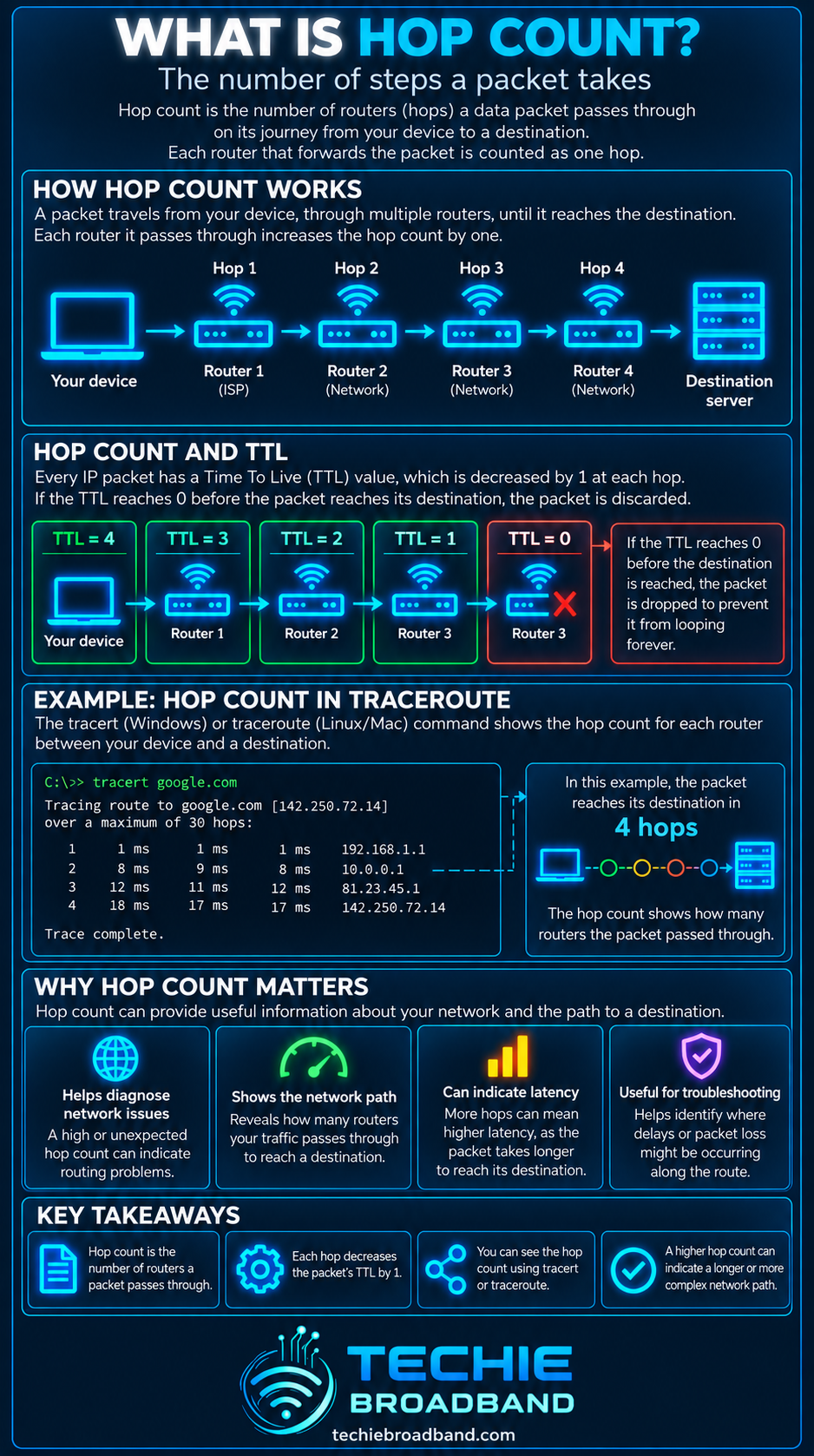
Hop count is the number of routing devices a packet passes through on its journey between two IP endpoints. Each router that forwards the packet represents a hop. A route with a lower hop count is shorter in routing terms, but it is not automatically faster, lower latency or better performing than a route with more hops.
Hop count is closely connected with routing, traceroute, latency and the IPv4 Time to Live field or IPv6 Hop Limit. Understanding it helps explain how packets cross ISP networks, peering points, transit networks and the wider internet.
What does hop count mean?
A hop occurs when a packet is forwarded by a router or other Layer 3 device from one network segment towards the next. Your own router can be one hop, an ISP edge router another, a core router another, and so on until the packet reaches the destination network.
Endpoints themselves are not normally counted as routing hops. If a packet leaves your device, crosses three routers and then reaches a server, the useful hop count for that route is three.
Hop count is not the same as distance
Hop count measures routing steps, not physical kilometres. Two routers can be in the same building, while a single hop can cross a long distance over a backbone or subsea link. A 12 hop path can therefore be geographically shorter than an 8 hop path.
Hop count is not the same as latency
Latency measures delay. Hop count measures the number of forwarding stages. A route with fewer hops can still have higher latency if it uses a longer physical path, congested links, slower interconnection or inefficient routing.
This is an important diagnostic distinction. Hop count can help describe a route, but it should not be treated as a direct broadband speed or quality score.
How IPv4 TTL relates to hop count
IPv4 uses an 8 bit Time to Live field. RFC 791 specifies that the TTL must be reduced as the datagram is processed, and by at least one at each processing point. In modern routing practice this makes TTL useful as a hop limiting mechanism, even though its original definition was based on lifetime in seconds.
If the TTL reaches zero before the packet reaches its destination, the packet is discarded. This prevents packets from circulating indefinitely if a routing loop exists.
How IPv6 Hop Limit relates to hop count
IPv6 makes the hop behaviour explicit. RFC 8200 defines the 8 bit Hop Limit field and states that it is decremented by one by each node that forwards the packet. A packet is discarded if the value reaches zero during forwarding.
IPv6 therefore uses the name Hop Limit rather than Time to Live. The practical purpose is similar: place an upper bound on how many forwarding steps a packet can take.
How traceroute reveals hops
Traceroute deliberately sends probes with progressively larger TTL or Hop Limit values. A probe limited to one hop expires at the first router. A probe limited to two hops can reach the second router, and so on. The resulting ICMP responses allow the tool to build an approximate view of the path.
RFC 1393 describes the familiar TTL based traceroute behaviour: start with TTL 1, then resend with TTL 2 and continue until the destination is reached. Modern traceroute implementations can use different probe types, so results should be interpreted as a diagnostic view rather than a perfect map of the internet.
A worked hop count example
Consider a simplified path from a UK home broadband connection to a remote service: device → home router → ISP edge router → ISP core router → peering or transit router → destination network router → server.
In this simplified example, five routing devices sit between the device and server, so the route has a hop count of five. The exact number seen by traceroute can differ because some devices may not respond, some network segments can be hidden by tunnelling or MPLS behaviour, and routes can change between probes.
Does a lower hop count mean a better route?
Not necessarily. Routing protocols do not all select paths by counting internet hops. BGP, for example, makes policy based routing decisions using attributes and autonomous system paths rather than simply choosing the route with the fewest individual routers.
A route with more hops can perform better if those hops use high capacity, low latency infrastructure. A route with fewer hops can perform worse if it crosses a congested or geographically inefficient link.
Why hop count can change
Internet paths are dynamic. Your hop count to the same destination can change because an ISP alters routing policy, a peering session changes, traffic moves to a different transit provider, maintenance shifts traffic, a content delivery network directs you to another location, or load balancing chooses another path.
The outbound and return paths can also be different. This is called asymmetric routing. A traceroute from your connection shows the outward path visible to the probes, not necessarily the route taken by the reply traffic all the way back.
Hop count inside UK broadband networks
A UK FTTP connection can traverse several logical and physical network layers before traffic reaches a public internet destination. The precise route depends on the access network, retail ISP architecture, regional aggregation, core network, peering and transit arrangements, and the destination itself.
The number of hops alone does not tell you whether an ISP has good peering, whether a route is congested or whether the access network is performing well. It is one piece of diagnostic evidence that becomes more useful when combined with latency, packet loss and route identity.
Hop count, ping and round trip time
Ping and Round Trip Time describe timing rather than path length. A traceroute commonly reports a response time for each visible hop, but those per hop timings are not a simple additive breakdown of end to end latency.
Routers can prioritise forwarding normal traffic over generating ICMP responses, and return paths for those responses can differ. A single apparently slow intermediate hop is therefore not proof that the router is slowing your broadband.
Why some traceroute hops show an asterisk
An asterisk or timeout does not automatically mean packet loss on your actual connection. A router can forward traffic normally while declining to answer traceroute probes, rate limiting ICMP responses or filtering the relevant probe type.
If the destination continues to respond normally after a silent intermediate hop, treat the missing reply cautiously. Persistent end to end packet loss is more meaningful than a single router failing to answer a diagnostic probe.
Can hop count diagnose a broadband fault?
Hop count can help identify route changes, loops and unexpectedly indirect paths, but it cannot diagnose broadband quality on its own. Compare traceroutes over time, look at end to end latency and packet loss, test multiple destinations and separate local network problems from wider routing behaviour.
Practical hop count troubleshooting
Run traceroute to a known destination and record the visible path.
Repeat the test to see whether the path is stable.
Compare a second destination.
Check whether a hop count change coincides with higher end to end latency or packet loss.
Do not treat a silent intermediate hop as a fault if later hops and the destination respond normally.
Where possible, test over wired Ethernet so WiFi behaviour does not confuse the diagnosis.
Common hop count misconceptions
Fewer hops does not automatically mean faster broadband.
More hops does not automatically mean congestion.
Every visible traceroute line does not necessarily represent a physically separate location.
A missing traceroute response does not automatically mean the router dropped your application traffic.
Hop count is a description of the routed path, not a benchmark score.
Hop Count FAQs
What is a hop in networking?
A hop is one Layer 3 forwarding step. When a router receives an IP packet and forwards it towards another network, that forwarding device represents a hop in the path.
What is a normal internet hop count?
There is no universal normal value. Hop count varies with the destination, ISP topology, peering, transit, geography and routing policy. The useful comparison is usually whether the path is sensible and stable for the destination being tested.
Does WiFi add a hop?
Not simply because the device uses WiFi. Hop count concerns Layer 3 forwarding. A WiFi access point operating as a bridge does not create an IP routing hop, while a device acting as a router can.
What is the maximum IPv6 Hop Limit?
The IPv6 Hop Limit field is 8 bits, so it can represent values from 0 to 255. The sender chooses an initial value and forwarding nodes decrement it.
Why does traceroute show different hop counts at different times?
Routing can change. Traffic engineering, peering, transit, failures, maintenance, load balancing and destination infrastructure can all alter the path.
Is hop count a good way to compare broadband providers?
Not by itself. A lower hop count does not prove better latency, throughput, reliability or peering. Compare end to end performance and route quality rather than counting routers alone.
Key takeaway
Hop count tells you how many Layer 3 forwarding steps a packet takes across a routed path. IPv4 TTL and IPv6 Hop Limit prevent packets from circulating forever, while traceroute uses those mechanisms to expose successive hops. Hop count is valuable diagnostic context, but it should always be interpreted alongside routing, latency, packet loss and the actual destination.
To explore the related technical concepts used in this Hop Count guide, visit our broadband terminology guide.
