
What is TTL (Time To Live)?
Updated: 2 days ago

TTL, or Time To Live, is an 8 bit field in the IPv4 header that limits how long an IP packet can continue travelling through a routed network. In practice, every router that forwards the packet reduces its TTL by at least one. If the value reaches zero before the destination is reached, the router discards the packet. This prevents packets from circulating indefinitely when routing loops or other forwarding problems occur.
Despite the name, modern IPv4 TTL behaves primarily as a hop limit rather than a stopwatch. IPv6 makes that purpose explicit by replacing TTL with an 8 bit Hop Limit field that is reduced by exactly one at each forwarding node.
What does TTL mean in networking?
Time To Live describes the lifetime control built into IPv4 packet forwarding. The sending host places a TTL value in each IPv4 packet. As the packet crosses routers, that value is reduced. A packet that runs out of TTL is not forwarded any further.
The original IPv4 specification in RFC 791 defines TTL as an 8 bit field and describes its purpose as bounding the lifetime of a datagram. Because each processing module must reduce the value by at least one, the field also limits how many routed forwarding steps the packet can survive.
Why does IPv4 need TTL?
IP routing is dynamic. If incorrect routing information creates a loop, a packet could otherwise be forwarded repeatedly between routers. TTL gives every IPv4 packet a finite forwarding lifetime.
Prevents packets circulating indefinitely in a routing loop.
Places a hard upper bound on how far a packet can propagate through routers.
Provides the expiry behaviour used by diagnostic tools such as traceroute.
Allows a router to report an expired packet using ICMP Time Exceeded.
TTL does not guarantee packet delivery, measure broadband speed or describe the age of application data. It is an Internet Protocol forwarding control.
How TTL is reduced by routers
The IPv4 router requirements in RFC 1812 state that a router must reduce TTL by at least one when forwarding a packet. Although TTL was historically defined using seconds, RFC 1812 notes that it effectively becomes a hop count limit because router processing normally takes far less than one second.
A simple practical example makes the behaviour clear. If a source sends an IPv4 packet with TTL 5, the first forwarding router reduces the value, the next router reduces it again, and so on. If the destination is reached while TTL remains above zero, the packet can be processed normally.
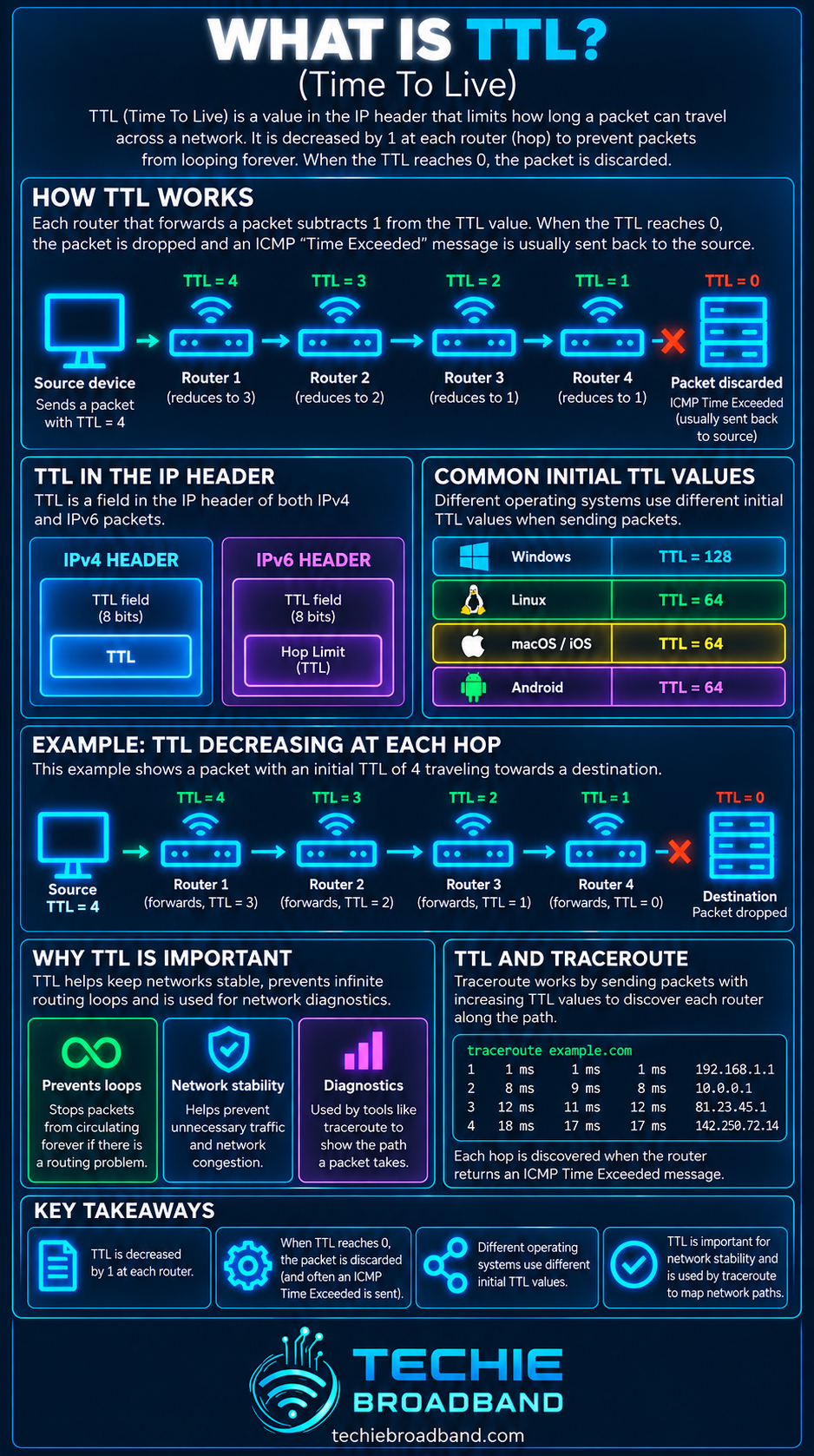
Techie Broadband TTL countdown example
The following is a theoretical forwarding example, not a claim about a particular ISP or destination. Assume an IPv4 packet leaves a source with TTL 5 and must cross three routers before reaching its destination.
Source sends packet: TTL 5.
Router 1 forwards packet: remaining TTL 4.
Router 2 forwards packet: remaining TTL 3.
Router 3 forwards packet: remaining TTL 2.
Destination receives the packet before TTL expires.
The important point is that TTL describes the packet's remaining forwarding lifetime. The source does not need to know the route length in advance. It simply chooses an initial TTL large enough for ordinary internet paths.
What happens when TTL reaches zero?
When a router reduces an IPv4 packet's TTL to zero, it discards the packet instead of forwarding it. RFC 1812 requires the router, for relevant non multicast traffic, to send an ICMP Time Exceeded message back to the source. In IPv4 ICMP this is Type 11, Code 0 for TTL exceeded in transit.
That feedback is useful because the sender or a diagnostic application can see that the packet expired before reaching its destination. It is also the mechanism that makes classic TTL based route discovery possible.
How traceroute uses TTL
Traceroute deliberately manipulates TTL to reveal successive forwarding hops. A probe with TTL 1 expires at the first router. A probe with TTL 2 can reach one router further before expiring. Increasing the value repeatedly can expose a sequence of routers on the outward path.
The returning ICMP Time Exceeded messages identify the routers that allowed each probe to progress that far. Different traceroute implementations can use different probe types, and some routers may not reply, so the visible output should not be treated as a perfect map of every physical device.
TTL and hop count are related, but not identical concepts
Hop count describes how many Layer 3 forwarding steps exist on a routed path. TTL is a field carried inside an IPv4 packet that limits how many such forwarding steps the packet can survive.
If a packet begins with TTL 64 and crosses 12 routers that each reduce it by one, a simple observation at the destination would leave TTL 52. However, the destination normally does not know the sender's chosen initial value merely from the remaining value, so reverse engineering hop count from a received TTL requires assumptions and should be treated cautiously.
TTL is not latency
Latency measures delay. TTL limits forwarding lifetime. A packet can cross many fast routers with low end to end latency, or relatively few routers over a geographically long or congested route with higher latency.
The original seconds based definition sometimes causes confusion, but a TTL value of 64 does not mean a modern packet is expected to remain on the internet for 64 seconds. Normal router forwarding reduces the field according to forwarding hops.
TTL is not DNS Time To Live
Networking uses the phrase Time To Live in more than one context. IPv4 packet TTL and DNS TTL are different mechanisms.
IPv4 packet TTL is carried in the IP header and is reduced during routed forwarding.
DNS TTL tells a DNS cache how long a DNS record may be retained before it should be refreshed.
Changing DNS TTL does not change the TTL field in ordinary IPv4 packets.
This distinction matters when troubleshooting because both may be shortened to TTL in technical documentation, yet they solve completely different problems.
IPv4 TTL versus IPv6 Hop Limit
IPv6 specification RFC 8200 replaces the IPv4 Time To Live name with Hop Limit. Hop Limit is also an 8 bit field, but its forwarding behaviour is expressed directly: each node that forwards the packet decrements the value by one, and the packet is discarded when forwarding would reduce it to zero.
IPv4: Time To Live, 8 bit field, historically expressed in seconds but effectively a hop count limit in ordinary forwarding.
IPv6: Hop Limit, 8 bit field, explicitly decremented by one by each forwarding node.
Both mechanisms prevent packets travelling indefinitely through a routed network.
RFC 8200 explicitly explains that IPv6 renamed the field because IPv4 implementations rarely enforce packet lifetime as actual elapsed time. The IPv6 name therefore describes modern forwarding behaviour more clearly.
What initial TTL value does a device use?
The initial TTL is chosen by the sending system or application according to its networking implementation and configuration. There is no single value that every internet device must use for all traffic.
This is why a received packet's remaining TTL cannot reliably tell you its exact hop count unless you know or can reasonably establish the sender's initial value. Operating systems and applications can also change their defaults over time, so fixed lists of supposed default TTL values are a poor foundation for a timeless reference article.
Can TTL tell you which operating system sent a packet?
TTL can sometimes contribute to passive fingerprinting because different systems may choose different initial values, but it is not a dependable operating system identifier on its own. The observed value has already been affected by the routed path, defaults can change and administrators can configure values.
TTL in a UK broadband connection
On a UK home broadband connection, an internet packet can leave a device, cross the home router, enter an access and ISP routing environment, traverse core and interconnection networks and then enter the destination network. The exact path depends on the ISP, access network, destination, routing policy, peering, transit and current network conditions.
A broadband user's TTL therefore does not describe FTTP speed, WiFi quality or the capacity of an Openreach, CityFibre or altnet access link. It belongs to the routed IP path. The same broadband connection can see different hop counts and routes to different destinations.
Can a low TTL cause internet problems?
Yes, if the initial TTL is too low for the required route. The packet can expire before reaching the destination. In normal consumer broadband use, operating system defaults are generally intended to provide ample forwarding lifetime, so an unexpectedly low manually configured TTL is a more specialised scenario.
A routing loop can also consume TTL repeatedly until the packet is discarded. In that case TTL is doing exactly what it was designed to do: preventing the looping packet from surviving indefinitely.
Practical TTL troubleshooting
Run a traceroute to the affected destination and look for whether the path progresses or appears to repeat.
Compare the result with a known working destination rather than treating hop count alone as a fault indicator.
Repeat the test because internet routing can change and individual routers may rate limit diagnostic replies.
Check end to end ping, latency and packet loss so TTL evidence is interpreted alongside actual connectivity behaviour.
If a route appears to loop, record the repeating addresses or network stages and test again from another connection if possible.
Remove VPNs or tunnels temporarily where appropriate because they can change the routed path and diagnostic visibility.
Do not assume an asterisk in traceroute means the router is dropping ordinary traffic. It may simply not answer the probe.
If packets consistently expire before the destination, investigate routing configuration, tunnel behaviour or an unusually low configured TTL.
Common TTL misconceptions
TTL is not a broadband speed measurement.
TTL is not the same as latency or round trip time.
A lower remaining TTL does not automatically mean a worse connection.
A high hop count does not automatically mean poor performance.
IPv4 packet TTL is not the same mechanism as DNS record TTL.
Traceroute timeouts at an intermediate hop do not automatically prove packet loss.
IPv6 uses Hop Limit rather than the IPv4 TTL field.
TTL FAQs
What is TTL in simple terms?
TTL is a value inside an IPv4 packet that limits how far the packet can continue through routers. Each forwarding router reduces the value. If it reaches zero, the packet is discarded.
What does TTL stand for?
TTL stands for Time To Live. In IPv4 the name is historical because the field was defined in time units, but modern forwarding behaviour makes it function effectively as a hop count limit.
What is the maximum IPv4 TTL value?
TTL is an 8 bit field, so its largest representable value is 255. A sender chooses an initial value within the field's range.
What happens at TTL 0?
A router does not continue forwarding a packet whose TTL has expired. It discards the packet and normally sends an ICMP Time Exceeded response to the source when the protocol rules require it.
Does every router reduce TTL?
For IPv4 forwarding, routers must reduce TTL by at least one. IPv6 forwarding nodes reduce Hop Limit by one.
Why does traceroute change TTL?
Traceroute uses deliberately limited packet lifetimes so probes expire at successive routers. The resulting Time Exceeded responses help reveal the routed path.
Is TTL the same as Hop Limit?
They are closely related mechanisms in different IP versions. IPv4 uses Time To Live. IPv6 uses Hop Limit, whose name directly reflects the forwarding hop behaviour.
Can changing TTL make broadband faster?
No. Increasing TTL does not increase bandwidth, throughput or line rate. It only gives an IPv4 packet a larger forwarding lifetime.
Key takeaway
TTL is IPv4's packet lifetime control. It is an 8 bit field that routers reduce as they forward a packet, preventing packets from circulating indefinitely. Although the name Time To Live comes from a historical time based definition, modern IPv4 routing makes TTL effectively a hop count limit. When TTL expires, the packet is discarded and ICMP Time Exceeded can report the event. IPv6 expresses the same core idea more directly with its Hop Limit field.
To explore the related technical concepts used in this TTL (Time To Live) guide, visit our broadband terminology guide.
