
What is Reverse DNS?
Updated: 3 days ago

Reverse DNS is the process of looking up a hostname from an IP address. Normal, or forward, DNS typically asks which IP address belongs to a domain name. Reverse DNS starts with an IPv4 or IPv6 address and asks which hostname, if any, has been published for it. The result normally comes from a PTR record in a dedicated reverse DNS zone.
Reverse DNS matters because IP addresses appear throughout server logs, email systems, network diagnostics and security tooling. A PTR result can make an address easier to identify, but it is not proof that the hostname owns the IP, that the host is trustworthy, or that a forward lookup will automatically point back to the same address.
How does Reverse DNS work?
A reverse lookup transforms the IP address into a special DNS name, then queries that name for a PTR record. IPv4 uses IN-ADDR.ARPA. IPv6 uses IP6.ARPA. The returned mapping is normally stored in a PTR record.
IPv4 reverse lookups use the IN-ADDR.ARPA domain.
IPv6 reverse lookups use the IP6.ARPA domain.
PTR is the record type normally used to map the reverse-zone entry to a hostname.
RFC 1035 defines PTR records and describes IPv4 reverse mapping in IN-ADDR.ARPA. RFC 3596 defines the IP6.ARPA domain used for IPv6 reverse lookups.
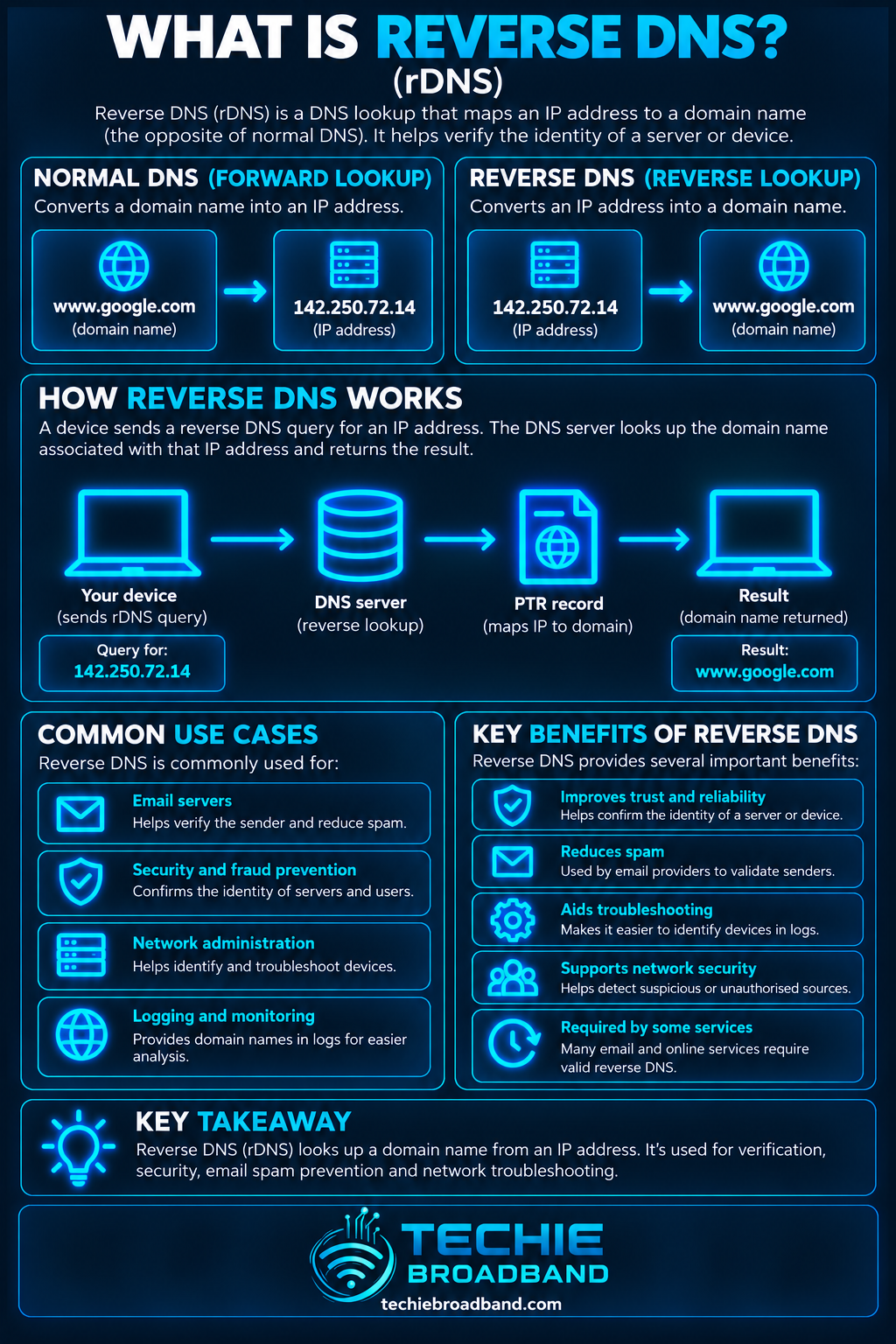
The important direction is IP address to hostname. Reverse DNS does not search ordinary forward DNS for every A or AAAA record containing an address. It follows the delegated reverse DNS tree and asks for the PTR data published there.
Reverse DNS vs forward DNS
Forward and reverse DNS are related, but they are separate mappings.
Forward DNS: a hostname is queried for an address, commonly using an A record for IPv4 or an AAAA record for IPv6.
Reverse DNS: an IP address is transformed into a reverse-zone name and queried for a PTR record that points to a hostname.
One mapping does not automatically create or guarantee the other.
A hostname can resolve to an IP address even when that IP has no PTR record. Likewise, an IP can have a PTR record whose hostname does not resolve back to the same address. Operationally, many systems prefer the forward and reverse mappings to be consistent.
How IPv4 Reverse DNS works
For IPv4, the four decimal octets are reversed and placed beneath IN-ADDR.ARPA. This structure lets reverse DNS be delegated along IP address space.
Practical example: take the illustrative IPv4 address 86.17.203.25. The reverse lookup name becomes 25.203.17.86.in-addr.arpa. A PTR query for that name may return a hostname such as mail.example.co.uk.
IP address: 86.17.203.25
Reverse name: 25.203.17.86.in-addr.arpa
PTR result: mail.example.co.uk
The reversed order can look strange until you consider delegation. DNS is hierarchical from right to left. Reversing the address lets larger address blocks be represented higher in the IN-ADDR.ARPA tree and more specific addresses appear beneath them.
How IPv6 Reverse DNS works
For IPv6, reverse DNS uses IP6.ARPA. RFC 3596 specifies that the IPv6 address is represented as individual hexadecimal nibbles, separated by dots and written in reverse order.
An IPv6 reverse name is much longer than the familiar four-octet IPv4 form. The address must first be expanded to its complete hexadecimal representation, then each hexadecimal digit is reversed into the IP6.ARPA hierarchy. You cannot simply reverse the colon-separated IPv6 groups.
What is a PTR record?
PTR stands for pointer. A PTR resource record contains a domain name that points elsewhere in the DNS namespace. In reverse DNS, it provides the hostname associated with the reverse-zone entry for an IP address.
A PTR record is not a CNAME. RFC 1035 describes PTR records as simple data and says they do not imply the special alias processing associated with CNAME records.
Who controls Reverse DNS?
The organisation controlling a domain name is not necessarily the organisation that can edit the PTR record for the public IP address. Control normally follows the IP address allocation and reverse-zone delegation.
For a UK residential or business broadband connection, that often means the ISP or upstream address provider controls the relevant reverse DNS zone. Some providers let customers request or configure a PTR record, particularly on static IP or business products; others do not.
If you need a custom PTR record, changing the ordinary DNS zone for your domain is not enough unless the reverse zone has been delegated to you. The IP provider must publish the PTR record or delegate appropriate reverse DNS control.
Why Reverse DNS matters for email
Email is one of the most visible uses of reverse DNS. Receiving mail systems can inspect the connecting server's IP address, perform a PTR lookup and compare the result with other identity signals.
RFC 1912 recommends matching PTR and A records and warns that inconsistent or missing DNS data can cause operational problems. Modern email acceptance is more complex than a PTR check alone: SPF, DKIM, DMARC, IP and domain reputation, HELO or EHLO identity, content and recipient-provider policy can all matter.
Correct reverse DNS is therefore an important part of mail-server hygiene, but a PTR record by itself does not guarantee inbox placement or prove that mail is legitimate.
Forward-confirmed Reverse DNS
A common consistency check is forward-confirmed reverse DNS, often abbreviated FCrDNS. It asks whether the hostname returned by the PTR lookup resolves forward to the original IP address.
Start with the IP address.
Perform a reverse DNS lookup and obtain the PTR hostname.
Resolve that hostname using the appropriate A or AAAA record.
Check whether the original IP address appears in the forward result.
A successful match provides stronger consistency than a PTR result alone, but it is still not an authentication system. DNS data can be configured by whoever controls the relevant zones.
What Reverse DNS is used for
Identifying IP addresses in server and network logs.
Mail-server identity checks and reputation systems.
Troubleshooting connectivity and routing problems.
Making traceroute and diagnostic output easier for humans to interpret.
Network inventory and operational monitoring.
Abuse investigation and security analysis.
Reverse DNS and UK broadband
On a UK broadband connection, do not assume that you can set your own PTR record. Whether reverse DNS is configurable depends on the ISP, exact product, addressing arrangement and whether the provider delegates or manages reverse DNS for the address.
A static public IP can make server addressing more predictable, but static addressing alone does not guarantee that the provider offers custom PTR records. Dynamic DNS and reverse DNS also solve different problems: DDNS changes forward DNS when an address changes; it does not automatically change an ISP-controlled PTR record.
Reverse DNS and CGNAT
CGNAT complicates inbound services because the public IPv4 address may be shared by multiple customers and controlled upstream by the provider. Even if that public address has a PTR record, it does not give an individual customer control of the shared address or create an inbound route to their router.
Does every IP address have Reverse DNS?
No. A public IP address can exist without a useful PTR record. A reverse lookup may return no answer, or the provider may publish a generic infrastructure hostname rather than a customer-selected name.
Can one IP address have more than one PTR record?
DNS can technically contain multiple PTR records at the same reverse name, but this can create ambiguity for applications that expect a single canonical-looking hostname. A clear and consistent PTR mapping is usually easier to operate.
Reverse DNS is not a complete list of every domain or website using an address. One IP can serve many unrelated hostnames, especially on shared hosting and content-delivery infrastructure.
How to check Reverse DNS
Standard DNS tools can perform a PTR lookup. Use the actual public IP address you are investigating.
dig: dig -x 86.17.203.25
nslookup: nslookup 86.17.203.25
PowerShell: Resolve-DnsName 86.17.203.25 -Type PTR
Troubleshooting Reverse DNS
When reverse DNS is missing or wrong, separate the reverse-zone problem from the forward DNS problem.
Confirm the exact public IPv4 or IPv6 address.
Perform a PTR lookup directly against that address.
If no PTR exists, identify who controls the IP allocation or reverse zone.
If a PTR exists, note the hostname exactly as returned.
Resolve that hostname forward using A or AAAA records.
Compare the forward result with the original address.
If the PTR needs changing, contact the IP provider or use its reverse-DNS control panel if available.
Allow for DNS TTL and caching after a change.
Retest using more than one resolver if cached data is suspected.
Common Reverse DNS misconceptions
Reverse DNS is not simply an ordinary DNS query typed backwards: it uses PTR records and dedicated reverse namespaces.
Owning a domain does not necessarily mean you control reverse DNS for an IP address.
A PTR record is not cryptographic proof of who owns an IP address.
Reverse DNS does not list every domain hosted on an IP.
Dynamic DNS does not automatically fix reverse DNS.
Techie Broadband analysis: separate identity, consistency and reachability
Reverse DNS becomes easier to troubleshoot if you separate three questions that are often mixed together.
Identity: what hostname does the PTR record publish for this IP?
Consistency: does that hostname resolve forward to the same address?
Reachability: can the intended service actually be reached at that address?
A system can pass the first two checks and still fail the third because of a firewall, CGNAT, routing or application problem. It can also be perfectly reachable while having no PTR record at all. Reverse DNS is one layer of network identity, not a general connectivity test.
Key takeaway
Reverse DNS maps an IP address to a hostname using a PTR record. IPv4 uses IN-ADDR.ARPA with reversed address octets, while IPv6 uses IP6.ARPA with reversed hexadecimal nibbles. Reverse DNS is particularly useful for email operations, logging and troubleshooting, but control normally follows the IP address provider, and a PTR record is neither proof of ownership nor a guarantee that a service is reachable.
Reverse DNS FAQs
Is Reverse DNS the same as a PTR record?
Not exactly. Reverse DNS is the lookup process and reverse-zone system. A PTR record is the DNS record normally returned by that lookup.
Can I set Reverse DNS in my normal domain DNS settings?
Usually not for a public broadband IP unless the reverse zone has been delegated to you. The IP address provider normally controls the reverse DNS zone or provides a separate PTR configuration method.
Why does email need Reverse DNS?
Mail systems commonly use reverse DNS as one identity and reputation signal for the connecting server. Correct PTR data helps establish operational consistency, but it works alongside other controls such as SPF, DKIM, DMARC and reputation systems.
Does a static IP automatically include Reverse DNS?
No. A static address makes the numeric IP predictable, but custom PTR control is a separate provider capability.
Does Reverse DNS work with IPv6?
Yes. IPv6 reverse lookups use the IP6.ARPA domain, with the hexadecimal nibbles of the fully expanded IPv6 address written in reverse order.
To explore the related technical concepts used in this Reverse DNS guide, visit our broadband terminology guide.
